
1. Introduction
This manual provides essential information for the safe and effective operation, setup, and maintenance of your GOYOJO 600W Ceramic Hot Plate (Model SH-4A). This device is designed for heating solutions, reagents, and reactions in laboratory environments, including chemical, pharmaceutical, industrial, and educational settings. It features a powerful 600W heating element, a ceramic-coated heating plate, and an adjustable thermostat for precise temperature control up to 380°C.
Key features include:
- Powerful 600W heating element for rapid heating up to 380°C.
- Continuous heating mode for uninterrupted operation during prolonged processes.
- Precise temperature control via an adjustable thermostat dial.
- Compact 320 x 190 mm footprint to conserve benchtop space.
- Quiet induction motor for vibration-free heating.
2. Safety Instructions
Read all safety warnings and instructions carefully before operating this device. Failure to follow these instructions may result in electric shock, fire, serious injury, or property damage.
- Electrical Safety: Ensure the power supply matches the voltage requirements of the hot plate. Do not operate with a damaged power cord or plug. Avoid using extension cords unless absolutely necessary and ensure they are rated for the device's power. Disconnect power before cleaning or maintenance.
- Heat Safety: The ceramic plate and surrounding surfaces become extremely hot during operation and remain hot for a period after shutdown. Always use appropriate personal protective equipment (PPE), such as heat-resistant gloves. Never touch the heating surface directly.
- Flammable Materials: Do not heat flammable or combustible materials directly on the hot plate. Ensure adequate ventilation when heating any substances that may produce fumes. Keep flammable liquids and gases away from the hot plate.
- Proper Placement: Place the hot plate on a stable, level, non-combustible surface, away from walls or other equipment to allow for proper ventilation.
- Supervision: Never leave the hot plate unattended during operation, especially when heating substances.
- Liquid Spills: Prevent liquids from spilling onto the control panel or into the internal components. In case of a spill, immediately disconnect power and allow the unit to cool before cleaning.
- Intended Use: Use this device only for its intended purpose as a laboratory heating plate. Do not modify the unit or use it for purposes other than those described in this manual.
- Children and Unauthorized Personnel: Keep the hot plate out of reach of children and ensure only trained personnel operate the device.
3. Product Overview
Familiarize yourself with the components of your GOYOJO Ceramic Hot Plate.
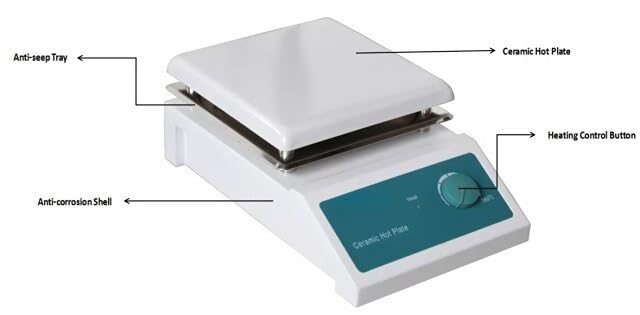
Figure 3.1: Diagram illustrating the key components of the hot plate: Anti-seep Tray, Ceramic Hot Plate, Heating Control Button, and Anti-corrosion Shell.
- Ceramic Hot Plate: The primary heating surface, coated for durability and even heat distribution.
- Anti-seep Tray: Located beneath the ceramic plate, designed to catch minor spills and prevent them from entering the internal components.
- Heating Control Button: An adjustable thermostat dial used to set the desired heating temperature.
- Anti-corrosion Shell: The robust outer casing designed to withstand harsh laboratory environments.
- Power Switch: Located on the side/rear of the unit, used to turn the main power ON/OFF.
- Power Input: Socket for connecting the power cord.
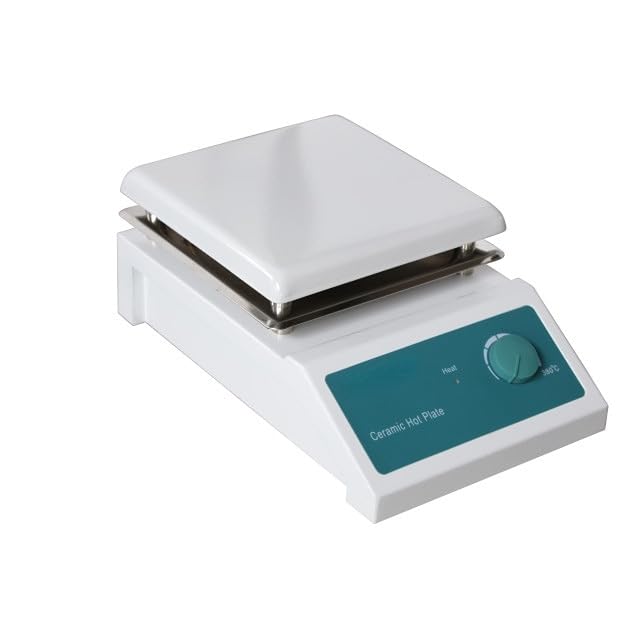
Figure 3.2: Front-side view of the GOYOJO 600W Ceramic Hot Plate, showing the white housing, ceramic heating surface, and control dial.

Figure 3.3: Rear-side perspective of the hot plate, highlighting the main power switch and the power cord input socket.
4. Setup
- Unpacking: Carefully remove the hot plate from its packaging. Inspect the unit for any signs of damage incurred during shipping. If damage is found, do not operate the device and contact your supplier.
- Placement: Place the hot plate on a stable, level, heat-resistant, and non-combustible surface. Ensure there is adequate clearance around the unit for proper ventilation (at least 15 cm from walls or other equipment). Avoid placing it near flammable materials or in areas with excessive moisture.
- Power Connection: Ensure the power switch on the hot plate is in the OFF position. Connect the provided power cord to the power input socket on the hot plate, then plug the other end into a grounded electrical outlet that matches the device's voltage requirements.
- Optional Support Rod (if applicable): If using a support rod for holding glassware, securely attach it to the designated mounting point on the hot plate.

Figure 4.1: The GOYOJO 600W Ceramic Hot Plate equipped with an optional support rod and clamp, suitable for holding laboratory glassware or sensors.
5. Operating Instructions
Follow these steps for safe and effective operation of your hot plate:
- Preparation: Place the vessel containing the substance to be heated directly onto the center of the ceramic heating plate. Ensure the vessel is heat-resistant and suitable for the intended temperature.
- Power On: Turn the main power switch to the ON position. The hot plate is now ready for operation.
- Set Temperature: Rotate the Heating Control Button (thermostat dial) clockwise to increase the temperature or counter-clockwise to decrease it. The dial is marked with temperature indicators up to 380°C. Adjust the dial to your desired heating temperature. The hot plate will begin to heat.
- Heating Process: Monitor the heating process. The hot plate will maintain the set temperature through its adjustable thermostat. The continuous heating mode allows for prolonged operation without interruption.
- Completion: Once heating is complete, rotate the Heating Control Button counter-clockwise to its minimum setting.
- Power Off: Turn the main power switch to the OFF position.
- Cool Down: Allow the hot plate to cool down completely before handling or cleaning. The ceramic plate will remain hot for a significant period after being turned off. Use caution and appropriate PPE.
6. Maintenance
Regular maintenance ensures the longevity and optimal performance of your hot plate.
- Cleaning the Ceramic Plate: After each use, and once the unit has completely cooled, wipe the ceramic heating plate with a damp cloth and a mild detergent if necessary. Avoid abrasive cleaners or scouring pads that could scratch the surface. Ensure no liquid enters the control panel or internal components.
- Cleaning the Exterior: Wipe the anti-corrosion shell and control panel with a soft, damp cloth. Do not use harsh chemicals or solvents.
- Spills: In case of spills, immediately turn off the hot plate and disconnect it from power. Allow it to cool, then carefully clean the spill. For significant spills, especially into the internal components, discontinue use and seek professional inspection.
- Storage: When not in use, store the hot plate in a clean, dry, and dust-free environment.
- No User-Serviceable Parts: The hot plate contains no user-serviceable parts. Do not attempt to open or repair the unit yourself. Refer all servicing to qualified personnel.
7. Troubleshooting
If you encounter issues with your hot plate, refer to the following common problems and solutions:
| Problem | Possible Cause | Solution |
|---|---|---|
| Hot plate does not turn on. | No power supply. Power cord not securely connected. Main power switch is OFF. | Check if the power cord is securely plugged into a live outlet. Ensure the main power switch is in the ON position. Check the circuit breaker. |
| Hot plate heats slowly or not to desired temperature. | Temperature dial set too low. Overload (vessel too large or contents too cold). Environmental factors (cold room). | Adjust the Heating Control Button to a higher setting. Allow more time for heating. Ensure the hot plate is not exposed to drafts or cold air. |
| Inconsistent heating. | Faulty thermostat. Uneven contact with vessel. | Ensure the vessel has a flat bottom and makes good contact with the ceramic plate. If the problem persists, contact customer support. |
| Unusual odors or smoke. | Initial burn-off (new unit). Spill on heating element. Internal fault. | A slight odor or smoke may occur during the first few uses; this is normal. Immediately turn off, disconnect power, and allow to cool. Clean any spills. If persistent, discontinue use and seek professional service. |
If the problem cannot be resolved using the troubleshooting guide, or if you suspect a serious malfunction, discontinue use and contact qualified service personnel or your supplier for assistance.
8. Specifications
| Feature | Specification |
|---|---|
| Model | SH-4A |
| Maximum Temperature | 380°C |
| Power | 600 Watts |
| Heating Plate Material | Ceramic Coated |
| Temperature Control | Adjustable Thermostat Dial |
| Heating Plate Dimensions | 320 x 190 mm |
| Overall Dimensions (L x W x H) | 320 x 190 x 125 mm |
| Operation Mode | Continuous |
| Motor Type | Induction |
| Manufacturer | GOYOJO |
| ASIN | B0CGCV5CTC |
| Date First Available | August 23, 2023 |