
1. Introduction
The LAFVIN LA044 WiFi Camera Smart Robot Car Kit is designed for individuals interested in electronics, programming, and robotics. This 4WD robot car utilizes a LAFVIN R3 controller and is equipped with an ESP32 Camera for real-time image transmission via WiFi. Users can control various functions of the robot car through a mobile application, including obstacle avoidance, line following, and object following. The kit includes detailed installation instructions and reference codes to facilitate the learning process.
2. Kit Contents
Before beginning assembly, please verify that all components listed in the kit are present. Refer to the provided parts list in your kit packaging. If any parts are missing, please contact LAFVIN support.

Image: The LAFVIN LA044 Robot Car Kit viewed from multiple angles, showcasing its chassis, wheels, sensors, and main control board.
3. Setup and Assembly
Assembly of the LAFVIN LA044 Robot Car is required. Follow the detailed installation instructions provided with your kit. Ensure all connections are secure and components are correctly oriented.
- Battery Installation: The robot car requires two 3.7V Lithium-Ion batteries (not included). Install them according to the polarity markings in the battery compartment.
- Board Integration: Carefully integrate the LAFVIN R3 controller board and ESP32 Camera module as per the tutorial.
- Wiring: Connect all motors, sensors, and the camera module to the main board using the provided wires, ensuring correct pin assignments.

Image: A visual guide illustrating various assembly steps, including wiring diagrams and component placement for the robot car.
3.1 Software Setup and Programming
The kit is compatible with Arduino IDE. Detailed tutorials and reference codes are provided to guide you through the programming process. This includes graphical programming test code.
- IDE Installation: Install the Arduino IDE on your computer.
- Board and Library Setup: Configure the Arduino IDE for the ESP32 board and install necessary libraries.
- Code Upload: Upload the provided example code to the ESP32 Camera module. Ensure a stable connection during the upload process.

Image: A screenshot of the ESP32 WiFi programming environment, displaying C/C++ code used to control the robot car's functions.
4. Operating Instructions
Once assembled and programmed, the robot car can be controlled via a mobile application connected through WiFi.
- WiFi Connection: Connect your mobile device to the robot car's WiFi network.
- APP Control: Use the dedicated mobile application to control the robot's movement and access the camera feed.
- Functions: The app allows control over various functions such as obstacle avoidance, line following, and object following.
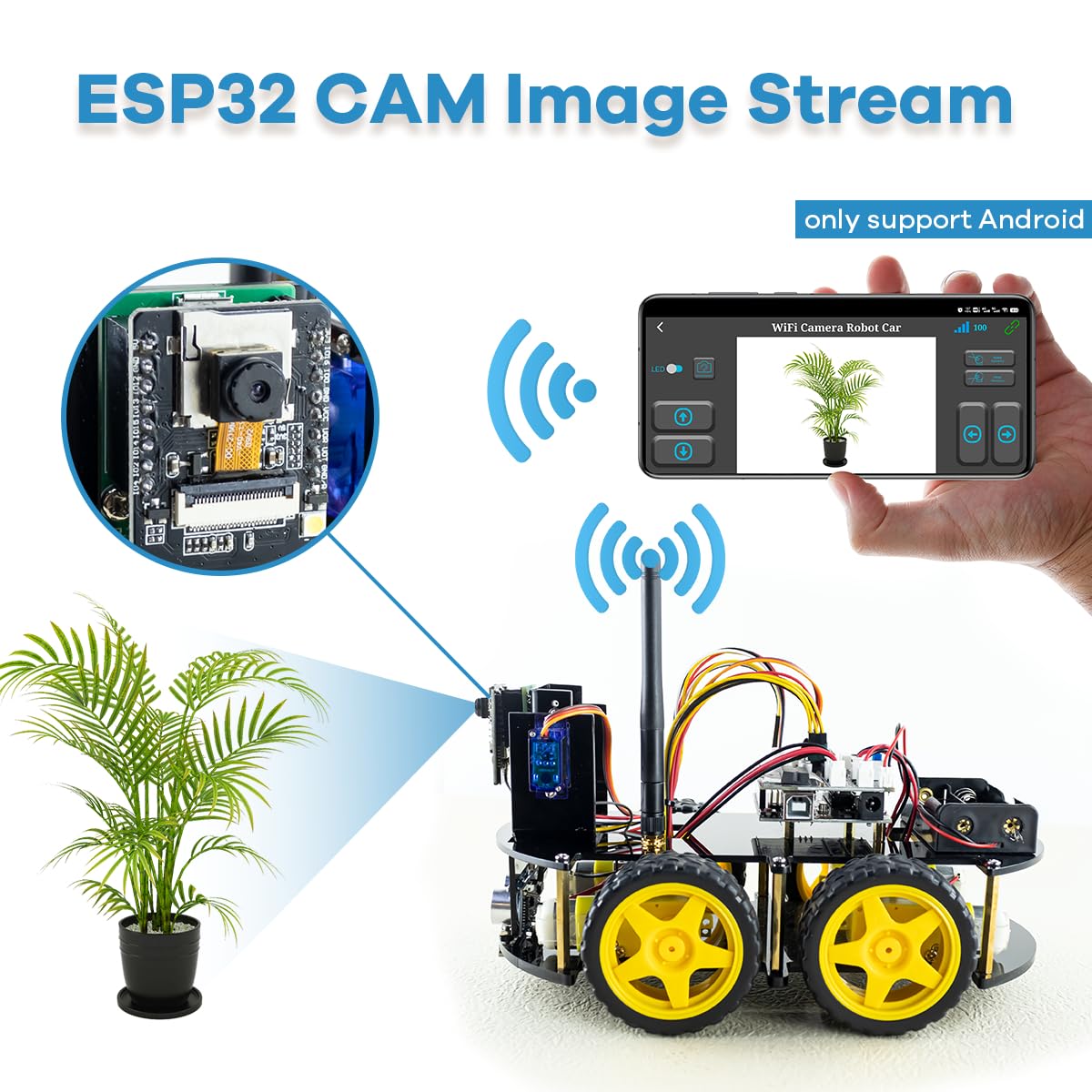
Image: The ESP32 Camera module streaming live video of a plant to a mobile phone application, demonstrating the WiFi image transmission feature.

Image: The ESP32 Camera module streaming live video of apples to a mobile phone application, further illustrating the WiFi image transmission capability.
4.1 Auto-Following Mode
The robot car features an ultrasound auto-following capability, allowing it to detect and follow objects in its path.

Image: The robot car using its ultrasonic sensors to detect and follow a human hand, illustrating its auto-following functionality.
5. Maintenance
To ensure the longevity and optimal performance of your LAFVIN LA044 Robot Kit, follow these maintenance guidelines:
- Cleaning: Keep the robot car clean and free from dust and debris. Use a soft, dry cloth for cleaning. Avoid using liquids directly on electronic components.
- Connection Checks: Periodically inspect all wiring and connections to ensure they are secure and free from damage. Loose connections can lead to erratic behavior.
- Battery Care: When not in use for extended periods, remove the batteries to prevent leakage. Recharge batteries as needed, following manufacturer guidelines.
- Sensor Cleaning: Ensure the ultrasonic sensors and camera lens are clean for accurate readings and clear images.
6. Troubleshooting
If you encounter issues with your LAFVIN LA044 Robot Kit, refer to the following troubleshooting tips:
- Robot Not Moving:
- Check battery charge and ensure they are correctly installed.
- Verify all motor connections are secure.
- Confirm the correct code has been uploaded and is running.
- Upload Errors in Arduino IDE:
- Ensure the correct board and port are selected in the Arduino IDE.
- Check USB cable connection.
- Try restarting the Arduino IDE and your computer.
- Controller Heats Up / Board Not Uploading:
- This could indicate a short circuit or component failure. Disconnect power immediately.
- Double-check all wiring for incorrect connections.
- Contact support if the issue persists after checking connections.
- Camera Feed Not Working:
- Ensure the robot car's WiFi is active and your mobile device is connected to it.
- Verify the camera module is correctly connected to the ESP32 board.
- Check camera-related code in the uploaded program.
- Difficulty on Carpet:
- The robot car has low ground clearance and may struggle on soft or thick carpet surfaces. Operate on smooth, hard surfaces for best performance.
7. Specifications
| Brand | LAFVIN |
| Model Number | LA044 |
| Theme | Robot |
| Item Dimensions (L x W x H) | 25.4 x 19.3 x 8.9 Centimeters |
| Educational Objective | Robotics and Programming Skills |
| Battery Description | Lithium-Ion (3.7V x 2, not included) |
| Material | Plastic |
| Assembly Required | Yes |
| Controller | LAFVIN R3 (compatible with Arduino IDE) |
| Camera | ESP32 Camera WiFi |
8. Support and Contact
For further assistance, technical support, or inquiries regarding missing parts, please contact LAFVIN customer service. Refer to the contact information provided in your product packaging or on the official LAFVIN website.