
1. Introduction
Thank you for purchasing the Yoncon Smart Food Scale YONCONX601. This digital kitchen scale is designed for precise weighing of ingredients for cooking, baking, and nutritional tracking. It features high-precision sensors, a tare function, and connectivity with the "Wealhub" app for detailed nutritional analysis. Please read this manual thoroughly before use to ensure proper operation and maintenance.

Image 1.1: The Yoncon Smart Food Scale with a bowl of fruit, demonstrating its use for weighing food. The scale displays a digital reading, and a smartphone screen shows nutritional data from the Wealhub app.
2. Package Contents
- Yoncon Smart Food Scale (Model: YONCONX601)
- Weighing Tray (can also serve as a cover)
- AAA Batteries (2 included)
- User Manual (this document)
3. Product Features
- High Precision Sensors: Ensures accurate measurements from 0.1g up to 3000g (3kg).
- Unit Conversion: Easily switch between grams (g) and ounces (oz).
- Tare Function: Allows for zeroing out the weight of containers.
- "Wealhub" App Connectivity: Syncs with the app for nutritional analysis and tracking.
- Durable Design: Stainless steel platform and ABS plastic body.
- Energy Saving: Self-developed power-saving motherboard.
- Compact Size: Easy to store.

Image 3.1: An exploded diagram illustrating the internal components of the Yoncon Smart Food Scale, highlighting the stainless steel platform, LCD display, high accuracy sensors, ABS plastic body, and power-saving motherboard.
4. Setup
- Unpacking: Carefully remove the scale and all accessories from the packaging.
- Battery Installation:
- Locate the battery compartment on the underside of the scale.
- Open the compartment cover.
- Insert the two AAA batteries, ensuring correct polarity (+/-).
- Close the battery compartment cover securely.
- Placement: Place the scale on a flat, stable, and level surface to ensure accurate readings. Avoid placing it on soft or uneven surfaces.
5. Operating Instructions
5.1 Power On/Off
- To power on, press the ON/OFF button. The display will light up and show "0.0g" or "0.0oz".
- To power off, press and hold the ON/OFF button for a few seconds until the display turns off. The scale will also automatically power off after a period of inactivity to conserve battery life.
5.2 Unit Conversion
- With the scale powered on, press the UNIT button to switch between grams (g) and ounces (oz). The selected unit will be displayed on the screen.

Image 5.1: The Yoncon Smart Food Scale displaying unit switching between grams (g) and ounces (oz), illustrating the ease of changing measurement units with a single tap.
5.3 Tare Function
The tare function allows you to subtract the weight of a container, so you only measure the net weight of the ingredients.
- Place an empty container on the scale platform. The display will show the container's weight.
- Press the TARE button. The display will reset to "0.0g" or "0.0oz".
- Add your ingredients to the container. The display will now show only the weight of the ingredients.
- To clear the tare function, remove all items from the scale and press the TARE button again, or power cycle the scale.
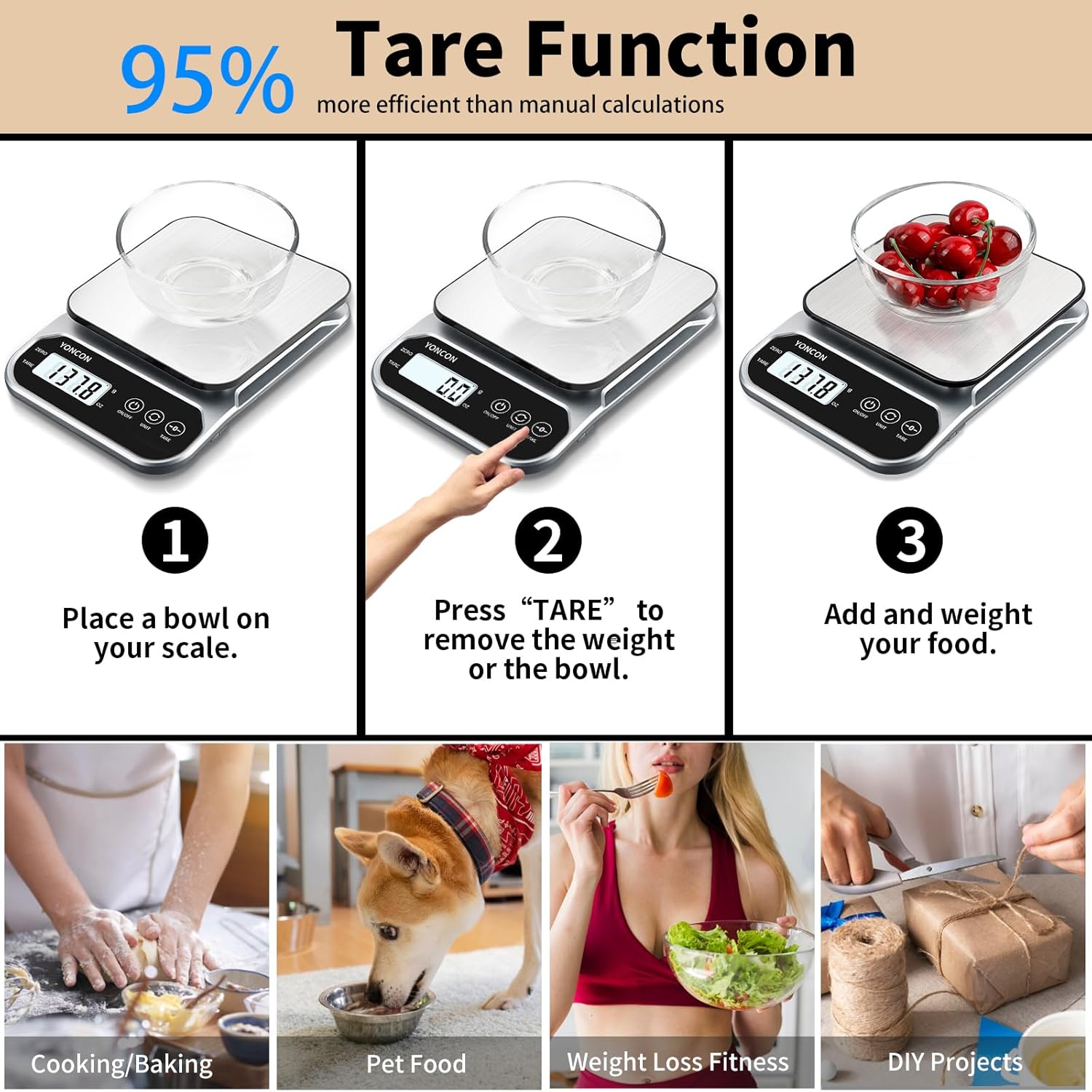
Image 5.2: A visual guide demonstrating the tare function: 1) Place an empty bowl on the scale, 2) Press the TARE button to zero the display, 3) Add ingredients to the bowl to measure their net weight.
5.4 "Wealhub" App Connection and Nutritional Analysis
The Yoncon Smart Food Scale can connect to the "Wealhub" app for advanced nutritional tracking and analysis.
- Download the App: Search for "Wealhub" in your smartphone's app store (iOS or Android) and download it.
- Pairing:
- Ensure Bluetooth is enabled on your smartphone.
- Open the "Wealhub" app and follow the on-screen instructions to pair with your Yoncon Smart Food Scale.
- Nutritional Tracking:
- Once paired, weigh your food items on the scale. The weight data will be sent to the app.
- The app provides 19 kinds of nutritional analysis functions and includes a USDA food database.
- You can add and customize your own food data within the app.
- Nutritional data can be synced with the Apple Health App.

Image 5.3: The Yoncon Smart Food Scale in use, with a smartphone displaying the "Wealhub" app's interface, highlighting its capability for 19 types of nutritional analysis and a comprehensive food database.

Image 5.4: A user interacting with the Yoncon Smart Food Scale and the Wealhub app, demonstrating how the scale assists in tracking diet metrics like calories, carbs, protein, and fat for health management.
6. Maintenance
- Cleaning: Wipe the scale surface with a soft, damp cloth. Do not immerse the scale in water or use abrasive cleaners. The stainless steel platform is designed for ease of cleaning.
- Storage: Store the scale in a cool, dry place. Its compact size (7.9 x 5.9 x 1.6 inches) allows for easy storage in drawers or cabinets.
- Battery Replacement: If the display becomes dim or shows a low battery indicator, replace both AAA batteries with new ones.

Image 6.1: The Yoncon Smart Food Scale being cleaned with a cloth and shown stored neatly in a kitchen drawer, emphasizing its easy-to-clean surface and compact design for convenient storage.
7. Troubleshooting
| Problem | Possible Cause | Solution |
|---|---|---|
| Scale does not turn on. | Dead or incorrectly installed batteries. | Check battery polarity. Replace batteries if necessary. |
| Inaccurate readings. | Uneven surface; overloaded scale; external vibrations. | Place scale on a flat, stable surface. Ensure weight does not exceed 3kg. Avoid vibrations during weighing. |
| Display shows "Lo" or "Err". | Low battery; overload. | Replace batteries. Remove excess weight from the scale. |
| App not connecting to scale. | Bluetooth off; app not open; scale not powered on. | Ensure Bluetooth is on, app is open, and scale is powered on. Try restarting both the scale and the app. |
8. Specifications
| Feature | Detail |
|---|---|
| Model Number | YONCONX601 |
| Weight Capacity | 3000g (3kg) / 6.61 lbs |
| Accuracy | 0.1g increments |
| Units of Measurement | Grams (g), Ounces (oz) |
| Display Type | LCD |
| Power Source | 2 x AAA Batteries (included) |
| Product Dimensions | 7.9 x 5.9 x 1.6 inches |
| Material | Stainless Steel Platform, ABS Plastic Body |
| Special Feature | Calorie Consumption (via Wealhub App) |

Image 8.1: The Yoncon Smart Food Scale highlighting its maximum weighing capacity of 3KG and a division accuracy of 0.1g, emphasizing its precision for various weighing needs.
9. Warranty and Support
For warranty information or technical support, please refer to the contact details provided with your purchase or visit the official Yoncon website. Keep your purchase receipt as proof of purchase.