
Introduction
The Humminbird Helix 7 G4 GPS Fish Finder is an advanced marine electronics device designed to enhance your fishing experience. It integrates MEGA Side Imaging, MEGA Down Imaging, Dual Spectrum CHIRP Sonar, AutoChart Live, built-in GPS, and Humminbird Basemap. This manual provides essential information for the proper setup, operation, and maintenance of your device.
Key Features
- MEGA Side & Down Imaging Technology: Provides detailed views of fish, structures, and contours up to 125 feet on both sides and directly below the boat, with three times the detail of standard imaging sonar. A transducer is included.
- Dual Spectrum CHIRP Sonar: Offers two viewing modes for fish arches and structures: Wide Mode for maximum coverage and Narrow Mode for detailed scanning. Features a Low-Q transducer for accurate 2D target separation.
- Enhanced GPS Navigation: Equipped with Humminbird Basemap, covering over 10,000 lakes and the continental US coastline. Compatible with premium LakeMaster, CoastMaster, and Navionics charts.
- Real-Time Mapping (AutoChart Live): Create custom maps of depth contours, bottom hardness, and vegetation in real-time with 8 hours of built-in recording. Compatible with AutoChart Zero Line SD cards for expanded mapping capacity.
- Reliable Keypad Control: A user-friendly menu system operated by soft-key controls ensures reliable operation in all weather conditions. Access preloaded views and settings with an intuitive button interface.
Setup
Proper installation is crucial for optimal performance. This section outlines the general steps for setting up your Humminbird Helix 7 G4 GPS Fish Finder.
1. Mounting the Control Head
The control head can be mounted using either the gimbal bracket or an in-dash mount kit. Ensure the mounting location provides clear visibility and easy access to controls, away from direct sunlight and excessive vibration.
- Gimbal Mount: Secure the gimbal bracket to a flat surface using the provided hardware. Attach the control head to the bracket and adjust the viewing angle.
- In-Dash Mount: Cut an opening in the dashboard according to the template provided in the full installation guide (not included here). Secure the control head using the flush mount hardware.
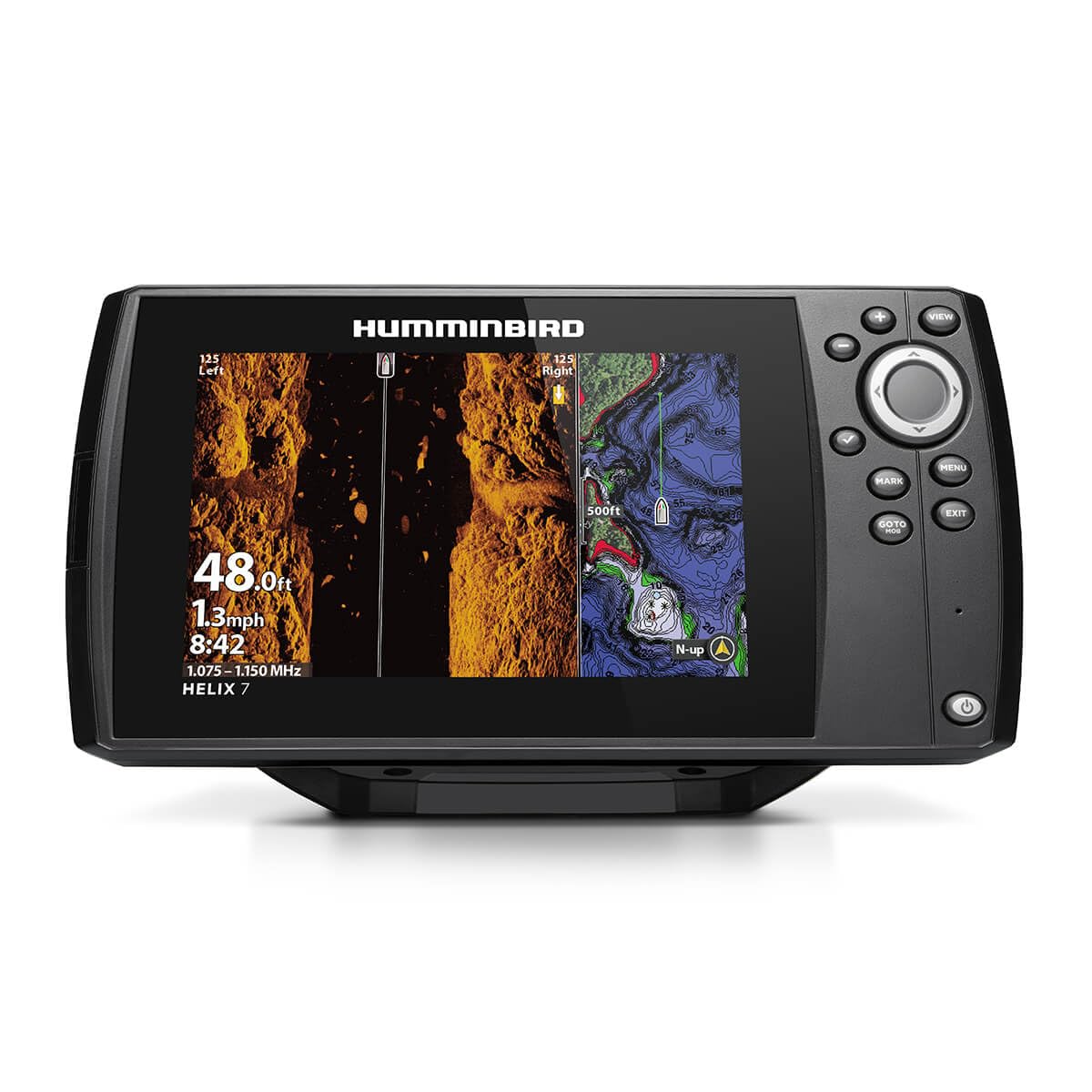
Image: Front view of the Humminbird Helix 7 G4 GPS Fish Finder control head.
2. Transducer Installation
The transom mount transducer should be installed on the boat's transom, ensuring it is submerged in water and free from obstructions that could interfere with the sonar signal. Refer to the transducer's specific installation guide for detailed instructions.
3. Power and Cable Connections
Connect the power cable to a 12V DC power source. Ensure all connections are secure and waterproof. The transducer cable connects to the appropriate port on the back of the control head.

Image: Rear view of the Humminbird Helix 7 G4 GPS Fish Finder showing power and transducer ports.
Operating Instructions
This section provides general guidance on operating your fish finder. For detailed feature usage, consult the comprehensive user manual.
1. Powering On/Off
Press and hold the POWER button to turn the unit on or off. A short press will access the power menu for backlight adjustment and other settings.
2. Navigating Menus
Use the MENU button to access the main menu. Use the arrow keys to navigate through options and the SELECT button to confirm selections. The EXIT button returns to the previous screen or closes the menu.
3. Sonar Views
The Helix 7 G4 offers various sonar views, including 2D Sonar, Down Imaging, Side Imaging, and Chart views. Use the VIEW button to cycle through available views or customize split-screen layouts.

Image: The Helix 7 G4 display showing a split-screen view with Side Imaging sonar and a navigation chart.
4. GPS and Chartplotter Functions
The built-in GPS allows for precise navigation. Use the MARK button to save waypoints and the GOTO button to navigate to saved locations. The chart view displays your current position, tracks, and map data.
Maintenance
Regular maintenance ensures the longevity and optimal performance of your fish finder.
- Cleaning: Clean the display screen with a soft, damp cloth. Avoid abrasive cleaners or solvents. Clean the transducer face regularly to remove marine growth or debris.
- Connections: Periodically check all cable connections for corrosion or damage. Ensure they are securely fastened.
- Software Updates: Check the Humminbird website for available software updates to ensure your unit has the latest features and performance enhancements.
- Storage: When not in use for extended periods, store the unit in a dry, temperate environment. Disconnect power to prevent battery drain.
Troubleshooting
This section addresses common issues you might encounter. For more complex problems, contact customer support.
| Problem | Possible Cause | Solution |
|---|---|---|
| No Power | Loose power connection, blown fuse, dead battery. | Check power cable connections, inspect fuse, verify battery charge. |
| No Sonar Reading | Transducer not submerged, dirty transducer, loose transducer connection, air bubbles under transducer. | Ensure transducer is in water, clean transducer face, check cable connection, reposition transducer to avoid turbulence. |
| Inaccurate GPS Position | Poor satellite reception, unit obstructed. | Move to an open area with clear sky view, ensure no large obstructions near the unit. |
| Screen Freezes/Unresponsive | Software glitch, temporary error. | Perform a soft reset (power off and on). If persistent, consider a factory reset (consult full manual for procedure). |
Specifications
Below are the technical specifications for the Humminbird Helix 7 G4 GPS Fish Finder.
| Feature | Detail |
|---|---|
| Brand | Humminbird |
| Model Name | Helix |
| Power Source | Corded Electric |
| Screen Size | 7 inches |
| Display Type | LCD |
| Maximum Depth Measurement | 125 feet (Imaging Sonar) |
| Mounting Type | Gimbal and In-Dash Mount Kit |
| Item Weight | 2.1 pounds |
| Product Dimensions (L x W x H) | 7.8 x 26.8 x 13.8 cm |
| Manufacturer Model Number | 411930-1 |
| Included Components | Control Head; Transom Mount Transducer and Mounting Hardware; Power Cable; Gimbal Mounting Bracket |
| Number of Units | 1.0 Count |
| Product Type | Fish Finder |
| ASIN | B0CG6P1TD5 |
| GTIN | 082324058295 |
Warranty Information
Humminbird products are covered by a limited warranty. Please refer to the official Humminbird website or the warranty card included with your product for specific terms, conditions, and registration details. Typically, the warranty covers defects in materials and workmanship for a specified period from the date of purchase.
Support
For further assistance, technical support, or to purchase accessories, please contact Humminbird customer service or visit their official website:
- Website: www.humminbird.com (Please note: This is a placeholder URL. Refer to your product documentation for the correct support website.)
- Phone Support: Refer to the contact information provided in your product packaging or on the official website for regional support numbers.
- Online Resources: The Humminbird website often provides FAQs, downloadable manuals, and software updates.


