
1. Introduction
Thank you for choosing the CCCEI Power Tool Organizer Cart. This mobile storage solution is designed to help organize your power tools, accessories, and charging equipment efficiently. Featuring a built-in charging station, multiple storage shelves, drill holders, and a pegboard, this cart provides a centralized and portable workstation for your garage or workshop. Please read this manual thoroughly before assembly and use to ensure safe and optimal performance.
2. Safety Information
WARNING: Failure to follow these safety instructions may result in electric shock, fire, and/or serious injury.
- Ensure the power strip is connected to a grounded outlet. Do not use adapters or extension cords that bypass grounding features.
- Do not overload the power strip. Check the total wattage of devices connected to ensure it does not exceed the power strip's maximum rating (15 amps).
- Keep the power strip and all electrical connections dry. Avoid using the cart in wet or damp environments.
- Do not modify the cart or its electrical components. Any modifications may void the warranty and create safety hazards.
- Distribute weight evenly on the shelves to prevent tipping.
- Lock the wheels when the cart is stationary to prevent unintended movement.
- Keep children and unauthorized persons away from the cart, especially when power tools are charging or stored.
- Always unplug the power strip from the wall outlet before cleaning or performing maintenance on the cart.
3. Package Contents
Verify that all components are present and undamaged before beginning assembly. If any parts are missing or damaged, contact CCCEI customer support.
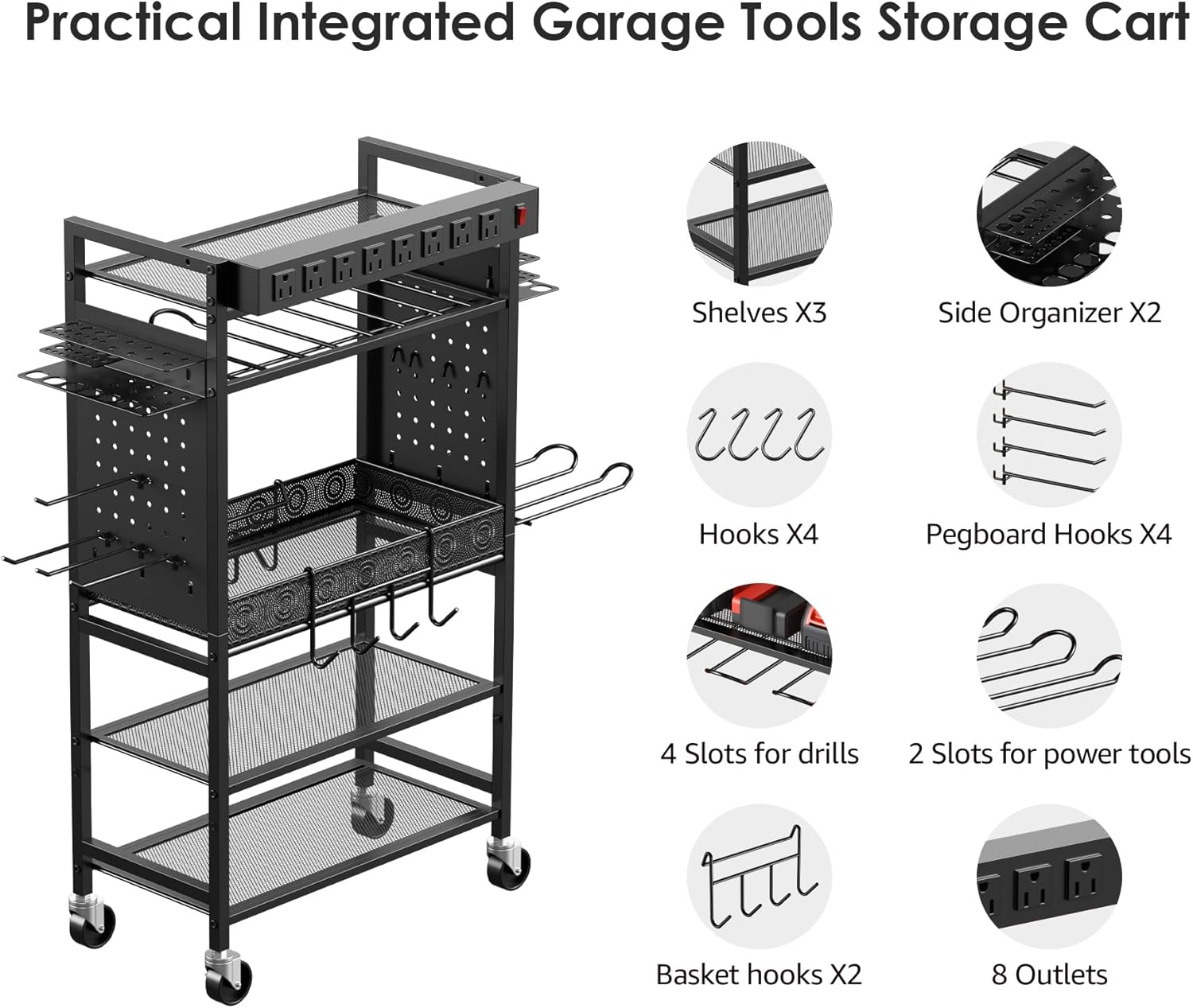
Figure 3.1: Overview of cart components including shelves, side organizers, hooks, drill slots, and power strip.
- Main Frame Components (Vertical supports, horizontal bars)
- Shelves (3 layers)
- Side Organizers (2 units, pegboard design)
- Hooks (Various types: 4 standard hooks, 4 pegboard hooks, 2 basket hooks)
- Drill Holders (6 slots for drills, 2 slots for power tools)
- Storage Basket (Removable)
- 8-Outlet Power Strip with 6ft Power Cord
- Casters (4 wheels, 2 with locking mechanism)
- Assembly Hardware (Screws, nuts, washers)
- Assembly Tools (Wrenches)
- Instruction Manual
4. Assembly Instructions
Assembly is required. It is recommended to have two people for easier assembly. All necessary hardware and tools are included.
- Attach Casters: Secure the four casters to the bottom of the main frame's vertical supports. Ensure that the two locking casters are installed on the same side for easy access. Tighten all bolts securely.
- Assemble Main Frame: Connect the vertical supports with the horizontal bars using the provided hardware. Ensure all connections are firm.
- Install Shelves: Place the three shelves onto the designated slots on the frame. The bottom shelf is adjustable and can be moved up or down to accommodate different item heights.

Figure 4.1: Cart dimensions and adjustable bottom shelf feature.
- Attach Side Organizers: Mount the two pegboard side organizers to the main frame. These provide additional hanging space for tools and accessories.
- Install Drill Holders: Secure the 6 drill holders and 2 power tool slots to the appropriate locations on the cart, typically beneath the top shelf or on the side panels.
- Place Storage Basket: Insert the removable storage basket into its designated area, usually on the middle shelf.
- Mount Power Strip: The 8-outlet power strip can be installed in two ways:
- Top Mount: Secure the power strip to the top horizontal bar of the cart.
- Side Mount: Attach the power strip to one of the side panels.

Figure 4.2: Power strip installation options.
- Add Hooks: Distribute the various hooks (standard, pegboard, basket hooks) as needed on the side organizers and other available points for tool hanging.
- Final Check: Verify that all screws and connections are tight and that the cart is stable.
5. Operating Instructions
The CCCEI Power Tool Organizer Cart is designed for convenient storage and charging of your tools.
- Tool Placement: Utilize the dedicated drill holders for cordless drills and other power tools. Hang hand tools, pliers, and other accessories on the various hooks and pegboard sections. Store battery packs, chargers, and larger tool cases on the shelves.

Figure 5.1: Example of organized tools on the cart.
- Charging Station Use: Plug the cart's 6ft power cord into a standard 120V AC grounded wall outlet. Use the 8 outlets on the power strip to connect battery chargers for your cordless tools. The 15-amp power strip can also power wired tools directly, provided the total load does not exceed its rating.
- Mobility: Unlock the casters to move the cart to your desired location. Once positioned, lock the casters to prevent the cart from rolling.
- Adjustable Shelf: The bottom shelf can be repositioned to accommodate taller items or different storage needs. To adjust, carefully lift the shelf and re-seat it into the desired slots on the vertical supports.
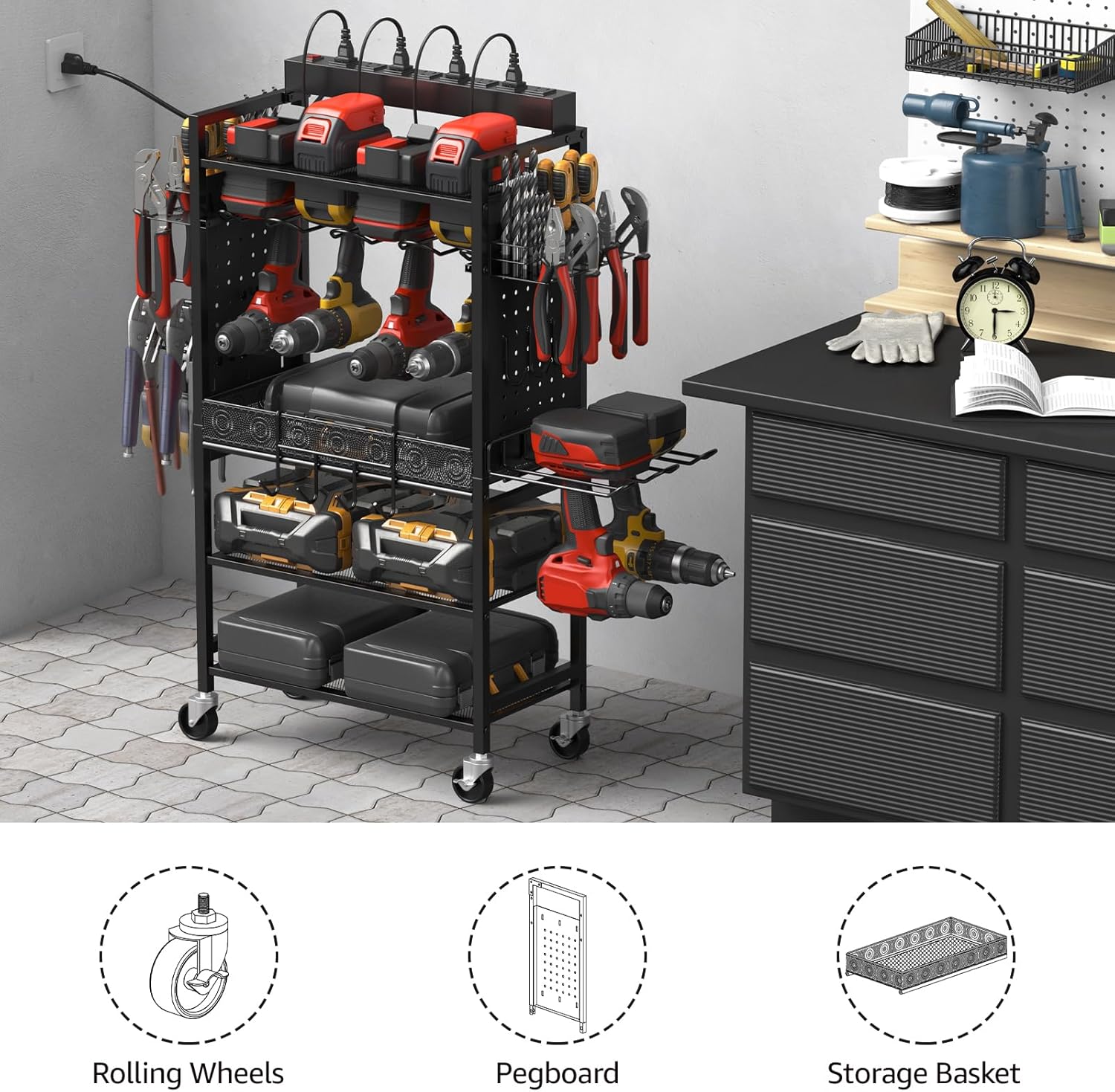
Figure 5.2: The cart in a typical workshop environment, demonstrating its organizational capabilities.
6. Maintenance
- Cleaning: Disconnect the power strip from the wall outlet before cleaning. Wipe down metal surfaces with a damp cloth and mild detergent. Avoid abrasive cleaners or solvents that could damage the finish. Ensure all surfaces are dry before reconnecting power.
- Caster Care: Periodically check the casters for debris (e.g., dust, hair, metal shavings) that might impede smooth rolling. Clean as necessary. Lubricate swivel points if movement becomes stiff.
- Hardware Check: Regularly inspect all screws and bolts to ensure they remain tight. Re-tighten any loose fasteners to maintain the cart's stability.
- Electrical Inspection: Periodically check the power cord and power strip for any signs of damage, such as cuts, fraying, or discoloration. If damage is found, discontinue use immediately and replace the power strip.
7. Troubleshooting
| Problem | Possible Cause | Solution |
|---|---|---|
| Power strip not supplying power. |
|
|
| Cart is unstable or wobbles. |
|
|
| Casters do not roll smoothly. |
|
|
8. Specifications
| Brand | CCCEI |
| Model (ASIN) | B0CG5L3TF1 |
| Color | Black |
| Material | Metal |
| Product Dimensions (L x W x H) | 9.84 x 17.9 x 34.05 inches |
| Item Weight | 15.98 pounds |
| Number of Shelves | 3 (1 adjustable) |
| Power Strip | 8 AC Outlets, 15 Amp, 6ft Cord |
| Casters | 4 Swivel Casters (2 lockable) |
| Assembly Required | Yes |
| Recommended Use | Indoor (Garage, Workshop) |
9. Warranty and Support
CCCEI products are manufactured to high-quality standards. For specific warranty information, please refer to the documentation included with your purchase or contact CCCEI customer support.
If you encounter any issues or have questions regarding your Power Tool Organizer Cart, please contact CCCEI customer service through the retailer's platform or the official CCCEI website for assistance.