
1. Introduction
The NEEWER Q4 400Ws Studio Flash is a powerful and portable outdoor strobe designed for professional photography. It features a compact rectangular design, high flash output, and versatile flash modes including TTL, Manual, and Multi. Equipped with a 2.4G Q system and a QPRO-N trigger, it offers seamless wireless control. Its robust battery and Bowens mount compatibility make it suitable for various indoor and outdoor shooting environments.

Figure 1.1: Overview of the NEEWER Q4 400Ws Studio Flash and its included components.
2. Key Features
- 400Ws High Power Output: Provides strong flash output with GN72 (with high performance reflector, not included) for effective outdoor and studio photography.
- Compact and Portable Design: Measures 7.28"x6.06"x8.35" and weighs 4.94lb, featuring a convenient top handle for easy transport.
- Versatile Flash Modes: Supports TTL (Through-The-Lens), Manual, and Multi (Stroboscopic) flash modes for diverse shooting requirements.
- High Speed Sync (HSS): Achieves flash sync speeds up to 1/8000s, allowing for creative control over ambient light.
- 30W LED Modeling Lamp: Features a 5600K, CRI95+ modeling lamp for precise light positioning and preview.
- Long-lasting Battery: Equipped with a 21.6V/2800mAh lithium battery, providing approximately 400 full power flashes and a fast recycling time of 0.01-1.2s.
- Built-in 2.4G Q System: Integrated wireless system compatible with the included QPRO-N trigger for remote control up to 328'/100m across 5 groups and 32 channels.
- Bowens Mount: Standard Bowens mount allows compatibility with a wide range of light modifiers such as softboxes, reflectors, and snoots.
- Firmware Upgrades: Supports USB Type-C for future firmware updates.

Figure 2.1: The NEEWER Q4 400Ws flash providing powerful illumination for outdoor photography.
3. Package Contents
Verify that all items are present in your package:
- 1 x NEEWER Q4 Flash Strobe
- 1 x QPRO-N Wireless Trigger (for Nikon)
- 1 x Standard Reflector
- 1 x Lithium Battery (21.6V/2800mAh)
- 1 x Handle Grip
- 1 x Power Cord (US Plug)
- 1 x Power Adapter
- 1 x Carrying Case
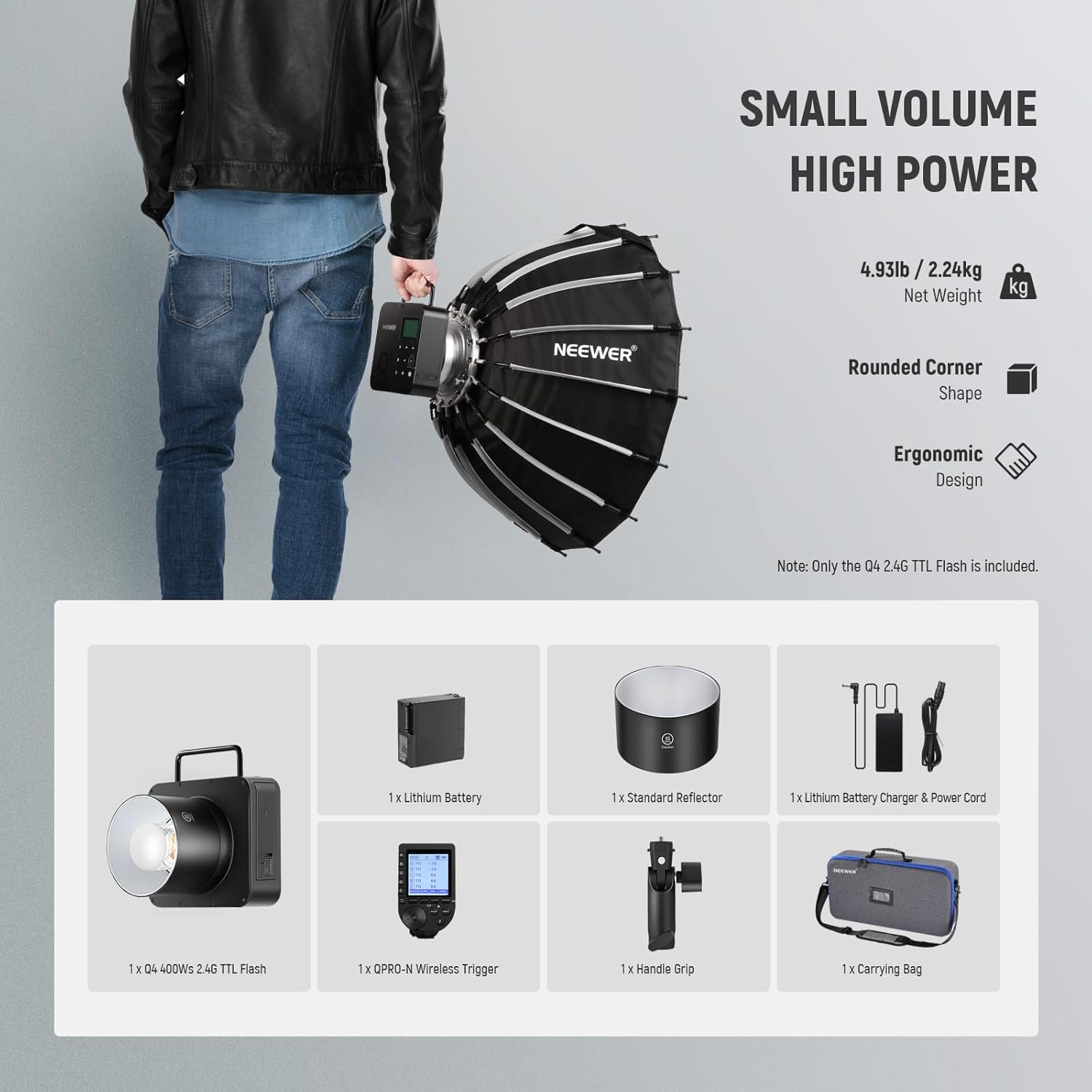
Figure 3.1: All components included in the NEEWER Q4 400Ws Studio Flash package.
4. Setup and Installation
4.1 Battery Installation and Charging
- Locate the battery compartment on the side of the Q4 flash unit.
- Insert the 21.6V/2800mAh lithium battery into the compartment, ensuring proper alignment of the contacts.
- Close the battery compartment securely.
- To charge the battery, connect the included power adapter and power cord to the DC charging port on the flash unit.
- A full charge takes approximately 3.5 hours. Only use the provided power adapter/cord for charging.

Figure 4.1: The large capacity lithium battery being inserted into the NEEWER Q4 flash.
4.2 Attaching the Handle Grip and Reflector
- Attach the handle grip to the designated mounting point on the Q4 flash unit for comfortable handling.
- Align the standard reflector with the Bowens mount on the front of the flash.
- Twist the reflector clockwise until it locks securely into place.
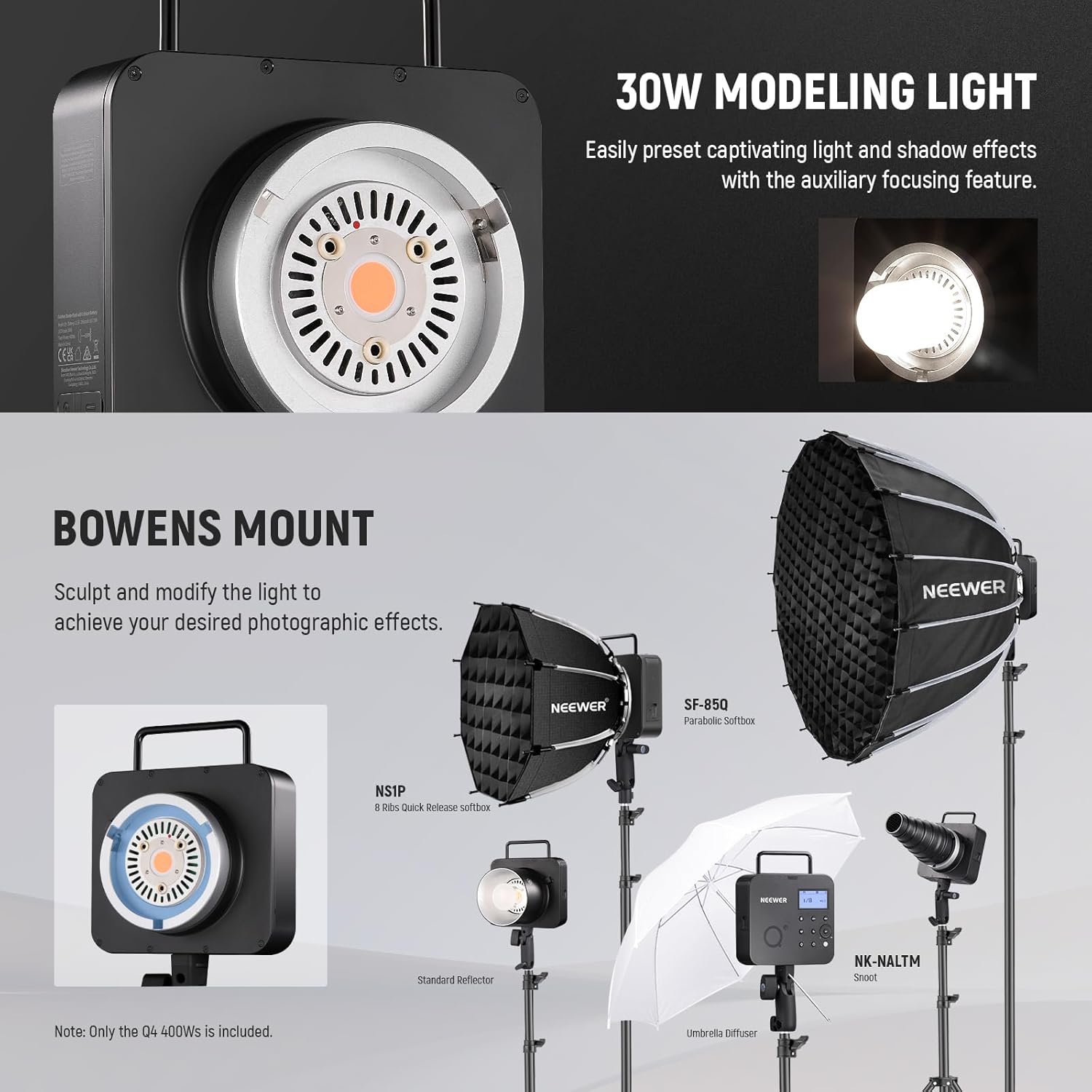
Figure 4.2: The NEEWER Q4 flash unit demonstrating the 30W modeling light and the Bowens mount for attaching light modifiers.
Important Note: Do not trigger the flash without the flash tube plugged in, as this can cause damage to the equipment.
5. Operating Instructions
5.1 Powering On/Off
Press and hold the power button on the Q4 flash unit to turn it on or off. The LCD screen will illuminate upon power-on.
5.2 Flash Modes
The Q4 offers three primary flash modes:
- TTL (Through-The-Lens) Mode: Automatically adjusts flash output for optimal exposure. Supports flash exposure compensation.
- Manual Mode: Allows precise manual control over flash power from 1/1 to 1/256 with 0.1 stop precision and 81 levels of fine tuning.
- Multi (Stroboscopic) Mode: Controls the stroboscopic rate up to 100 times (199 Hz) for capturing multiple exposures in a single frame.
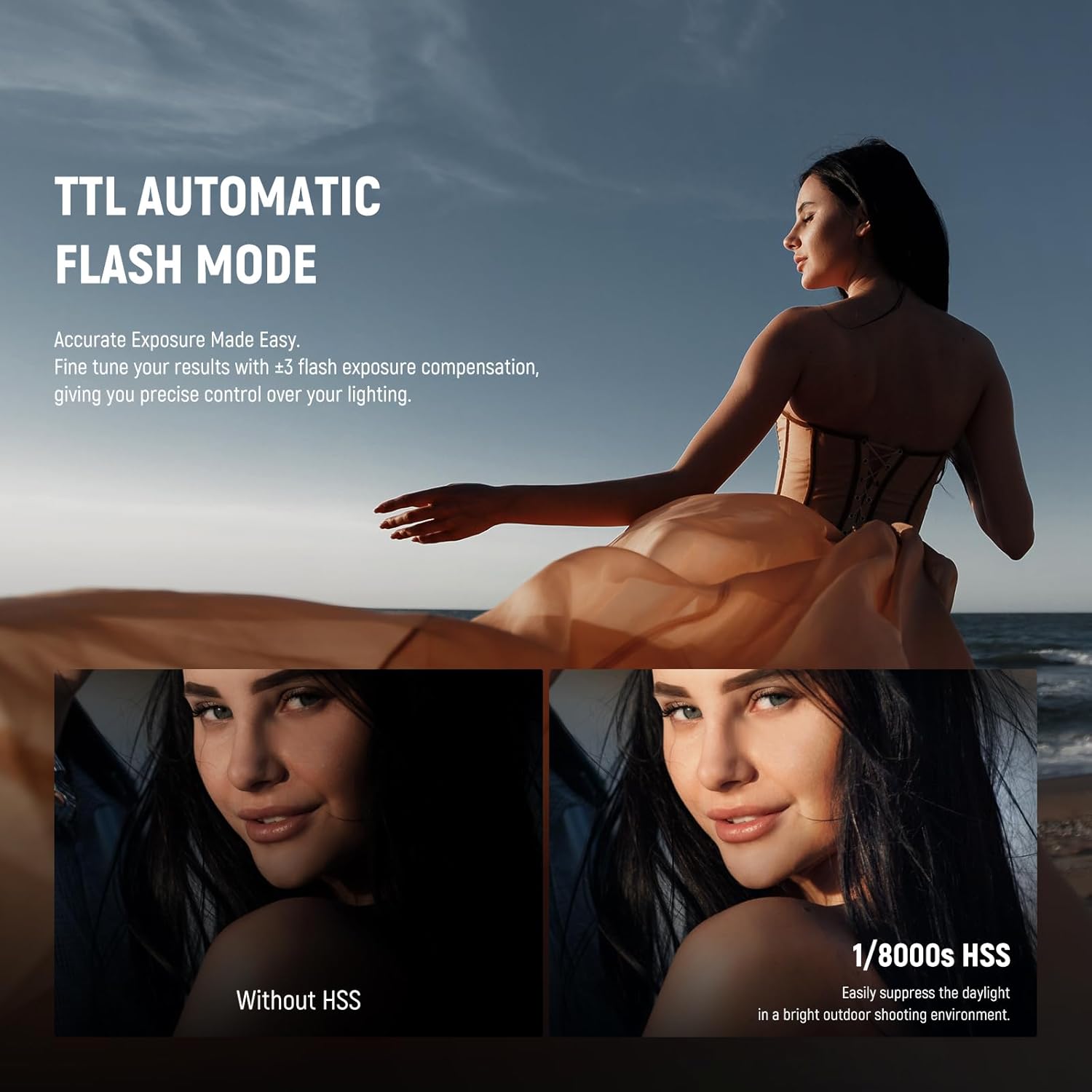
Figure 5.1: The NEEWER Q4 in TTL Automatic Flash Mode, showcasing its ability to provide accurate exposure and High Speed Sync (HSS) capabilities.

Figure 5.2: The Manual Flash Mode interface, illustrating the granular control over power output and brightness.
5.3 High Speed Sync (HSS) and Curtain Sync
The Q4 supports 1/8000s High Speed Sync (HSS) for shooting with fast shutter speeds, ideal for overpowering ambient light. It also supports First Curtain Sync and Second Curtain Sync for creative motion blur effects.

Figure 5.3: The Q4's fast flash duration (1/10989s) effectively freezes action, demonstrated with a ballet dancer and a multi-strobe effect on a runner.

Figure 5.4: The Q4 supports various shooting functions, including flash exposure compensation, high speed synchronization, and curtain synchronization.
5.4 2.4G Q System and QPRO-N Trigger
The Q4 has a built-in 2.4G Q system receiver, allowing it to be wirelessly controlled by the included QPRO-N trigger. The trigger supports up to 5 groups, 32 channels, and 01-99 IDs within a range of 328'/100m. Ensure your camera model is compatible (e.g., Nikon D4, D5, D6, D750, Z9, Zfc, etc.). Firmware upgrades for the trigger may be necessary for full compatibility.

Figure 5.5: The QPRO-N trigger's display, illustrating options for customizable single contact mode. Note: Disable single contact mode for TTL and High Speed Sync.

Figure 5.6: The NEEWER 2.4G Q system allows the Q4 flash to function as a slave unit, controlled by the QPRO wireless trigger as a master.

Figure 5.7: The QPRO trigger's interface, detailing the magnification function for single group operation and custom function settings (C.Fn) for advanced configurations.
5.5 Modeling Lamp
The integrated 30W LED modeling lamp (5600K, CRI95+) assists in previewing lighting effects and focusing. It can be controlled independently from the flash output.

Figure 5.8: The 30W modeling light of the NEEWER Q4, providing continuous illumination for setup and focusing.
6. Maintenance and Care
- Keep the flash unit and accessories clean and dry. Use a soft, dry cloth for cleaning.
- Avoid exposing the unit to extreme temperatures, humidity, or direct sunlight for prolonged periods.
- Store the unit in its carrying case when not in use to protect it from dust and physical damage.
- Ensure the flash tube is properly installed before triggering the flash to prevent damage.
7. Troubleshooting
| Problem | Possible Cause | Solution |
|---|---|---|
| Flash not firing | Low battery; Flash tube not installed; Trigger not paired; Incorrect mode/settings. | Charge battery; Ensure flash tube is securely installed; Pair trigger with flash; Check flash mode and settings. |
| Inconsistent flash output | Battery level fluctuating; Interference with wireless signal. | Ensure battery is fully charged; Reduce distance between flash and trigger; Change wireless channel. |
| Trigger incompatibility | Outdated firmware; Camera model not fully supported. | Check NEEWER's official website for the latest firmware updates and compatibility list. |
8. Specifications
| Feature | Detail |
|---|---|
| Model | Q4 |
| GN Index | GN72 (1m, ISO 100) with High Performance Reflector |
| Power | 400Ws |
| Flash Duration | 1/209-1/10989s |
| Flash Modes | TTL, Manual, Multi (Stroboscopic) |
| Power Output | 9 Steps 1/256 - 1/1 |
| Flash Exposure Compensation | Manual, FEB: +/-3 stops in 1/3 stops increments |
| Sync Modes | HSS (up to 1/8000s), First/Second Curtain Sync |
| Modeling Lamp (LED) | 30W / 5600K / CRI95+ |
| Battery | 21.6V / 2800mAh Lithium Battery |
| Full Power Flashes | Approx. 400 |
| Recycling Time | 0.01-1.2s |
| Wireless Function | Slave Unit, Wireless Off, 2.4G |
| Transmission Range | 100 meters |
| Channels | 1-32 |
| Wireless IDs | 01-99 |
| Dimensions | 7.28" x 6.06" x 8.35" (18.5 x 15.4 x 21.2 cm) |
| Net Weight | 4.94lb / 2.24kg (Excluding lamp and reflector) |

Figure 8.1: Comprehensive technical specifications for the NEEWER Q4 400Ws Studio Flash.
9. Official Product Video
Video 9.1: Official product video showcasing the features and usage of the NEEWER Q4 400Ws Studio Flash. This video demonstrates the flash's capabilities in various shooting scenarios.
10. Warranty and Support
For warranty information, technical support, or service inquiries, please refer to the official NEEWER website or contact their customer service directly. Keep your purchase receipt for warranty claims.
Official NEEWER Store: NEEWER Amazon Store