
1. Introduction
Thank you for choosing the Goplus 20-Inch PC Hardside Carry-On Luggage. This manual provides essential information for the proper setup, operation, and maintenance of your new luggage. Please read these instructions carefully before use and retain them for future reference.
This carry-on luggage is designed for convenience and durability, featuring a robust PC hardshell, a front pocket for electronics, a foldable tabletop, a USB charging port, and a TSA-approved combination lock.

Image: Goplus 20-Inch PC Hardside Carry-On Luggage. This image shows the luggage in a travel setting, highlighting its compact and modern design.
2. Setup
2.1 Setting the TSA007 Combination Lock
Your luggage is equipped with a TSA007 combination lock. The initial factory setting is 0-0-0. To set your personal combination:
- Ensure the lock is set to 0-0-0 and open the lock by sliding the release button.
- Locate the small reset button (usually a small hole) on the side or bottom of the lock. Use a pen or pointed object to press and hold this button until you hear a click.
- While holding the reset button, set your desired 3-digit combination by turning the dials.
- Release the reset button. Your new combination is now set. Test it by scrambling the numbers and then entering your new combination to open the lock.
Important: Remember your combination. There is no master key for personal combinations, and Goplus cannot assist in opening locked luggage if the combination is forgotten.

Image: Built-in TSA007 Lock. This image illustrates the combination lock mechanism on the luggage.
2.2 Connecting a Power Bank to the USB Port
The luggage features an external USB port for convenient charging of your electronic devices. A power bank (not included) is required for this functionality.
- Open the main compartment of the luggage.
- Locate the internal USB cable connected to the external USB port.
- Connect your personal power bank to this internal USB cable.
- Place the power bank securely within the designated compartment or pocket inside the luggage.
Once connected, you can plug your device's charging cable into the external USB port to charge it.

Image: USB Port and Foldable Tabletop. This image demonstrates how to connect a power bank to the internal USB cable and the functionality of the foldable tabletop.
3. Operating Instructions
3.1 Utilizing the Front Pocket Compartment
The front pocket provides quick access to essential items without opening the main compartment. It includes multiple dedicated sections:
- Padded Laptop Pocket: Designed to hold laptops up to 15.6 inches.
- iPad Pocket: Suitable for iPads up to 9.7 inches.
- ID Bags (2): For identification cards, passports, or small documents.
- Mesh Pocket: For miscellaneous small items.
To open the front pocket, ensure the TSA lock is disengaged (if it secures the front pocket) and press the release mechanism or unlatch as designed.

Image: Convenient Front Pocket. This diagram details the organization and capacity of the front pocket.
3.2 Deploying the Foldable Tabletop
The integrated foldable tabletop offers a convenient surface for drinks, tablets, or phones. It can support up to 5.5 lbs (2.5 kg).
- Locate the tabletop panel on the top surface of the luggage.
- Gently pull or slide the panel outwards to extend it.
- Ensure it is fully extended and stable before placing items on it.
- To retract, push the panel back into its housing until it clicks securely into place.
Image: Foldable Tabletop in use. This image illustrates the tabletop extended, holding a tablet and a drink.
3.3 Adjusting the Telescoping Handle
The aluminum telescoping handle can be adjusted to four different heights for comfortable maneuvering:
- 35.5 inches
- 37.5 inches
- 39.5 inches
- 41.5 inches
To adjust, press the button on the handle grip and extend or retract the handle to your desired height. Release the button to lock it in position.

Image: Adjustable Telescoping Handle. This image displays the various height settings for the handle.
3.4 Using the Double-Spinner Wheels
The luggage is equipped with four multi-directional double-spinner wheels, allowing for 360° rotation and smooth, silent movement. This design enables effortless navigation through airports and other travel environments.

Image: Multi-Directional Double-Spinner Wheels. This image highlights the smooth and silent operation of the wheels.
3.5 Packing the Interior
The interior is designed for efficient packing for 1-3 day trips, offering a capacity of 44 liters. It features:
- Elastic Clothing Compression Straps: To secure garments and minimize shifting.
- Two Large Zippered Mesh Bags: Ideal for smaller items, toiletries, or accessories.
- Zippered Panel: For double-sided packing, separating contents in each half of the luggage.
Utilize these features to keep your belongings organized and secure during transit.
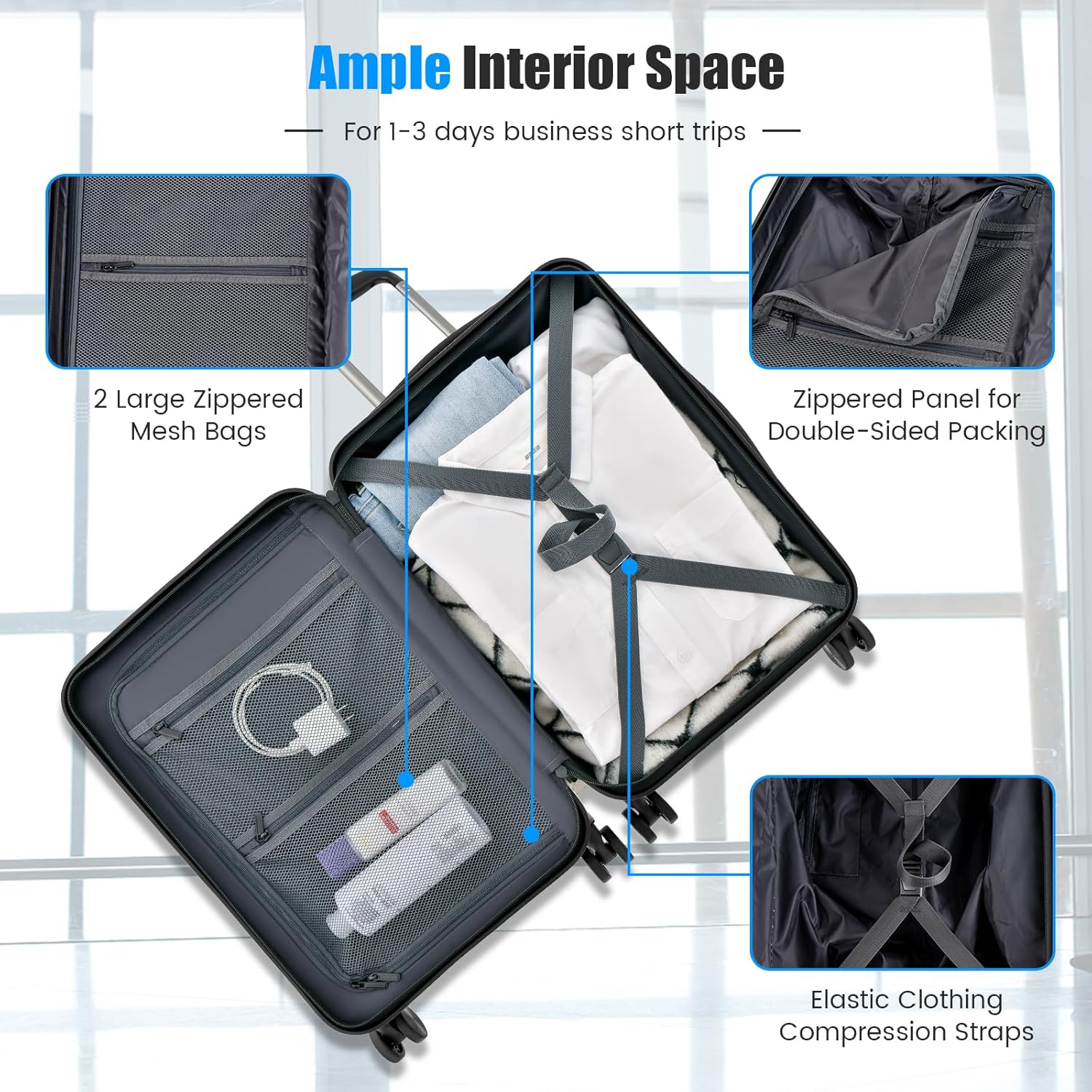
Image: Ample Interior Space. This image demonstrates the internal organization features for packing.
4. Maintenance
4.1 Cleaning the Hardshell Exterior
The PC hardshell is impact-resistant and scratch-resistant. To clean, wipe the surface with a soft cloth dampened with mild soap and water. Avoid abrasive cleaners or solvents that may damage the finish.
4.2 Wheel Care
Periodically check the spinner wheels for any debris (e.g., hair, lint) that may hinder smooth operation. Clean the wheel axles with a soft brush or cloth. Avoid applying excessive force or harsh chemicals to the wheels.
4.3 Handle Maintenance
Ensure the telescoping handle extends and retracts smoothly. If it becomes stiff, clean any visible dirt from the telescoping tubes. Do not force the handle if it jams.

Image: Premium Details. This image showcases the durable construction and ergonomic features of the luggage.
5. Troubleshooting
| Problem | Possible Cause | Solution |
|---|---|---|
| TSA Lock will not open. | Incorrect combination entered. | Ensure the correct 3-digit combination is aligned. If forgotten, contact Goplus customer support for guidance (note: they cannot reset personal combinations). |
| USB port not charging device. | Power bank not connected or discharged; faulty cable. | Verify the internal power bank is connected and charged. Test with a different charging cable or power bank. |
| Telescoping handle is stiff or stuck. | Debris in the mechanism; bent handle. | Clean any visible dirt or debris from the handle tubes. Do not force. If bent, contact customer support. |
| Wheels are not rolling smoothly. | Debris caught in wheels; damaged wheel. | Remove any hair or debris from the wheels. If a wheel is damaged, contact customer support. |
6. Specifications
| Brand | Goplus |
| Model | 20 Inch PC Hardside Carry-On Luggage |
| Material | Polycarbonate (PC) Hardshell, Aluminum Handle |
| Overall Dimensions (L x W x H) | 14" x 9" x 21.5" |
| Packing Capacity | 44 Liters |
| Item Weight | 8 lbs |
| Wheel Type | 4 Multi-Directional Double-Spinner Wheels |
| Lock Type | TSA007 Combination Lock |
| Handle Type | 4-Level Adjustable Telescopic Handle |
| Front Pocket Compartments | Padded Laptop Pocket (up to 15.6"), iPad Pocket (up to 9.7"), 2 ID Bags, Mesh Pocket |
| Foldable Tabletop Capacity | Up to 5.5 lbs |
| USB Port | External port with internal cable for power bank connection (power bank not included) |
7. Warranty & Support
7.1 Warranty Information
Specific warranty details for your Goplus luggage may vary. Please refer to the warranty card included with your purchase or visit the official Goplus website for the most current and detailed warranty information. Keep your proof of purchase for any warranty claims.
7.2 Customer Support
For technical assistance, parts replacement, or any questions regarding your Goplus 20-Inch PC Hardside Carry-On Luggage, please contact Goplus customer service. Contact information can typically be found on the Goplus website or on the packaging materials.
Goplus Official Website: www.goplu.com (Note: This is a placeholder URL, please verify the actual Goplus website for support.)


