
1. Introduction
This manual provides essential information for the safe and effective installation, operation, and maintenance of the ZIPCOM TOQ3-2P/125 Automatic Transfer Switch (ATS). The TOQ3 is a terminal type automatic transfer device designed for dual power grid systems. It ensures continuous power supply to load circuits by automatically switching between a normal power source and a reserve power source when one fails.
This device is suitable for 3-phase 4-wire (or 1-phase 1-wire) dual power grids with AC 50/60Hz, rated voltage 400V/230V, and rated current up to 125A. It complies with IEC60947-6-1 and GB/T14048.11 standards.
2. Safety Information
- Installation and maintenance must be performed by qualified personnel only.
- Ensure all power sources are disconnected before installation or servicing to prevent electric shock.
- Verify correct wiring connections according to the provided diagrams to avoid damage to the device or connected equipment.
- The 125A ATS does not include overcurrent or short-circuit protection. Appropriate external protection devices must be installed.
- The device is made of flame-retardant plastic material, offering good insulation and high temperature resistance.
3. Product Overview
The ZIPCOM TOQ3-2P/125 ATS is designed for reliable and automatic switching between two power sources. Key features include:
- Automatic and Manual Operation: Allows for flexible control over power source selection.
- Fast Conversion: Switches between power sources in less than 4 seconds.
- Multiple Protection Functions: Supports short circuit, overload, phase loss, and undervoltage protection (requires external devices for full protection).
- High Conductivity: Utilizes silver contacts for improved conductivity and extended service life.
- Signal Output Port: Built-in port for connecting signal indicators.

Figure 1: Front view of the ZIPCOM TOQ3-2P/125 Automatic Transfer Switch, showing the selector switch and indicator lights.

Figure 2: Angled view of the ZIPCOM TOQ3-2P/125 Automatic Transfer Switch, highlighting its compact design.
4. Installation and Wiring
Proper installation and wiring are crucial for the safe and correct operation of the ATS. Refer to the wiring diagram below.
4.1 Terminal Connections
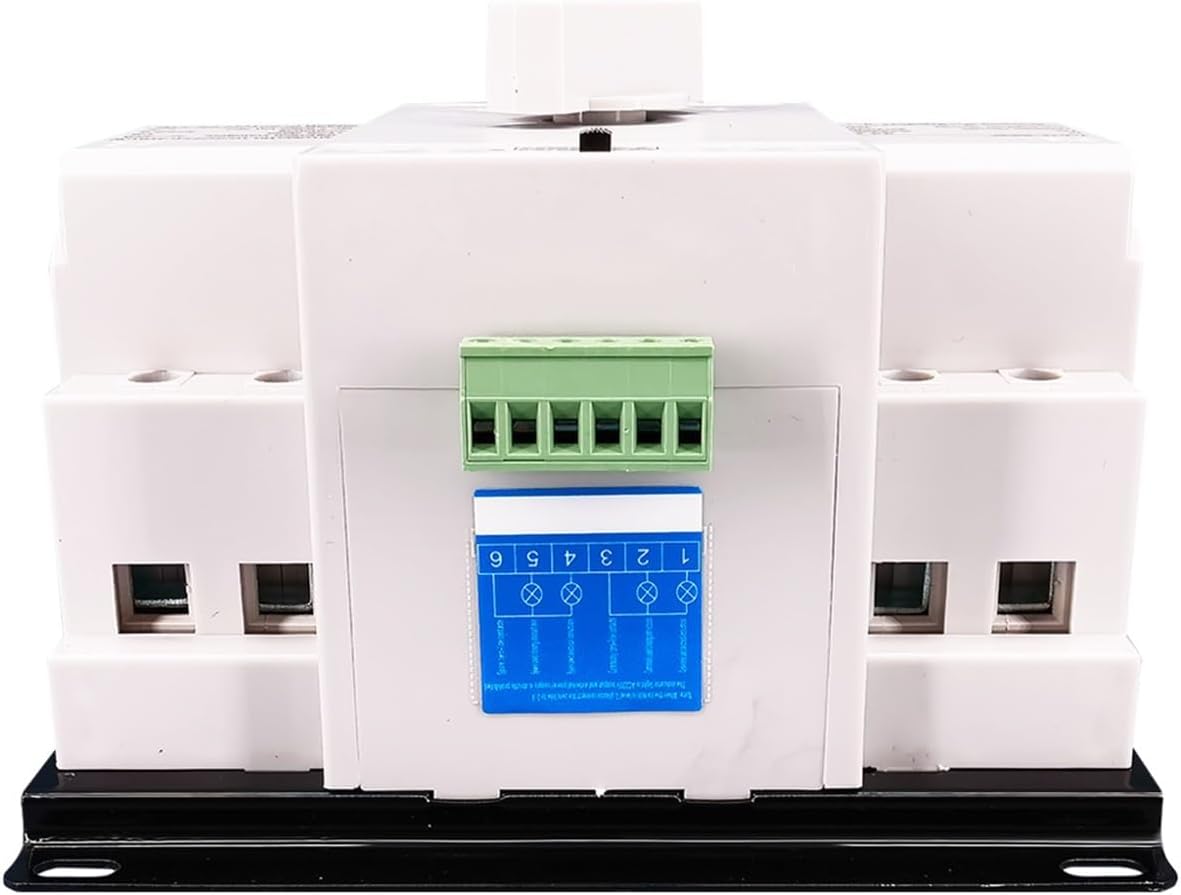
Figure 3: Back view of the ATS, illustrating the terminal block for power connections.
4.2 Wiring Diagram
Connect the common power supply (Normal Power), backup power supply (Reserve Power), and the load according to the diagram. Ensure all connections are secure and properly insulated.

Figure 4: Wiring diagram showing connections for common power supply (L, N), backup power (L, N), and the load. The 'N' side of the switch connects to the normal power, and the 'R' side connects to the reserve power.
- Normal Power: Connect the main utility power to the 'N' terminals.
- Reserve Power: Connect the generator or alternative power source to the 'R' terminals.
- Load: Connect the electrical load to the output terminals of the ATS.
5. Operation
The ATS offers both automatic and manual operation modes.
5.1 Automatic Mode
To enable automatic switching, set the selector switch to the 'Auto' position. In this mode:
- The switch prioritizes the Normal power supply. If Normal power is available, the switch will connect to it.
- If Normal power fails (e.g., loss of voltage or phase on Phase A), and Reserve power is available, the switch will automatically transfer the load to the Reserve power supply.
- When Normal power is restored, the switch will automatically transfer the load back to the Normal power supply.

Figure 5: Illustration demonstrating the extremely fast conversion process (less than 4 seconds) between main power and backup power in automatic mode.
5.2 Manual Mode
To operate the switch manually, set the selector switch to the 'Manual' position. In this mode, you must manually switch the direction (between Normal and Reserve power) using the selector handle. This mode is useful for testing or in specific situations where automatic switching is not desired.
6. Specifications
| Specification | Value |
|---|---|
| Model | TOQ3-2P/125 |
| Rated Voltage | 230V (AC 50/60Hz) |
| Rated Current | 125A |
| Operation Mode | Automatic / Manual |
| Conversion Time | < 4 seconds |
| Insulation Voltage (Ui) | AC400V |
| Impulse Withstand Voltage (Uimp) | 4kV |
| Utilization Category | AC-33B |
| Standard Compliance | IEC60947-6-1, GB/T14048.11 |
| Contact Material | Silver |
| Item Weight | 1.76 pounds |
| Manufacturer | ZIPCOM |
7. Maintenance
The ZIPCOM TOQ3-2P/125 ATS is designed for reliable operation with minimal maintenance. However, periodic checks are recommended to ensure optimal performance and safety.
- Visual Inspection: Regularly inspect the device for any signs of physical damage, loose connections, or discoloration.
- Terminal Tightness: Periodically check that all wiring terminals are securely tightened to prevent arcing or overheating.
- Cleanliness: Keep the device free from dust and debris. Use a dry, soft cloth for cleaning. Do not use liquid cleaners.
- Functionality Test: If safe to do so, periodically test the automatic transfer function by simulating a power outage on the normal supply to ensure the switch operates correctly.
8. Troubleshooting
This section addresses common issues and their potential solutions.
8.1 Power Does Not Transfer Automatically
- Check Mode: Ensure the selector switch is set to 'Auto'.
- Power Availability: Verify that both Normal and Reserve power sources are functioning correctly and providing the expected voltage. The ATS tests Normal Phase A voltage and Reserve Phase A voltage.
- Wiring: Inspect all wiring connections for looseness or incorrect installation.
8.2 Load Not Receiving Power
- Power Source: Confirm that at least one power source (Normal or Reserve) is active.
- External Protection: Check any external circuit breakers or fuses connected to the ATS for tripping or failure. Remember, the ATS itself does not have overcurrent or short-circuit protection.
- Manual Override: In manual mode, ensure the switch is correctly positioned to the desired power source.
8.3 Protection Functions
The ATS supports various protection functions (short circuit, overload, phase loss, undervoltage). These functions rely on external protective devices. If a protection event occurs:
- Identify and rectify the cause of the fault (e.g., short circuit, overload).
- Reset any tripped external protective devices.

Figure 6: Illustration highlighting the importance of short circuit protection, typically provided by an external circuit breaker with a coil and protection mechanism.
9. Warranty and Support
The ZIPCOM TOQ3-2P/125 Automatic Transfer Switch is manufactured to high-quality standards and complies with international norms such as IEC60947-6-1 and GB/T14048.11. For specific warranty details or technical support, please refer to the product packaging or contact your retailer or the manufacturer directly.