
1. Introduction
Thank you for choosing the KEMIMOTO Motorcycle Speaker. This waterproof stereo sound bar is designed to provide high-quality audio for your motorcycle or ATV, featuring a built-in amplifier, AUX input, USB port, Bluetooth compatibility, and FM radio. This manual provides detailed instructions for installation, operation, maintenance, and troubleshooting to ensure optimal performance and longevity of your device.

Image: The KEMIMOTO Motorcycle Speaker, a sleek black sound bar designed for handlebar mounting on motorcycles and ATVs.
2. What's in the Box
Please verify that all components listed below are included in your package:
- Speaker x 1
- Power cord x 1
- Controller Extension Cable x 1
- Spare fuse x 2
- Controller Power Cord x 1
- Mounting clamp anti-slip pad x 4
- Cable ties x 5
- Controller stand x 1
- Controller x 1
- Hex wrench x 1
- Hexagon socket head screw x 4
- Relax washer x 4
- Nut x 2
- Extension bracket x 2
- Mounting clamp x 2
- Manual x 1

Image: An exploded view of the KEMIMOTO Motorcycle Speaker and all its included accessories, such as cables, mounting hardware, and the controller.
3. Specifications
Key technical specifications of the KEMIMOTO Motorcycle Speaker:
| Feature | Specification |
|---|---|
| Brand | KEMIMOTO |
| Model Name | MU-B0117-02501SL |
| Item Model Number | KMB0117-02501BK |
| Input Voltage | 12 Volts |
| Speaker Maximum Output Power | 60 Watts |
| Mounting Type | Handlebar Mount |
| Material | Aluminum |
| Speaker Type | Built-In |
| Special Feature | USB Port |
| Compatible Devices | Smartphone, MP3 Player |
| Controller Type | Button |
| Color | Black |
| Is Waterproof | True |
| Wireless Communication Technology | Bluetooth |
| Power Source | Corded Electric |
| Vehicle Service Type | Motorcycle, ATV |
| Water Resistance Level | Waterproof |
| Bluetooth Range | 10 Meters |
| Product Dimensions | 5.11 x 9.44 x 3.15 inches |
| Item Weight | 2.44 pounds |

Image: Detailed dimensions of the speaker unit (8.2 inches long, 2.1 inches diameter) and mounting clamps (0.9 inches wide, 3.6 inches long).
4. Setup and Installation
Follow these steps for proper installation of your KEMIMOTO Motorcycle Speaker:
4.1 Mounting the Speaker
- Identify a suitable location on your motorcycle or ATV handlebar (0.75-1 inch round rods) for mounting the speaker. Ensure it does not obstruct your view or controls.
- Attach the mounting clamps to the speaker using the provided screws and washers.
- Place the anti-slip pads inside the mounting clamps to ensure a secure fit and prevent scratching the handlebar.
- Securely fasten the speaker to the handlebar using the hex wrench and hexagon socket head screws. Ensure the speaker is firmly in place and does not rotate freely.

Image: The speaker and its universal mount clamp, demonstrating how it attaches to a handlebar on an ATV.
4.2 Wiring Instructions
The speaker requires a standard 12V power connection. Use the provided wiring diagram for correct connections:
- Connect the red wire of the power cord to the positive (+) terminal of your vehicle's 12V power supply.
- Connect the black wire of the power cord to the negative (-) terminal of your vehicle's power supply.
- Ensure the 3A fuse is properly installed in the power line.
- Connect the controller to the speaker using the controller interface and extension cable.
- If using the USB function, insert a USB flash disk into the USB input port.
- Position the FM antenna for optimal signal reception.
- Use cable ties to neatly secure all wiring, preventing interference with moving parts and protecting against damage.

Image: A comprehensive wiring diagram illustrating connections for power, controller, USB, and FM antenna, with labels for each component.
5. Operating Instructions
5.1 Power On/Off and Volume Control
- Press and hold the power button on the controller to turn the speaker on or off.
- Use the volume buttons on the controller to adjust the sound level.
5.2 Bluetooth Connection
- Ensure the speaker is powered on and in Bluetooth mode (indicated by a specific light or voice prompt).
- On your smartphone or MP3 player, enable Bluetooth and search for available devices.
- Select "KEMIMOTO Speaker" (or similar name) from the list to pair.
- Once paired, you can stream audio wirelessly from your device to the speaker.

Image: A smartphone displaying its Bluetooth settings, ready to connect to the speaker, with the speaker mounted on a motorcycle handlebar in the background.
5.3 FM Radio Operation
- Switch to FM radio mode using the mode button on the controller.
- Use the seek buttons to scan for available radio stations.
- Adjust the volume as needed.
5.4 USB and AUX Input
- USB: Insert a USB flash drive containing audio files into the USB port. The speaker will automatically switch to USB playback mode.
- AUX: Connect an external audio device (e.g., MP3 player) to the AUX input using a 3.5mm audio cable. Switch to AUX mode on the controller.

Image: The speaker mounted on a motorcycle, with visual cues indicating its ability to produce clear sound even at speeds of 40, 50, and 60 mph.
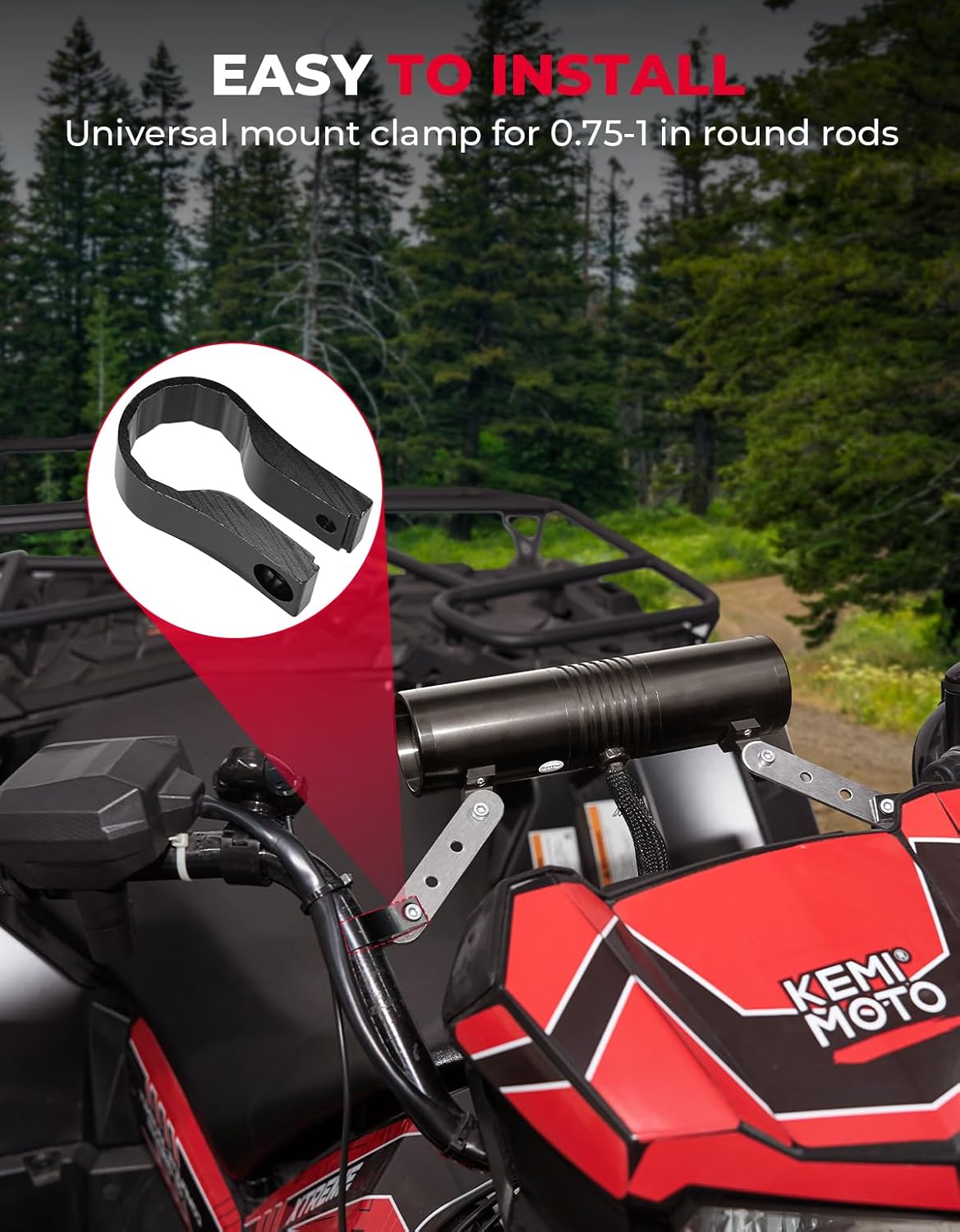
Image: A cutaway view of the speaker's internal structure, highlighting the built-in high-performance audio amplifier and speaker components responsible for sound quality.
6. Maintenance
To ensure the longevity and optimal performance of your KEMIMOTO Motorcycle Speaker, follow these maintenance guidelines:
- Cleaning: Regularly wipe the speaker with a soft, damp cloth to remove dust and dirt. Avoid using harsh chemicals or abrasive cleaners.
- Waterproof Feature: The speaker bar is double waterproof. While designed for wet conditions, avoid submerging the unit. Ensure all connections are secure to maintain water resistance.
- Connection Check: Periodically check all wiring connections to ensure they are tight and free from corrosion.
- Storage: If storing the vehicle for an extended period, consider disconnecting the speaker from the power supply.
7. Troubleshooting
If you encounter issues with your KEMIMOTO Motorcycle Speaker, refer to the following common problems and solutions:
| Problem | Possible Cause | Solution |
|---|---|---|
| No power/Speaker does not turn on | Loose power connection; Blown fuse; Insufficient power supply | Check all power connections; Inspect and replace the 3A fuse if blown; Ensure vehicle's 12V power supply is active. |
| No sound or low volume | Volume too low; Incorrect mode selected; Bluetooth not connected; Damaged speaker/wiring | Increase volume; Switch to correct input mode (Bluetooth, FM, USB, AUX); Re-pair Bluetooth device; Check wiring for damage. |
| Bluetooth connection issues | Device too far; Interference; Speaker not in pairing mode | Ensure device is within 10 meters; Move away from other electronic devices; Put speaker into pairing mode and re-attempt connection. |
| Poor FM radio reception | Weak signal; Antenna position | Adjust the FM antenna position; Try scanning for stations in a different location. |
| Sound distortion | Volume too high; Poor audio source; Damaged speaker | Reduce volume; Try a different audio source; If problem persists, contact support. |
8. Warranty and Support
The KEMIMOTO Motorcycle Speaker comes with a limited warranty. Please refer to the warranty card included in your package for specific terms and conditions. For technical support, troubleshooting assistance, or warranty claims, please contact KEMIMOTO customer service through their official website or the retailer where you purchased the product.
For more information and product updates, visit the official KEMIMOTO store: KEMIMOTO Store on Amazon