
1. Introduction
Thank you for choosing the Philips Steam Iron DST0820/20. This manual provides essential information for the safe and effective use, maintenance, and troubleshooting of your steam iron. Please read these instructions carefully before first use and retain them for future reference.

Figure 1: Philips Steam Iron DST0820/20. A front-side view of the Philips Steam Iron DST0820/20, showcasing its blue transparent water tank and white body with a non-stick soleplate.
2. Important Safety Information
- Always ensure the voltage indicated on the iron corresponds to the local mains voltage before connecting.
- Do not leave the iron unattended while it is connected to the mains.
- Keep the iron and its cord out of reach of children.
- Never immerse the iron in water or any other liquid.
- Do not operate the iron if it has been dropped, if there are visible signs of damage, or if it is leaking.
- Always unplug the iron before filling with water, emptying, or cleaning.
- Place the iron on a stable, heat-resistant surface when resting.
- To prevent water leakage, keep the iron horizontal when not in use. Do not overfill the water tank; leave some gap. Allow the iron to heat up fully before using steam functions.
3. Product Overview
Familiarize yourself with the components of your Philips Steam Iron DST0820/20:

Figure 2: Iron Components. An annotated diagram highlighting key components of the Philips Steam Iron DST0820/20, including the water filling door, spray button, steam setting dial, ergonomic grip, 360-degree swivel cord, and calc clean function.
- Water Filling Door: For adding water to the tank.
- Spray Button: Activates the spray function for stubborn creases.
- Steam Setting Dial: Adjusts steam output or selects dry ironing.
- Ergonomic Grip: Designed for comfortable handling.
- 360° Swivel Cord: Provides flexibility and ease of movement.
- Calc Clean Function: For maintaining the iron's performance.
- Non-Stick Soleplate: Multilayer coated for smooth gliding on various fabrics.

Figure 3: Soleplate Detail. A close-up view of the iron's soleplate, illustrating its non-stick surface and steam vents, designed for smooth gliding and extended durability.
4. Setup
- Unpacking: Remove all packaging materials and labels from the iron.
- First Use: It is normal for a slight odor or smoke to be emitted during the first use as the heating elements burn off manufacturing residues. This will disappear after a short time.
- Filling the Water Tank:
- Ensure the iron is unplugged.
- Open the water filling door.
- Fill the water tank with tap water up to the 'MAX' indicator. Do not overfill. The tank capacity is 170 ml.
- Close the water filling door securely.
5. Operating Instructions
5.1 Setting the Temperature
- Plug the iron into a suitable power outlet.
- Turn the temperature dial to the desired setting according to the fabric type. Refer to the garment's care label.
- The indicator light will illuminate, indicating the iron is heating. It will turn off when the set temperature is reached.
5.2 Steam Ironing
Steam ironing is suitable for most fabrics, especially cotton and linen. The iron provides a powerful continuous steam output of up to 15 g/min.
- Ensure the water tank is filled.
- Set the temperature dial to the steam position (usually indicated by steam symbols or a higher temperature setting).
- Wait for the indicator light to turn off, signifying the iron has reached the correct temperature for steam.
- Begin ironing. The iron will automatically produce steam.

Figure 4: Steam Ironing in Progress. The Philips Steam Iron DST0820/20 being used to iron a garment, showing steam being emitted from the soleplate, demonstrating its steam ironing capability.
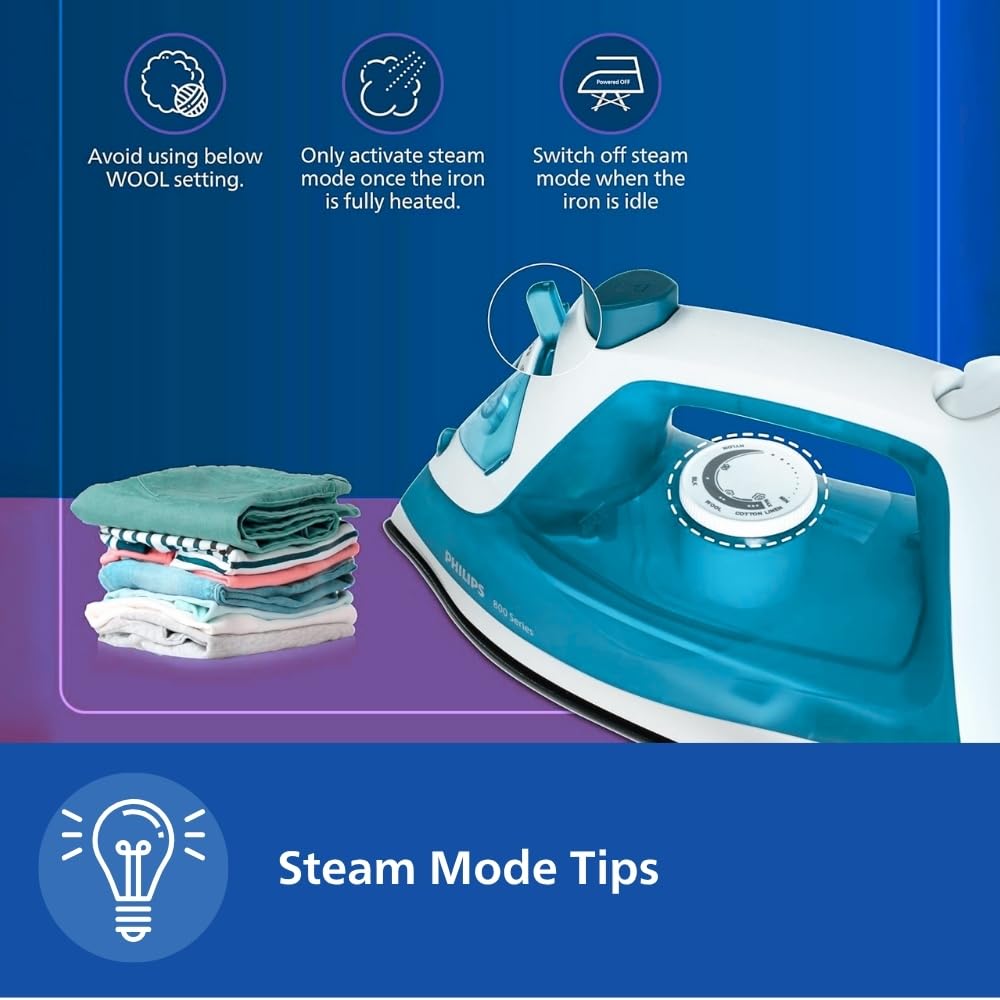
Figure 5: Steam Mode Usage Tips. An image showing the iron with visual tips for using steam mode: avoid wool setting, activate steam only when fully heated, and switch off steam when idle.
5.3 Dry Ironing
For delicate fabrics or when steam is not required:
- Ensure the water tank is empty or the steam setting is turned off.
- Set the temperature dial to the desired dry ironing setting.
- Wait for the indicator light to turn off before ironing.
5.4 Spray Function
The spray function helps to moisten stubborn creases for easier removal.
- Press the spray button to release a fine mist of water onto the fabric.
- Ensure the water tank contains water for this function to operate.
5.5 Cotton Express Feature
The Cotton Express feature is designed to provide efficient ironing for cotton garments, potentially reducing ironing time by up to 25% with ideal steam distribution.

Figure 6: Cotton Express Ironing. The Philips Steam Iron DST0820/20 in action on a blue cotton garment, illustrating the 'Cotton Express' feature for faster ironing with optimal steam.
6. Maintenance
6.1 Cleaning the Iron
- Always unplug the iron and allow it to cool down completely before cleaning.
- Wipe the exterior of the iron with a damp cloth. Do not use abrasive cleaners or solvents.
- Clean the soleplate with a damp cloth and a non-abrasive liquid cleaner if necessary. Avoid scratching the non-stick surface.
6.2 Descaling (Calc Clean)
Regular descaling helps maintain steam performance and prolong the life of your iron. Refer to the 'Calc Clean' function in the product overview (Figure 2).
- Fill the water tank to the MAX level.
- Set the steam dial to the 'no steam' position and the temperature dial to maximum.
- Plug in the iron and wait for the indicator light to go out.
- Unplug the iron.
- Hold the iron over a sink, press and hold the Calc Clean button (if available, refer to Figure 2), and gently shake the iron until all the water has been used. Hot water and steam will be discharged from the soleplate, carrying away scale particles.
- Plug in the iron again and let it heat up to dry the soleplate.
- Repeat this process monthly or more frequently if you live in a hard water area.
6.3 Storage
- Unplug the iron and allow it to cool down completely.
- Empty any remaining water from the tank.
- Wrap the power cord neatly around the cord wrap area (if available).
- Store the iron upright in a safe, dry place.
7. Troubleshooting
| Problem | Possible Cause | Solution |
|---|---|---|
| Iron does not heat up. | Not plugged in; power outlet faulty; temperature too low. | Check power connection; try another outlet; set temperature higher. |
| No steam or insufficient steam. | Water tank empty; temperature too low for steam; steam vents blocked. | Fill water tank; set temperature to steam range; perform Calc Clean. |
| Water leakage from soleplate. | Temperature too low for steam; iron not fully heated; overfilled water tank. | Allow iron to heat up fully before using steam; do not overfill water tank; ensure iron is horizontal when not in use. |
| Soleplate is dirty. | Starch or fabric residue. | Clean soleplate with a damp cloth and non-abrasive cleaner after cooling. |
8. Specifications
- Model: DST0820/20
- Power: 1250 Watts
- Steam Output: Up to 15 g/min continuous steam
- Water Tank Capacity: 170 ml
- Soleplate: Multilayer Coated Non-stick Soleplate
- Dimensions (L x W): 27 cm x 11 cm (approx.)
- Weight: 771 g (approx.)
- Included Components: Steam Iron, User Manual
9. Warranty and Support
For detailed warranty information, please refer to the warranty card included with your product. Philips offers various protection plans, including extended warranty options, which may be available for purchase separately.
If you encounter any issues or require assistance with your Philips Steam Iron DST0820/20, please contact Philips customer support through their official website or the contact details provided in your product documentation.