
Product Overview
This manual provides detailed instructions for the Yungeln Electric Scooter Controller, designed as a replacement mainboard compatible with the Segway Ninebot Max G30 electric scooter. It covers essential information regarding installation, technical specifications, and general usage to ensure optimal performance and longevity of your scooter.
Safety Information
- Always disconnect the scooter's power source and battery before attempting any installation, maintenance, or repair.
- Wear appropriate personal protective equipment, such as gloves and eye protection, during the installation process.
- Ensure all electrical connections are secure and correctly matched according to color codes to prevent short circuits or damage.
- If you are uncertain about any step or procedure, it is recommended to consult a qualified technician.
- Keep the controller unit dry and protect it from extreme temperatures or direct exposure to water.
Package Contents
- 1 x Yungeln Electric Scooter Controller
- 1 x User Manual
Specifications
| Feature | Detail |
|---|---|
| Item Type | Scooter Controller |
| Material | Aluminum Alloy, PCB |
| Size (Approx.) | 115 x 67 mm (4.5 x 2.6 inches) |
| Weight (Approx.) | 277g (9.8 oz) |
| Item Package Dimensions | 7.09 x 4.33 x 1.93 inches |
| Package Weight | 0.31 Kilograms |
Installation Instructions
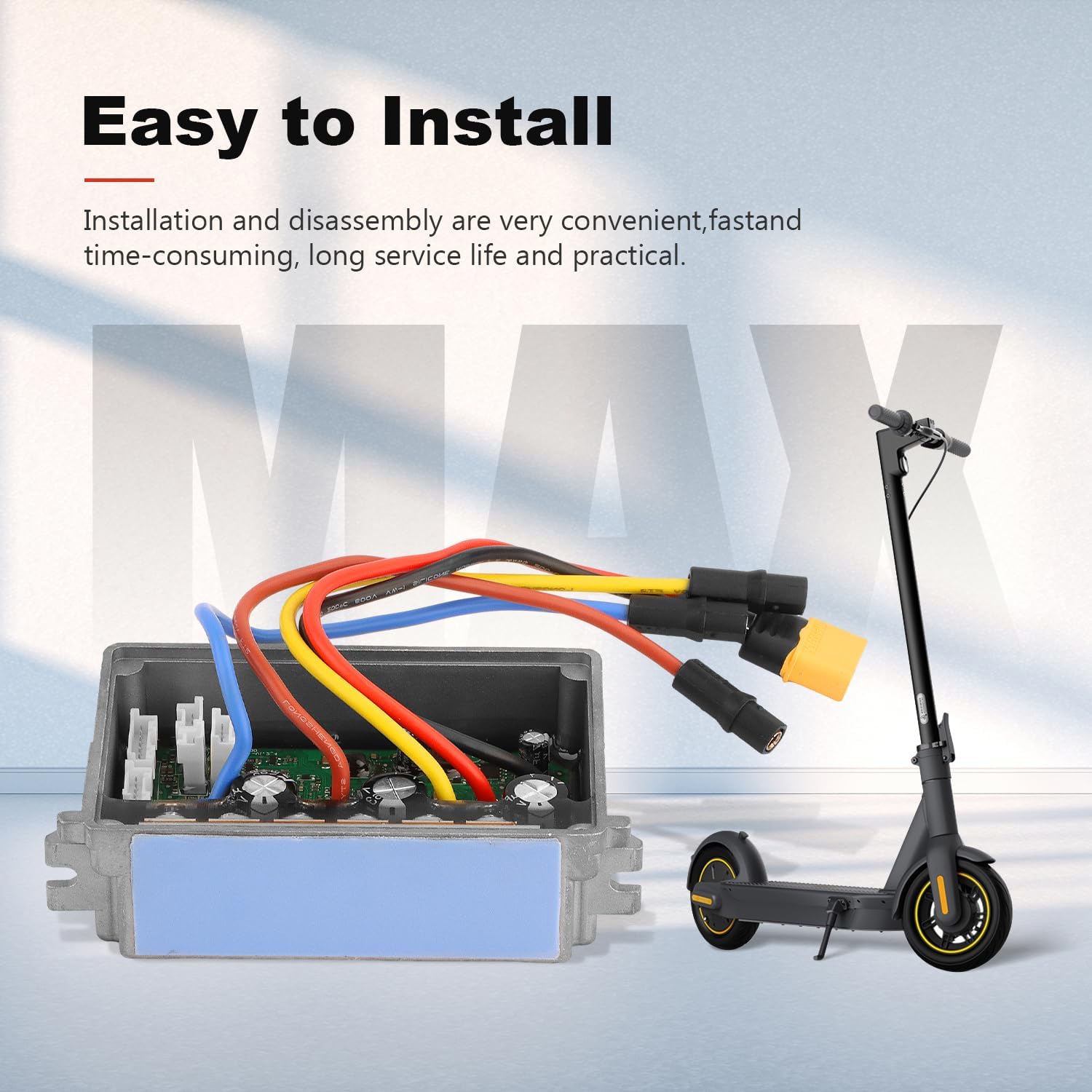
The Yungeln Electric Scooter Controller is designed for straightforward installation and disassembly. Please follow these steps carefully:
- Preparation: Ensure your Segway Ninebot Max G30 scooter is completely powered off and the battery is disconnected before beginning any work.
- Access the Old Controller: Carefully locate and remove the existing scooter controller from its housing.
- Wiring Connection: The new controller's wiring is generally color-coded to match the motor wire butt joints. Connect the wires as follows:
- Connect the red and black wires to the XT60 power supply.
- Connect the green wire to the motor power.
- Connect the blue wire to the motor power.
- Connect the yellow wire to the motor power.
- Secure the Controller: Carefully place the new controller into its designated position. Ensure that the protective plastic film on the blue thermal adhesive at the bottom of the controller is removed before securing it.
- Final Check: Double-check all wiring connections to ensure they are secure and correctly matched. Reassemble the scooter's housing.
Important Note: Some users have reported that the wires leading to the XT60 power connector can be loose. To prevent them from detaching, hold the back of the wires firmly when plugging the connector into the battery.
Firmware Information: The controller may come with firmware version 1.2.7. If you experience a high-pitched noise from the rear wheel after installation, updating the controller's firmware to version 1.8.11 or newer is recommended. Custom firmware flashing is possible using tools like Scooter Hacking Utility, though it may require multiple attempts for successful completion.


Product Features
- High-Quality Construction: The controller's outer shell is manufactured from high-quality aluminum alloy, ensuring durability and a long operational lifespan.
- Efficient Heat Dissipation: Designed with excellent heat dissipation capabilities to prevent thermal overload. The circuit board is coated with glue, providing enhanced waterproofing.
- Compact and Portable Design: Features a mini size, contributing to space-saving, energy efficiency, and ease of transport and use.
- Direct Compatibility: This controller is fully compatible with Segway Ninebot MAX G30 electric scooters, making it an ideal replacement for original or damaged controllers.

Operating the Scooter with New Controller
After successfully installing the new controller, power on your Segway Ninebot Max G30 scooter. The controller should integrate seamlessly, allowing for normal operation. It is advisable to perform a brief test ride in a safe area to confirm all functions are working correctly, including acceleration, braking, and display indicators. Monitor for any unusual behavior or error codes during initial use.
The controller is designed to provide stable and reliable performance. If you observe any unexpected changes in speed, acceleration, or braking response, please refer to the troubleshooting section of this manual.
Maintenance
To ensure the longevity and optimal performance of your Yungeln Electric Scooter Controller, adhere to the following maintenance guidelines:
- Periodically inspect all wiring connections for any signs of wear, corrosion, or looseness. Re-secure any loose connections.
- Keep the controller area clean and free from accumulated dust, dirt, and debris, which can impede heat dissipation.
- While the circuit board has a waterproof coating, avoid exposing the controller to excessive moisture or direct water spray to prevent potential damage.
- If the scooter is to be stored for an extended period, ensure it is kept in a dry, temperature-controlled environment to protect electronic components.
Troubleshooting
- Scooter Not Powering On:
Check all power connections, especially the XT60 connector, to ensure they are fully seated and secure. Verify that the scooter's battery is adequately charged. - Unusual Noises (e.g., high-pitched sound from rear wheel):
This symptom might indicate that the controller is running an older firmware version. Consider updating the controller's firmware to 1.8.11 or newer, as this has been reported to resolve such issues. - Inconsistent Performance (e.g., erratic speed, poor acceleration):
Re-check all wiring connections for proper contact. Ensure the controller is correctly seated within its housing and that there are no obstructions affecting its heat dissipation. - Error Codes Displayed:
If your scooter's display shows specific error codes, consult your Segway Ninebot Max G30 scooter's original user manual for detailed interpretations and recommended solutions. - Difficulty with Firmware Flash:
If attempts to flash custom firmware are unsuccessful, try multiple times. Ensure you are using the correct flashing tools and following the procedure precisely.
Product Videos
This video, titled "ninebot max g30 controller" by Felixstory, provides a visual overview of the controller, showcasing its various components and connections. It helps in understanding the physical aspects of the product.
This video, titled "bldc motor controller" by eBuy-smart, demonstrates the manufacturing and testing process of similar motor controllers, providing insight into the quality control and assembly.
This video, titled "Electric Scooter Controller Board Dashboard" by efancy, offers another perspective on the controller board and its dashboard components, which can be helpful for visual learners during installation.
Warranty and Support
The Yungeln Electric Scooter Controller is manufactured to high standards for durability and reliable performance. If you encounter any issues, have questions, or require technical assistance, please do not hesitate to contact Yungeln customer service. We are committed to providing prompt support and aim to respond to all inquiries within 24 hours.
For specific details regarding the product warranty, please refer to the information provided on the product packaging or contact the seller directly for further clarification.