
1. Product Overview
The WHSTELENI 2000W Adjustable Switching Power Supply (Model: 48V-42A) is a high-reliability AC-DC power conversion unit designed for various industrial and DIY applications. It provides a stable and adjustable output voltage from 0 to 48V and an adjustable output current from 0 to 42A, with a maximum power output of 2000W. This power supply features a digital display for intuitive monitoring and adjustment of voltage and current, along with multiple built-in protection mechanisms to ensure safe operation.
2. Safety Information
WARNING: This is an industrial-grade product. Improper operation or dismantling by non-professionals may pose risks including electric shock or damage to the unit. Always ensure proper grounding and follow all electrical safety guidelines.
- Ensure the power supply is disconnected from the AC input before making any connections or adjustments.
- Verify the input voltage switch (110V/220V) is set correctly for your region's power supply before connecting.
- Always connect the ground (FG) terminal to a proper earth ground.
- Do not operate the power supply in wet or damp conditions.
- Ensure adequate ventilation around the unit to prevent overheating.
- Do not attempt to open or repair the unit if you are not a qualified professional.
3. Setup and Installation
3.1. Input Voltage Selection
Locate the red switch on the side of the power supply. Ensure it is set to the correct voltage for your region (110V for North America, 220V for most other regions). Incorrect setting can cause damage to the unit.
3.2. AC Input Connection
Connect the AC power source to the input terminals labeled 'L' (Live), 'N' (Neutral), and 'FG' (Frame Ground). Use appropriate gauge wiring for the 2000W capacity. Ensure all connections are secure.

3.3. DC Output Connection
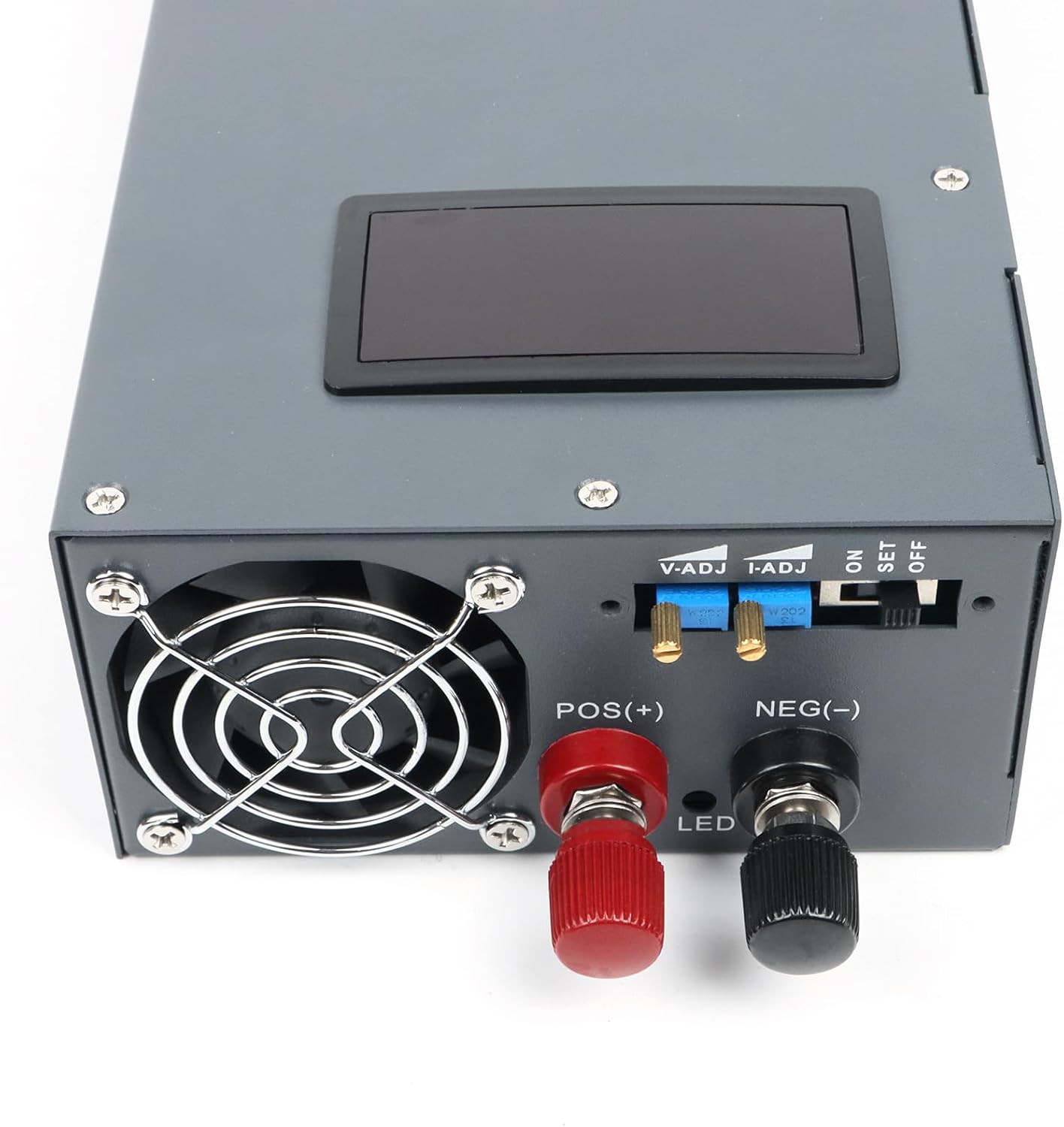
Connect your load to the DC output terminals labeled 'POS(+)' for positive and 'NEG(-)' for negative. Ensure polarity is correct for your device. The terminals are designed for secure wire connections.

3.4. Initial Adjustment
Before powering on, ensure the ON/SET/OFF switch is in the 'OFF' position. For initial setup, you may switch to 'SET' to pre-adjust voltage and current using the V-ADJ and I-ADJ potentiometers. The factory default settings are 48V and 42A.

3.5. Connection Demonstration Video
4. Operating Instructions
4.1. Power On/Off
After all connections are secure and the input voltage switch is correctly set, move the ON/SET/OFF switch to the 'ON' position to power on the unit. To power off, move the switch to 'OFF'.
4.2. Adjusting Output Voltage and Current
The power supply features a digital display for real-time monitoring of output voltage and current. To adjust these values:
- Move the ON/SET/OFF switch to the 'SET' position. The display will show the preset values.
- Use the V-ADJ (Voltage Adjustment) potentiometer to set the desired output voltage (0-48V).
- Use the I-ADJ (Current Adjustment) potentiometer to set the desired output current limit (0-42A).
- Once adjustments are complete, move the switch to the 'ON' position. The display will now show the real-time output voltage and current delivered to your load.

5. Maintenance
- Cleaning: Regularly clean the exterior of the power supply with a soft, dry cloth. Do not use liquid cleaners or solvents.
- Ventilation: Ensure the cooling fan and ventilation openings are free from dust and obstructions to maintain optimal performance and prevent overheating.
- Inspection: Periodically check all wiring connections for tightness and signs of wear or damage.
- Professional Service: For any internal maintenance or repairs, contact qualified service personnel. Do not attempt to open the casing yourself.
6. Troubleshooting
| Problem | Possible Cause | Solution |
|---|---|---|
| No power/Display off |
|
|
| No output voltage/current |
|
|
| Unit overheats |
|
|
7. Technical Specifications
| Feature | Specification |
|---|---|
| Model | 48V-42A |
| Input Voltage | AC 110V~ 50/60Hz (Normal operating range: 100-130V~) |
| Output Voltage | Adjustable 0-48V |
| Output Current | Adjustable 0-42A |
| Output Wattage | 2000W |
| Display | Digital Voltage & Current Display |
| Protection Features | Power on/off switch, Temperature Protection, Short Circuit Protection, Input Low Voltage Protection, Overload Protection, Overcurrent Protection |
| Cooling Method | Air Cooling (Integrated Fan) |
| Item Weight | 5.39 pounds |
| Package Dimensions | 13.74 x 5.63 x 3.07 inches |
| Applications | Motors, LEDs, Battery Charging/Activation, Heaters, Distribution Cabinets, Servo Drives, Maintenance Industry, Electronic DIY, Educational Use |
8. Warranty and Support
This WHSTELENI power supply comes with an 18-month warranty from the date of purchase. If you encounter any issues with the product during this period, please contact the seller or manufacturer's customer support for assistance.
For technical support, troubleshooting, or warranty claims, please refer to the contact information provided with your purchase or visit the official WHSTELENI website.
Note: The warranty may be voided if the product is dismantled or modified by unauthorized personnel.