
Introduction
The NUX Time Core Deluxe MKII is a versatile delay effect pedal designed for guitarists. It offers 7 distinct delay types and a 40-second stereo phrase looper, providing a wide range of sonic possibilities. This manual will guide you through the pedal's features, setup, operation, and maintenance to ensure optimal performance.
Setup
To begin using your NUX Time Core Deluxe MKII, follow these steps:
- Power Connection: Connect a standard 9V DC power adapter (center negative, 120mA minimum) to the DC 9V input jack on the pedal.
- Instrument Input: Connect your guitar or the output of a preceding effect pedal to the IN A (MONO) jack on the right side of the pedal using a 1/4" instrument cable. For stereo input, connect a second source to the IN B jack.
- Audio Output: Connect the OUT A (MONO) jack on the left side of the pedal to your amplifier's input or the next effect pedal in your signal chain. For stereo output, connect the OUT B jack to a second amplifier or input.
- Power On: Once all connections are secure, apply power to the pedal. The FS indicator LED will illuminate.
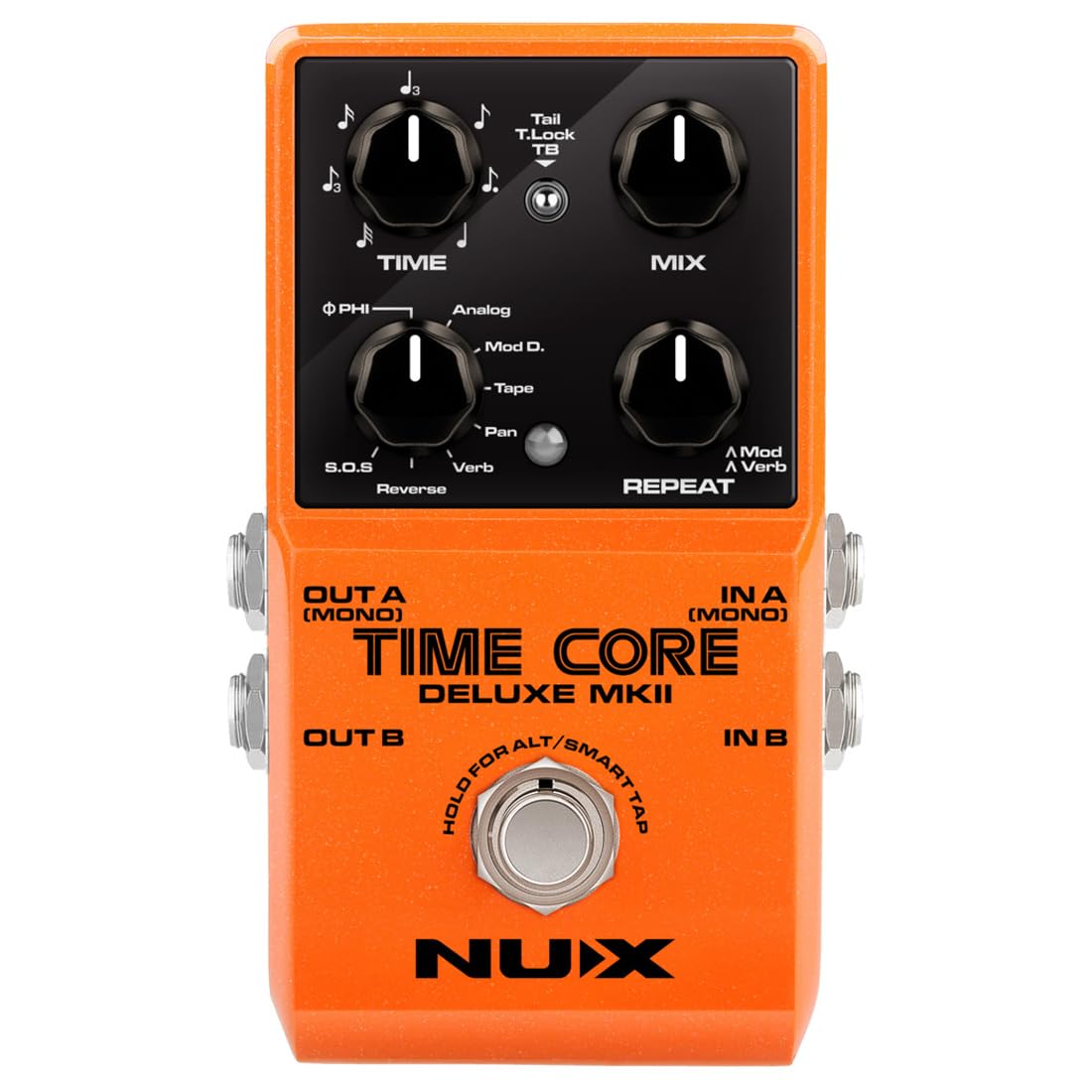
Image: The NUX Time Core Deluxe MKII pedal connected to a guitar, illustrating typical setup with input and output cables.
Controls and Functions
The NUX Time Core Deluxe MKII features intuitive controls for shaping your delay effects:
- TIME Knob: Adjusts the delay time, controlling the duration between the original signal and the delayed repeats.
- MIX Knob: Controls the wet/dry signal ratio. Turning it clockwise increases the level of the delay effect, from 0% (dry signal only) to 100% (effect only).
- DELAY TYPE Knob: Selects one of the 7 available delay types. Rotate this knob to cycle through the different delay algorithms.
- REPEAT Knob: Adjusts the number of delay repeats or feedback. Higher settings result in more repeats. In Alt mode (for Mod D. or Verb types), this knob adjusts modulation or reverb parameters.
- TOGGLE Switch (Tail / T.Lock / TB): This three-position switch controls the bypass mode and the Tone Lock function.
- Tail: Activates Buffer-Bypass mode. When the effect is disengaged, the delay repeats will naturally decay (spillover).
- TB (True-Bypass): Activates True-Bypass mode. When the effect is disengaged, the signal bypasses the pedal completely, and any active delay repeats are immediately cut off.
- T.Lock (Tone Lock): An innovative function to store and lock your current parameter settings. After setting your desired parameters, toggle the switch to the T.Lock position. The FS indicator LED will flash GREEN twice to confirm that the settings are stored and locked, preventing accidental changes during performance.
- FOOTSWITCH & FS Indicator: This multi-function footswitch controls effect engagement and tap tempo.
- Single Press: Engages or disengages the delay effect. When engaged, the FS indicator will show RED. When disengaged, the FS indicator will turn off.
- Double Press: Activates Smart Tap Tempo. The delay time will synchronize with your tap tempo and the current sub-division parameter. The FS indicator will flash according to the current BPM. The maximum delay time for tap tempo is 1580ms.
- Hold Footswitch: For Modulation Delay (Mod D.) or Verb Delay types, holding the footswitch enters Alt mode. The FS indicator will flash ORANGE. In this mode, the REPEAT knob adjusts the modulation or reverb parameters. Short press the footswitch again to exit Alt mode.

Image: A top-down view of the NUX Time Core Deluxe MKII pedal, highlighting the TIME, MIX, DELAY TYPE, and REPEAT knobs, as well as the Toggle Switch and Footswitch.
Delay Types
The Time Core Deluxe MKII offers 7 distinct delay algorithms:
- ΦPhi Digital Delay: A modern, clear digital delay.
- Analog Delay: Emulates the warm, decaying repeats of classic analog delay units.
- Modulation Delay: Adds modulation (e.g., chorus or vibrato) to the delay repeats.
- Tape Echo: Recreates the characteristic sound of vintage tape echo machines, including subtle wow and flutter.
- Pan Delay: Creates a stereo panning effect with the delay repeats.
- Verb Delay: Combines delay with a reverb effect for spacious sounds.
- Reverse Delay: Plays the delay repeats backward.
- Sound On Sound (Looper): A phrase looper function allowing for recording and layering audio.
Operating the Phrase Looper
The Sound On Sound (S.O.S.) delay type functions as a 40-second stereo phrase looper. Basic operation includes:
- Record: Select S.O.S. with the DELAY TYPE knob. Press the footswitch once to start recording.
- Play/Overdub: Press the footswitch again to stop recording and start playback. While playing, press the footswitch again to enter overdub mode and record new layers.
- Stop: Double-press the footswitch to stop playback.
- Clear: Hold the footswitch for a few seconds while stopped to clear the recorded loop.
Connections
The NUX Time Core Deluxe MKII offers flexible input and output options:
- IN A (MONO) & IN B Jacks: These are standard 1/4" mono (TS) audio inputs. Connect your instrument or preceding effects here. Using both allows for stereo input.
- OUT A (MONO) & OUT B Jacks: These are standard 1/4" mono (TS) audio outputs. Connect to your amplifier(s) or subsequent effects. Using both allows for stereo output.
- DC 9V Jack: For connecting a 9V DC power adapter (center negative).
- USB Port: Used for firmware updates. Connect to a computer using a USB cable.

Image: A side view of the NUX Time Core Deluxe MKII pedal, illustrating the input and output jacks for audio connections.
Specifications
| Brand | NUX |
| Model Number | Time Core Deluxe MKII |
| Item Weight | 11.2 ounces |
| Voltage | 9 Volts |
| Amperage | 120 Milliamps |
| Audio Output Effects | Delay |
| Controls Type | Knob |
| Power Source | Corded Electric |
| Hardware Interface | 1/4-inch Audio |
| Signal Format | Analog |
| Item Dimensions | 6 x 3.95 x 2.25 inches |
| UPC | 885947105090 |
| GTIN | 00885947105090 |
Maintenance
Proper maintenance ensures the longevity and performance of your pedal:
- Cleaning: Use a soft, dry cloth to clean the pedal's exterior. Avoid abrasive cleaners or solvents.
- Storage: Store the pedal in a cool, dry place away from direct sunlight and extreme temperatures.
- Firmware Updates: Periodically check the NUX official website for any available firmware updates. These can be installed via the USB port.
- Power Supply: Always use a regulated 9V DC (center negative) power supply to prevent damage.
Troubleshooting
If you encounter issues with your NUX Time Core Deluxe MKII, consider the following:
- No Sound:
- Ensure the power adapter is correctly connected and providing power.
- Check all instrument cables for proper connection and functionality.
- Verify that the pedal is engaged (FS indicator RED) or in True-Bypass (TB) mode if you expect dry signal.
- Check the MIX knob setting; if set to 0%, you will only hear the dry signal.
- Unexpected Effect Behavior:
- Check if Tone Lock (T.Lock) is engaged, preventing knob adjustments. Toggle the switch out of T.Lock to make changes.
- If in Alt mode (FS indicator ORANGE), the REPEAT knob will control different parameters. Short press the footswitch to exit Alt mode.
- Ensure the correct DELAY TYPE is selected.
- Latency Issues:
- Ensure the pedal is not accidentally in a mode that causes latency. If the light is green and the effect is off, try holding the footswitch until the light turns red to re-engage the effect properly.
- If issues persist, try disconnecting and reconnecting the power adapter.
Warranty and Support
The NUX Time Core Deluxe MKII comes with a one-year manufacturer warranty. For warranty claims or technical support, please contact your authorized NUX dealer or visit the official NUX website for support resources and contact information.