
1. Introduction
This manual provides comprehensive instructions for the assembly, operation, maintenance, and troubleshooting of your HUANUO HNESD19V 55" x 24" Electric Standing Desk. Please read this manual thoroughly before assembly and use to ensure safe and efficient operation.
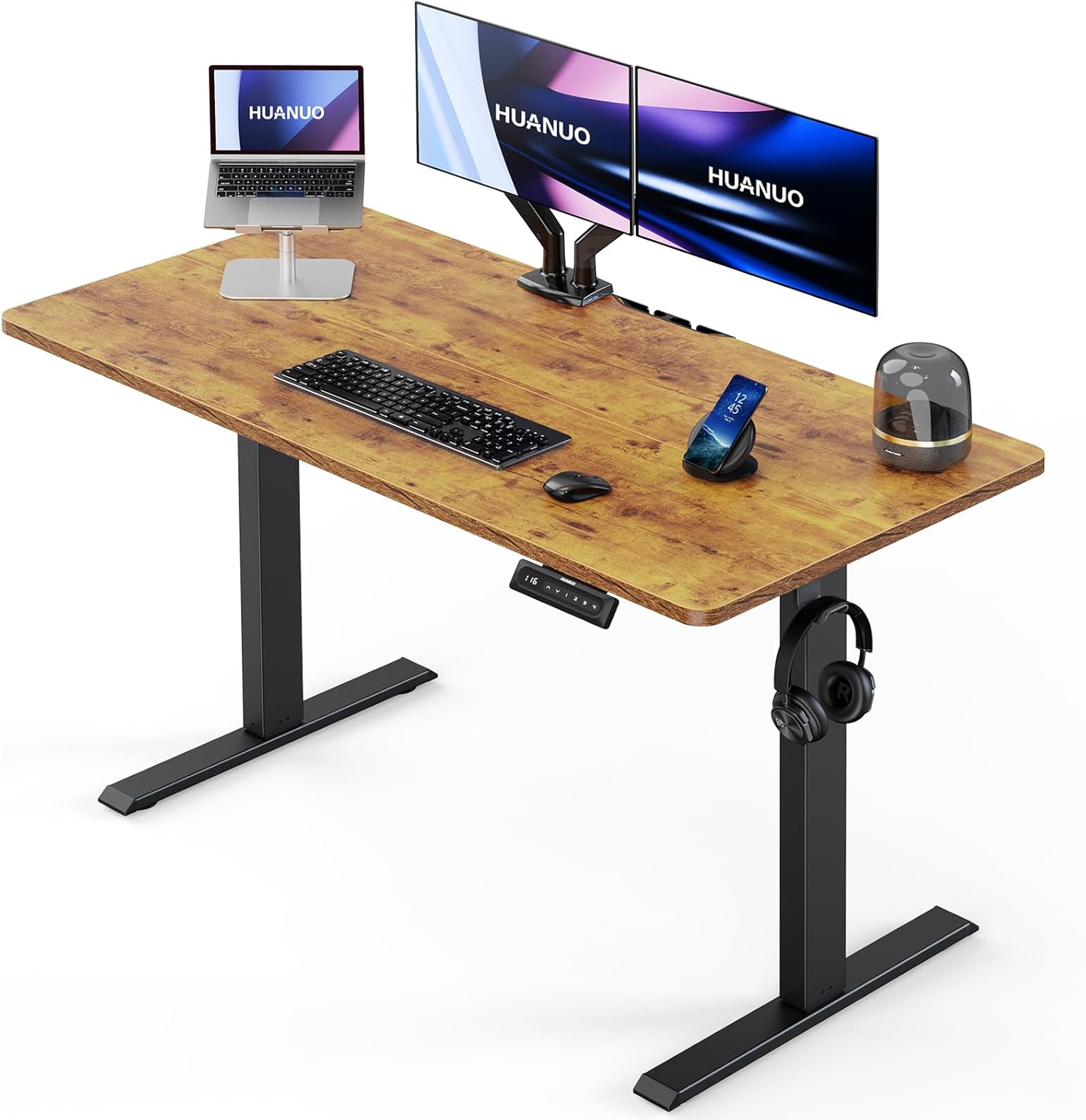
Image 1.1: The HUANUO 55" x 24" Electric Standing Desk, showcasing its vintage brown desktop and black frame.
2. Important Safety Information
Please observe the following safety guidelines to prevent injury or damage to the product:
- Do not exceed the maximum weight recommendation of 110 pounds (50 kg).
- Ensure the desk is properly anchored and assembled according to instructions to prevent tipping.
- Keep children and pets away from the desk during operation.
- Ensure there are no obstructions in the desk's path during height adjustments.
- Only use the provided power adapter and components.
3. Setup and Assembly
Follow these steps for proper assembly of your electric standing desk. All necessary tools are included.
3.1. Assembly Video Guide
Video 3.1: Official HUANUO Electric Standing Desk Assembly Video. This video provides a visual guide for assembling the desk frame and desktop components.
3.2. Step-by-Step Assembly
- Assemble the Frame:
Attach the motor to the table legs and secure the crossbar. Ensure correct orientation of the legs and crossbar. Use the provided screws (e.g., B x 4) and Allen wrench. The frame is constructed from automotive-grade SPCC cold-rolled steel for stability.

Image 3.2: Illustration of the desk frame's robust construction, featuring cold-rolled steel, anti-rust layer, nano coating, and powder coating finish.
- Assemble the Desktop:
If your desktop comes in multiple pieces, use wooden dowels to align and secure them. Attach any necessary brackets or cable management components to the underside of the desktop using the provided screws (e.g., E x 3 for cable manager, H x 6 for steel plates).
- Attach the Frame to the Desktop:
Carefully place the assembled desktop onto the frame. Align the pre-drilled holes and secure the desktop to the frame using the provided screws (e.g., H x 10). Install the control panel and any accessories like headphone hooks on the side you prefer, securing them with screws (e.g., H x 2 for each).

Image 3.3: Visual representation of the quick assembly process, highlighting the attachment of the control panel and other components.
- Connect the Controller and Motor:
Connect the cables from the motor to the control panel. Ensure all connections are secure. Plug the power adapter into the control box and then into a power outlet.
4. Operating Instructions
Your HUANUO Electric Standing Desk features intuitive controls for adjusting height and saving preferred positions.
4.1. Height Adjustment
- Use the Up (^) and Down (v) arrow buttons on the control panel to manually adjust the desk height. The current height will be displayed on the digital screen.
- The desk offers a wide height range from 27.95 inches to 46.45 inches.

Image 4.1: Visual representation of the desk's adjustable height range, from its lowest sitting position to its highest standing position.
4.2. Memory Height Settings
The desk features 4 programmable memory presets for quick height adjustments.
- To Set a Memory Position: Adjust the desk to your desired height using the Up/Down buttons. Press the "M" button (or "S" depending on controller version), then press one of the number buttons (1, 2, 3, or 4) within 3 seconds. The display will show "S-" followed by the number, indicating the position is saved.
- To Recall a Memory Position: Press the corresponding number button (1, 2, 3, or 4). The desk will automatically move to the saved height.
Video 4.2: Official HUANUO video demonstrating the 4 memory height settings of the electric standing desk, showing how to program and recall preferred sitting and standing positions.
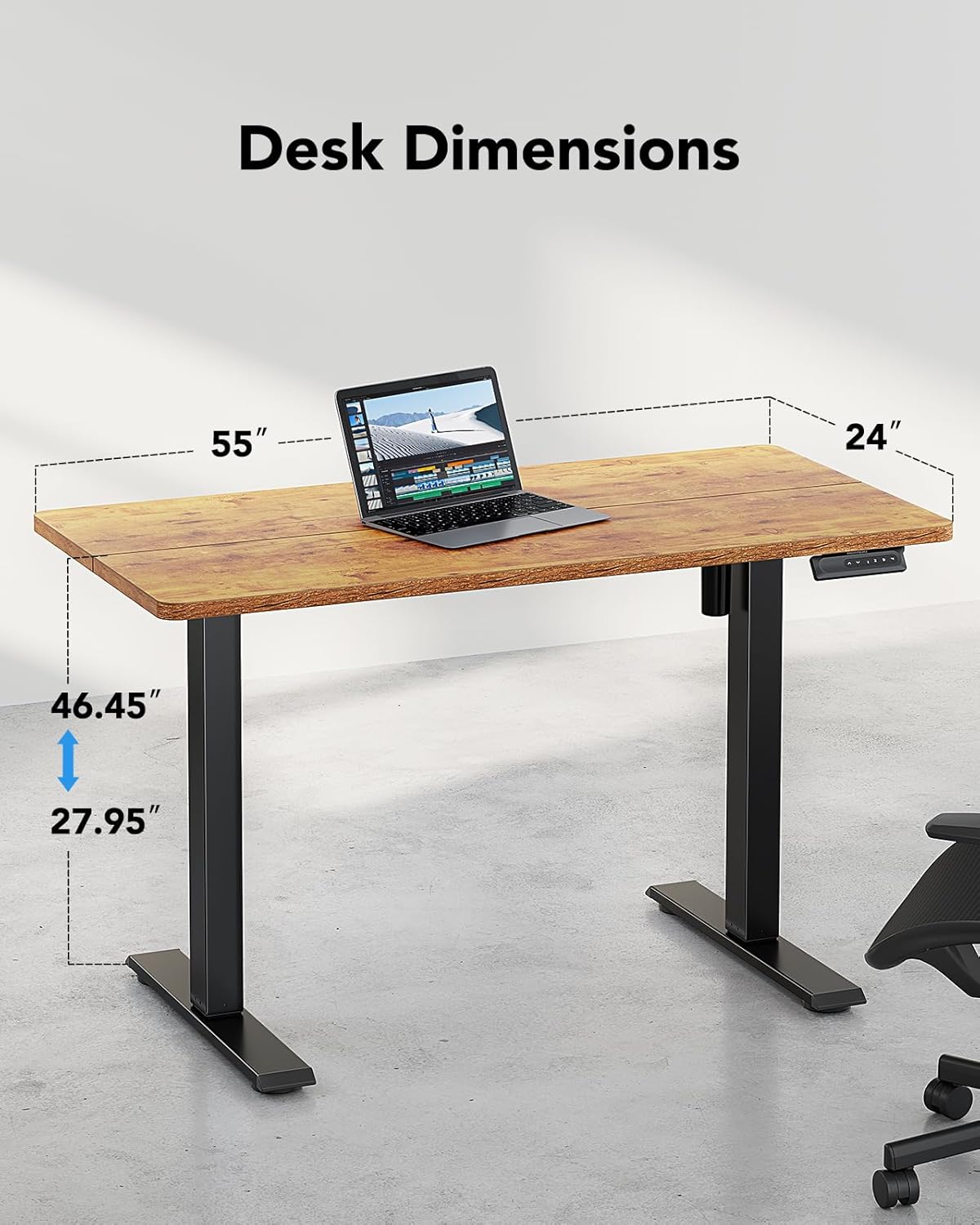
Image 4.2: Close-up of two possible control panel designs for the HUANUO Electric Standing Desk, both offering digital height display and memory preset functionality.
4.3. Anti-Collision System
The desk is equipped with an anti-collision system. If the desk encounters an obstacle during height adjustment, it will automatically stop and reverse slightly to prevent damage to the desk or objects.

Image 4.3: A visual explanation of the anti-collision feature, where the desk detects an object and retracts to avoid impact.
4.4. Additional Features
- Cable Management: Integrated cable management features help keep your workspace tidy.
- Headphone Hook: A convenient hook is provided for storing headphones or other accessories.

Image 4.4: A visual showcasing the practical storage hooks and integrated cable management system designed to organize your workspace.
5. Maintenance
To ensure the longevity and optimal performance of your HUANUO Electric Standing Desk, follow these maintenance tips:
- Regularly check all screws and bolts to ensure they are tight.
- Clean the desktop surface with a soft, damp cloth. Avoid abrasive cleaners or harsh chemicals.
- Keep the motor and electrical components free from dust and moisture.
- Do not place hot items directly on the desktop without protection.
6. Troubleshooting
If you encounter any issues with your desk, refer to the following common problems and solutions:
| Problem | Possible Cause | Solution |
|---|---|---|
| Desk does not move. | Power cable disconnected, motor cable loose, overload. | Check all cable connections. Reduce weight on the desk. Reset the system by unplugging for 30 seconds and plugging back in. |
| Desk moves unevenly or makes unusual noises. | Loose screws, uneven load, internal mechanism issue. | Ensure all assembly screws are tight. Distribute weight evenly. Contact support if the issue persists. |
| Memory settings not working. | Incorrect programming, power interruption. | Reprogram the memory positions following the instructions in Section 4.2. |
| Anti-collision system triggers too often. | Sensitivity setting, actual obstruction. | Ensure no objects are in the desk's path. Refer to the full manual for potential sensitivity adjustments (if applicable to your model). |
7. Specifications
- Brand: HUANUO
- Model Number: HNESD19V
- Product Dimensions: 24"D x 55"W x 27.6"H (Minimum Height)
- Minimum Height: 27.9 Inches
- Maximum Height: 46.8 Inches
- Desktop Material: Engineered Wood (Laminated, Vintage Brown)
- Frame Material: Carbon Steel (Black)
- Maximum Weight Recommendation: 110 Pounds (50 kg)
- Special Features: Electric Adjustable Height, 4 Memory Height Settings, One-Touch Lifting, Anti-Collision System
- Assembly: Required (Tools included)
- Item Weight: 45.2 Pounds
- UPC: 810145639375

Image 7.1: Detailed dimensions of the HUANUO Electric Standing Desk, including desktop size and height range.
8. Warranty Information
The HUANUO HNESD19V Electric Standing Desk comes with a 5-year limited warranty. This warranty covers manufacturing defects and ensures reliable long-term performance. For specific terms and conditions, please refer to the warranty card included with your product or contact customer support.
9. Customer Support
For any questions, assistance, or troubleshooting not covered in this manual, please contact HUANUO customer support:
- Support Email: support@huanuo.com
- Please have your model number (HNESD19V) and purchase information ready when contacting support.