
JBL Concert Bass Pack 8
JBL Concert Bass Pack 8 Set: A652 Amplifier and Stage82 Subwoofer Instruction Manual
Model: Concert Bass Pack 8
Introduction
This manual provides detailed instructions for the installation, operation, and maintenance of your JBL Concert Bass Pack 8 Set. This package includes a JBL Concert A652 Amplifier, a JBL Stage82 200W Subwoofer with housing, and a complete cable kit. Please read this manual thoroughly before attempting installation or operation to ensure proper use and optimal performance.
Product Overview
The JBL Concert Bass Pack 8 is designed to enhance your vehicle's audio system with powerful bass. It comprises the following main components:
- JBL Concert A652 Amplifier: A 2-channel amplifier providing power to the subwoofer.
- JBL Stage82 Subwoofer: An 8-inch subwoofer designed for deep bass reproduction, housed in a dedicated enclosure.
- Cable Kit: Essential wiring for power, ground, remote turn-on, and audio signals.

Image 1: Overview of the JBL Concert Bass Pack 8 Set, showing the JBL Concert A652 amplifier, the JBL Stage82 subwoofer within its enclosure, and the included wiring kit.

Image 2: Rear panel of the JBL Concert A652 Amplifier, detailing the power input terminals (GND, REM, +12V), fuse holder (30A), and speaker output terminals (CH1, CH2, Bridged).
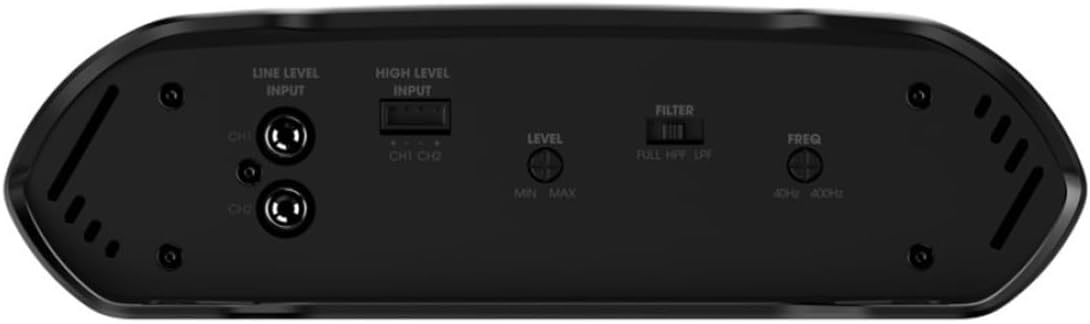
Image 3: Front panel of the JBL Concert A652 Amplifier, displaying the Line Level Input (RCA), High Level Input, Level control (Min/Max), Filter switch (FULL, HPF, LPF), and Frequency control (40Hz-400Hz).

Image 4: Front view of the JBL Stage82 Subwoofer, showcasing its cone and surround design.

Image 5: Rear view of the JBL Stage82 Subwoofer, showing the magnet structure and product labeling with specifications like 200W RMS and 800W Peak power.
Setup and Installation
Proper installation is crucial for the performance and safety of your audio system. If you are unsure about any step, consult a professional installer.
Safety Precautions:
- Disconnect the vehicle's negative battery terminal before starting any electrical work.
- Ensure all wiring is properly insulated and secured to prevent shorts and damage.
- Mount components securely to prevent movement during vehicle operation.
Installation Steps:
- Power Wiring:
- Run the main power cable (typically red) from the vehicle's positive battery terminal to the amplifier's +12V terminal. Install an inline fuse holder within 18 inches (45 cm) of the battery.
- Connect the ground cable (typically black) from the amplifier's GND terminal to a clean, unpainted metal surface on the vehicle chassis. Ensure a solid electrical connection.
- Connect the remote turn-on cable (typically blue) from your head unit's remote output to the amplifier's REM terminal. This cable signals the amplifier to turn on and off with your head unit.
- Audio Signal Input:
- RCA Input (Line Level): If your head unit has RCA pre-outs, connect RCA cables from the head unit's subwoofer or full-range outputs to the amplifier's Line Level Input.
- High-Level Input: If your head unit does not have RCA pre-outs, use the included high-level input adapter. Connect the speaker wires from your head unit's speaker outputs to the amplifier's High Level Input.
- Subwoofer Connection:
- Connect the subwoofer's speaker terminals to the amplifier's speaker output terminals. For optimal performance with a single subwoofer, bridge the amplifier's channels. Refer to the amplifier's specific wiring diagram for bridged mode connection. Ensure correct polarity (+ to + and - to -).
- Mounting:
- Securely mount the amplifier in a location that allows for adequate ventilation and protection from moisture. Common locations include under a seat or in the trunk.
- Place the subwoofer enclosure in the desired location within the vehicle, typically the trunk or cargo area. Ensure it is stable and does not obstruct safety features.
- Final Checks:
- Double-check all wiring connections for security and correct polarity.
- Reconnect the vehicle's negative battery terminal.
Operating Instructions
After installation, follow these steps to configure and operate your JBL Concert Bass Pack 8 Set:
- Initial Power-Up:
- Turn on your vehicle's ignition and head unit. The amplifier's power indicator should illuminate.
- Setting the Gain (Level):
- Turn the amplifier's "Level" control to its minimum (Min) setting.
- Play a familiar piece of music with strong bass content through your head unit at about 75% of its maximum volume.
- Slowly increase the amplifier's "Level" control until you hear distortion, then back it off slightly until the sound is clear. This sets the amplifier's input sensitivity to match your head unit's output.
- Setting the Crossover Filter:
- The JBL Concert A652 amplifier features a "Filter" switch with options: FULL, HPF (High Pass Filter), and LPF (Low Pass Filter). For a subwoofer, select LPF.
- Adjust the "Freq" (Frequency) control. This sets the upper frequency limit for the subwoofer. A common starting point is between 80Hz and 120Hz. Adjust this to blend the subwoofer's output seamlessly with your main speakers.
- Fine-Tuning:
- Listen to various types of music and make small adjustments to the "Level" and "Freq" controls until the bass sounds balanced and integrated with the rest of your audio system.
Maintenance
Regular maintenance ensures the longevity and optimal performance of your JBL Concert Bass Pack 8 Set.
- Cleaning: Use a soft, dry cloth to wipe down the amplifier and subwoofer enclosure. Avoid using harsh chemicals or abrasive cleaners.
- Ventilation: Ensure the amplifier's cooling fins are free from dust and debris to prevent overheating. Do not block any ventilation openings.
- Connections: Periodically check all wiring connections for tightness and corrosion. Loose connections can lead to poor performance or damage.
- Environment: Protect the components from extreme temperatures, direct sunlight, and moisture.
Troubleshooting
If you encounter issues with your JBL Concert Bass Pack 8 Set, refer to the following common problems and solutions:
| Problem | Possible Cause | Solution |
|---|---|---|
| No sound from subwoofer |
|
|
| Distorted or unclear bass |
|
|
| Amplifier overheats and shuts off |
|
|
If the problem persists after attempting these solutions, contact JBL customer support or a qualified car audio technician.
Specifications
Key technical specifications for the JBL Concert Bass Pack 8 Set components:
JBL Concert A652 Amplifier:
- Wattage: 200 watts (RMS, likely bridged for subwoofer)
- Impedance: Supports 4 Ohm (subwoofer is 4 Ohm)
- Filter: Full, HPF, LPF (adjustable frequency)
- Fuse: 30A
- Model Name: Concert A652
JBL Stage82 Subwoofer:
- Type: Subwoofer
- Power Handling: 200W RMS, 800W Peak
- Impedance: 4 Ohm
- Model Name: Stage82
General System Specifications:
- Product Dimensions: 50 x 50 x 28 cm
- Item Weight: 10.65 kg
- Color: Black
- Power Source: Corded Electric
- Model Number: Concert Bass Pack 8
Warranty and Support
For warranty information, product registration, or technical assistance, please refer to the official JBL website or contact JBL customer support directly. Keep your purchase receipt as proof of purchase for warranty claims.
JBL Official Website: www.jbl.com
Ask a question about this manual
Ask about setup, troubleshooting, compatibility, parts, safety, or missing instructions. Manuals+ will review the question and use this page’s manual context to help answer it.