Introduction
The SHOPBUY Smart Fitness Watch, model Realme Q5 Pro, is designed to be a comprehensive daily companion for tracking your health and activity. It provides real-time information and notifications directly on your wrist, helping you stay informed and active throughout the day.
Key features include:
- Daily activity tracking: Steps, distance, and calories burned.
- Heart Rate Sensor and Sleep Monitor for comprehensive health insights.
- Notification display for calls, messages, and social media alerts (Facebook, WhatsApp, LinkedIn, Instagram, Twitter).
- 1.3" LED Touchscreen for easy navigation and data viewing.
- USB direct plug for convenient charging.
- Compatibility with all Android and iOS mobile phones and Android tablets.
Setup Guide
1. Charging the Device
Before initial use, ensure the smart fitness watch is fully charged. The watch features an integrated USB plug for direct charging.
- Gently detach one side of the watch strap to reveal the USB charging port.
- Plug the exposed USB port directly into a standard USB charger (e.g., mobile phone charger), laptop USB port, or power bank.
- The watch display will indicate charging status. Allow sufficient time for a full charge.

Figure 1: The watch features a direct USB plug for convenient charging via a computer, mobile phone charger, or power bank.

Figure 2: This sequence illustrates the simple process of charging the smartwatch: detach one side of the strap to expose the integrated USB connector, then plug it directly into any standard USB port for charging.
2. Installing the Fitpro Application
To unlock the full functionality of your smart fitness watch and synchronize data, you must install the Fitpro application on your mobile device.
- Search for "Fitpro" in your device's app store (Google Play Store for Android, Apple App Store for iOS).
- Download and install the application.
- Open the Fitpro app and follow the on-screen instructions to create an account or log in.
3. Connecting via Bluetooth
After installing the Fitpro app, connect your watch to your mobile device via Bluetooth.
- Ensure Bluetooth is enabled on your mobile phone.
- Enable location services on your mobile phone, as required by the Fitpro app for device discovery.
- Open the Fitpro application. Navigate to the device binding section (usually indicated by a device icon or "Add Device").
- The app will search for nearby devices. Select your "Realme Q5 Pro" smart fitness watch from the list.
- Confirm the pairing request on both your phone and the watch if prompted.
- Once connected, the watch's time will automatically synchronize with your phone.
Operating Instructions
1. Daily Activity Tracking
The watch automatically tracks your daily steps, distance covered, and calories burned. This data is displayed on the watch's OLED screen and can be viewed in detail within the Fitpro application.

Figure 3: The smartwatch provides comprehensive all-day activity tracking, including steps taken, distance covered, and calories burned, encouraging an active lifestyle.
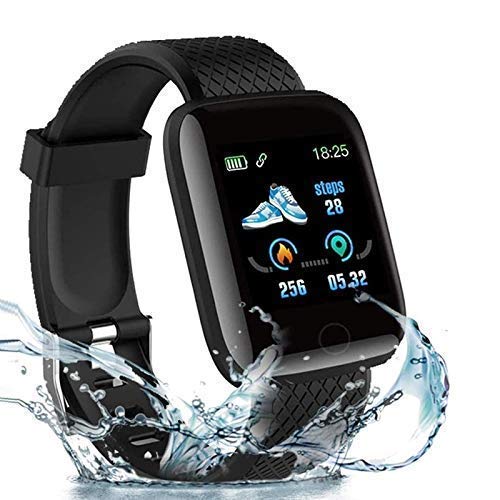
Figure 4: The watch face shows real-time activity data including steps, calories burned, and distance covered, designed to motivate daily activity.
2. Receiving Notifications
Once connected to your phone via the Fitpro app, the watch will display notifications for incoming calls, messages (SMS), and various social media applications.
- Call Notifications: You can receive notifications for incoming calls and choose to accept or reject them directly from your wrist.
- Message Notifications: Read full text messages and calendar alerts on the watch display.
- SNS Notifications: Get alerts from Facebook, WhatsApp, LinkedIn, Instagram, Twitter, WeChat, Snap, and Slack.
Ensure notification permissions are granted to the Fitpro app in your phone's settings for this feature to function correctly.
3. Heart Rate and Sleep Monitoring
The watch includes a heart rate sensor and sleep monitor to provide insights into your health and well-being.
- Heart Rate: Access your current heart rate reading from the watch's menu. Detailed historical data can be viewed in the Fitpro app.
- Sleep Monitoring: Wear the watch to bed for automatic sleep tracking. The Fitpro app will provide detailed analysis of your sleep patterns, including duration, deep sleep, light sleep phases, and awake times.
4. Blood Pressure Monitoring
The smartwatch is equipped with blood pressure monitoring capabilities. Data is displayed directly on the watch and can be synchronized to the Fitpro app for real-time tracking and historical review.

Figure 5: The smartwatch can monitor blood pressure, with data displayed directly on the bracelet and the option to sync real-time data to the companion mobile application.
5. Water Resistance (IP67)
The watch has an IP67 waterproof rating, meaning it is protected from dust and can withstand immersion in water up to 1 meter for up to 30 minutes. It is suitable for daily use, such as hand washing or light rain, but not recommended for swimming or showering with hot water.
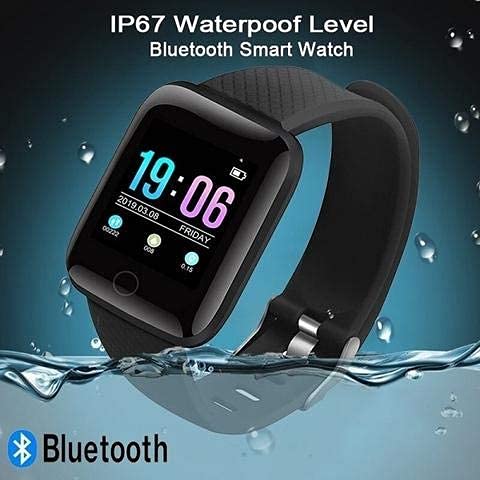
Figure 6: The watch boasts an IP67 waterproof rating, making it resistant to splashes and brief immersion, suitable for daily use.
Maintenance
Proper care and maintenance will extend the life of your smart fitness watch.
- Cleaning: Wipe the watch and strap regularly with a soft, dry cloth. If necessary, use a slightly damp cloth and then dry thoroughly. Avoid harsh chemicals or abrasive cleaners.
- Water Exposure: While IP67 rated, avoid prolonged immersion, hot water, or steam. If the watch gets wet, dry it completely before charging or using the USB port.
- Storage: Store the watch in a cool, dry place when not in use.
- Charging: Only use compatible USB power sources for charging.
Troubleshooting
| Problem | Possible Solution |
|---|---|
| Watch not turning on or charging. |
|
| Cannot connect to Fitpro app. |
|
| Notifications not appearing on watch. |
|
| Inaccurate activity data. |
|
Specifications
| Brand | SHOPBUY |
| Model Name | Realme Q5 Pro |
| Item Model Number | Realme Q5 Pro |
| Compatible Devices | All Android and iOS Mobile Phones, Android Tablets, Laptops |
| Special Features | All-day activity tracking (steps, distance, calories), Heart Rate Sensor, Sleep Monitor, Notification display (calls, SMS, SNS), USB direct charging, IP67 Waterproof. |
| Material | Plastic |
| Item Weight | 70 g |
| Package Dimensions | 19 x 10 x 6 cm |
| Mounting Hardware | 1 smart Watch |
| Country of Origin | India |
Warranty and Support
Your SHOPBUY Smart Fitness Watch comes with a 3 Months warranty from the date of purchase.
To activate your warranty or for any support inquiries, please reach out to the manufacturer or seller directly. Refer to your purchase documentation for specific contact details.