
Introduction
This manual provides detailed instructions for the setup, operation, and maintenance of your SHOPBUY Smart Fitness Watch Model HTC U20. This device is designed to track daily activities, monitor health metrics, and provide notifications from your connected smartphone.
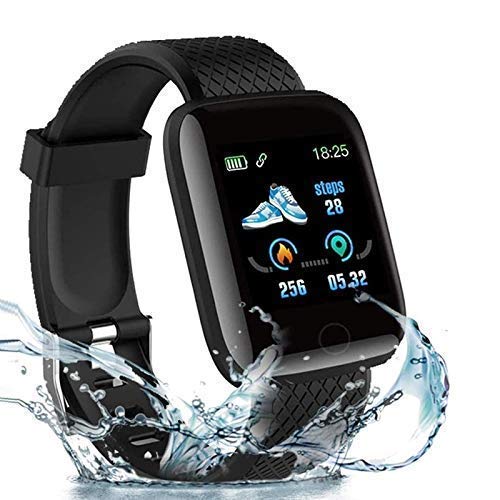
Image: The SHOPBUY Smart Fitness Watch Model HTC U20, showcasing its design and water resistance.
Package Contents
Upon opening the package, verify that all items are present:
- 1 x SHOPBUY Smart Fitness Watch (Model HTC U20)
Setup Guide
1. Charging the Device
The SHOPBUY Smart Fitness Watch features a direct USB charging port. To charge, detach one side of the wristband to reveal the USB connector. Insert this connector into a standard USB port on a mobile charger, laptop, or power bank.

Image: The watch being charged via its integrated USB plug, connected to a power adapter.

Image: A four-panel illustration demonstrating how to detach the strap and plug the watch into a USB port for charging.
2. Installing the Companion Application
To access all features and synchronize data, install the Fitpro application from your device's app store (Google Play Store for Android or Apple App Store for iOS).
3. Pairing with Your Smartphone
- Ensure Bluetooth is enabled on your smartphone.
- Open the Fitpro application.
- Follow the in-app instructions to search for and connect to your Smart Fitness Watch. Ensure location services are also enabled on your phone during the pairing process.
- The watch's time will automatically synchronize with your phone after successful pairing.
Operating Instructions
Basic Navigation
The watch features a touchscreen display for navigation. Swipe left, right, up, or down to access different functions and menus. Tap to select an option.
Activity Tracking
The watch automatically tracks daily steps, distance covered, and calories burned. This data can be viewed directly on the OLED display or in detail within the Fitpro application.

Image: A user wearing the SHOPBUY Smart Fitness Watch while engaged in daily activities, demonstrating its integration into a routine.
Notifications
Once paired with your smartphone, the watch will display notifications for incoming calls, SMS messages, and various social media applications (e.g., Facebook, WhatsApp, LinkedIn, Instagram, Twitter). You can view the full text of messages on the watch display. Call rejection functionality is also available.
Sleep Monitoring
The watch monitors your sleep patterns, providing data on sleep duration, deep sleep, light sleep phases, and awake times. This information is accessible through the Fitpro application.
Heart Rate and Blood Pressure Monitoring
The device includes sensors for heart rate and blood pressure monitoring. Real-time data can be viewed on the watch and synchronized with the Fitpro application for historical tracking.

Image: The watch display showing blood pressure monitoring data, indicating real-time health tracking capabilities.
Key Features
- Integrated USB Charging: Direct USB port for convenient charging without a separate cable.
- All-Day Activity Tracking: Monitors steps, distance, calories burned, and active minutes.
- Smart Notifications: Displays call, SMS, and social media alerts (Facebook, WhatsApp, LinkedIn, Instagram, Twitter).
- Health Monitoring: Includes heart rate sensor and sleep monitor.
- Compatibility: Works with both Android and iOS mobile phones and Android tablets.
- Display: 1.3-inch OLED touchscreen with 240x240 resolution.
- Connectivity: Bluetooth for seamless pairing with smartphones.
- Water Resistance: IP67 waterproof level, suitable for daily use and splashes.
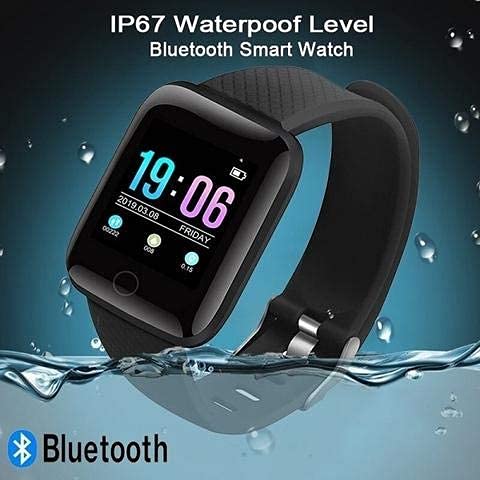
Image: The SHOPBUY Smart Fitness Watch submerged in water, illustrating its IP67 waterproof rating.
Maintenance
To ensure the longevity and optimal performance of your Smart Fitness Watch, follow these maintenance guidelines:
- Cleaning: Wipe the watch and strap regularly with a soft, dry cloth. For stubborn dirt, a slightly damp cloth can be used, followed by drying.
- Water Exposure: While the watch is IP67 waterproof, avoid prolonged submersion or exposure to hot water, steam, or chemicals. Dry the watch thoroughly if it gets wet.
- Storage: Store the watch in a cool, dry place when not in use.
- Charging: Use only compatible USB power sources for charging.
Troubleshooting
If you encounter issues with your Smart Fitness Watch, refer to the following common solutions:
- Watch not turning on: Ensure the watch is fully charged. Connect it to a USB power source for at least 30 minutes.
- Unable to pair with phone:
- Verify Bluetooth is enabled on your phone.
- Ensure location services are active on your phone.
- Restart both your phone and the watch.
- Make sure the Fitpro app is installed and running.
- Incorrect time display: The watch time synchronizes with your phone via the Fitpro app. Ensure successful pairing.
- Notifications not appearing:
- Check notification permissions for the Fitpro app in your phone's settings.
- Ensure the watch is connected to your phone via Bluetooth.
Technical Specifications
| Brand | SHOPBUY |
| Model | HTC U20 |
| Display Type | OLED |
| Screen Size | 1.3 Inches |
| Resolution | 240 x 240 |
| Connectivity | Bluetooth, USB |
| Compatible Devices | Android and iOS Mobile Phones, Android Tablets |
| Operating System | Smartwatch OS |
| Material | Plastic |
| Item Weight | 70 g |
| Water Resistance | IP67 |
Warranty and Support
This product comes with a 3-month warranty from the date of purchase. To activate your warranty or for any support inquiries, please contact SHOPBUY customer service. Details for reaching out can typically be found on the product packaging or the retailer's website.