
Introduction
Thank you for choosing the CVLIFE EagleFeather 3-9x40 AO Rifle Scope. This manual provides detailed instructions for the proper setup, operation, and maintenance of your new rifle scope. Please read this manual thoroughly before use to ensure safe and effective performance.
What's in the Box
Upon opening the package, please verify that all the following components are included:
- 1 x CVLIFE EagleFeather 3-9x40 AO Rifle Scope
- 2 x Flip Up Lens Covers
- 2 x Picatinny Scope Rings with Wrenches
- 2 x CR2032 Batteries
- 1 x Lens Cloth
- 1 x Instruction Manual

Image: Contents of the product packaging, including the scope, lens covers, scope rings, batteries, wrench, lens cloth, and manual.
Product Overview and Components
Familiarize yourself with the various parts of your CVLIFE EagleFeather 3-9x40 AO Rifle Scope:

Image: Labeled diagram showing the Fast Focus Eyepiece, Reticle Focus Ring, Magnification Adjustment Ring, Windage Adjustment, Elevation Adjustment, Illumination Adjustment, Parallax Adjustment, and Objective Lens.
Setup
1. Mounting the Scope
Use the included 20mm Picatinny scope rings to securely attach the rifle scope to your firearm's Picatinny rail. Ensure the rings are tightened evenly to prevent damage to the scope tube and maintain proper alignment.
2. Installing Batteries for Illumination
The scope requires CR2032 batteries for the illuminated reticle feature. Locate the battery compartment on the illumination adjustment knob, typically on the left side of the scope. Unscrew the cap, insert the batteries with the correct polarity, and re-secure the cap.
Operating Instructions
1. Magnification Adjustment
The scope offers a variable magnification range from 3x to 9x. Rotate the magnification adjustment ring, located near the eyepiece, to select your desired magnification level. Higher magnification provides a closer view but reduces the field of view.

Image: Visual representation of the field of view at 3x magnification (40.2 ft) versus 9x magnification (13.4 ft) at 100 yards.
2. Fast Focus Eyepiece
To achieve a sharp reticle image, look through the scope at a plain background (like the sky or a blank wall). Rotate the fast focus eyepiece, located at the very rear of the scope, until the reticle appears crisp and clear to your eye. This adjustment is personal and should be set for your vision.

Image: A close-up of the fast focus eyepiece being rotated to adjust reticle clarity.
3. Reticle Illumination
The Mil-Dot reticle features dual red and green illumination with 5 brightness levels for each color. Rotate the illumination adjustment knob to turn on the illumination and select your preferred color and brightness. This feature enhances visibility in low-light conditions.

Image: Two views of the reticle, one illuminated in green and the other in red, demonstrating the dual illumination feature.
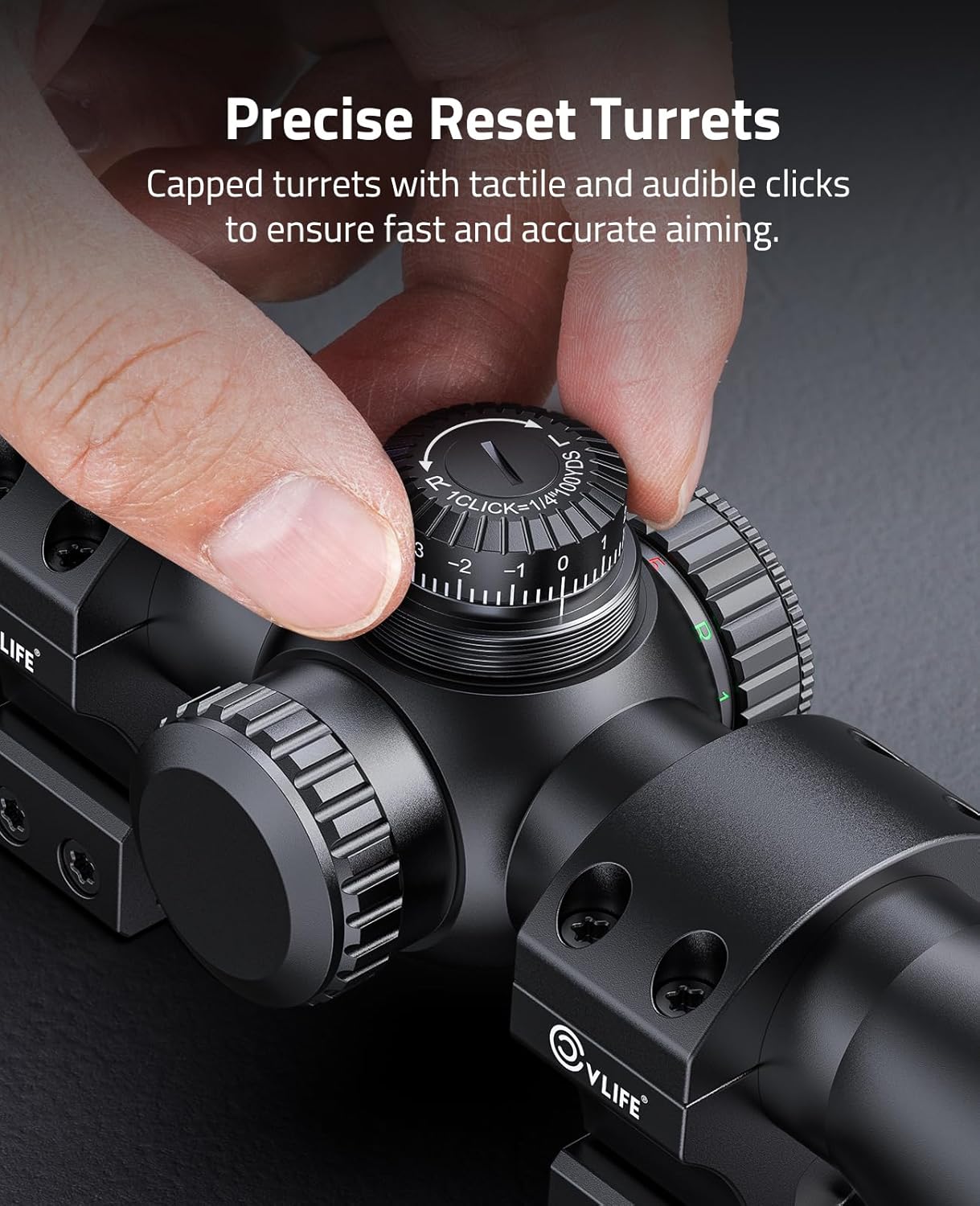
Image: A detailed view of the illumination adjustment dial, showing the settings for red and green brightness levels.
4. Parallax Adjustment (Adjustable Objective - AO)
The Adjustable Objective (AO) feature allows you to correct for parallax error, which occurs when the target and reticle appear to shift relative to each other with slight head movements. Rotate the objective lens housing to match the distance setting on the scope to your target distance. This ensures the target and reticle are on the same focal plane, providing a parallax-free view from 5 yards to infinity.

Image: A close-up view of the objective lens with parallax adjustment markings.

Image: A diagram comparing aiming with and without AO adjustment, showing how AO adjustment reduces parallax and improves aiming accuracy.

Image: An illustration demonstrating how to adjust the parallax from 5 yards to infinity by rotating the objective lens, ensuring a clear view at various distances.
5. Windage and Elevation Adjustment (Zeroing)
The scope features high-precision resettable turrets for windage (horizontal) and elevation (vertical) adjustments. Each click of the turret adjusts the point of impact by 1/4 MOA (Minute of Angle). To adjust, remove the turret caps. Rotate the elevation turret (top) for vertical adjustments and the windage turret (right) for horizontal adjustments. After zeroing, you can reset the turrets to '0' by lifting and rotating them, then pushing them back down. This allows for quick reference to your zero setting.

Image: A close-up view of the capped windage and elevation turrets, highlighting their precise, audible clicks for adjustment.

Image: A hand demonstrating the adjustment of the elevation turret, showing the numbered markings and click mechanism.
Maintenance
Your CVLIFE EagleFeather scope is designed for durability and performance in various conditions. To maintain its condition:
- Cleaning: Use the provided lens cloth to gently wipe optical surfaces. For stubborn marks, use a lens cleaning solution specifically designed for optics. Avoid abrasive materials.
- Storage: Store the scope in a dry, cool place, away from direct sunlight and extreme temperatures. Use the flip-up lens covers to protect the lenses when not in use.
- Waterproof and Fogproof: The scope is O-ring sealed and nitrogen purged, making it resistant to water and internal fogging. While designed for adverse environments, avoid prolonged submersion.
- Shockproof: Constructed from aircraft-grade aluminum, the scope is built to withstand recoil and impacts.

Image: The rifle scope shown with water droplets, illustrating its waterproof design for use in various weather conditions.

Image: A person aiming a rifle with the scope mounted, highlighting the scope's shockproof construction to maintain zero after firing.

Image: A split view through the scope, showing clear visibility on one side and a fogged view on the other, demonstrating the fogproof capability in humid environments.
Troubleshooting
If you encounter issues with your scope, consider the following common solutions:
- Unclear Reticle: Adjust the fast focus eyepiece until the reticle is sharp.
- Blurred Image: Adjust the parallax (AO) to match your target distance. Ensure the magnification is set appropriately for the viewing distance.
- Illumination Not Working: Check if the CR2032 batteries are correctly installed and have sufficient charge. Replace if necessary.
- Inconsistent Point of Impact: Ensure the scope rings are securely tightened to the rifle and the scope itself. Verify that the turrets are not accidentally bumped or moved.
For persistent issues, please contact CVLIFE customer support.
Specifications
| Feature | Specification |
|---|---|
| Magnification | 3-9x |
| Reticle Type | Mil-Dot Reticle |
| Eye Relief | 3.8"-3.7" |
| Field of View | 40.2'-13.4' @ 100 yards |
| Diopter Adjustment | ±2 |
| Body Material | 6061 Aircraft Grade Aluminum |
| Coating | Fully Multicoated |
| Click Value | 1/4 MOA |
| Windage/Elevation Adjustment | ±35 MOA |
| Parallax Adjustment | 5 yds - ∞ |
| Weight | 19.8 oz |
| Objective Lens Diameter | 40 Millimeters |
| Mounting Type | Picatinny Mount |
| Color | Matte Black |

Image: A visual representation of the scope's dimensions and a table summarizing its key specifications.
Official Product Video
Video: An official product video from CVLIFE demonstrating the features and adjustments of the 3-9x40 AO Illuminated Rifle Scope.
Warranty and Support
The CVLIFE EagleFeather 3-9x40 AO Rifle Scope comes with a 1-year manufacturer's warranty. For warranty claims, technical assistance, or any questions regarding your product, please refer to the contact information provided with your purchase or visit the official CVLIFE website.

