
1. Introduction
This manual provides detailed instructions for the installation and operation of your ASVEGE Android 11 Car Stereo Multimedia Video Player Navigation GPS Head Unit, designed specifically for Toyota RAV4 models from 2005 to 2013. Please read this manual thoroughly before installation and use to ensure proper functionality and to maximize your experience with the product.
2. Vehicle Compatibility
This car stereo is compatible with Toyota RAV4 models manufactured between 2005 and 2013. It supports original car functions such as steering wheel controls and air conditioning settings (CANBUS required). Please note the following critical compatibility points:
- Automatic Air Conditioning: The unit is compatible with vehicles equipped with automatic air conditioning.
- Manual Air Conditioning: The unit is not compatible with vehicles equipped with manual air conditioning.
- JBL Amplifier Sound System: The unit does not support vehicles with an original JBL amplifier sound system.
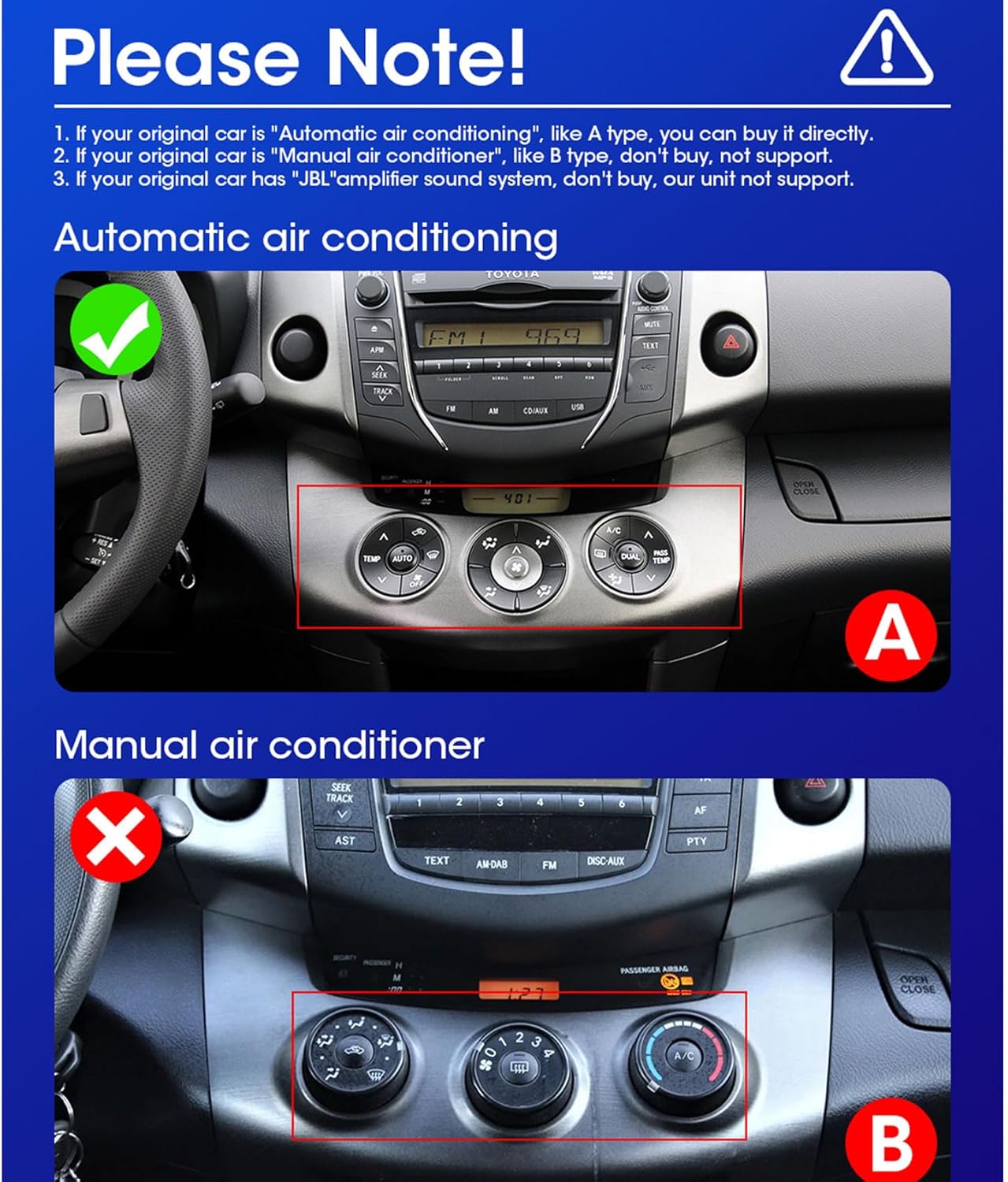
Figure 2.1: Compatibility check for automatic vs. manual air conditioning. Ensure your vehicle has automatic air conditioning for proper function.
If you are unsure about your vehicle's compatibility, please consult your vehicle's manual or contact customer support with photos of your original car radio installation location and the back interface.
3. Package Contents
Verify that all items listed below are included in your package:

Figure 3.1: Contents of the ASVEGE Car Stereo package.
- Head Unit (Machine)
- Installation Frame
- Power Cable
- RCA Cable
- USB Cables (x2)
- GPS Antenna
- 4G RCA Cable (for 4G functionality)
- Camera Input Cable
- Installation Manual (this document)
4. Installation Guide
The ASVEGE car stereo is designed for plug-and-play installation. However, professional installation is recommended if you are unfamiliar with car audio systems or electrical wiring. Ensure the vehicle's battery is disconnected before starting installation.
4.1 Pre-Installation Check
Before beginning, confirm your vehicle's dashboard matches the compatible layout and that you have automatic air conditioning. The new frame is designed to fit perfectly with the original car dashboard.

Figure 4.1: Comparison of dashboard before and after installation.
4.2 General Installation Steps
- Carefully remove the original car radio and dashboard trim.
- Connect the provided power cable and CANBUS (if applicable) to the car's wiring harness.
- Connect the GPS antenna, USB cables, and any other necessary cables (e.g., camera input, 4G RCA) to the head unit.
- Mount the new head unit into the dashboard using the provided frame.
- Secure all connections and reassemble the dashboard trim.
- Reconnect the vehicle's battery and test the unit's functionality.

Figure 4.2: ASVEGE Car Stereo fully installed in a Toyota RAV4.
5. Operating Instructions
Your ASVEGE car stereo runs on Android 11, offering a wide range of features and customization options.
5.1 Basic Navigation and Interface
The unit features an IPS screen with multi-angle viewing. Navigate through applications and settings using the touch screen interface. The system supports more custom settings and applications.
5.2 Split Screen Function
The Android 11 system supports application split screen, allowing you to run two applications simultaneously. For example, you can use navigation on one side and music playback on the other.

Figure 5.1: Split Screen Functionality.
5.3 Wireless & Wired USB Carplay / Wired USB Android Auto
Connect your smartphone for seamless integration with Apple Carplay (wireless or wired USB) or Android Auto (wired USB). This allows access to navigation, music, calls, and messages directly from the car stereo display.

Figure 5.2: Carplay & Android Auto Interface.
5.4 Air Conditioning Control Integration
For vehicles with automatic air conditioning, the unit supports displaying and controlling air conditioning settings directly on the screen via CANBUS integration.

Figure 5.3: Integrated Air Control Display.
5.5 Radio and DSP
- AM/FM Radio with RDS: Tune into your favorite radio stations with clear reception and RDS (Radio Data System) information.
- Built-in DSP: The Digital Sound Processor (DSP) with 4*50W amplification allows for advanced audio customization, including equalizer settings, sound field delay, and balance adjustments for an optimized listening experience.
5.6 Bluetooth 5.0
Connect your phone via Bluetooth 5.0 for hands-free calling and Bluetooth music streaming. The unit supports syncing your phone book.
5.7 GPS Navigation
Utilize the built-in GPS for navigation. The unit supports Google Maps and GPS voice guidance. Ensure the GPS antenna is properly installed for optimal signal reception.
5.8 Wi-Fi and 4G Network
Connect to Wi-Fi for internet access, app downloads, and online services. The unit also supports 3G/4G networks (requires 4G RCA cable and a compatible SIM card, not included).
6. Specifications
| Feature | Detail |
|---|---|
| Operating System | Android 11 |
| CPU | TS10 |
| RAM | 4GB |
| ROM | 64GB |
| Screen Type | IPS Screen |
| Audio Output Mode | Stereo |
| Amplification | Built-in DSP with 4*50W |
| Bluetooth Version | 5.0 |
| Connectivity | Bluetooth, Cellular (3G/4G), USB, Wi-Fi |
| Special Features | Built-In GPS, Carplay, Android Auto, Split Screen, Steering Wheel Control Support, Radar Parking Sensor Support, A/C Information Display Support (Automatic A/C only) |
| Human Interface Input | Buttons, Microphone, Touch |
| Item Weight | 4.44 pounds |
| Package Dimensions | 14.17 x 12.8 x 9.06 inches |
7. Troubleshooting
This section addresses common issues you might encounter. If you experience problems not covered here, please contact customer support.
| Problem | Possible Cause | Solution |
|---|---|---|
| Unit does not power on. | Incorrect wiring, blown fuse, loose connection. | Check all power connections. Verify vehicle fuses. Ensure the car battery is properly connected. |
| No sound from speakers. | Speaker wires disconnected, incorrect audio settings, amplifier issue. | Check speaker wiring. Adjust volume and audio settings (DSP). Ensure external amplifier (if any) is powered. |
| GPS signal is weak or unavailable. | GPS antenna not properly installed or obstructed. | Ensure the GPS antenna is mounted in a clear location, away from metal obstructions, and securely connected to the unit. |
| Steering wheel controls not working. | CANBUS not connected or configured correctly. | Verify CANBUS connection and ensure it is correctly configured in the unit's settings. |
| Air conditioning display not showing. | CANBUS not connected, vehicle has manual A/C. | Confirm CANBUS connection. This feature only works with automatic air conditioning. |
| Bluetooth connection issues. | Device not discoverable, interference, incorrect pairing. | Ensure Bluetooth is enabled on both devices. Restart both devices. Re-pair the devices. |
8. Warranty and Customer Support
For warranty information, technical assistance, or any questions regarding your ASVEGE car stereo, please refer to the warranty card included in your package or contact ASVEGE customer support directly. Provide your product model number (B0CFV8Z9R8) and purchase details when seeking support.
You can often find support contact information on the manufacturer's official website or through your point of purchase.