
1. Introduction
This manual provides comprehensive instructions for the installation, operation, and maintenance of your matell DC 12-60V 20A PWM Brush Motor Speeds Controller, model PWM-M6020. This device is designed to precisely control the speed and direction of DC brush motors within the specified voltage and current ranges. Please read this manual thoroughly before use to ensure safe and efficient operation.
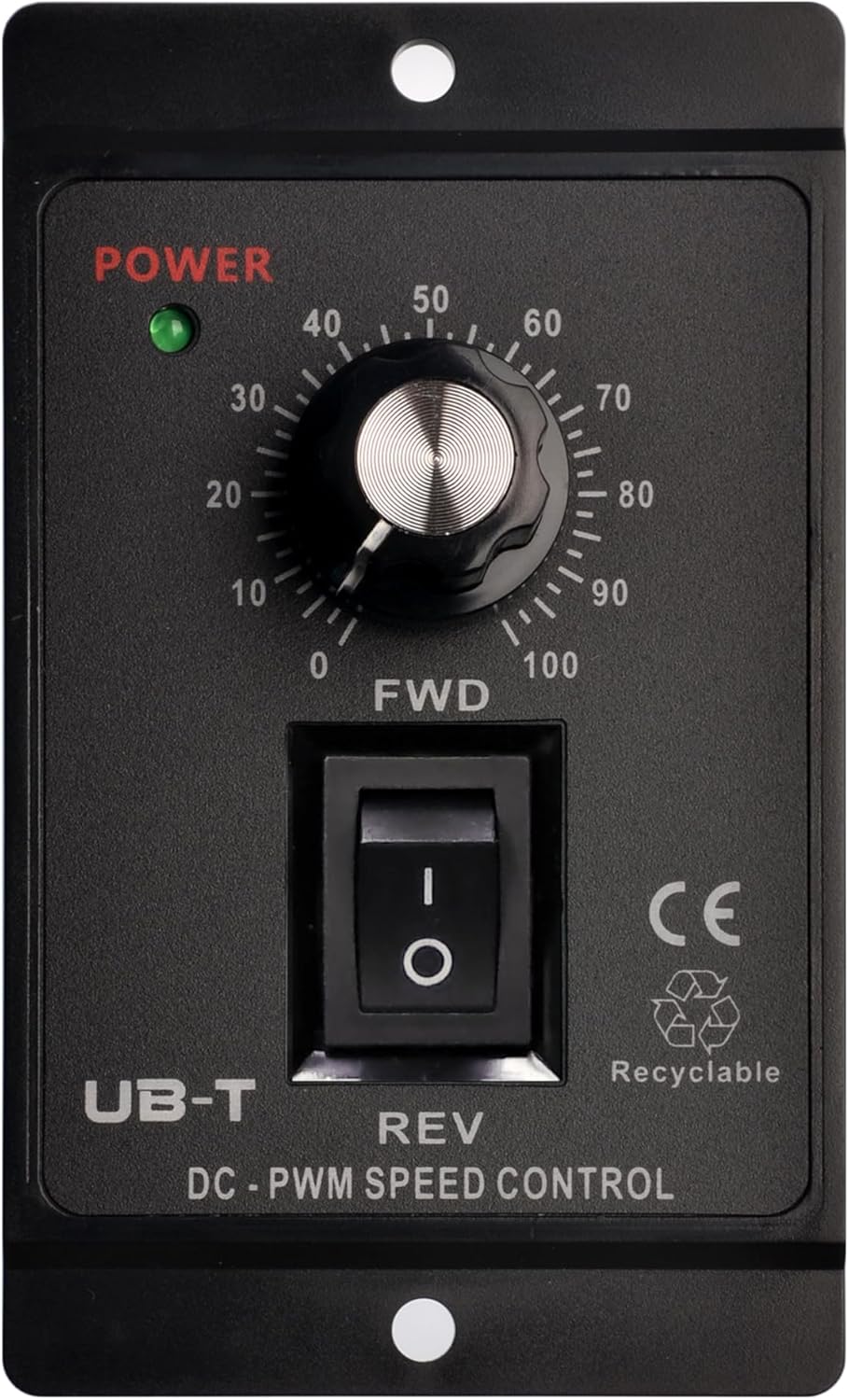
Figure 1: Front view of the matell DC PWM Brush Motor Speed Controller, showing the power indicator, speed control knob, and forward/reverse switch.

Figure 2: Various application scenarios for the motor speed controller, including household appliances, industrial automation, electric vehicles, and smart home devices.
2. Key Features
The matell PWM-M6020 controller offers a range of features designed for robust and versatile motor speed management:
- Wide Voltage Range: Supports DC 12V to 60V input.
- High Current Capacity: Rated for 20A continuous operation.
- Stepless Regulation: Smooth and precise speed adjustment from 0% to 100%.
- Forward/Reverse Function: Integrated switch for easy motor direction control.
- Compatibility: Suitable for 775/795/895 DC motors and all double-wire DC motors.
- Durable Construction: Features a flame-retardant ABS casing for safety and longevity.
- Advanced Terminal Block: Barrier-type terminal block capable of carrying high currents without overheating, equipped with a safety cover.

Figure 3: Visual representation of the controller's key features, including voltage range, regulation type, and motor compatibility.

Figure 4: Diagram highlighting the design advantages of the controller, such as its robust casing and user-friendly features.
3. Specifications

Figure 5: Overview of the controller's physical dimensions and primary electrical specifications.
| Specification | Value |
|---|---|
| Applicable Voltage | DC 12-60V (Cannot be connected to AC) |
| Applicable Current | 20A |
| Power Range | PWM output range adjustable from 0% to 100% |
| Voltage Regulation Range | 0-100% |
| Control Frequency | 16KHz |
| Item Model Number | PWM-M6020 |
| Product Dimensions | 4.8"L x 4.2"W x 3.3"H (12.2cm x 10.7cm x 8.4cm) |
| Item Weight | 8.2 ounces (233 Grams) |
| Material | Copper (internal components), Flame-retardant ABS (casing) |
| Included Components | DC-PWM Speed Controller Unit |

Figure 6: Detailed dimensional drawing of the controller.
4. Setup and Installation
Before connecting the controller, ensure that the power source is disconnected. Incorrect wiring can damage the unit or the motor.
4.1 Wiring Diagram

Figure 7: Detailed wiring instructions for connecting the power source and DC motor.
- Power Input (DC 12-60V):
- Connect the positive terminal of your DC power source (12V-60V) to the DC+ terminal on the controller.
- Connect the negative terminal of your DC power source (12V-60V) to the DC- terminal on the controller.
- NOTE: The input power cannot be reversed. This unit is designed for DC power only and cannot be connected to a household 220V AC supply, as this will cause severe damage.
- Motor Output:
- Connect the DC motor wires to the OUT terminals on the controller. There is no polarity distinction for the motor connection.
- NOTE: If the motor rotates in reverse of your desired direction, simply switch the order of the motor wires connected to the OUT terminals to adjust the direction.
- NC Terminals: The "NC" terminals are Not Connected and should not be used.
4.2 Mounting
The controller features mounting holes for secure installation. Choose a stable, well-ventilated location away from moisture, direct sunlight, and excessive heat. Ensure adequate space for wiring and heat dissipation.
5. Operating Instructions
5.1 Power On/Off
Once wired correctly, connect the power source. The green "POWER" indicator light on the front panel will illuminate, indicating the unit is receiving power.
5.2 Speed Control
The large rotary knob on the front panel controls the motor speed. Rotate the knob clockwise to increase the motor speed from 0% to 100% of its maximum speed. Rotate counter-clockwise to decrease the speed.
5.3 Forward/Reverse Function
The toggle switch below the speed control knob allows you to change the motor's direction:
- Flip the switch to "FWD" for forward rotation.
- Flip the switch to "REV" for reverse rotation.
- The center "O" position will stop the motor.
CAUTION: It is recommended to bring the motor to a complete stop (by setting the speed knob to 0 or the switch to "O") before changing the direction to prevent damage to the motor or controller.
6. Maintenance
The matell PWM-M6020 controller is designed for low maintenance. Follow these guidelines to ensure its longevity:
- Cleaning: Periodically wipe the unit with a soft, dry cloth to remove dust. Do not use abrasive cleaners or solvents. Ensure the unit is powered off before cleaning.
- Ventilation: Ensure the ventilation openings are not obstructed to allow for proper heat dissipation.
- Connections: Periodically check all wiring connections to ensure they are secure and free from corrosion.
- Environment: Store and operate the controller in a dry environment, away from extreme temperatures and humidity.
7. Troubleshooting
If you encounter issues with your matell PWM-M6020 controller, refer to the table below for common problems and solutions:
| Problem | Possible Cause | Solution |
|---|---|---|
| Controller not powering on (no green light) | No power input; Incorrect voltage; Loose connections. | Check power source connection and voltage (12-60V DC). Ensure all wires are securely connected. |
| Motor not running | Speed knob at 0; Motor switch at "O"; Incorrect motor wiring; Motor fault. | Increase speed knob. Ensure switch is on "FWD" or "REV". Verify motor wiring. Test motor separately if possible. |
| Motor runs in wrong direction | Motor wires connected in reverse polarity. | Switch the two motor wires connected to the "OUT" terminals. |
| Motor speed is inconsistent or fluctuates | Unstable power supply; Overload; Loose connections. | Ensure stable DC power supply. Reduce motor load. Check all wiring connections. |
| Controller gets excessively hot | Overload; Insufficient ventilation. | Reduce motor load. Ensure proper airflow around the controller. Do not exceed 20A current rating. |
8. Safety Information
Adhere to the following safety precautions to prevent injury or damage to the device:
- Always disconnect power before making any wiring connections or performing maintenance.
- This controller is for DC brush motors only. Do not connect to AC power sources.
- Ensure the input voltage is within the specified range of DC 12V-60V.
- Do not exceed the maximum current rating of 20A.
- Install the controller in a dry, well-ventilated area, away from flammable materials.
- Keep out of reach of children.
- If the "VOID IF SEAL IS BROKEN" sticker on the back is damaged, it may void the warranty.
9. Warranty and Support
For warranty information, technical support, or service inquiries, please contact matell customer service through your original point of purchase or visit the official matell website. Please have your product model number (PWM-M6020) and purchase details ready when contacting support.