
Samsung 5030
Samsung WindFree Connect Air Conditioner User Manual
Model: SAMSUNG 5030
Introduction and Safety Information
This manual provides essential information for the safe and efficient operation of your Samsung WindFree Connect Air Conditioner. Please read it thoroughly before installation and use, and keep it for future reference.
Important Safety Instructions
- Always ensure the unit is properly grounded.
- Do not attempt to repair or modify the air conditioner yourself. Contact qualified service personnel for all repairs.
- Keep the area around the outdoor unit clear of obstructions.
- Do not insert fingers or objects into the air inlet/outlet.
- Ensure the power supply matches the specifications of the unit.
Setup and Installation
The Samsung WindFree Connect Air Conditioner is a split system designed for efficient cooling. Due to its nature, professional installation is highly recommended to ensure proper setup and optimal performance.

Figure 1: Overview of the Samsung WindFree Connect Air Conditioner, showing the indoor unit, outdoor unit, and remote control.
Pre-Installation Checks
- Verify that the installation location can support the weight of both indoor and outdoor units.
- Ensure adequate space for air circulation around both units.
- Confirm that the electrical supply is 220 Volts as required by the unit.
Unit Dimensions
The product dimensions are approximately 21.65 x 30.71 x 12.99 inches. Consider these measurements for proper placement and installation.
Operating Instructions
Your Samsung WindFree Connect Air Conditioner offers various modes and features for optimal comfort and energy efficiency.
Remote Control Functions

Figure 2: The remote control for your Samsung WindFree Connect Air Conditioner. It allows access to all primary functions and settings.
- Power Button: Turns the unit on or off.
- Mode Button: Cycles through operating modes: Cool, Dry, Fan, Auto.
- Temp +/- Buttons: Adjusts the desired temperature.
- Fan Button: Adjusts fan speed.
- Fast Mode: Activates rapid cooling for quick temperature reduction.
- WindFree Mode: Disperses air gently through thousands of micro-holes, eliminating harsh drafts. This mode is ideal for maintaining comfort without direct airflow.
- Quiet Mode: Optimizes operation for minimal noise, suitable for nighttime use.
- Timer Function: Sets the unit to turn on or off automatically after a specified period.
SmartThings App Connectivity
The WindFree Connect model can be controlled via the Samsung SmartThings app on your smartphone. This allows for remote control, scheduling, and monitoring of energy consumption.
- Download the Samsung SmartThings app from your device's app store.
- Follow the in-app instructions to connect your air conditioner to your home Wi-Fi network.
- Once connected, you can manage settings, receive notifications, and monitor usage from anywhere.

Figure 3: The WindFree Connect unit features fast cooling capabilities, reducing room temperature efficiently.
Maintenance
Regular maintenance ensures the longevity and efficient operation of your air conditioner. Always disconnect power before performing any maintenance.
Air Filter Cleaning
Your unit is equipped with a system of two powerful filters to ensure cleaner air. These filters should be cleaned regularly, typically every two weeks, or more often depending on usage and air quality.
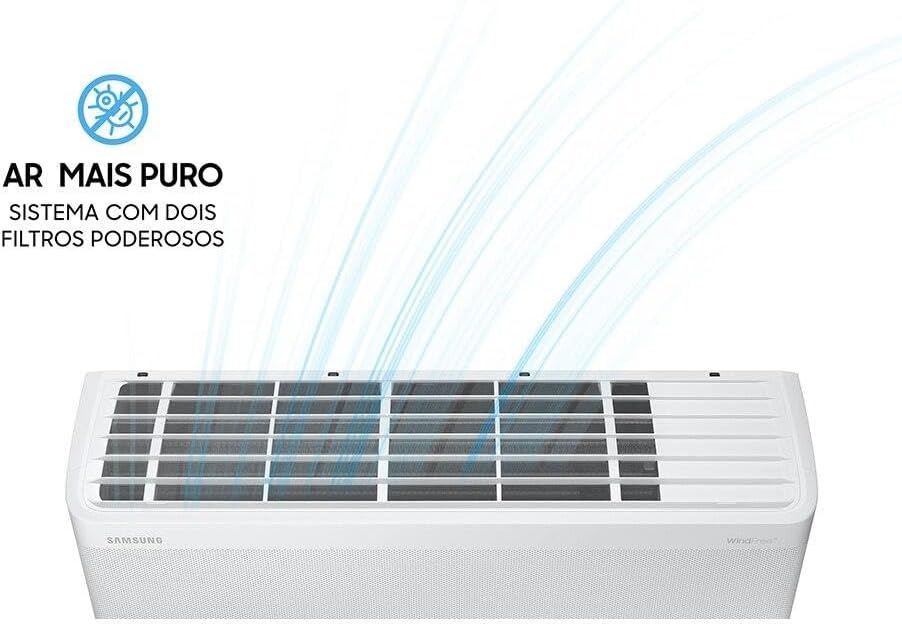
Figure 4: Location of the air filters within the indoor unit, designed for easy access and cleaning.
- Open the front panel of the indoor unit.
- Gently remove the air filters.
- Clean the filters using a vacuum cleaner or wash them with lukewarm water and a mild detergent.
- Allow the filters to dry completely in a shaded area before reinserting them.
- Close the front panel securely.
General Cleaning
- Wipe the exterior of the indoor and outdoor units with a soft, damp cloth.
- Do not use harsh chemicals, abrasives, or solvents.
- Ensure the drainage hose is not blocked.
Troubleshooting
If you encounter issues with your air conditioner, refer to the following common problems and solutions before contacting service.
| Problem | Possible Cause | Solution |
|---|---|---|
| Unit does not turn on. | No power, remote control batteries low, circuit breaker tripped. | Check power supply, replace remote batteries, reset circuit breaker. |
| Insufficient cooling. | Dirty air filters, blocked outdoor unit, room too large, doors/windows open. | Clean filters, clear obstructions, ensure proper room size, close openings. |
| Unusual noise. | Loose parts, foreign objects, unit not level. | Check for loose components, remove foreign objects, ensure unit is level. |
| Water leakage. | Blocked drain hose, improper installation. | Clear drain hose, contact professional for re-installation check. |
If the problem persists after attempting these solutions, please contact Samsung customer support or a qualified service technician.
Specifications
Detailed technical specifications for the Samsung WindFree Connect Air Conditioner.
- Brand: Samsung
- Model: SAMSUNG 5030
- Product Dimensions: 21.65 x 30.71 x 12.99 inches
- Installation Type: Split System
- Capacity: 0.75 Tons / 9,000 British Thermal Units (BTUs)
- Efficiency: High Efficiency, 5 Star BEE Rating, SEER 13
- Special Features: Inverter Compressor, WindFree Technology, SmartThings Connectivity
- Color: White
- Voltage: 220 Volts
- Refrigerant: R 410A
- Power Source: Corded Electric
Warranty and Support
Samsung provides comprehensive support for its products.
Warranty Information

Figure 5: The outdoor unit highlighting the 10-year warranty on the Digital Inverter Motor Technology.
Your Samsung WindFree Connect Air Conditioner comes with a 10-year warranty on the Digital Inverter Motor Technology. For specific warranty terms and conditions, please refer to the warranty card included with your product or visit the official Samsung website.
Customer Support
For technical assistance, service requests, or further inquiries, please visit the official Samsung support website or contact their customer service hotline. You can find contact details on the Samsung website or in your product's packaging.
Ask a question about this manual
Ask about setup, troubleshooting, compatibility, parts, safety, or missing instructions. Manuals+ will review the question and use this page’s manual context to help answer it.