
1. Introduction
This manual provides essential information for the safe and effective operation, maintenance, and troubleshooting of your Generic TH1153256 Rotary Hammer. Please read these instructions carefully before using the tool and keep them for future reference. Proper use and maintenance will ensure optimal performance and extend the life of your rotary hammer.
2. General Safety Instructions
Always follow basic safety precautions to reduce the risk of fire, electric shock, and personal injury when operating power tools.
- Work Area Safety: Keep your work area clean and well-lit. Cluttered or dark areas invite accidents. Do not operate power tools in explosive atmospheres, such as in the presence of flammable liquids, gases, or dust.
- Electrical Safety: Power tool plugs must match the outlet. Never modify the plug in any way. Do not use any adapter plugs with earthed (grounded) power tools. Avoid body contact with earthed or grounded surfaces such as pipes, radiators, ranges, and refrigerators.
- Personal Safety: Always wear eye protection. Use hearing protection when operating the tool for extended periods. Wear a dust mask if operations create dust. Dress properly; do not wear loose clothing or jewelry. Keep hair, clothing, and gloves away from moving parts.
- Tool Use and Care: Do not force the power tool. Use the correct power tool for your application. Disconnect the plug from the power source before making any adjustments, changing accessories, or storing power tools. Store idle power tools out of the reach of children.
- Kickback: Be prepared for kickback. A sudden reaction to a pinched or snagged rotating tool can cause the tool to kick back. Always maintain a firm grip on the tool with both hands.
3. Components Identification
Familiarize yourself with the parts of your rotary hammer for safe and efficient operation.

Figure 1: The Generic TH1153256 Rotary Hammer shown with its detachable auxiliary handle and a robust carrying case. Key components include the chuck, mode selector, trigger, and main handle.
- Chuck: Holds the drill bit or chisel.
- Mode Selector: Allows switching between drilling, hammer drilling, and chiseling modes.
- Auxiliary Handle: Provides additional grip and control during operation.
- Trigger Switch: Activates and deactivates the tool. Includes variable speed control.
- Depth Gauge: Used to set the desired drilling depth.
4. Setup
4.1 Attaching the Auxiliary Handle
- Loosen the auxiliary handle clamp by rotating it counter-clockwise.
- Slide the handle onto the tool's barrel to the desired position.
- Rotate the handle to the most comfortable and secure working angle.
- Tighten the clamp by rotating it clockwise until the handle is firmly secured.
4.2 Inserting and Removing Drill Bits/Chisels
- Ensure the tool is unplugged from the power source.
- Clean the shank of the drill bit or chisel.
- Pull back the chuck collar and insert the bit into the chuck until it clicks into place.
- Release the chuck collar and pull on the bit to ensure it is securely locked. A slight axial movement of the bit is normal.
- To remove, pull back the chuck collar and pull the bit out.
5. Operating Instructions
5.1 Selecting the Operating Mode
The TH1153256 Rotary Hammer features a mode selector for different applications:
- Drilling Mode (Rotation Only): For drilling in wood, metal, and plastics.
- Hammer Drilling Mode (Rotation with Hammering): For drilling in concrete, masonry, and stone.
- Chiseling Mode (Hammering Only): For light chiseling, chipping, and demolition work.
To change the mode, rotate the mode selector switch to the desired icon. Ensure the tool is not running when changing modes.
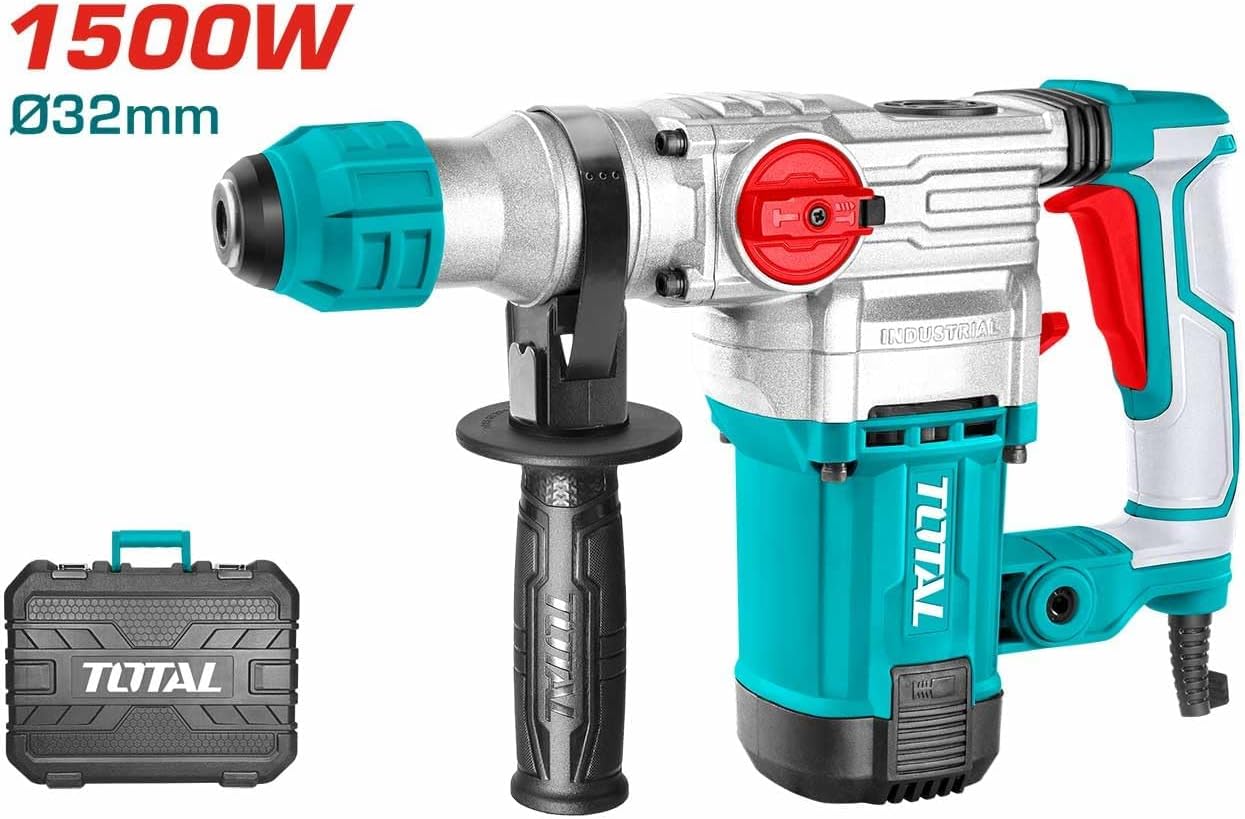
Figure 2: The Generic TH1153256 Rotary Hammer, emphasizing its 1500W power output and 32mm maximum drilling capacity in concrete.
5.2 Starting and Stopping the Tool
- Connect the tool to a suitable 240V power supply.
- To start, press the trigger switch. The tool features variable speed, so pressing the trigger further increases the speed.
- To stop, release the trigger switch.
5.3 Working Tips
- Apply steady, firm pressure. Do not force the tool; let the hammer action do the work.
- For deep holes, withdraw the bit periodically to clear debris.
- Always hold the tool firmly with both hands, especially during hammer drilling or chiseling.
6. Maintenance
Regular maintenance ensures the longevity and safe operation of your rotary hammer.
- Cleaning: After each use, clean the tool with a soft cloth. Remove any dust or debris from ventilation openings. Do not use water or chemical cleaners.
- Lubrication: The internal components are factory-lubricated. Refer to a qualified service technician for any internal lubrication needs.
- Carbon Brushes: Inspect carbon brushes periodically. Worn brushes should be replaced by a qualified technician to prevent motor damage.
- Storage: Store the tool in its carrying case in a dry, secure place, out of reach of children.
- Power Cord: Regularly inspect the power cord for damage. If damaged, have it replaced by an authorized service center.
7. Troubleshooting
Before attempting any repairs, always unplug the tool from the power source.
| Problem | Possible Cause | Solution |
|---|---|---|
| Tool does not start | No power supply; Damaged power cord; Faulty switch | Check power outlet and cord; Have cord or switch replaced by a qualified technician. |
| Reduced hammering action | Worn carbon brushes; Insufficient lubrication; Damaged internal components | Have carbon brushes checked/replaced; Contact service center for internal inspection. |
| Excessive vibration | Bent drill bit/chisel; Loose auxiliary handle; Internal imbalance | Replace bent accessories; Tighten auxiliary handle; Contact service center. |
| Overheating | Blocked ventilation slots; Overloading the tool; Prolonged use | Clean ventilation slots; Reduce load; Allow tool to cool down. |
8. Specifications
Detailed technical specifications for the Generic TH1153256 Rotary Hammer.
| Feature | Specification |
|---|---|
| Model Number | TH1153256 |
| Brand | Generic |
| Maximum Power | 1500 Watts |
| Voltage | 240 Volts |
| No-Load Speed | 4500 RPM |
| Max. Drilling Capacity (Concrete) | 32 MM |
| Power Source | Plug-in Electric |
| Special Features | Variable Speed |
| Material | Metal |
| Item Weight | 200 g |
| Product Dimensions | 40 x 10 x 10 cm |
| Included Components | Rotary hammer (main unit) |
9. Warranty and Support
For information regarding warranty coverage, service, or technical support for your Generic TH1153256 Rotary Hammer, please refer to the warranty card included with your purchase or contact the retailer from whom the product was acquired. Keep your proof of purchase for any warranty claims.