Introduction
Thank you for purchasing the ANWBROAD UBDT1358 Makeup Vanity Desk. This manual provides detailed instructions for assembly, operation, maintenance, and troubleshooting to ensure safe and efficient use of your new vanity desk. Please read this manual thoroughly before assembly and use, and retain it for future reference.
Safety Information
- Read all instructions: Ensure you understand all assembly steps and safety warnings before proceeding.
- Keep children and pets away: Small parts can be a choking hazard. Keep them away from the assembly area.
- Use appropriate tools: Only use the tools specified or recommended in the assembly instructions.
- Assemble on a soft surface: To prevent scratches, assemble the unit on a clean, soft surface like a carpet.
- Secure all fasteners: Ensure all screws, bolts, and connectors are securely tightened before use.
- Avoid overloading: Do not place excessive weight on shelves or drawers to prevent damage or tipping.
- Electrical safety: When using the charging station, ensure proper electrical connections and avoid liquid spills.
- Mirror care: Handle the mirror with care to avoid breakage. Clean with a soft, dry cloth.
Package Contents
Before beginning assembly, verify that all parts listed below are present and undamaged. If any parts are missing or damaged, please contact customer support.
- Vanity Desk Frame Components
- Mirror with LED Lights
- Drawers and Shelving Units
- Cushioned Stool
- Charging Station Unit (with USB-A, USB-C, and power outlets)
- Assembly Hardware (screws, dowels, cam locks, etc.)
- Instruction Manual
Assembly Instructions
Assembly is required for this product. Please follow the steps carefully. It is recommended to have two people for assembly.
Step 1: Prepare the Workspace
Clear a spacious area and lay out all components on a soft, clean surface to prevent scratches.
Step 2: Assemble the Main Desk Frame
Connect the main desk panels using the provided hardware. Ensure all connections are firm.
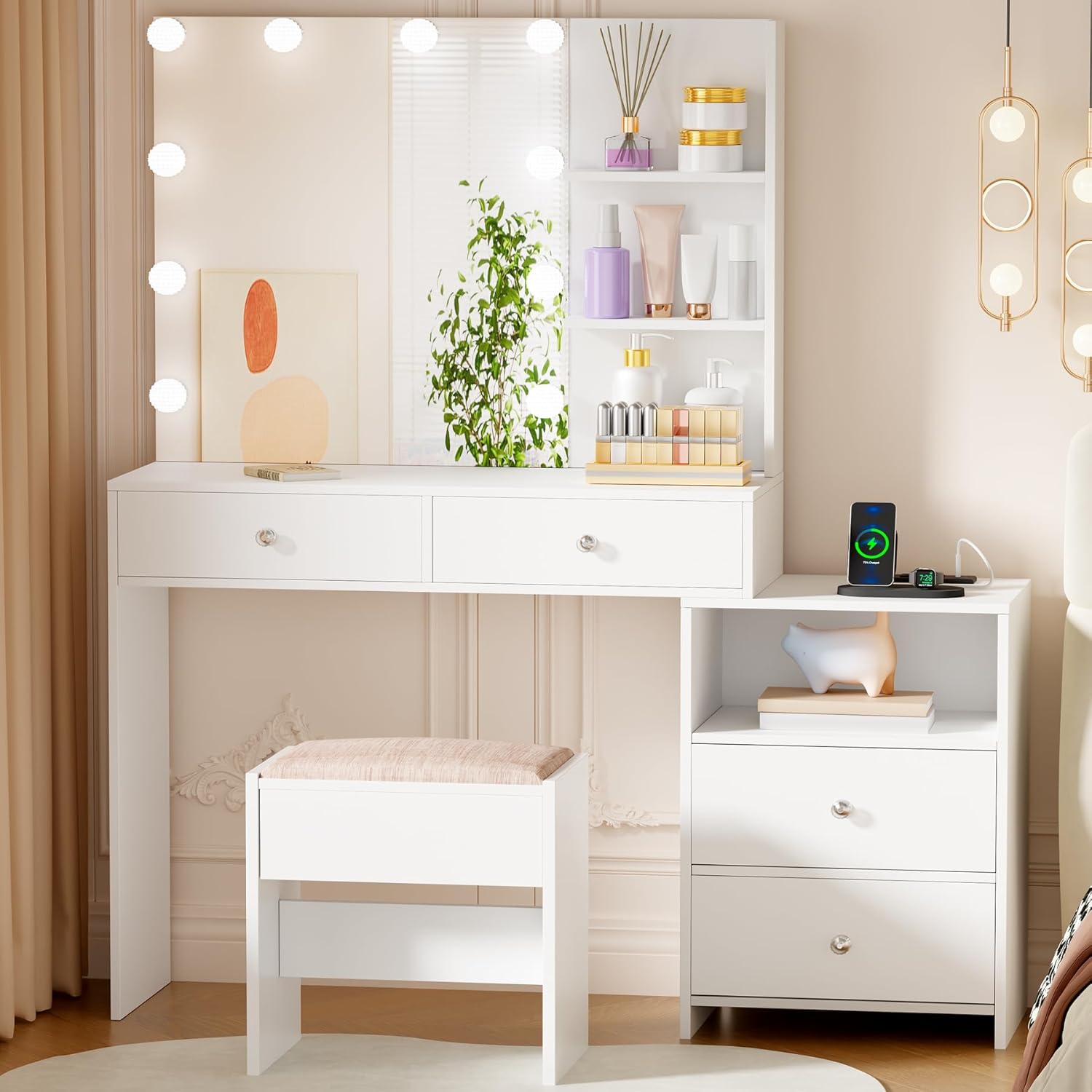
Image: The fully assembled ANWBROAD Makeup Vanity Desk, showing the main desk, mirror, side storage, and stool.
Step 3: Install Drawers and Shelves
Slide the drawers into their designated slots and secure the drawer slides. Attach any fixed shelves to the main structure.

Image: A close-up of the vanity desk's storage features, including drawers and open shelves, highlighting the ample storage capacity.
Step 4: Attach the Mirror and LED Lights
Carefully attach the mirror unit to the back of the desk. Connect the LED lights as per the wiring instructions. Ensure the mirror is stable and secure.

Image: The vanity mirror with its 10 LED lights and integrated side storage shelves, ready for use.
Step 5: Assemble the Stool
Assemble the stool components and attach the cushioned seat. Ensure the stool is stable.

Image: A close-up showing the comfortable cushioned stool and the integrated charging station with USB ports and power outlets.
Step 6: Connect the Charging Station
Integrate the charging station into the designated area of the desk. Plug it into a suitable power outlet.

Image: A detailed view of the charging station, showing the power outlets and USB ports for electronic devices.
Operating Instructions
LED Mirror Lights
The vanity mirror features 10 LED lights with adjustable brightness and three color modes:
- Warm White: Ideal for evening makeup.
- Natural White: Suitable for daily makeup.
- Cool White: Best for professional makeup application.
To operate the lights:
- Power On/Off: Touch the central power button on the mirror to turn the lights on or off.
- Change Color Mode: Briefly touch the 'M' button to cycle through the three color modes (Warm, Natural, Cool).
- Adjust Brightness: Press and hold the '+' or '-' buttons to increase or decrease the brightness level.

Image: An illustration demonstrating the touch controls for the LED mirror lights, including power, mode selection, and brightness adjustment.
Charging Station
The integrated charging station includes 2 standard power outlets, 1 USB-A port, and 1 USB-C port. This allows for convenient charging of various electronic devices such as mobile phones, tablets, and laptops.
- Ensure the vanity desk is plugged into a functional wall outlet.
- Connect your devices to the appropriate USB ports or power outlets.
- Avoid overloading the charging station with too many high-power devices simultaneously.
Video: An official product video demonstrating the features of the ANWBROAD Makeup Vanity Desk, including the LED lights and charging station functionality.
Maintenance
- Cleaning: Wipe the surfaces with a soft, dry cloth. For stubborn marks, use a slightly damp cloth and mild soap, then dry immediately. Avoid harsh chemicals or abrasive cleaners.
- Mirror Cleaning: Use a glass cleaner specifically designed for mirrors and a lint-free cloth. Spray cleaner onto the cloth, not directly onto the mirror, to prevent liquid from seeping into the edges.
- Hardware Check: Periodically check all screws and fasteners to ensure they remain tight. Tighten if necessary to maintain stability.
- Stool Cushion Care: Spot clean the stool cushion with a mild fabric cleaner. Do not machine wash.
Troubleshooting
| Problem | Possible Cause | Solution |
|---|---|---|
| LED lights do not turn on. | Power cable not connected; loose wiring; faulty power outlet. | Ensure the power cable is securely plugged into the wall and the vanity. Check the wall outlet with another device. Verify all internal wiring connections are secure. |
| Lights are dim or flickering. | Low power supply; loose connection; brightness setting too low. | Ensure the vanity is plugged directly into a wall outlet, not a power strip. Check all connections. Increase brightness using the '+' button. |
| Charging station not working. | Vanity not powered; device cable faulty; charging station overload. | Confirm the vanity is powered. Try a different charging cable or device. Unplug other devices from the charging station. |
| Drawers are stiff or do not slide smoothly. | Misaligned slides; debris in tracks; overloaded drawer. | Check drawer slide alignment and ensure they are properly installed. Clean tracks of any dust or debris. Reduce the weight in the drawer. |
| Vanity feels unstable. | Loose fasteners; uneven floor. | Retighten all assembly screws and bolts. Place shims under the legs if the floor is uneven. |
Specifications
| Feature | Detail |
|---|---|
| Model Number | UBDT1358 |
| Brand | ANWBROAD |
| Overall Dimensions (L x W x H) | 31.5" x 15.7" x 55.1" (80cm x 40cm x 140cm) |
| Stool Dimensions (L x W x H) | 15.7" x 11.6" x 17.7" (40cm x 29.5cm x 45cm) |
| Material | Engineered Wood, Foam & Polyester (Stool Seat) |
| Color | White |
| LED Lights | 10 Dimmable Bulbs, 3 Color Modes (Warm, Natural, Cool) |
| Charging Station | 2 Standard Power Outlets, 1 USB-A Port, 1 USB-C Port |
| Assembly Required | Yes |
| Product Weight | Approximately 87 pounds (39.5 kg) |
Warranty and Support
ANWBROAD products are designed for quality and durability. For specific warranty information regarding your UBDT1358 Makeup Vanity Desk, please refer to the warranty card included in your package or visit the official ANWBROAD website. If you encounter any issues or require assistance, please contact ANWBROAD customer support through the retailer where the product was purchased or via the contact information provided on the ANWBROAD website.
Contact Information: Please refer to your purchase documentation or the ANWBROAD official website for the most up-to-date customer support contact details.