
1. Introduction and Overview
Welcome to the user manual for your new artfone F30 4G VoLTE Senior Flip Phone. This device is designed with ease of use in mind, featuring large buttons, a clear 2.4-inch display, and essential functions tailored for seniors. It supports 4G, 3G, and 2G networks across all European carriers, ensuring reliable communication.
Key features include a dedicated SOS button for emergencies, a convenient charging cradle, FM radio, a powerful flashlight, and a loud speaker for clear audio. This manual will guide you through the setup, operation, maintenance, and troubleshooting of your artfone F30.

Image: The artfone F30 flip phone in grey silver, displayed both closed and open, with its accompanying charging cradle. This illustrates the phone's design and primary charging method.
2. Setup
2.1. Battery Installation
- Carefully remove the back cover of the phone.
- Insert the provided Lithium-ion battery into the battery compartment, ensuring the gold contacts align.
- Replace the back cover, pressing firmly until it clicks into place.
2.2. SIM Card Insertion
The artfone F30 supports nano-SIM cards. You may need an adapter if your SIM card is a different size.
- With the battery removed, locate the SIM card slot(s).
- Insert your nano-SIM card(s) into the designated slot(s) with the gold contacts facing down, following the diagram usually found near the slot.
- Reinstall the battery and back cover.
2.3. Initial Charging
Before first use, fully charge your artfone F30.
- Connect the charging cable to the charging cradle.
- Place the artfone F30 phone into the charging cradle. The phone will automatically begin charging.
- A full charge typically takes a few hours. The phone is designed to automatically turn off the protective mobile phone when fully charged.

Image: The artfone F30 flip phone positioned in its charging cradle on a table, illustrating the ease of charging by simply placing the phone in the dock.
3. Operating Instructions
3.1. Basic Call Functions
- Answering Calls: Simply open the flip to answer an incoming call.
- Ending Calls: Close the flip to hang up a call, or press the red 'End Call' button.
- Making Calls: Dial the number using the large keypad and press the green 'Call' button.

Image: A hand demonstrating the artfone F30 flip phone, with a close-up inset showing the large, easy-to-read keypad, designed for comfortable dialing.
3.2. Emergency SOS Function
The F30 features a dedicated SOS button for emergencies. You can configure up to 5 emergency contacts.
- Setup: Navigate to the SOS settings in the phone's menu to add up to 5 emergency numbers.
- Activation: Press and hold the SOS button for 3 seconds. The phone will automatically call these numbers in sequence until someone answers.

Image: The artfone F30 flip phone with a finger activating the SOS button, visually representing the one-button emergency call feature.
3.3. Speed Dial
Program up to 8 speed dial keys (A/B/C/*/#/2-9) for quick access to frequently called numbers.
- Setup: Access the speed dial settings in the phone's menu to assign contacts to these keys.
- Usage: Press and hold the assigned key to dial the contact.
3.4. Flashlight
The integrated flashlight provides convenient illumination.
- Activation: Use the dedicated side switch to turn the flashlight on or off.

Image: The artfone F30 flip phone with its powerful flashlight activated, casting a bright beam in a dark setting, demonstrating its utility.
3.5. Time Announcement
For users with visual impairments, the phone can announce the current time.
- Activation: Press and hold the Volume+ button to hear the time announcement.
3.6. Call Blocking
Manage unwanted calls by blocking up to 50 numbers.
- Setup: Access the call blocking feature in the phone's settings to add numbers to the block list.
3.7. User Interface and Multimedia
The artfone F30 features a user-friendly interface with clear icons for various functions.
- Navigation: Use the directional keys to navigate through the menu options.
- Multimedia: The phone supports microSD cards up to 64GB for storing photos and music.
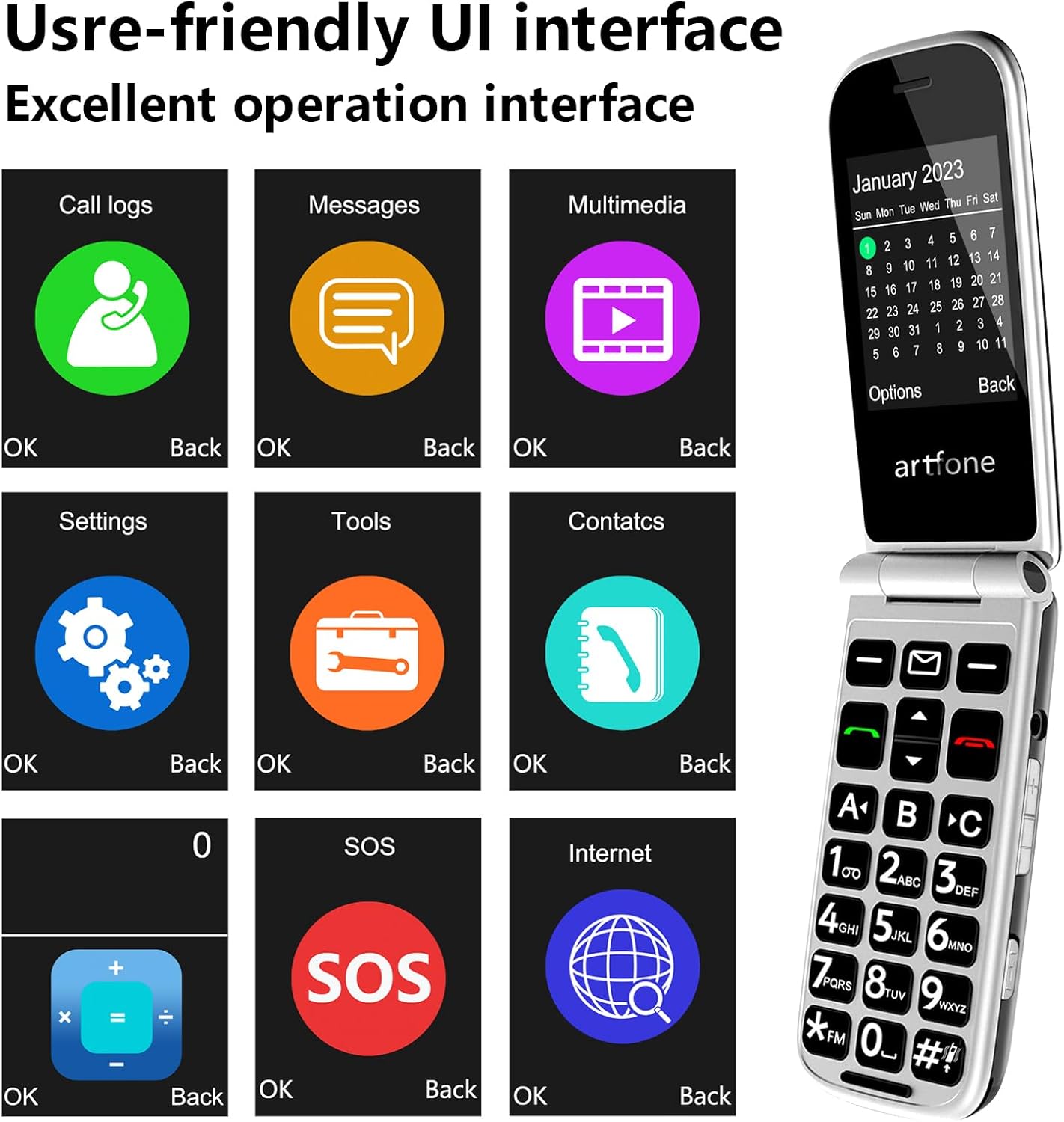
Image: The artfone F30 flip phone showcasing its intuitive user interface, featuring large, distinct icons for various functions like call logs, messages, and settings.
3.8. Speaker Quality
The phone is equipped with an AAC box speaker for enhanced audio clarity, making conversations easier to understand, especially for those with hearing difficulties.

Image: The artfone F30 flip phone with a graphic overlay indicating sound waves from its speaker, emphasizing the loud and clear AAC box speaker for improved call quality.
4. Maintenance
4.1. Battery Care
- Regularly charge your phone using the provided charging cradle to maintain battery health.
- Avoid extreme temperatures, which can affect battery performance and lifespan.
- If the phone will not be used for an extended period, charge it to about 50% before storing.
4.2. Cleaning
- Use a soft, dry cloth to clean the phone's exterior and screen.
- Avoid using harsh chemicals or abrasive materials.
4.3. Durability
The F30 has undergone rigorous testing, including 120,000 open/close cycles, ensuring its durability for long-term use.
5. Troubleshooting
5.1. Common Issues and Solutions
| Problem | Possible Cause | Solution |
|---|---|---|
| Phone does not turn on | Low battery; Battery not installed correctly | Charge the phone; Reinstall battery, ensuring contacts align. |
| Cannot make/receive calls | No SIM card; SIM card not inserted correctly; No network signal | Insert SIM card; Reinsert SIM card; Move to an area with better signal. |
| Poor call quality / Low volume | Weak signal; Speaker blocked; Volume too low | Move to an area with better signal; Check for obstructions on speaker; Adjust volume using side buttons. |
| Battery drains quickly | Frequent use; Old battery; Background processes | Reduce screen time; Consider replacing battery if very old; Close unused applications. |
| Phone freezes or is unresponsive | Software glitch; Too many applications running | Remove battery and reinsert to restart; Close unnecessary applications. |
| Difficulty answering calls (requires second press) | Specific software behavior | Ensure you press the green call button after opening the flip if the call doesn't connect immediately. |
If you encounter issues not listed here, please refer to the support section or contact customer service.
6. Specifications
- Brand: artfone
- Model Name: F30
- Color: artfone F30 Grey Silver - 4G/3G/2G
- Product Type: Flip Phone
- Operating System: artfone OS
- Screen Size: 2.4 Inches
- Resolution: 320 x 240
- Connectivity: Bluetooth, Cellular (4G, 3G, 2G)
- CPU Model: Mediatek Dimensity 900
- Installed RAM Size: 48 MB
- Memory Storage Capacity: 64 GB (via microSD card, not internal)
- Special Features: VoLTE, Large Buttons, SOS Function, FM Radio, Flashlight, Charging Cradle
- Battery Composition: Lithium-ion
- Battery Capacity: 1200mAh (approx. 4-5 hours talk time, 200 hours standby)
- USB Ports: 1 (USB Type C)
- Audio Jack: 3.5 mm
- Wireless Carrier Compatibility: All Carriers
7. Warranty and Support
7.1. Return Policy
This product is subject to a 30-day return policy for refund or replacement. Please refer to your purchase platform's specific return guidelines for detailed information.
7.2. Customer Support
For further assistance, technical support, or warranty inquiries, please contact artfone customer service through the retailer where you purchased the device. Keep your purchase receipt or order number handy for faster service.


