1. Introduction
This manual provides essential instructions for the safe and efficient operation of the BOSYTRO TYTL-24V600W Adjustable DC Power Supply. This device converts AC input voltage (110V/220V) to a regulated and adjustable DC output voltage (0-24V) and current (0-25A), with a maximum power output of 600W. It is designed for various industrial and electronic applications.
2. Safety Information and Warnings
- Input Voltage Selection: Before connecting the power supply, ensure the input voltage switch is set correctly for your region (AC110V or AC220V). Incorrect selection can cause damage to the unit.
- Indoor Use Only: This power supply is not waterproof. Use it exclusively in dry, indoor environments to prevent electrical hazards.
- Load Capacity: For continuous operation, the working current should not exceed 80% of the rated maximum current (25A). The total load should not exceed 600W.
- Inductive Loads: When using with inductive loads such as motors or fans, ensure their maximum startup current and stall current do not exceed the power supply's maximum current. Exceeding this limit can damage the power supply.
- Not a Battery Charger: This unit is an industrial switching power supply and is not designed to function as a battery charger. Using it for battery charging may lead to damage or unsafe conditions.
- Ventilation: Ensure adequate ventilation around the power supply to prevent overheating. Do not block the cooling fan or ventilation holes.
3. Product Features
- Adjustable Output: Provides adjustable DC output voltage from 0-24V and adjustable current from 0-25A.
- High Power Output: Capable of delivering up to 600W of power.
- LED Digital Display: Features an integrated LED display for real-time monitoring of output voltage and current.
- Efficient Cooling: Constructed with a durable aluminum shell, multiple ventilation holes, and a built-in cooling fan for effective heat dissipation, extending service life.
- Multiple Protection Functions: Includes intelligent protection against overload, overvoltage, short circuit, earth leakage, overcurrent, and overheat.
- Quality Construction: Manufactured using high-quality magnetic materials and lead-free processes (RoHS compliant) for stable performance and safety.
4. Setup and Wiring
Carefully follow these steps for proper setup and wiring of the power supply.
4.1. Input Voltage Selection
Locate the input voltage selector switch on the side of the unit. Set it to either AC110V or AC220V according to your local power grid. This step is critical and must be performed before connecting to AC power.
4.2. Wiring Connections
Connect your AC input and DC output wires to the terminal block as indicated below. Ensure all connections are secure and properly insulated.

Figure 4.2.1: Wiring diagram for the power supply. This image illustrates the terminal block connections for AC input (L, N, G) and DC output (+V, -V).
- L: AC Input Live Wire
- N: AC Input Neutral Wire
- G: Ground Line
- +V: Positive DC Output
- -V: Negative DC Output
Always ensure the power supply is disconnected from the AC mains before making or changing any wiring connections.
5. Operating Instructions
Once properly wired, the power supply is ready for operation.
5.1. Powering On
Connect the AC input cable to a suitable power outlet. The LED digital display will illuminate, showing the current output voltage and current. A status indicator light may also be present.
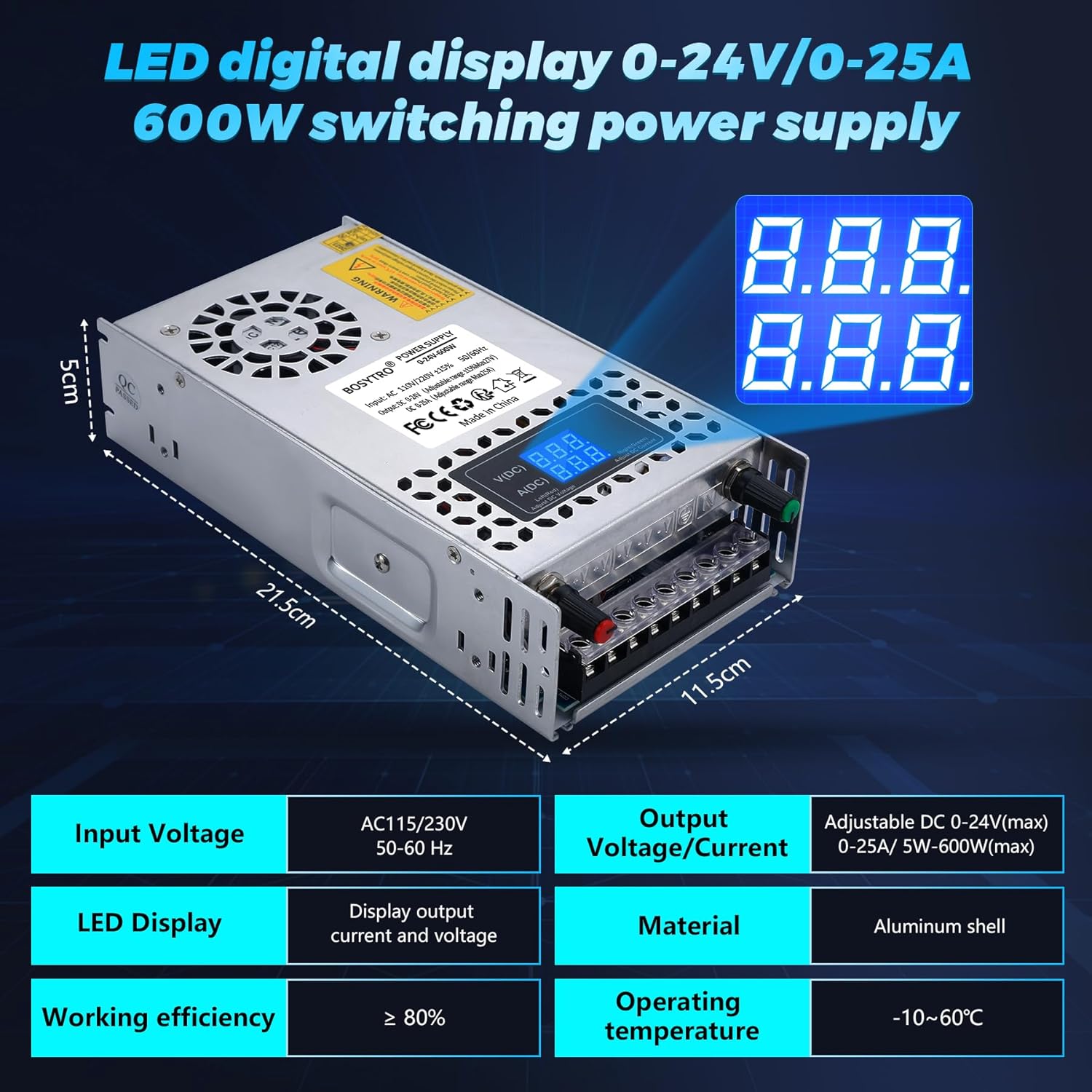
Figure 5.1.1: Overview of the power supply with its LED digital display and key features.
5.2. Adjusting Output Voltage and Current
The power supply features two adjustment knobs:
- Voltage Adjustment Knob: Rotate this knob to adjust the DC output voltage within the 0-24V range.
- Current Adjustment Knob: Rotate this knob to adjust the DC output current limit within the 0-25A range.
Monitor the LED digital display to observe the real-time voltage and current settings as you make adjustments.
6. Maintenance
To ensure the longevity and optimal performance of your power supply, observe the following maintenance guidelines:
- Keep Clean: Regularly clean the exterior of the unit with a dry, soft cloth. Avoid using liquid cleaners.
- Ensure Ventilation: Periodically check that the ventilation holes and the cooling fan are free from dust and obstructions. Proper airflow is crucial for heat dissipation.
- Cooling Fan Operation: The built-in cooling fan is designed to activate only when the internal temperature reaches a certain threshold. If the fan is not running when the unit is cool or under light load, it is not indicative of a malfunction. This design improves efficiency.

Figure 6.1.1: Illustration of the power supply's heat dissipation system, highlighting the cooling fan and ventilation.
7. Troubleshooting
If you encounter issues with your power supply, refer to the following common problems and solutions:
- No Output/No Power:
- Check if the AC input cable is securely connected to both the power supply and the wall outlet.
- Verify that the input voltage selector switch (AC110V/220V) is set correctly for your region.
- Inspect the wiring connections at the terminal block for any loose or incorrect connections.
- Power Supply Shuts Down or Overheats:
- Ensure the load connected to the power supply does not exceed 600W or 25A. Reduce the load if necessary.
- Check for any obstructions around the ventilation holes or cooling fan. Clear any dust or debris.
- Confirm the ambient operating temperature is within the specified range (-10℃ to 60℃).
- Fan Not Running:
- As mentioned in Section 6, the fan operates only when needed for cooling. If the unit is not hot, the fan may not be running, which is normal.
- Damage from Inductive Loads:
- If the power supply was used with an inductive load (e.g., motor) whose startup current exceeded the unit's maximum, internal damage may have occurred. Refer to Section 2 for warnings regarding inductive loads.

Figure 7.1.1: Visual representation of the multiple protection features integrated into the power supply.
8. Specifications
| Parameter | Value |
|---|---|
| Output Voltage | 0-24V DC (Adjustable) |
| Current Range | 0-25A (Adjustable) |
| Max Power | 600W |
| Input Voltage | AC110V/220V (85-145V / 185-265V) |
| Efficiency | ≥80% |
| Frequency | 50-60Hz |
| Operating Temperature | -10℃ to 60℃ |
| Dimensions (L*W*H) | 215 x 115 x 50 mm |
| Weight | 0.75 kg |
| Protection Features | Overload, Overvoltage, Short Circuit, Earth Leakage, Overcurrent, Overheat |

Figure 8.1.1: Internal composition of the power supply, highlighting key electronic components and the cooling system.
9. Applications
The BOSYTRO TYTL-24V600W power supply is suitable for a wide range of DC 0-24V applications, including:
- LED lighting and displays
- 3D printers
- CCTV security systems
- Computer projects and laboratory use
- Automation equipment
- Various electronic devices requiring adjustable DC power

Figure 9.1.1: Examples of diverse applications for the BOSYTRO adjustable DC power supply.
10. Warranty and Support
For warranty information, technical support, or any questions regarding your BOSYTRO TYTL-24V600W Adjustable DC Power Supply, please contact the manufacturer or your point of purchase. Ensure you have your product model number (TYTL-24V600W) and purchase details available when seeking support.