
Introduction
The ERICAT Grain Moisture Meter is a precision instrument designed to accurately measure the percentage of water content in various grain types. This device provides essential data for determining if grain is ready for storage, processing, or requires further drying. Equipped with a backlit LCD display, voice prompt function, and a high-precision sensitive probe, it offers reliable and convenient moisture testing for 14 different grain varieties.

Image: The ERICAT Grain Moisture Meter, featuring its digital display, control buttons, and dual-rod probe. This image provides a general view of the device.
Safety Information
Please read and understand all safety instructions before operating the device. Failure to follow these instructions may result in injury or damage to the meter.
- Keep the device away from water and excessive moisture to prevent electrical shock or damage.
- Do not attempt to disassemble or modify the meter. Repairs should only be performed by qualified personnel.
- Handle the sensitive probe with care to avoid bending or breaking.
- Store the meter in a dry, cool place when not in use.
- Keep out of reach of children.
Product Overview
The ERICAT Grain Moisture Meter is equipped with several features designed for efficient and accurate moisture content measurement.
- High Precision Dual-Rod Steel Probe: Durable and highly sensitive for accurate measurements.
- Backlit LCD Display: Provides clear readings, even in low-light conditions.
- Voice Prompt Function: Announces measurement readings for convenience.
- Deviation Adjustment: Allows for calibration to correct measurement deviations within -3% to +5%.
- Memory Function: Retains previous settings even after battery removal.
- Limit Function: Enables setting a moisture limit range of 10%-40%.
- Data Storage: Stores measurement data for reference.
- Alarm Settings: Pre-set 10 adjustable resistance alarm settings.

Image: A detailed view highlighting the high-sensitive probes and the large, backlit LCD screen of the grain moisture meter, designed for clear data visibility.

Image: The grain moisture meter being used to test grain in a sack, accompanied by icons illustrating its key features: Voice Reminder, Data Storage, Backlight Display, and Alarm Settings.
Setup
Battery Installation
- Locate the battery compartment cover on the back of the meter.
- Slide or unclip the cover to open the compartment.
- Insert four (4) 1.5V AA batteries, ensuring correct polarity (+/-).
- Replace the battery compartment cover securely.
Note: Batteries are not included with the product. Please use fresh alkaline batteries for optimal performance.
Operating Instructions
Powering On/Off
- To power on the device, press and hold the ON/OFF button.
- To power off the device, press and hold the ON/OFF button again until the display turns off.
Selecting Grain Type
- With the meter powered on, press the Varieties button.
- Each press will cycle through the 14 available grain types (P0-P13) displayed on the screen. Select the appropriate grain type for your measurement.

Image: A table detailing the 14 grain varieties (Paddy, Wheat, Corn, Barley, Rice, Sorghum, Pellet feed, Rapeseed, Melon seeds, Sesame, Soymeal, Soybean, Peanut, Seed cotton) with their respective codes (P0-P13) and typical moisture measurement ranges.
Taking a Measurement
- Ensure the correct grain type is selected.
- Carefully insert the dual-rod probe into the grain sample. Ensure the probes are fully submerged and making good contact with the grain.
- Hold the meter steady. The moisture content reading will appear on the LCD display.
- The voice prompt function will announce the reading if enabled.
Voice Broadcast Function
The meter provides voice prompts for various statuses:
- d1: Announces the moisture content readings.
- d2: Indicates high moisture content.
- d3: Voice-over function is off.
- d4: Bip-sound.
Press the Voice button to toggle the voice prompt function on or off.
Deviation Adjustment
To adjust the measurement deviation:
- Press the Adjust button.
- Use the + and - buttons to set the correction deviation within the range of -3% to +5%.
- This feature allows for fine-tuning the meter's readings to match known standards or other instruments.
Limit Function
The limit function allows you to set a specific moisture range:
- Press the Limit button.
- Use the + and - buttons to set the desired moisture limit range, typically between 10% and 40%.
- The meter may provide an alert if the measured moisture content falls outside this set range.
Memory Function
The meter features a memory function that retains your previous settings. Even if the batteries are removed, your last selected grain type, deviation adjustment, and limit settings will not be lost.
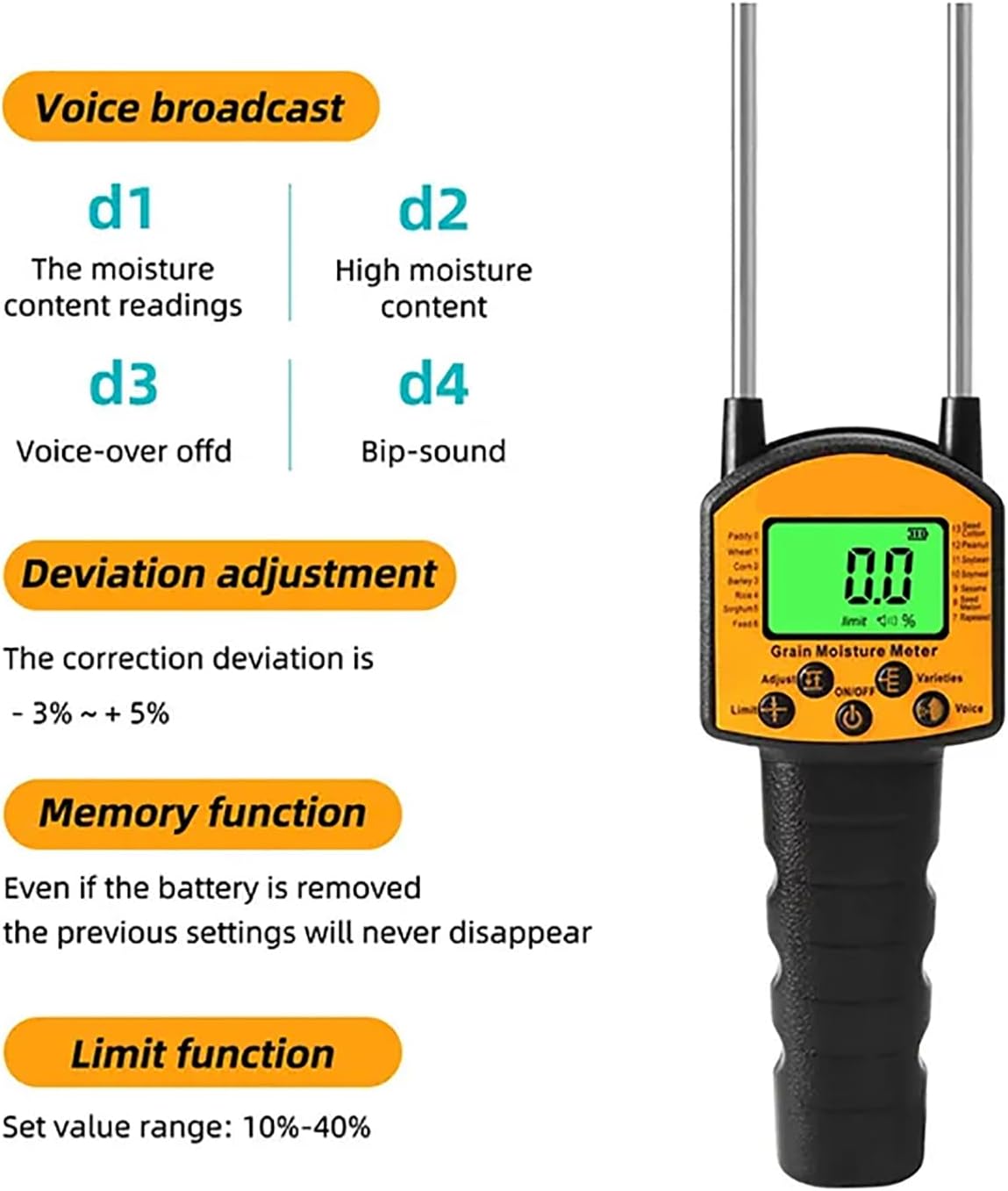
Image: An infographic detailing the voice broadcast options (d1, d2, d3, d4), the deviation adjustment range (-3% to +5%), the non-volatile memory function, and the adjustable limit function (10%-40%).
Maintenance
Cleaning the Probe
- After each use, especially when measuring different grain types, gently wipe the probes with a clean, dry cloth.
- Do not use abrasive cleaners or solvents, as these can damage the probe material.
- Ensure no grain residue or moisture remains on the probes before storage.
Battery Replacement
- When the battery indicator on the LCD display shows low power, replace all four (4) AA batteries.
- Refer to the "Battery Installation" section under Setup for detailed steps.
- Dispose of used batteries according to local regulations.
Storage
- Store the meter in its original gift box or a protective case to prevent damage.
- Keep the device in a dry, cool environment, away from direct sunlight and extreme temperatures.
- If storing for an extended period, it is recommended to remove the batteries to prevent leakage.
Troubleshooting
If you encounter issues with your ERICAT Grain Moisture Meter, please refer to the following common problems and solutions:
- No Power / Display Not Turning On:
- Check if the batteries are installed correctly with the correct polarity.
- Replace old or depleted batteries with new 1.5V AA batteries.
- Ensure the ON/OFF button is pressed and held sufficiently.
- Inaccurate Readings:
- Verify that the correct grain type is selected for the sample being measured.
- Ensure the probes are clean and free of residue.
- Make sure the probes are fully inserted into the grain sample and making good contact.
- Use the Deviation Adjustment function to calibrate the meter if you have a known standard.
- Ensure the grain sample is uniform and representative.
- Voice Prompt Not Working:
- Press the Voice button to ensure the voice function is enabled (not in 'd3' mode).
- Check battery level, as low power can affect voice output.
Specifications
| Product Name | Grain Moisture Meter |
| Brand | ERICAT |
| Model | B0CFPJJZPK |
| Accuracy | 0.1 / 0.1% |
| Backlight Display | Yes |
| Deviation Adjustment | Yes (Correction range: -3% to +5%) |
| Voice-Over | Yes |
| Resistance Alarm Setting | Pre-set 10 (Adjustable) |
| Memory Function | Yes |
| Power | 4 * 1.5V AA Battery (Not Included) |
| Product Size | 425 * 80 * 43mm |
| Applicable Grains | Paddy, Wheat, Corn, Barley, Rice, Sorghum, Pellet feed, Rapeseed, Melon seeds, Sesame, Soymeal, Soybean, Peanut, Seed cotton (14 varieties) |

Image: A visual representation of the 14 types of grains that the ERICAT Grain Moisture Meter is capable of measuring, including Rice crop, Wheat, Corn, Barley, Sorghum, Pellet feed, Rapeseed, Watermelon seeds, Sesame, Soybean meal, Soybean, Peanut kernels, and Seed cotton.
Warranty and Support
For warranty information or technical support, please contact the manufacturer, ERICAT, through their official channels or the retailer from whom the product was purchased. Please have your product model number (B0CFPJJZPK) and purchase date available when contacting support.