
Introduction
This instruction manual provides guidance for the proper installation and maintenance of EtliN replacement parts (Set E) designed for the ZACO A11s Pro Robot Vacuum Cleaner. Regular replacement and maintenance of these parts ensure optimal performance and longevity of your robot vacuum cleaner.
Package Contents
The EtliN Replacement Parts Set E typically includes the following components:
- Main Roller Brushes
- HEPA Filters
- Side Brushes
- Mop Pads
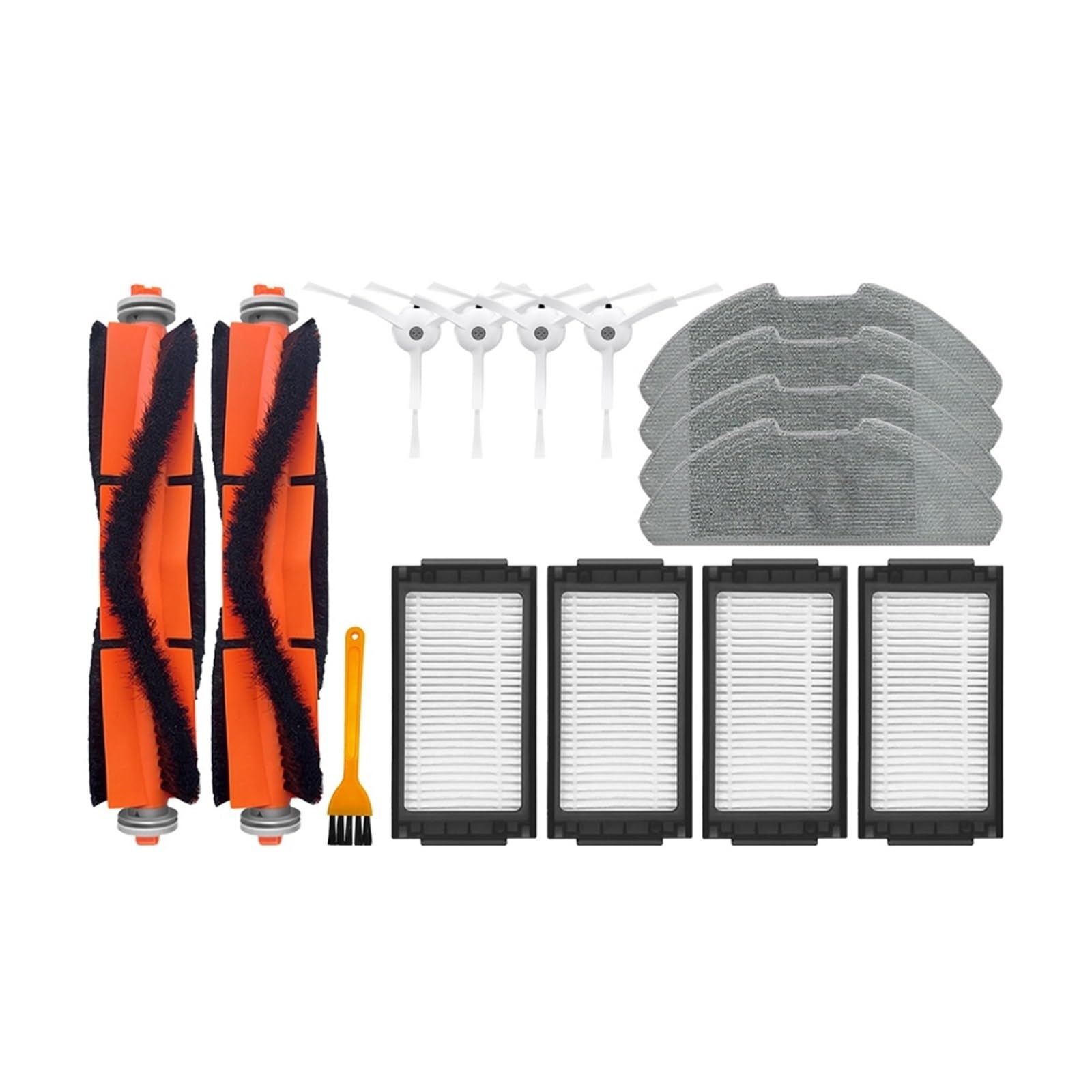
Image: Overview of all components included in EtliN Replacement Parts Set E, featuring main roller brushes, HEPA filters, side brushes, and mop pads.
Compatibility
These replacement parts are specifically designed to be compatible with the ZACO A11s Pro Robot Vacuum Cleaner. Ensure your robot vacuum cleaner model matches this specification for proper fit and function.
Installation Guide
Before installing any replacement parts, ensure the robot vacuum cleaner is powered off and disconnected from its charging base.
1. Main Roller Brush Replacement
- Turn the robot vacuum cleaner upside down.
- Locate the brush guard cover, usually secured by clips or latches. Open or remove it.
- Carefully lift out the old main roller brush.
- Insert the new EtliN main roller brush, ensuring the ends align with the slots in the vacuum cleaner.
- Close the brush guard cover until it clicks into place.

Image: A single EtliN main roller brush, featuring orange and black bristles, ready for installation.
2. Side Brush Replacement
- Turn the robot vacuum cleaner upside down.
- Locate the side brushes. They are typically held in place by a screw.
- Use a screwdriver to remove the screw holding the old side brush.
- Remove the old side brush and place the new EtliN side brush into position.
- Secure the new side brush with the screw.

Image: A white EtliN side brush with three bristles, designed for sweeping debris into the main brush path.
3. HEPA Filter Replacement
- Open the dustbin cover on your robot vacuum cleaner and remove the dustbin.
- Locate the filter compartment within the dustbin.
- Remove the old HEPA filter. Dispose of it properly.
- Insert the new EtliN HEPA filter into the compartment, ensuring it is seated correctly.
- Close the filter compartment and reinsert the dustbin into the robot vacuum cleaner.

Image: A rectangular EtliN HEPA filter with pleated material, designed to capture fine dust particles.
4. Mop Pad Attachment
- Locate the mop pad attachment area on the underside of your robot vacuum cleaner, typically a water tank or a dedicated mopping module.
- Attach the EtliN mop pad to the designated area. Mop pads usually attach via Velcro or slide into grooves.
- Ensure the mop pad is securely fastened before operating the vacuum cleaner in mopping mode.

Image: A gray EtliN mop pad, designed for wet cleaning, with a textured surface for effective dirt removal.
Maintenance
Regular cleaning and timely replacement of parts are crucial for maintaining the efficiency of your ZACO A11s Pro robot vacuum cleaner.
1. Main Roller Brush Maintenance
- Cleaning: Regularly remove hair and debris tangled around the main roller brush using the cleaning tool provided with your vacuum cleaner or a pair of scissors.
- Replacement Frequency: Replace the main roller brush every 6-12 months, or sooner if visible wear or damage occurs.
2. Side Brush Maintenance
- Cleaning: Check side brushes for tangled hair or debris. Clean them as needed.
- Replacement Frequency: Replace side brushes every 3-6 months, or if they become bent or worn, affecting their sweeping ability.
3. HEPA Filter Maintenance
- Cleaning: Tap the HEPA filter gently over a trash can to remove accumulated dust. Do not wash HEPA filters with water unless explicitly stated by the vacuum cleaner manufacturer, as this can damage the filter material.
- Replacement Frequency: Replace HEPA filters every 1-3 months, depending on usage and household dust levels, to maintain filtration efficiency.
4. Mop Pad Maintenance
- Cleaning: After each mopping session, remove the mop pad and wash it thoroughly with water. It can be hand-washed or machine-washed on a gentle cycle.
- Replacement Frequency: Replace mop pads every 3-6 months, or when they show signs of significant wear, reduced absorbency, or discoloration.
Troubleshooting
If you encounter issues after replacing parts, consider the following:
- Reduced Suction: Ensure the HEPA filter is clean and correctly installed. Check for any blockages in the main brush area or dustbin.
- Brushes Not Spinning: Verify that the main roller brush and side brushes are installed correctly and free from hair or debris. Ensure the brush guard cover is properly closed.
- Poor Mopping Performance: Check if the mop pad is clean and properly attached. Ensure the water tank (if applicable to your vacuum model) is filled.
- Unusual Noises: Inspect all newly installed parts for proper seating and ensure no foreign objects are caught in the brushes or wheels.
For persistent issues, refer to your ZACO A11s Pro Robot Vacuum Cleaner's original user manual or contact ZACO customer support.
Specifications
| Brand | EtliN |
| Compatible Model | ZACO A11s Pro Robot Vacuum Cleaner |
| Product Model Number | 2269 |
| ASIN | B0CFLSFGZ5 |
| Package Dimensions | 1.18 x 0.79 x 0.39 inches |
| Item Weight | 1.76 ounces |
| Number of Pieces (Set E) | Varies by component type within the set |