
1. Product Overview
The boxtech Ultra Quiet Aquarium Air Pump Model K1 is designed to provide essential oxygenation for freshwater and marine aquariums ranging from 1 to 30 gallons. Its compact design and low noise operation ensure a stable and healthy environment for aquatic life.
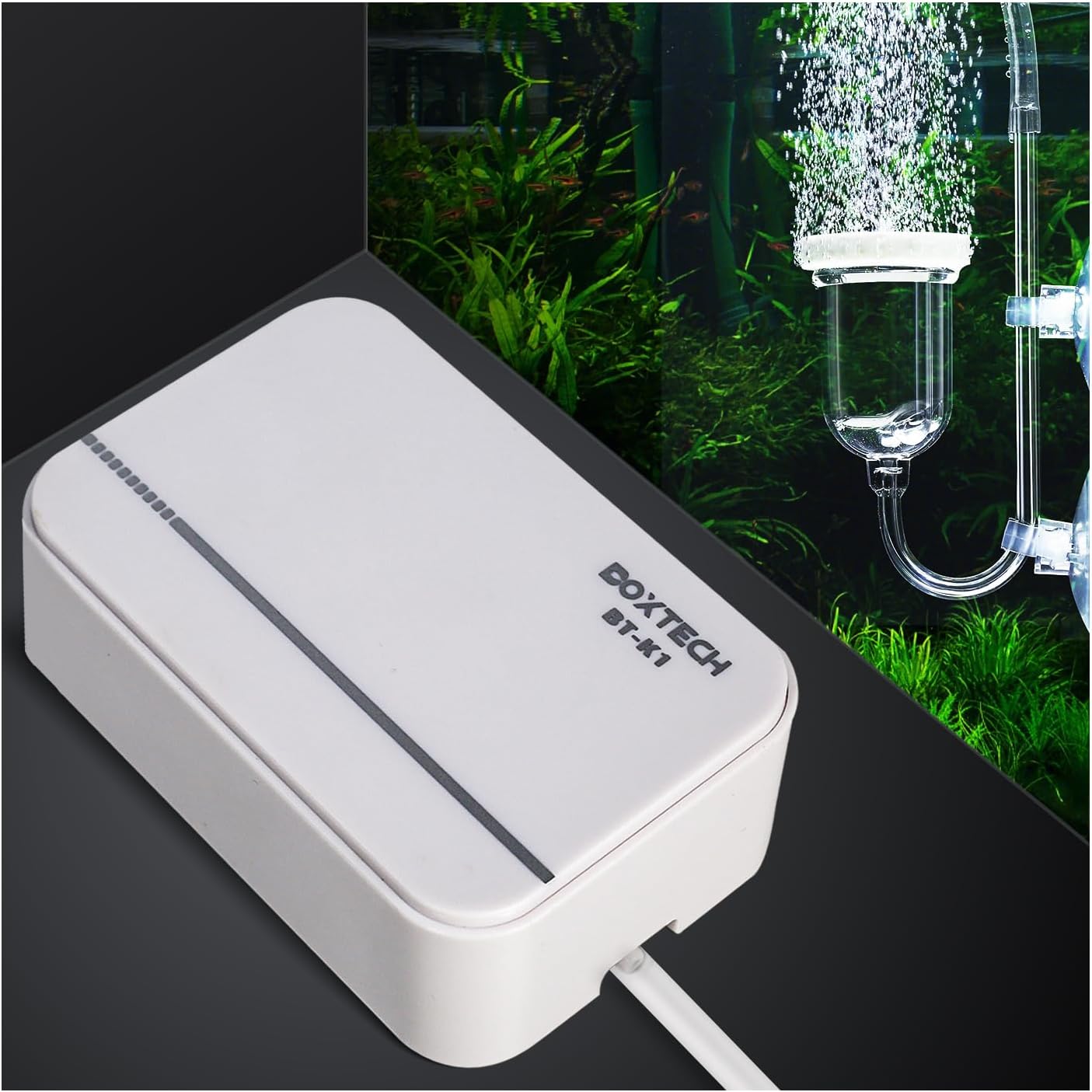
Image 1.1: The boxtech K1 Aquarium Air Pump positioned beside an active aquarium, demonstrating its function in oxygenating the water.
Key Features:
- Ultra-Quiet Operation: Engineered to operate at a noise level below 35dB, minimizing disturbance.
- Powerful Air Flow: Delivers consistent and stable air bubbles for effective oxygenation.
- Compact Design: Small footprint suitable for various aquarium setups.
- Durable Construction: Features a full copper wire motor for energy efficiency and extended lifespan, with a special synthetic rubber membrane.
- Integrated Air Filter: Bottom air intake filter helps block contaminant particles, ensuring cleaner air output.

Image 1.2: An infographic highlighting the pump's main attributes: powerful air volume, suitability for 1-20 gallon tanks, quiet operation, mini size, and availability in two colors.
2. Safety Instructions
- Always disconnect the power supply before performing any maintenance or handling the pump.
- Ensure the power cord is not damaged or frayed. Do not operate the pump with a damaged cord.
- The air pump is designed for indoor use only. Do not expose it to water or extreme humidity.
- Place the air pump on a stable, dry surface, away from direct contact with water.
- If the air pump is positioned below the water level of the aquarium, a check valve must be installed on the air tubing to prevent water backflow into the pump during a power outage.
- Keep out of reach of children and pets.
3. Package Contents
The boxtech Ultra Quiet Aquarium Air Pump K1 package includes:
- 1 x boxtech Ultra Quiet Aquarium Air Pump K1
Note: Air pipe, air stone, and check valve are typically required for a complete setup but are not included with this 'only air pump' variant. These accessories must be purchased separately.

Image 3.1: The boxtech K1 Aquarium Air Pump shown with its packaging and accompanying instruction manual.
4. Setup Guide
- Positioning the Air Pump: Place the air pump on a flat, dry surface above the water level of your aquarium. If placing it below the water level, a check valve is mandatory to prevent water backflow.
- Connecting Air Tubing: Connect one end of the air tubing (not included) to the air outlet nozzle on the pump.
- Installing Check Valve (if necessary): If the pump is below water level, cut the air tubing and insert a check valve (not included) in the line, ensuring the arrow on the valve points towards the air stone.
- Attaching Air Stone: Connect the other end of the air tubing (or the check valve output) to an air stone (not included).
- Placing Air Stone: Submerge the air stone in your aquarium to the desired depth.
- Power Connection: Plug the air pump into a suitable power outlet.
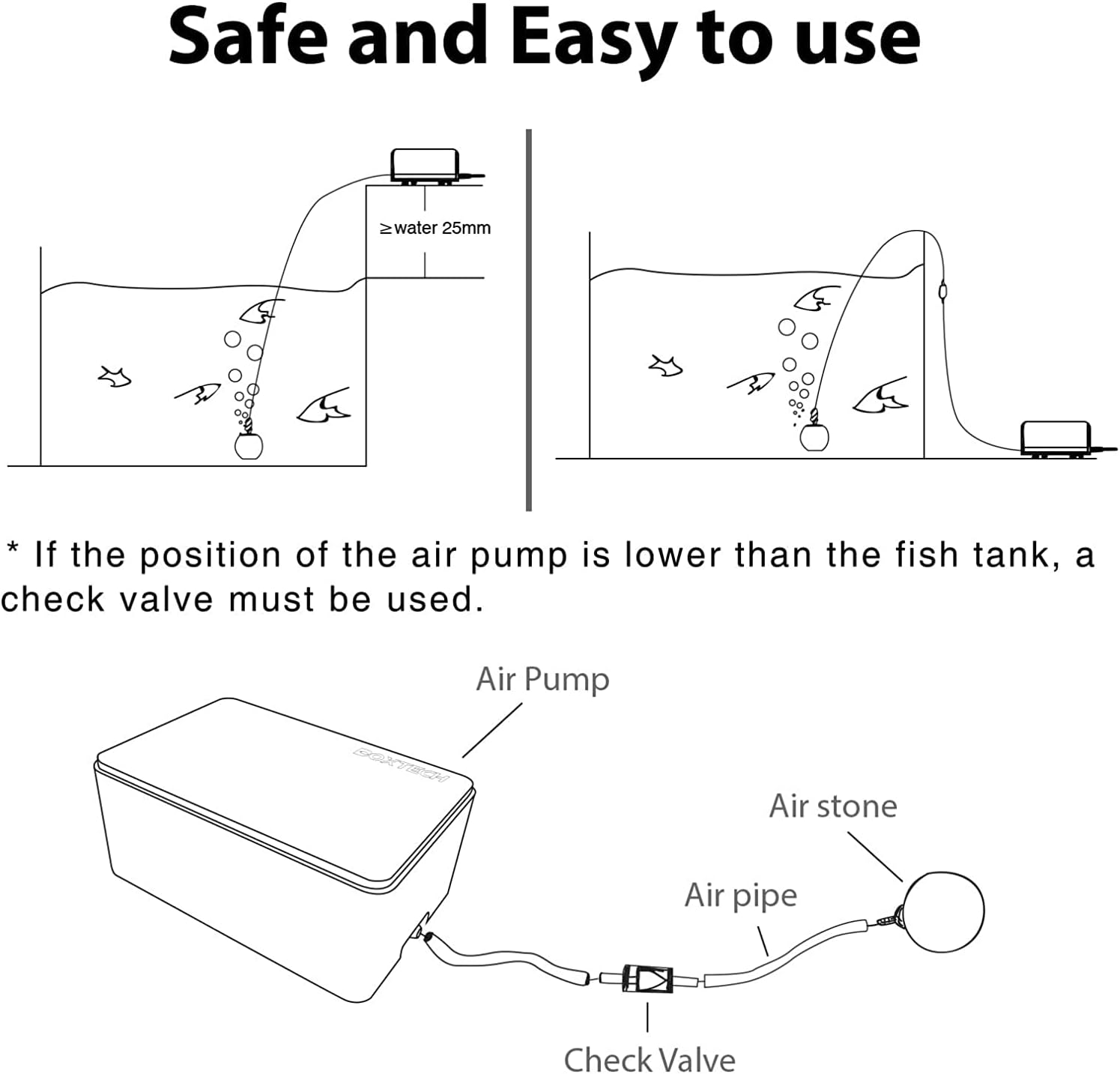
Image 4.1: A diagram showing two setup configurations for the air pump: one with the pump above water level (no check valve needed) and one with the pump below water level (requiring a check valve).

Image 4.2: The air pump connected to a sponge filter, demonstrating a common application for aeration and filtration.

Image 4.3: The air pump connected to an air stone, illustrating a basic setup for oxygen delivery.
5. Operating Instructions
Once properly set up and plugged into a power source, the boxtech K1 air pump will begin operating automatically, providing a steady stream of air to your aquarium. This model features a fixed output and does not require manual adjustment for airflow.
Noise Level:
The pump is designed for ultra-quiet operation, with noise levels typically below 35dB. This allows for placement in various environments without significant auditory disturbance.

Image 5.1: The boxtech mini aquarium air pump shown in a serene setting, highlighting its quiet performance suitable for environments where low noise is critical.
6. Maintenance
Regular maintenance ensures optimal performance and longevity of your air pump.
- Clean Air Intake Filter: Periodically check and clean the air intake filter located at the bottom of the pump. Dust and debris can accumulate, reducing airflow. Gently wipe or brush away any buildup.
- Inspect Air Tubing and Air Stone: Regularly inspect the air tubing for kinks or blockages and the air stone for clogging. Clean or replace these components as needed to maintain consistent air output.
- Check Valve Inspection: If a check valve is used, ensure it is functioning correctly and not obstructed.

Image 6.1: Close-up views of the air pump, detailing the suction filter hole for maintenance reference, the single air outlet, available color options, and the non-slip anti-vibration rubber pads.
7. Troubleshooting
- No Air Output:
- Ensure the power cord is securely plugged into a working outlet.
- Check for kinks or blockages in the air tubing or air stone.
- Verify the air intake filter is not completely clogged.
- Weak Air Output:
- Clean the air intake filter.
- Inspect air tubing and air stone for partial blockages or wear.
- Ensure the air stone is not too deep for the pump's capacity.
- Excessive Noise:
- Ensure the pump is placed on a flat, stable surface.
- Check that the rubber feet are intact and providing proper vibration dampening.
- Verify that the air tubing or other components are not vibrating against the aquarium or other surfaces.

Image 7.1: A comparison of the pump's base, showing the non-slip anti-vibration rubber pads that contribute to its quiet operation.
8. Specifications
| Feature | Specification |
|---|---|
| Model | K1 |
| Noise Level | <35dB |
| Power | 2W |
| Exhaust (Air Flow Capacity) | 2.0 L/min |
| Pressure | 0.014 MPa (2.03 PSI) |
| Suitable Tank Size | 1-30 Gallons |
| Material | Plastic |
| Item Weight | 12 Ounces |
| Power Source | Corded Electric |
| Dimensions (L x W x H) | 4.8 x 3.2 x 2 inches (approximate) |

Image 8.1: A visual representation of the boxtech K1 air pump's dimensions and key technical specifications.
9. Warranty and Support
For warranty information or technical support, please refer to the contact details provided with your purchase or visit the official boxtech website. Keep your proof of purchase for any warranty claims.