
IVEOPPE Samsung Tab A8 Tastatur
IVEOPPE Samsung Galaxy Tab A8 Keyboard Case User Manual
Model: Samsung Tab A8 Tastatur | Brand: IVEOPPE
1. Introduction
This manual provides detailed instructions for the IVEOPPE Bluetooth Keyboard Case with Trackpad, designed specifically for the Samsung Galaxy Tab A8 10.5-inch (2022 models: SM-X200/X205/X207). Please read this manual thoroughly before use to ensure proper functionality and to maximize your product experience.
1.1 Compatibility
This keyboard case is exclusively compatible with the Samsung Galaxy Tab A8 10.5-inch (2022 models: SM-X200, SM-X205, SM-X207). It is not compatible with other Samsung tablet models, such as the Samsung Galaxy Tab A7 10.4" 2020 (SM-T500/T505) or Samsung Galaxy Tab A 8.0 2019 (SM-T290/T295).

Image 1.1: Visual guide illustrating compatible and incompatible Samsung Galaxy Tab models for this keyboard case.
2. Package Contents
Please verify that all items are present in your package:
- 1 x IVEOPPE Case for Samsung Galaxy Tab A8 10.5-inch
- 1 x Bluetooth Keyboard (QWERTZ German Layout)
- 1 x USB Charging Cable
- 1 x User Manual
3. Setup Instructions
3.1 Charging the Keyboard
Before initial use, fully charge the keyboard using the provided USB charging cable. Connect the small end of the USB cable to the keyboard's charging port and the larger end to a USB power adapter (not included) or a computer's USB port. The charging indicator light will illuminate during charging and turn off when fully charged.
3.2 Pairing the Bluetooth Keyboard with Your Tablet
Follow these steps to establish a Bluetooth connection between the keyboard and your Samsung Galaxy Tab A8:
- Ensure the keyboard is fully charged.
- Locate the "OFF/ON" switch on the top right corner of the keyboard and slide it to the "ON" position.
- Press the "Connect" button on the keyboard. The Bluetooth indicator light will start blinking, indicating it is in pairing mode.
- On your Samsung Galaxy Tab A8, go to Settings.
- Tap on Connections, then select Bluetooth.
- Ensure Bluetooth is turned On. Your tablet will search for available devices.
- Locate and tap on the keyboard (usually named "Bluetooth Keyboard" or similar) in the list of available devices.
- A connection will be established, and the Bluetooth indicator light on the keyboard will turn off.
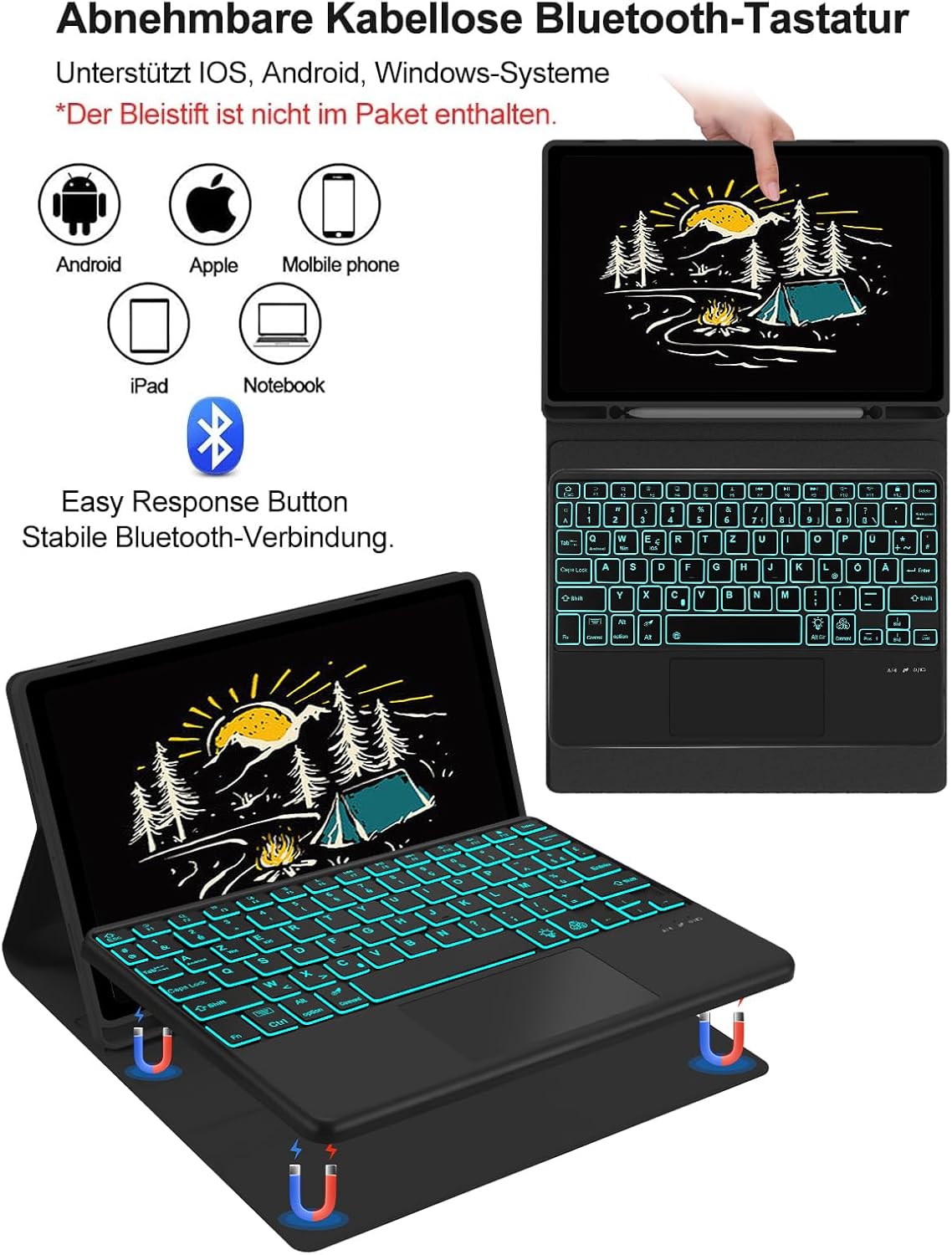
Image 3.1: The keyboard connected to a tablet, demonstrating its wireless Bluetooth functionality and compatibility with various operating systems.
4. Operating Instructions
4.1 Keyboard Features
- QWERTZ German Layout: The keyboard features a standard QWERTZ German layout for comfortable and familiar typing.
- Scissor-Switch Keys: Designed with a scissor-switch mechanism, the keys provide a uniform press, crisp rebound, and no lag, enhancing typing speed and accuracy.
- Backlighting: The keyboard includes backlighting for improved visibility in low-light conditions.
4.2 Multi-Touch Trackpad
The integrated trackpad allows for precise navigation and control, similar to a mouse. It supports various multi-finger gestures:
- Single Finger Tap: Left-click.
- Two-Finger Scroll: Scroll up or down on web pages and documents.
- Pinch-to-Zoom: Use two fingers to zoom in or out on content.
- Swipe Gestures: Specific gestures may be supported for switching applications or accessing system functions, depending on your tablet's operating system.

Image 4.1: The ergonomic design of the keyboard case, featuring the multi-touch trackpad, scissor-switch keys, and three adjustable viewing angles (130°, 125°, 120°) for user comfort.
4.3 Case Features
- Magnetic Detachable Keyboard: The keyboard is magnetically attached to the case, allowing it to be easily removed for standalone use or to lighten the case.
- High-Quality TPU Material: The case is constructed from high-quality TPU, offering superior scratch and abrasion resistance compared to conventional silicone materials. It is also easy to clean and durable.
- Honeycomb Structure for Heat Dissipation: The integrated honeycomb design promotes efficient heat dissipation, preventing your tablet from overheating during extended use.
- Automatic Sleep/Wake Function: Opening the case automatically wakes your tablet, and closing it puts the tablet to sleep, conserving battery life.
- S Pen Holder: A dedicated holder is included to securely store your S Pen, preventing loss and ensuring it's always accessible.
- Shock Absorption: The case provides robust protection against drops and impacts, absorbing shocks to safeguard your tablet.
- Precise Cutouts: All ports, buttons, and the camera are easily accessible thanks to precise cutouts.

Image 4.2: Detailed view of the case's construction, highlighting the anti-slip lining, honeycomb structure for heat dissipation, and the soft, protective TPU material.

Image 4.3: Demonstrates key features of the case: precise cutouts for tablet access, shock absorption capabilities, and the automatic sleep/wake function.

Image 4.4: Illustrates the keyboard case in various usage scenarios, showcasing its utility for typing, productivity, and portability.
5. Maintenance and Care
To ensure the longevity and optimal performance of your IVEOPPE Keyboard Case, follow these maintenance guidelines:
- Cleaning the Case: Wipe the TPU case with a soft, damp cloth. For stubborn stains, a mild soap solution can be used. Avoid harsh chemicals or abrasive cleaners.
- Cleaning the Keyboard: Use a soft, dry cloth to clean the keyboard keys. For dust or debris between keys, use compressed air. Do not spray liquids directly onto the keyboard.
- Storage: When not in use for extended periods, store the keyboard case in a cool, dry place. Ensure the keyboard is turned off to conserve battery.
- Avoid Extreme Conditions: Do not expose the product to extreme temperatures, direct sunlight, or high humidity.
6. Troubleshooting
If you encounter issues with your keyboard case, please refer to the following common problems and solutions:
- Keyboard not connecting via Bluetooth:
- Ensure the keyboard is charged and turned ON.
- Make sure Bluetooth is enabled on your tablet.
- Press the "Connect" button on the keyboard to enter pairing mode.
- Forget the device in your tablet's Bluetooth settings and attempt to re-pair.
- Restart both your tablet and the keyboard.
- Keyboard not typing or keys unresponsive:
- Check if the keyboard is properly connected via Bluetooth.
- Ensure the keyboard battery is not low. Charge if necessary.
- Restart the keyboard and tablet.
- Trackpad not responding:
- Ensure the keyboard is connected.
- Check if the trackpad function is enabled (some keyboards have a toggle key).
- Clean the trackpad surface.
- Tablet not entering sleep/wake mode:
- Ensure the tablet is correctly seated in the case and the cover closes completely.
- Check your tablet's settings for magnetic cover detection.
If these steps do not resolve the issue, please contact IVEOPPE customer support for further assistance.
7. Specifications
| Brand | IVEOPPE |
| Model Name | Funda con teclado para Samsung Galaxy Tab A8 |
| Product Model Number | Samsung Tab A8 Tastatur |
| Compatibility | Samsung Galaxy Tab A8 10.5-inch 2022 (SM-X200/X205/X207) |
| Connectivity Technology | Bluetooth |
| Keyboard Layout | QWERTZ (German) |
| Number of Keys | 78 |
| Switch Type | Clic (Scissor-switch) |
| Trackpad | Yes, Multi-Touch |
| Material | Plastic (Keyboard), TPU (Case) |
| Power Source | Battery (1 Lithium Polymer battery included) |
| Product Dimensions | 25.5 x 18 x 1.89 cm |
| Product Weight | 710 g |
| Water Resistance Level | Not water resistant |
8. Warranty and Support
IVEOPPE products are designed for quality and reliability. For specific warranty information, please refer to the documentation included with your purchase or contact IVEOPPE customer service. If you encounter any issues or have questions regarding your product, please reach out to our support team for assistance.
Ask a question about this manual
Ask about setup, troubleshooting, compatibility, parts, safety, or missing instructions. Manuals+ will review the question and use this page’s manual context to help answer it.