
1. Introduction
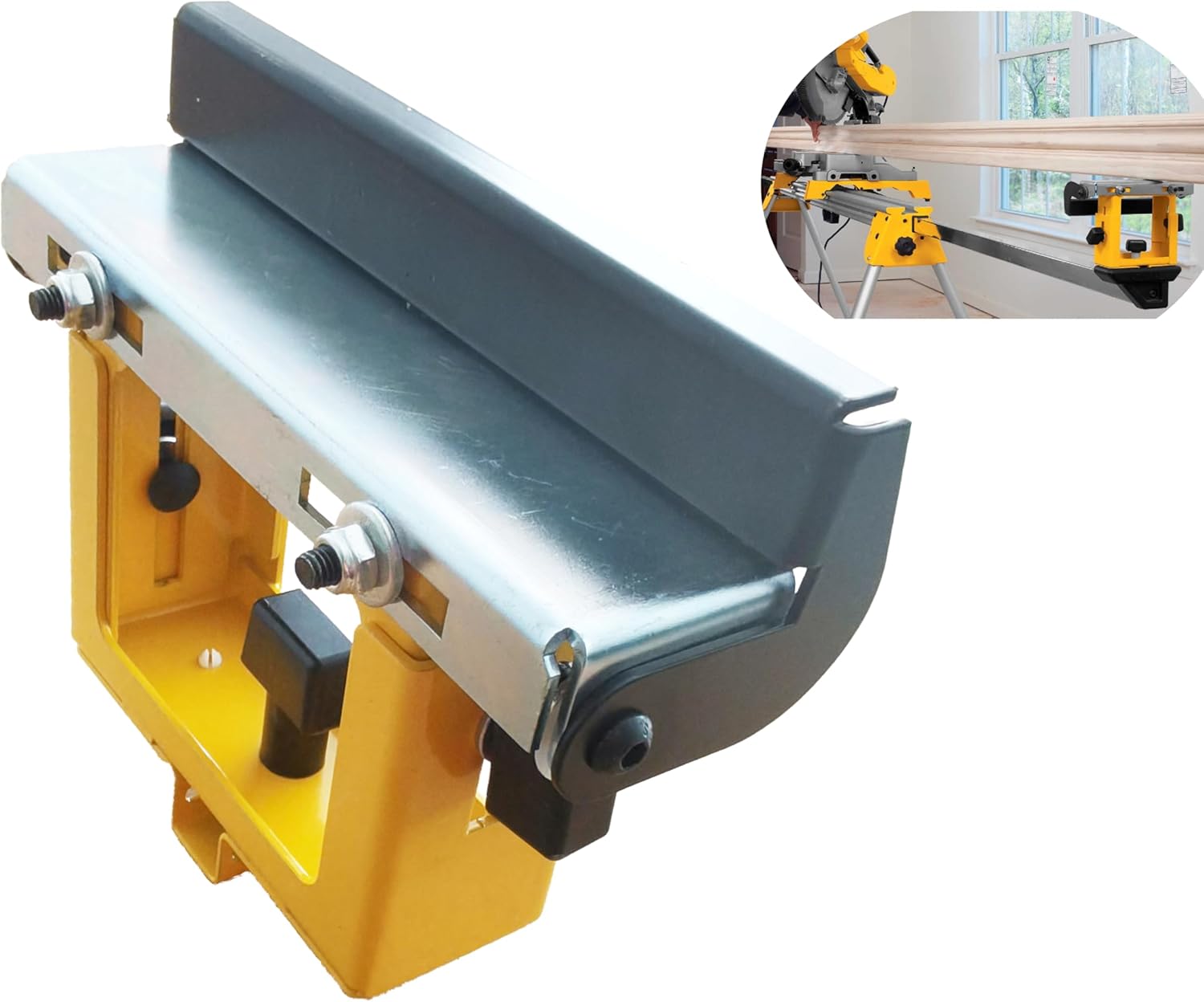
The deawater DW7232 Adjustable Miter Saw Stand Material Support Stop is designed to enhance the functionality and precision of your miter saw stand. This accessory provides stable support for longer workpieces and acts as a reliable stop for repetitive cuts, improving accuracy and efficiency in your woodworking projects. It is compatible with DeWalt miter saw stands including models DW723, DWX723, and DWX724.
2. Safety Information
Always prioritize safety when operating power tools and accessories. Failure to follow these instructions may result in serious injury or property damage.
- Read the Manual: Before assembly or operation, read and understand all instructions in this manual and your miter saw stand manual.
- Wear Personal Protective Equipment (PPE): Always wear safety glasses, hearing protection, and appropriate work gloves.
- Ensure Stability: Verify that the miter saw stand is stable and properly set up on a level surface before attaching the support stop.
- Secure Attachment: Ensure the DW7232 support stop is securely attached to the miter saw stand rails as instructed. Loose attachments can lead to instability.
- Workpiece Support: Do not overload the support stop. Ensure the workpiece is adequately supported to prevent tipping or unexpected movement during cutting.
- Clear Work Area: Keep your work area clean and free of clutter to prevent accidents.
3. Package Contents
Carefully unpack the box and ensure all items are present and undamaged. If any parts are missing or damaged, do not attempt to assemble or use the product. Contact customer support.
- 1 x deawater DW7232 Adjustable Miter Saw Stand Material Support Stop
4. Setup and Installation
Follow these steps to properly install the DW7232 support stop onto your compatible DeWalt miter saw stand.
- Prepare the Miter Saw Stand: Ensure your DeWalt miter saw stand (DW723, DWX723, or DWX724) is fully assembled, stable, and on a level surface.
- Identify Mounting Points: Locate the accessory mounting rails on your miter saw stand. The DW7232 is designed to slide onto these rails.
- Attach the Support Stop: Slide the DW7232 onto the miter saw stand rail. The support stop features a clamping mechanism to secure it in place.
- Secure the Support Stop: Tighten the black knobs on the underside of the DW7232 to firmly clamp it to the stand rail. Ensure it is snug and does not wobble.
- Adjust Height: The DW7232 features an adjustable height mechanism. Loosen the side adjustment knobs to raise or lower the support surface. Adjust the height to match the table height of your miter saw, typically between 3-7/8 inches and 6 inches. Once the desired height is achieved, tighten the adjustment knobs securely.
5. Operating Instructions
The DW7232 can be used in two primary ways: as an auxiliary material support and as a material stop for repetitive cuts.
5.1. Using as Auxiliary Material Support
For cutting long or heavy workpieces, the DW7232 provides essential stability, preventing the material from tipping or sagging.
- Position the Support: Slide the DW7232 along the miter saw stand rail to a position that best supports your workpiece. For very long materials, consider using multiple support stops.
- Adjust Height: Ensure the support surface of the DW7232 is level with the miter saw table. Use the side adjustment knobs to fine-tune the height (3-7/8" to 6").
- Secure Position: Tighten the clamping knobs to lock the support stop in its desired position on the rail.
- Place Workpiece: Carefully place your workpiece onto the miter saw table and the DW7232 support. Ensure the material is stable before making any cuts.
5.2. Using as a Material Stop
When making multiple cuts of the same length, the DW7232 can serve as a precise material stop.
- Measure and Mark: Measure and mark the desired cut length on your workpiece.
- Position the Stop: Slide the DW7232 along the miter saw stand rail until the stop plate aligns with your desired cut length, relative to the saw blade.
- Secure the Stop: Tighten the clamping knobs to firmly lock the DW7232 in place.
- Test Cut: Make a test cut on a scrap piece of material to verify the accuracy of your stop setting. Adjust if necessary.
- Repetitive Cuts: Once set, you can place subsequent workpieces against the stop for consistent, accurate cuts.


6. Maintenance
Regular maintenance ensures the longevity and optimal performance of your DW7232 support stop.
- Cleaning: After each use, wipe down the support stop with a clean, dry cloth to remove sawdust and debris. Avoid using harsh chemicals or abrasive cleaners that could damage the finish.
- Inspection: Periodically inspect all fasteners, knobs, and moving parts for wear, damage, or looseness. Tighten any loose fasteners.
- Storage: Store the support stop in a dry, clean environment when not in use to prevent rust and corrosion. The foldable design of compatible miter saw stands allows for compact storage.
7. Troubleshooting
If you encounter issues with your DW7232 support stop, refer to the following common problems and solutions.
| Problem | Possible Cause | Solution |
|---|---|---|
| Support stop wobbles on the stand rail. | Clamping knobs are not sufficiently tightened. | Ensure the black clamping knobs are fully tightened to secure the support stop to the miter saw stand rail. |
| Difficulty adjusting height. | Adjustment knobs are too tight or debris is obstructing movement. | Loosen the side adjustment knobs completely. Check for any sawdust or debris in the adjustment mechanism and clear it. Apply a dry lubricant if necessary. |
| Support surface is not level with miter saw table. | Incorrect height adjustment. | Re-adjust the height using the side adjustment knobs until the support surface is perfectly level with your miter saw table. Use a straight edge for verification. |
| Support stop does not fit my miter saw stand. | Incompatible miter saw stand model. | The DW7232 is specifically designed for DeWalt miter saw stands DW723, DWX723, and DWX724. Verify your stand model for compatibility. |
8. Specifications
- Model: DW7232
- Adjustable Height Range: 3-7/8 inches to 6 inches
- Compatibility: DeWalt Miter Saw Stands DW723, DWX723, DWX724
- Package Dimensions: 7.72 x 6.22 x 2.8 inches
- Item Weight: 2.41 pounds
- Material: High-quality steel construction
9. Warranty and Support
For warranty information or technical support regarding your deawater DW7232 Adjustable Miter Saw Stand Material Support Stop, please refer to the documentation provided at the point of purchase or contact the manufacturer directly. Keep your purchase receipt as proof of purchase.