
1. Introduction
This document provides instructions for the Generic Universal Remote Control, designed as a replacement for specific Mindkoo Soundbar Speaker Systems, including models MK-BR03, MK-BR02, and MK-BR01. This remote operates using infrared (IR) technology. Please ensure your soundbar model is listed for compatibility before use.
Important Note: This is a replacement remote control. It does not include batteries or a separate instruction manual in its packaging. Functionality may vary slightly compared to the original remote control.
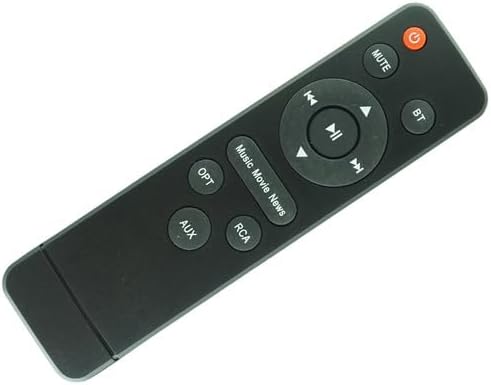
Figure 1: Front view of the universal remote control, displaying all buttons and their labels.
2. Setup
2.1 Battery Installation
The remote control requires two (2) AAA batteries for operation. Batteries are not included with the remote and must be purchased separately.
- Locate the battery compartment on the back of the remote control.
- Press down on the latch and slide the battery cover downwards to open it.
- Insert two AAA batteries, ensuring the positive (+) and negative (-) terminals align correctly with the markings inside the compartment.
- Slide the battery cover back into place until it clicks securely.

Figure 2: Rear view of the remote control with the battery compartment open, showing the two AAA battery slots.

Figure 3: Rear view of the remote control with the battery compartment closed after battery installation.
3. Operating Instructions
Point the remote control directly at the infrared receiver on your Mindkoo soundbar. Ensure there are no obstructions between the remote and the soundbar.
3.1 Button Functions
- Power Button (): Turns the soundbar on or off.
- MUTE: Mutes or unmutes the soundbar audio.
- BT: Selects the Bluetooth input source.
- Navigation Buttons (Up, Down, Left, Right, OK/Play/Pause):
- Play/Pause (): Plays or pauses media playback.
- Previous Track (): Skips to the beginning of the current track or the previous track.
- Next Track (): Skips to the next track.
- Up/Down/Left/Right: May be used for menu navigation or volume control depending on the soundbar model.
- Play/Pause (
- OPT: Selects the Optical input source.
- AUX: Selects the Auxiliary input source.
- RCA: Selects the RCA input source.
- Music / Movie / News: These buttons likely switch between different sound modes or equalizer presets for optimized audio experience.
4. Maintenance
To ensure optimal performance and longevity of your remote control:
- Cleaning: Wipe the remote control with a soft, dry cloth. Do not use liquid cleaners or abrasive materials.
- Battery Replacement: Replace batteries when the remote's response becomes sluggish or it stops functioning. Always replace both batteries at the same time with new ones of the same type (AAA).
- Storage: If the remote will not be used for an extended period, remove the batteries to prevent leakage and potential damage.
- Environment: Avoid exposing the remote to extreme temperatures, direct sunlight, moisture, or dust.
5. Troubleshooting
- Remote not responding:
- Check if the batteries are inserted correctly with the correct polarity.
- Replace old batteries with new AAA batteries.
- Ensure there are no obstructions between the remote control and the soundbar's IR receiver.
- Confirm that the remote is pointed directly at the soundbar.
- Limited functionality or some buttons not working:
- This is a replacement remote. Some advanced functions or specific buttons present on the original remote may not be supported.
- Verify that your soundbar model (MK-BR03, MK-BR02, or MK-BR01) is explicitly listed as compatible. Incompatibility with other models may result in partial or no functionality.
- Short operating range:
- Replace batteries if they are low.
- Ensure no strong light sources (like direct sunlight) are interfering with the IR signal.
6. Specifications
- Product Type: Universal Replacement Remote Control
- Connectivity Technology: Infrared (IR)
- Compatible Devices: Mindkoo MK-BR03, MK-BR02, MK-BR01 Soundbar Speaker Systems
- Power Source: 2 x AAA Batteries (not included)
- Max Number of Supported Devices: 1 (specific soundbar model)
- Manufacturer: SZHKHXD
- Date First Available: August 14, 2023
7. Warranty and Support
As a generic replacement remote, specific warranty details are typically provided by the retailer or seller at the time of purchase. This product is intended as a direct replacement for the listed Mindkoo soundbar models. Please refer to the product listing or contact your seller for information regarding returns or support.
It is crucial to verify that your soundbar's model number matches those specified (MK-BR03, MK-BR02, MK-BR01) to ensure compatibility and expected functionality. This remote may not work with other models.