
1. Introduction
This manual provides detailed instructions for the installation, operation, and maintenance of your KEMIMOTO UTV Overhead Sound System. Please read this manual thoroughly before installation and use to ensure proper function and safety. This system is designed to provide high-quality audio in UTV environments, featuring 6.5-inch speakers, Bluetooth connectivity, and a rugged, weatherproof enclosure.
2. Safety Information
Always observe the following safety precautions:
- Ensure the vehicle's power is off before beginning installation to prevent electrical shock or damage.
- Verify all connections are secure and properly insulated to avoid short circuits.
- Do not operate the sound system at excessively high volumes for prolonged periods, as this may cause hearing damage.
- Regularly inspect mounting hardware for tightness, especially after off-road use.
- This product is designed for UTVs. Ensure compatibility with your vehicle's roll cage dimensions (1.625''-1.9'' diameter, 450-720mm / 17.7-28.5in distance between parallel roll cages).
3. Package Contents
Before installation, please check that all items are present:
- KEMIMOTO UTV Overhead Sound System (Main Unit with 6.5" Speakers)
- Control Panel
- USB/AUX Extender with Weatherproof Cover
- Mounting Hardware (Clamps, Bolts, Nuts)
- Wiring Harness
- Instruction Manual
Video: Unboxing the KEMIMOTO UTV Sound System components, including the amplifier, roll cage clamps, USB/AUX extender, and control panel.
4. Setup and Installation
Follow these steps for proper installation of your UTV Overhead Sound System:
4.1. Mounting the Speaker Unit
- Determine Placement: Position the sound system on your UTV's roll cage to ensure it does not obstruct your rear view or interfere with head clearance. The system is designed to fit 1.625''-1.9'' roll cages, with a required distance of 450-720mm (17.7-28.5in) between parallel roll cages.
- Adjust Brackets: The mounting brackets on the speaker unit are adjustable. Slide them to match the width of your UTV's roll cage.
- Secure to Roll Cage: Use the provided clamps to secure the speaker unit to the roll cage. Ensure all bolts are tightened securely to prevent movement during operation.
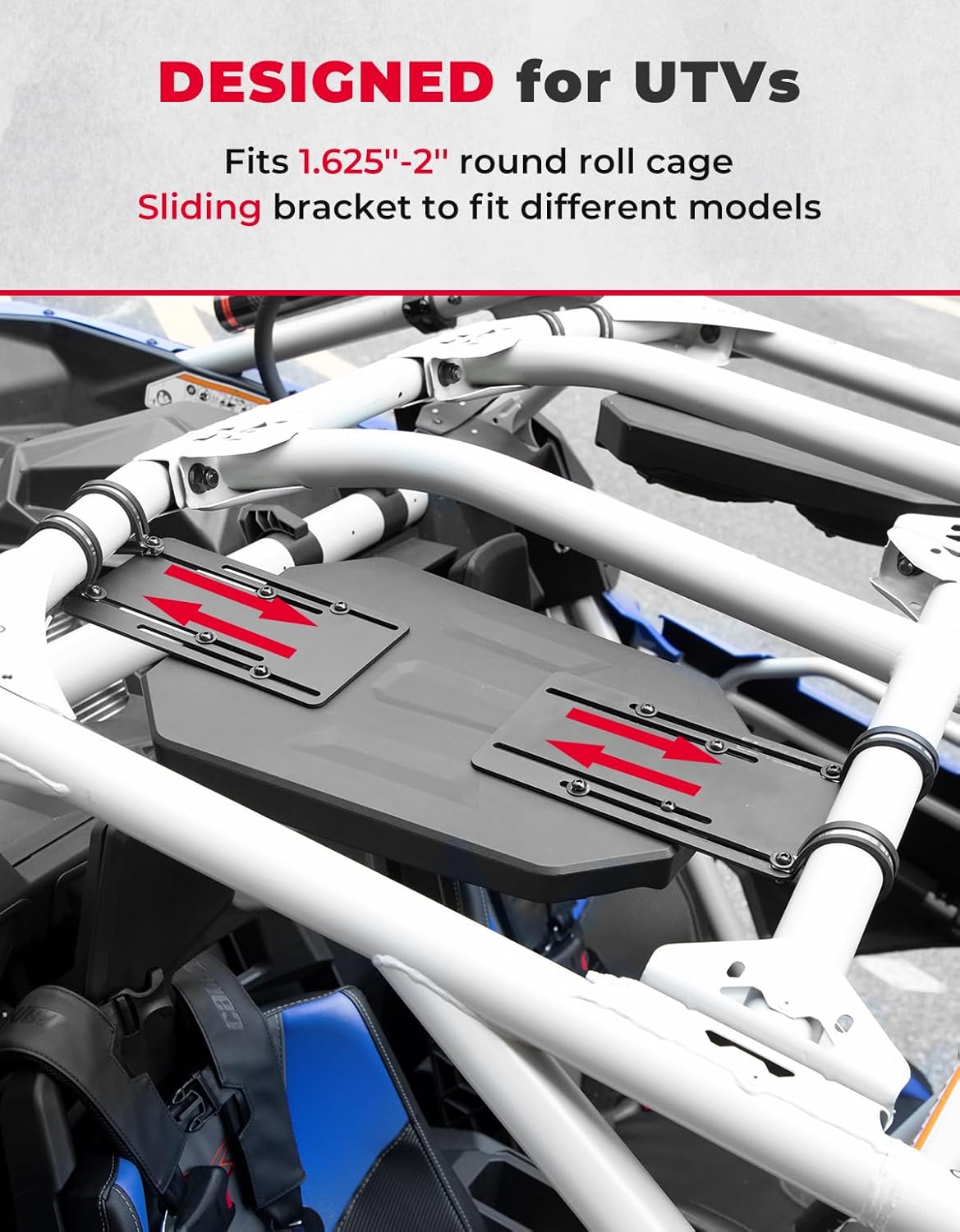
Image: The adjustable sliding brackets on the sound system, designed for flexible installation on various UTV roll cage widths.
Video: Demonstration of adjusting the speaker unit's width to fit the roll cage and securing it in place.

Image: The KEMIMOTO UTV sound system securely mounted to the vehicle's roll cage.
4.2. Wiring and Control Panel Installation
- Connect Wiring Harness: Connect the main wiring harness to the sound system and route it to your power source (e.g., UTV's bus bar) and the control panel location.
- Install Control Panel: The control panel and USB/AUX extender are designed to fit into standard switch dash slots. Carefully insert them into the desired location on your dashboard.
- Secure Connections: Ensure all electrical connections are firm and protected from the elements.

Image: Close-up of the control panel, showing the USB input, AUX input, and control buttons.
Video: Installation of the power button and USB/AUX extender into the dashboard.
5. Operating Instructions
5.1. Power On/Off
Press and hold the Mode/Power button on the control panel to turn the system on or off.
5.2. Bluetooth Connectivity
- Ensure the sound system is powered on.
- On your mobile device, enable Bluetooth and search for available devices.
- Select "KEMIMOTO-T1" (or similar) from the list to pair. A confirmation tone will sound upon successful connection.
- Once connected, you can stream audio wirelessly from your device.

Image: Visual representation of connecting a smartphone via Bluetooth to the sound system.
5.3. USB and AUX Inputs
The USB/AUX extender on the switch dash allows for wired audio input:
- USB Input: Connect a USB device (e.g., MP3 player) for audio playback. The USB port can also be used for charging compatible devices.
- 3.5mm AUX-In: Connect any device with a 3.5mm audio jack using an AUX cable.
- Use the Mode/Power button to switch between input sources (Bluetooth, USB, AUX).
5.4. Control Panel Functions
The control panel provides easy access to audio functions:
- Volume Up/Down: Press the + or - buttons to adjust the volume. Hold to rapidly change volume.
- Play/Pause: Press the Play/Pause button to pause or resume playback.
- Track Forward/Previous: Press the Track Forward or Track Previous buttons to skip tracks.
Video: Demonstration of the control panel buttons for volume adjustment, track skipping, and play/pause functions.
6. Maintenance
To ensure the longevity and optimal performance of your KEMIMOTO UTV Overhead Sound System:
- Cleaning: Wipe the unit with a soft, damp cloth. Avoid harsh chemicals or abrasive cleaners.
- Weather Protection: Although the unit has an IP67 weatherproof rating, prolonged exposure to extreme conditions should be minimized when possible. Ensure the weatherproof cover for the USB/AUX extender is always closed when not in use.
- Connection Checks: Periodically check all wiring connections for corrosion or looseness. Tighten as necessary.

Image: The sound system demonstrating its IP67 waterproof capabilities, suitable for various outdoor conditions.
7. Troubleshooting
| Problem | Possible Cause | Solution |
|---|---|---|
| No power | Loose power connection, blown fuse, vehicle power off. | Check wiring, inspect fuse, ensure vehicle power is on. |
| No sound | Volume too low, incorrect input source, device not paired (Bluetooth). | Increase volume, select correct input (Bluetooth/USB/AUX), re-pair Bluetooth device. |
| Poor sound quality | Loose speaker connections, interference, low quality audio source. | Check speaker wiring, move away from interference sources, use high-quality audio files. |
| Bluetooth not connecting | Device too far, Bluetooth off on device, system already paired to another device. | Ensure device is within 66 feet, turn Bluetooth on, disconnect from other devices. |
8. Specifications
- Brand: KEMIMOTO
- Model Number: B0117-03001BK
- Speaker Type: Outdoor, 6.5 Inches Coaxial Woofers (x4)
- Speaker Maximum Output Power: 200 Watts
- Frequency Response: Up to 20 KHz
- Connectivity Technology: Bluetooth 5.0
- Bluetooth Range: 66 Feet
- Audio Output Mode: Stereo
- Mounting Type: Roll Cage Mount (Fits 1.625''-1.9'' roll cages, 450-720mm / 17.7-28.5in between parallel cages)
- Enclosure Material: Plastic Or Metal
- Additional Features: Dustproof, USB Port (charging capable), Waterproof (IP67 rated)
- Controller Type: Button (Control panel with Mode/Power, Volume Up/Down, Play/Pause, Track Forward/Previous)
- Color: Black
- Input Voltage: 12 Volts
- Item Weight: 12.15 Kilograms
- Compatible Devices: Smartphone, MP3 Player, Tablet, Laptop
- Power Source: Vehicle Powered
9. Warranty and Support
This KEMIMOTO product comes with a Limited Warranty. For specific warranty details, claims, or technical support, please refer to the warranty card included in your package or contact KEMIMOTO customer service directly. Keep your purchase receipt as proof of purchase.
For further assistance, visit the official KEMIMOTO website or contact their support team.