
ADC-VDB750
Alarm.com ADC-VDB750 WiFi 2MP Video Doorbell Camera User Manual
Model: ADC-VDB750
Introduction
The Alarm.com ADC-VDB750 is an advanced WiFi 2MP Video Doorbell Camera designed to enhance your home security. It features a crystal clear 2MP picture, expansive field of view, two-way audio, and intelligent people detection to provide comprehensive monitoring of your front door. This manual provides essential information for setup, operation, and maintenance of your device.
Safety Information
Please read and understand all safety instructions before installing and operating this device. Failure to follow these instructions may result in electric shock, fire, or other hazards.
- Ensure power is disconnected before installation or maintenance.
- Do not expose the device to extreme temperatures or moisture beyond its operating specifications.
- Use only manufacturer-approved accessories and replacement parts.
- This device requires an Alarm.com subscription for full functionality.
What's in the Box
Verify that all components are present before beginning installation:
- Camera Body
- Mounting plate
- Mounting hardware
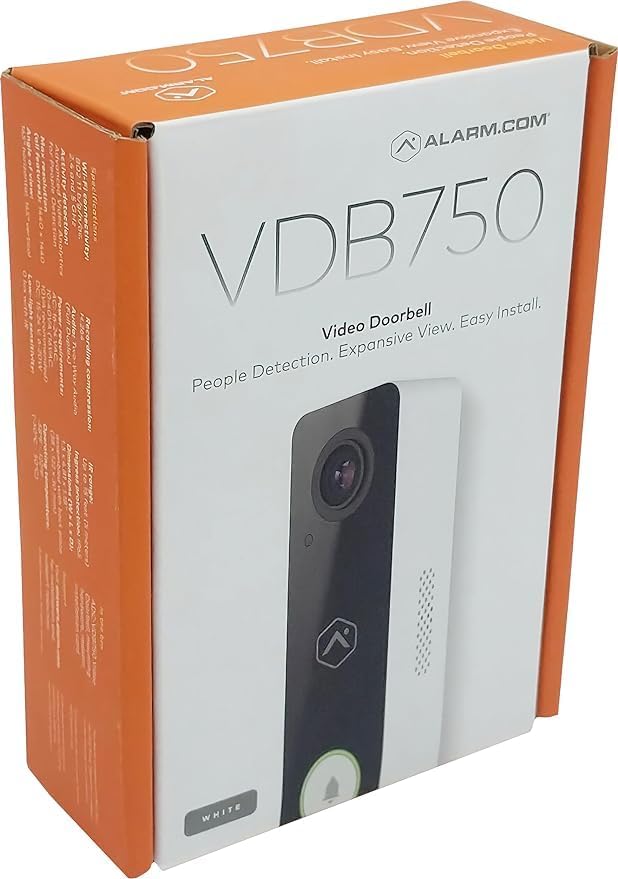
Image: The retail packaging for the Alarm.com ADC-VDB750 Video Doorbell Camera, showing the product name and key features.
Setup and Installation
Pre-installation Checklist:
- Ensure you have an active Alarm.com subscription.
- Verify your existing doorbell wiring is compatible (wired installation).
- Confirm strong Wi-Fi signal at the installation location.
- Gather necessary tools (screwdriver, drill, etc.).
Installation Steps:
- Disconnect Power: Turn off power to your existing doorbell at the circuit breaker.
- Remove Old Doorbell: Carefully remove your current doorbell button and disconnect its wires.
- Mounting Plate Installation: Secure the provided mounting plate to your wall using the included mounting hardware. Ensure it is level and stable.
- Wire Connection: Connect the existing doorbell wires to the terminals on the ADC-VDB750 camera body. Follow the wiring diagram provided in the quick start guide (not included in this manual).
- Attach Camera Body: Carefully attach the camera body to the mounting plate, ensuring it clicks securely into place.
- Restore Power: Turn the power back on at the circuit breaker.
- Wi-Fi Connection: Follow the instructions in the Alarm.com app to connect your new doorbell camera to your home Wi-Fi network.

Image: Front view of the Alarm.com ADC-VDB750 Video Doorbell Camera, highlighting its sleek design and camera lens.

Image: Side view of the Alarm.com ADC-VDB750 Video Doorbell Camera, showing its slim profile and speaker grille.
Operating Your Doorbell Camera
The ADC-VDB750 integrates seamlessly with your Alarm.com system, offering a range of features for enhanced security and convenience.
Key Features:
- Two-Way Audio: Communicate with visitors at your door from anywhere using the Alarm.com app.
- Video Analytics with People Detection: Receive faster and more relevant alerts with advanced detection capabilities, reducing false notifications.
- Expansive Field of View: A 165° horizontal and 145° vertical field of view ensures you capture a wide area around your front door.
- Full HD Resolution & HDR: Enjoy clear, detailed video quality in various lighting conditions.
- Infrared Night Vision: Monitor your property effectively even in low-light or nighttime environments.
- Compatibility: Works with the Alarm.com Smart Chime (ADC-W115C) for indoor alerts.
Using the Alarm.com App:
Once connected, use the Alarm.com mobile application to:
- View live video feed from your doorbell.
- Receive instant notifications for motion detection or doorbell presses.
- Engage in two-way conversations with visitors.
- Access recorded video clips and events.
- Customize detection zones and notification settings.
Maintenance
Regular maintenance helps ensure optimal performance and longevity of your doorbell camera.
- Cleaning: Gently wipe the camera lens and body with a soft, damp cloth. Avoid abrasive cleaners or solvents.
- Firmware Updates: Ensure your device's firmware is up-to-date through the Alarm.com app to benefit from the latest features and security enhancements.
- Connectivity Check: Periodically check your Wi-Fi signal strength to ensure a stable connection.
Troubleshooting
If you encounter issues with your ADC-VDB750, try the following common troubleshooting steps:
- No Power/Offline:
- Check your circuit breaker to ensure power is on.
- Verify all wiring connections are secure.
- Ensure your Wi-Fi network is active and the doorbell is within range.
- Poor Video Quality:
- Clean the camera lens.
- Check your Wi-Fi signal strength; a weak signal can affect video streaming.
- Audio Issues:
- Ensure your device's microphone and speaker are not obstructed.
- Check audio settings within the Alarm.com app.
- False Notifications:
- Adjust motion detection sensitivity and detection zones in the Alarm.com app.
For more detailed troubleshooting or persistent issues, please refer to the Alarm.com support resources or contact your Alarm.com service provider.
Specifications
| Feature | Specification |
|---|---|
| Model Name | Alarm.com ADC-VDB750 |
| Indoor/Outdoor Usage | Outdoor |
| Power Source | Battery Powered |
| Connectivity Protocol | Wi-Fi |
| Controller Type | Alarm.com |
| Mounting Type | Wall Mount |
| Video Capture Resolution | 1080p |
| Color | White |
| Number of Items | 1 |
| Number of Channels | 1 |
| Form Factor | Doorbell |
| Viewing Angle | 165 Degrees |
| Installation Type | Screw In |
| Night Vision Range | 15 Feet |
| Item dimensions L x W x H | 4.81 x 1.5 x 1.18 inches |
| Item Weight | 8.9 ounces |
| UPC | 850038186692 |
| Manufacturer | Alarm.com |
| Recommended Uses For Product | Outdoor Security |
| Special Feature | HD Resolution, Night Vision, 2-Way Audio, Night Vision Motion Sensor, Motion Sensor |
Warranty and Support
For warranty information, technical support, or further assistance, please contact your Alarm.com service provider or visit the official Alarm.com website. Keep your purchase receipt and product model number (ADC-VDB750) handy for faster service.
Related documentsADC-VDB750


Ask a question about this manual
Ask about setup, troubleshooting, compatibility, parts, safety, or missing instructions. Manuals+ will review the question and use this page’s manual context to help answer it.