
GFTVRCE V0050
Chameleon Ultra RFID Emulator User Manual
Model: V0050
Introduction
The Chameleon Ultra is a versatile and portable RFID tool designed for emulation, cloning, and testing of various RFID systems. It serves as a comprehensive solution for managing RFID tags and cards, offering functionalities for security professionals, engineers, and hobbyists. This manual provides detailed instructions for the setup, operation, and maintenance of your Chameleon Ultra device.

Figure 1: Front and back view of the Chameleon Ultra device, showcasing its compact design and internal components.
Setup
1. Initial Charging
Upon receiving your Chameleon Ultra, it is recommended to fully charge the device before first use. The device may arrive with a discharged battery.
- Connect the Chameleon Ultra to a standard USB power source using a compatible USB cable.
- Observe the charging indicator (if available) on the device. Charging status may be indicated by an LED light.
- Allow the device to charge until the battery is full.

Figure 2: The Chameleon Ultra connected to a charging cable, illustrating the charging process.
2. Firmware Update (Optional but Recommended)
For optimal performance and access to the latest features, it is advisable to update the device firmware. This process typically requires specific software and technical knowledge.
- Refer to the official Chameleon Ultra documentation or community resources for detailed instructions on firmware updates.
- Ensure your computer has the necessary drivers and software installed (e.g., ProxSpace environment for Windows).
- Follow the specific steps provided by the manufacturer for connecting the device and initiating the firmware update.
Operating Instructions
The Chameleon Ultra offers three primary functionalities: Emulation, Cloning, and Testing.
1. Emulation
Emulation allows the Chameleon Ultra to behave like a specific RFID tag or system, useful for testing and validating RFID readers.
- Program the Chameleon Ultra with specific data and commands using a programming language (e.g., Lua).
- The device will then transmit this data, which RFID readers will interpret as if it originated from a real RFID tag.
2. Cloning
Cloning involves creating a duplicate of an existing RFID tag. This is useful for replacing lost tags or creating multiple copies.
- Place the Chameleon Ultra in "tag emulation mode."
- Program the device to mimic the target RFID tag.
- Use the Chameleon Ultra to read data from the original RFID tag.
- Write the captured data onto a blank RFID tag to create a clone.
3. Testing
The Chameleon Ultra can be used to test and validate the behavior of RFID readers and systems under various conditions.
- Emulate RFID tags with specific characteristics, such as a weak signal or different operating frequencies.
- Identify potential issues or weaknesses in RFID systems and optimize their performance.
Supported Functions and Card Types
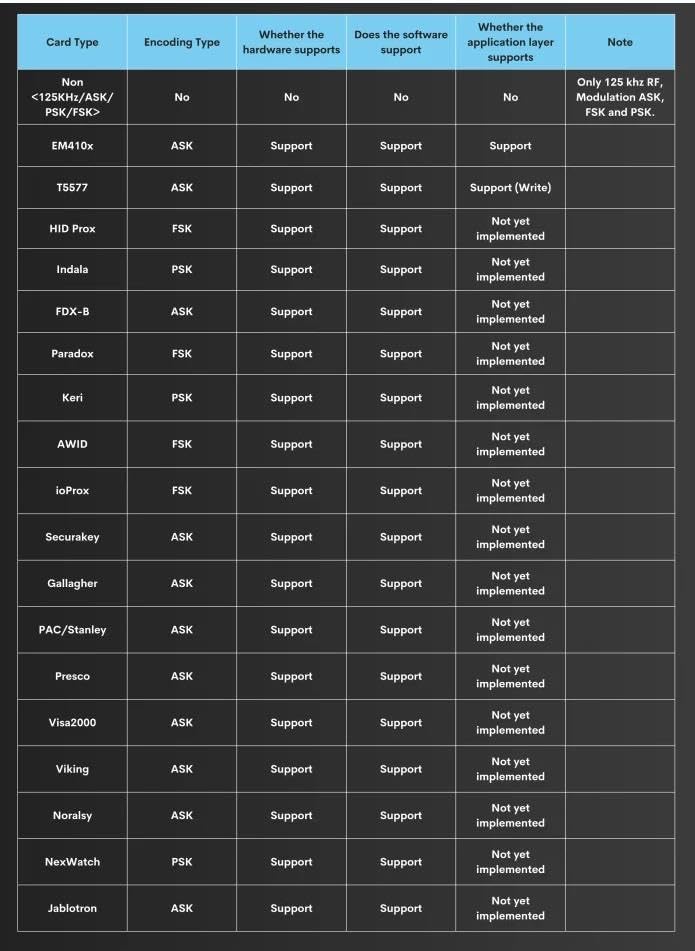
The Chameleon Ultra supports a wide range of RFID card types and functions. Refer to the tables below for detailed compatibility information.
Supported Functions: Low Frequency Reader
| Card Type | Encoding Type | Hardware Support | Software Support | Application Layer Support | Note |
|---|---|---|---|---|---|
| Non <125KHz/ASK/PSK/FSK> | No | No | No | No | Only 125 kHz RF, Modulation ASK, FSK and PSK. |
| EM410x | ASK | Support | Support | Support | |
| T5577 | ASK | Support | Support | Support (Write) | |
| HID Prox | FSK | Support | Support | Not yet implemented | |
| Indala | PSK | Support | Support | Not yet implemented | |
| FDX-B | ASK | Support | Support | Not yet implemented | |
| Paradox | FSK | Support | Support | Not yet implemented | |
| Keri | PSK | Support | Support | Not yet implemented | |
| AWID | FSK | Support | Support | Not yet implemented | |
| ioProx | FSK | Support | Support | Not yet implemented | |
| Securakey | ASK | Support | Support | Not yet implemented | |
| Gallagher | ASK | Support | Support | Not yet implemented | |
| PAC/Stanley | ASK | Support | Support | Not yet implemented | |
| Presco | ASK | Support | Support | Not yet implemented | |
| Visa2000 | ASK | Support | Support | Not yet implemented | |
| Viking | ASK | Support | Support | Not yet implemented | |
| Noralsy | ASK | Support | Support | Not yet implemented | |
| NexWatch | PSK | Support | Support | Not yet implemented | |
| Jablotron | ASK | Support | Support | Not yet implemented |
Figure 3: Table detailing supported Low Frequency (LF) card types and their compatibility with hardware, software, and application layers for reading functions.
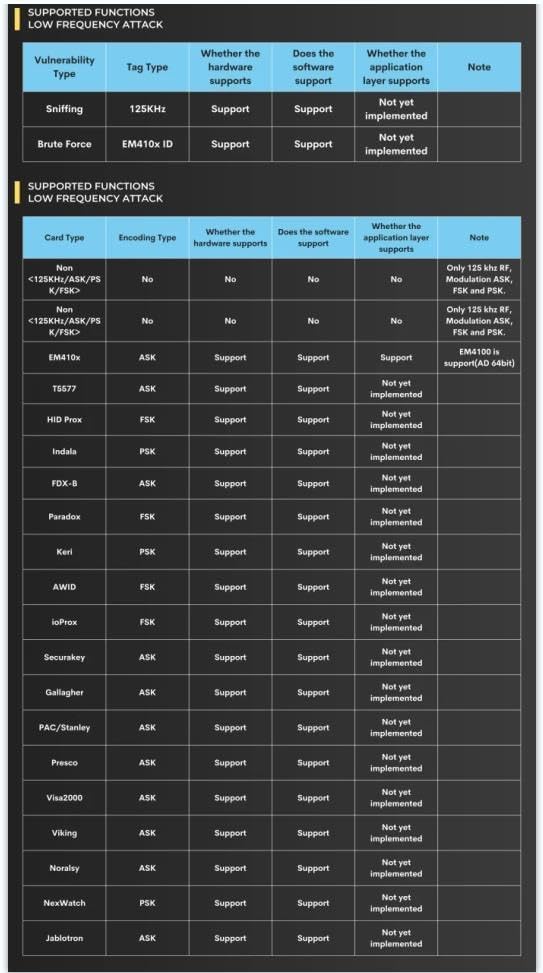
Supported Functions: Low Frequency Attack
| Vulnerability Type | Tag Type | Hardware Support | Software Support | Application Layer Support | Note |
|---|---|---|---|---|---|
| Sniffing | 125KHz | Support | Support | Not yet implemented | |
| Brute Force | EM410x ID | Support | Support | Not yet implemented | EM4100 is support(AD 64bit) |
Figure 4: Table detailing supported Low Frequency (LF) attack types and their compatibility with hardware, software, and application layers.
Supported Functions: High Frequency Reader
| Card Type | Encoding Type | Hardware Support | Software Support | Application Layer Support | Note |
|---|---|---|---|---|---|
| Non <13.56MHz or ISO14443A> | No | No | No | No | NXP RC522 Datasheet |
| NTAG 21x (210-218) | ISO14443A/106 kbit/s | Support | Support | Not yet implemented | |
| MIFARE Ultralight | ISO14443A/106 kbit/s | Support | Support | Not yet implemented | |
| MIFARE Ultralight EV1 | ISO14443A/106 kbit/s | Support | Support | Not yet implemented | |
| MIFARE Ultralight C | ISO14443A/106 kbit/s | Support | Support | Not yet implemented | |
| MIFARE Classic 1K/2K/4K (4B/7B) | ISO14443A/106 kbit/s | Support | Support | Not yet implemented | |
| MIFARE DESFire | ISO14443A High Rate | Supports low rates, or possibly higher rates | Supports low rates, or possibly higher rates | Not yet implemented | |
| MIFARE DESFire EV1 | ISO14443A High Rate | Supports low rates, or possibly higher rates | Supports low rates, or possibly higher rates | Not yet implemented | Backward compatible |
| MIFARE DESFire EV2 | ISO14443A High Rate | Supports low rates, or possibly higher rates | Supports low rates, or possibly higher rates | Not yet implemented | |
| MIFARE PLUS | ISO14443A High Rate | Supports low rates, or possibly higher rates | Supports low rates, or possibly higher rates | Not yet implemented |
Figure 5: Table detailing supported High Frequency (HF) card types and their compatibility with hardware, software, and application layers for reading functions.

Supported Functions: High Frequency Attack
| Attack Type | Tag Type | Hardware Support | Software Support | Application Layer Support | Note |
|---|---|---|---|---|---|
| Sniffing | No | No | No | No | |
| MFKEY32 V2 | MIFARE Classic | Support | Support | Support | MIFARE Classic Protection |
| Darkside | MIFARE Classic | Support | Support | Support | Encrypted 4 bit NAck |
| Nested | MIFARE Classic | Support | Support | Support | PRNG (Distance guess) |
| StaticNested | MIFARE Classic | Support | Support | Not yet implemented | PRNG (2NT Fast Decrypt) |
| HardNested | MIFARE Classic | Support | Support | Support | No |
| Relay attack | ISO14443A | Support | Support | Support | No |
Figure 6: Table detailing supported High Frequency (HF) attack types and their compatibility with hardware, software, and application layers.
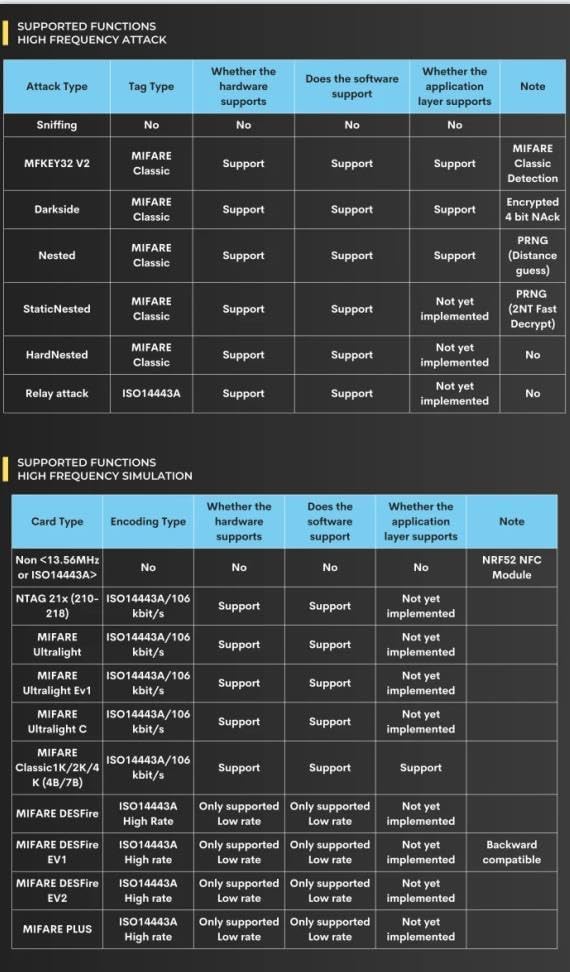
Supported Functions: High Frequency Simulation
| Card Type | Encoding Type | Hardware Support | Software Support | Application Layer Support | Note |
|---|---|---|---|---|---|
| Non <13.56MHz or ISO14443A> | No | No | No | No | NRF52 NFC Module |
| NTAG 21x (210-218) | ISO14443A/106 kbit/s | Support | Support | Not yet implemented | |
| MIFARE Ultralight | ISO14443A/106 kbit/s | Support | Support | Not yet implemented | |
| MIFARE Ultralight EV1 | ISO14443A/106 kbit/s | Support | Support | Not yet implemented | |
| MIFARE Ultralight C | ISO14443A/106 kbit/s | Support | Support | Not yet implemented | |
| MIFARE Classic 1K/2K/4K (4B/7B) | ISO14443A/106 kbit/s | Support | Support | Not yet implemented | |
| MIFARE DESFire | ISO14443A High Rate | Only supported Low rate | Only supported Low rate | Not yet implemented | |
| MIFARE DESFire EV1 | ISO14443A High Rate | Only supported Low rate | Only supported Low rate | Not yet implemented | Backward compatible |
| MIFARE DESFire EV2 | ISO14443A High Rate | Only supported Low rate | Only supported Low rate | Not yet implemented | |
| MIFARE PLUS | ISO14443A High Rate | Only supported Low rate | Only supported Low rate | Not yet implemented |
Figure 7: Table detailing supported High Frequency (HF) simulation types and their compatibility with hardware, software, and application layers.
Specifications
Key technical specifications for the Chameleon Ultra device:
- Manufacturer: GFTVRCE
- Model Number: V0050
- Package Dimensions: 5 x 4.33 x 0.55 inches
- Item Weight: 0.634 ounces (0.02 Kilograms)
- Material: Polycarbonate (PC)
- Color: Black, Gold
- Display Type: LCD
- Included Components: NFC
- Batteries required: No
Function Comparison Chart
A comparison of Chameleon Ultra's functions against similar RFID products.
| 14A Full Simulation | MIFARE Full Simulation | 14A Read | Darkside | Nested | StaticNested | Hardnest | Low Frequency Simulation | Low Frequency Read | |
|---|---|---|---|---|---|---|---|---|---|
| ChameleonUltra | ✔ | ✔ | ✔ | ✔ | ✔ | ✔ | ✔ | ✔ | ✔ |
| ChameleonLite | ✔ | ✔ | x | x | x | x | x | ✔ | x |
| ChameleonTiny | ✔ | but slow | UID Only | x | x | x | x | ✔ | x |
| FlipperZero | ✔ | but slow | Default Keys Only | x | x | x | x | ✔ | ✔ |
| Keysy | x | x | x | x | x | x | x | x | x |
Figure 8: Comparison chart of Chameleon Ultra's RFID functions against other similar devices.

Performance Comparison Chart
A comparison of Chameleon Ultra's performance metrics against similar RFID products.
| Power Consumption of Simulation | Charging Cycle For Daily Use | Battery Reader Read Rate (High Frequency) | AUTH-nt Frame Delay Time | AUTH-nr-at Frame Delay Time | AUTH-at Frame Delay Time | |
|---|---|---|---|---|---|---|
| ChameleonUltra | 7mA | 6 Months | 100% | 2244uS | 3348uS | 5652uS |
| ChameleonLite | 7mA | 6 Months | 100% | 2244uS | 3348uS | 5652uS |
| ChameleonTiny | 35mA | 2 Months | 20% | 9316uS | 5412uS | 9380uS |
| FlipperZero | 42mA | 1 Week | 20% | 6004uS | 8212uS | 19156uS |
| Keysy | x | x | x | x | x | x |
Figure 9: Performance comparison chart of Chameleon Ultra against other similar RFID devices.
Troubleshooting
If you encounter issues with your Chameleon Ultra, consider the following common troubleshooting steps:
- Device Not Responding/Powering On: Ensure the device is fully charged. Connect it to a reliable USB power source and allow sufficient charging time.
- Unable to Read/Scan Cards (LF or HF):
- Verify that the card type you are attempting to read is supported by the Chameleon Ultra (refer to the "Supported Functions" tables).
- Ensure the card is placed correctly and within the optimal reading range of the device.
- Check if the correct frequency (LF or HF) is selected on the device or in the accompanying software.
- If specific card types (e.g., LF 125kHz) are not reading, confirm that your device's firmware supports these functions, as some features might be under development or require specific configurations.
- Connectivity Issues (USB/Bluetooth):
- For USB connection, ensure the correct drivers are installed on your computer. Try a different USB port or cable.
- For Bluetooth connection, ensure Bluetooth is enabled on both the Chameleon Ultra and your host device, and that they are properly paired.
- Firmware Related Issues: If the device behaves unexpectedly after a firmware update, or if you suspect a corrupted firmware, refer to the official documentation for instructions on how to re-flash or restore the firmware.
Maintenance
Proper maintenance ensures the longevity and optimal performance of your Chameleon Ultra:
- Cleaning: Use a soft, dry cloth to clean the exterior of the device. Avoid using harsh chemicals, solvents, or abrasive materials.
- Storage: Store the device in a cool, dry place away from direct sunlight, extreme temperatures, and high humidity.
- Battery Care: Although the product states "Batteries required: No", implying an internal rechargeable battery, it's good practice to avoid fully discharging the battery frequently. If storing for extended periods, charge the device to about 50% to prolong battery life.
- Physical Protection: While durable, avoid dropping the device or subjecting it to strong impacts.
Warranty and Support
For information regarding product warranty, technical support, or service, please refer to the official website of GFTVRCE or contact their customer support channels. Keep your purchase receipt as proof of purchase for any warranty claims.
Related Documents - V0050
 |
CTB V0050 Chameleon Ultra External Photos Report External photos and identification of key components for the CTB V0050 Chameleon Ultra model, including 125K ANT and BT ANT, with detailed textual descriptions and scale references. |
 |
FCC Compliance and RF Exposure Information for Shenzhen Guanfeiteng V0050 Details on FCC Part 15 compliance, interference guidelines, and radio frequency exposure requirements for the Shenzhen Guanfeiteng V0050 device. |
 |
ISDB-T Full-Seg User Manual User manual for the ISDB-T Full-Seg digital terrestrial television tuner, covering setup, operation, and troubleshooting. |
 |
TCI America Safety Data Sheet: N-[2-(N-Vinylbenzylamino)ethyl]-3-aminopropyltrimethoxysilane Hydrochloride (30-40% in Methanol) Safety Data Sheet (SDS) for N-[2-(N-Vinylbenzylamino)ethyl]-3-aminopropyltrimethoxysilane Hydrochloride (30-40% in Methanol) from TCI America. Provides information on identification, hazards, composition, first aid, fire-fighting, accidental release, handling, storage, exposure controls, physical and chemical properties, stability, reactivity, toxicology, ecology, disposal, transport, and regulatory information. |
 |
FCC ID Label and Location for Chameleon Ultra V0050 Details the FCC ID (2BHL5-V0050) and Model Number (V0050) for the Chameleon Ultra device, including a textual description of the device and its label location. |
Ask a question about this manual
Ask about setup, troubleshooting, compatibility, parts, safety, or missing instructions. Manuals+ will review the question and use this page’s manual context to help answer it.