
1. Introduction and Overview
The Sanpyl Smart Video Doorbell Camera provides enhanced home security and communication. It features 1080P HD video, PIR human detection, two-way audio, and night vision capabilities, allowing you to monitor your doorstep and interact with visitors remotely via your smartphone or tablet.

Image: The Sanpyl Smart Video Doorbell Camera (left) and its wireless chime (right), both in white, showcasing their compact design.
2. Product Features
- 1080P HD Video: Captures clear, high-definition video with a wide-angle lens, ensuring comprehensive coverage of your entryway.
- Two-Way Audio: Equipped with a high-powered speaker and sensitive microphone for clear, real-time communication with visitors.
- PIR Human Detection: Automatically records and sends notifications to your phone when human motion is detected, minimizing false alarms.
- Infrared Night Vision: Built-in infrared lights and an ICR infrared filter enable automatic switching between day and night modes, providing clear footage even in low-light or dark conditions.
- Remote Video Call: Receive instant push notifications when the doorbell is pressed, allowing you to answer and view your doorstep remotely through the mobile application.
- Cloud Storage: Supports cloud storage for recorded video footage, accessible anytime via the app.
- Wireless Connectivity: Connects via 2.4GHz Wi-Fi for stable and reliable operation.

Image: Illustration of the doorbell camera's infrared night vision, showing a hallway transitioning from day to night view, highlighting its ability to provide clear visibility in dark environments.

Image: A smartphone displaying a live feed from the doorbell camera, showing a delivery person. Above, small images depict users checking their phones, emphasizing the remote surveillance capability.
3. Package Contents
Please verify that all items are present in the package before proceeding with installation.
- Sanpyl Doorbell Camera Unit
- Wireless Chime Unit
- USB Charging Cable (Type-C)
- Mounting Plate (for doorbell)
- Adhesive Mounting Pad
- Screws and Wall Anchors (for perforated mounting)
- User Manual
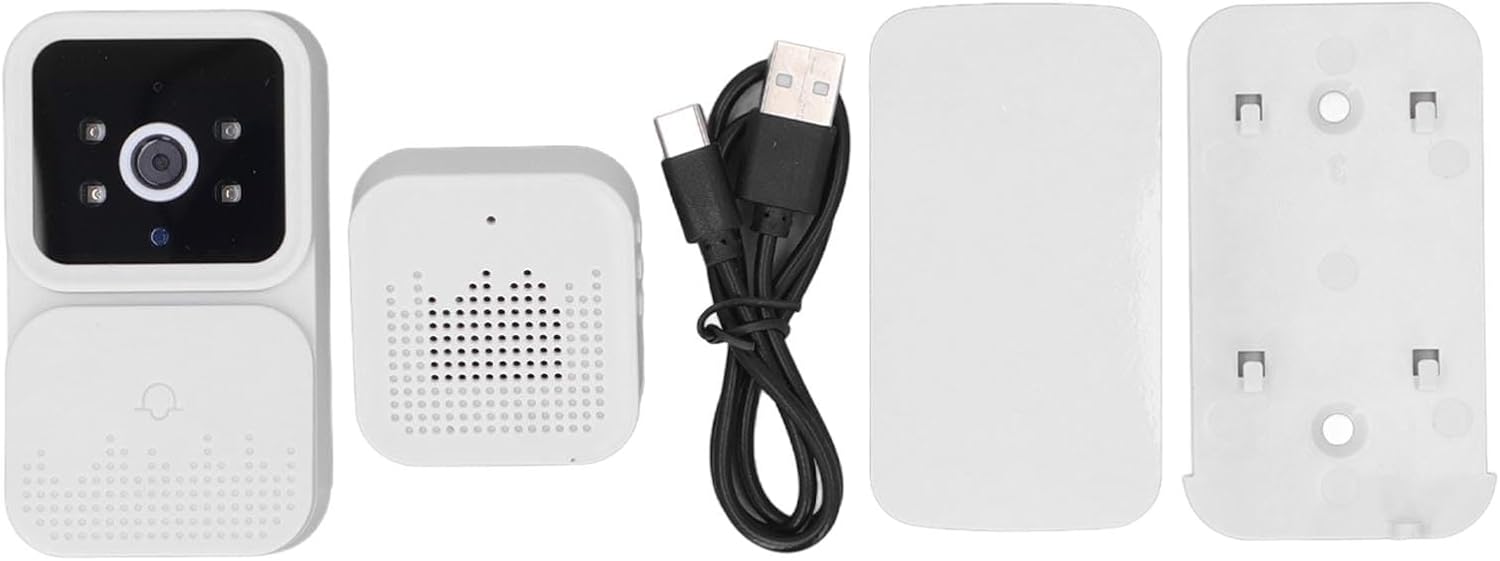
Image: An overhead view of the package contents, including the doorbell camera, wireless chime, USB cable, mounting plate, and adhesive pad.
4. Product Diagram and Components
Doorbell Camera

Image: A detailed diagram of the doorbell camera unit, labeling key components such as the Microphone, Lens, Photosensitive sensor, Indicator light, and Doorbell button.
- Microphone: For two-way audio communication.
- Lens: Captures 1080P HD video.
- Photosensitive Sensor: Detects ambient light for automatic day/night mode switching.
- Indicator Light: Displays device status (e.g., pairing, charging, recording).
- Doorbell Button: Activates the doorbell and sends notifications.
Wireless Chime
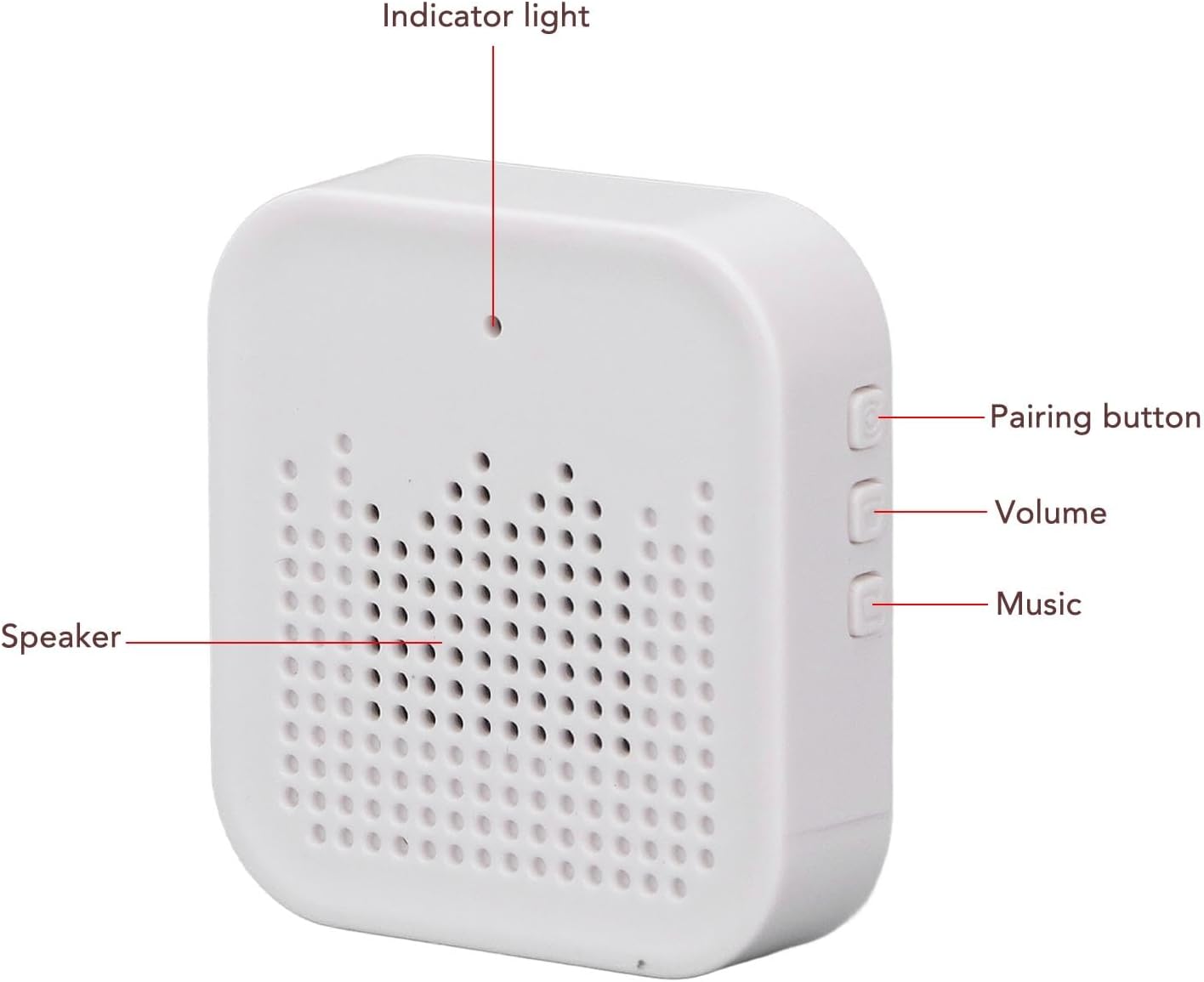
Image: A detailed diagram of the wireless chime unit, labeling the Indicator light, Speaker, Pairing button, Volume buttons, and Music selection button.
- Indicator Light: Shows chime status.
- Speaker: Emits doorbell sound.
- Pairing Button: Used to pair the chime with the doorbell camera.
- Volume Buttons: Adjust the chime's volume.
- Music Button: Selects different chime melodies.
5. Setup and Installation
5.1 Charging the Doorbell Camera
Before first use, fully charge the doorbell camera using the provided USB Type-C cable. Connect the cable to the doorbell's charging port and a standard USB power adapter (not included). The indicator light will show charging status.

Image: An illustration showing a USB plug, indicating the universal charging method for the device.
5.2 Mobile App Installation and Pairing
- Download the App: Search for "Tuya" in your mobile app store (Android 4.3+ or iOS 9.0+).
- Create Account: Open the Tuya app and follow the on-screen instructions to create a new account or log in.
- Add Device: In the app, select "Add Device" or the "+" icon. Choose "Security & Video Surveillance" then "Smart Doorbell".
- Connect to Wi-Fi: Follow the app's instructions to connect the doorbell camera to your 2.4GHz Wi-Fi network. Ensure your phone is also connected to the same Wi-Fi network during setup.
- Pair Chime: Press and hold the Pairing button on the wireless chime until its indicator light flashes. Then, press the doorbell button on the camera. The chime's indicator light will become solid when successfully paired.
5.3 Mounting the Doorbell Camera
The doorbell camera offers two mounting options:

Image: A visual representation of the two mounting methods: "No-hole mounting" using strong adhesive backing and "Perforated mounting" using screw fixing.
- Adhesive Mounting (No-hole):
- Clean the desired mounting surface thoroughly to ensure it is dry and free of dust or grease.
- Peel off the protective film from the adhesive pad and firmly press the mounting plate onto the wall. Hold for 30 seconds.
- Slide the doorbell camera onto the mounted plate.
- Screw Mounting (Perforated):
- Position the mounting plate on the wall at the desired height and mark the screw holes.
- Drill holes at the marked positions and insert wall anchors if necessary.
- Secure the mounting plate to the wall using the provided screws.
- Slide the doorbell camera onto the mounted plate.
Ensure the doorbell is mounted at a height that allows for optimal viewing of visitors and detection of motion.
6. Operating Instructions
6.1 Answering a Doorbell Call
- When a visitor presses the doorbell button, your paired chime will ring, and you will receive a push notification on your smartphone via the Tuya app.
- Tap the notification to open the live view in the app.
- To speak to the visitor, tap the microphone icon in the app to enable two-way audio. Tap again to mute.
- You can also capture screenshots or record video directly from the live view interface.
6.2 Motion Detection Alerts
The doorbell camera's PIR human detection system will automatically detect motion and send alerts to your phone. You can adjust the sensitivity of motion detection and set detection zones within the Tuya app settings to minimize unwanted alerts.

Image: A person's hand reaching to press the doorbell, illustrating the point of interaction and potential motion detection trigger.
6.3 Chime Settings
- Volume Adjustment: Use the Volume buttons on the side of the chime unit to increase or decrease the sound level.
- Melody Selection: Press the Music button on the chime unit to cycle through available doorbell melodies.

Image: A split image showing a person pressing the doorbell on the left, and a person using a laptop with the chime visible on the right, illustrating the "one-key capture" and "receiver volume adjustable" features.
7. Maintenance
- Cleaning: Use a soft, damp cloth to wipe the doorbell camera and chime. Do not use harsh chemicals or abrasive cleaners.
- Battery Life: The doorbell camera is powered by a rechargeable Lithium Ion battery. Monitor the battery level in the Tuya app and recharge when prompted.
- Weather Resistance: The doorbell camera has an IP65 rating, meaning it is protected against dust and low-pressure water jets. While it can withstand rain, avoid submerging it in water.
- Firmware Updates: Periodically check the Tuya app for firmware updates to ensure optimal performance and access to new features.
8. Troubleshooting
| Problem | Possible Cause | Solution |
|---|---|---|
| Doorbell not connecting to Wi-Fi. | Incorrect Wi-Fi password; too far from router; 5GHz network. | Ensure correct 2.4GHz Wi-Fi password. Move doorbell closer to router. Confirm router is broadcasting 2.4GHz. |
| No push notifications. | App notifications disabled; phone in Do Not Disturb mode; app not running in background. | Check app notification settings. Disable Do Not Disturb. Ensure app has background refresh permissions. |
| Poor video quality or night vision. | Dirty lens; insufficient light; network bandwidth issues. | Clean the camera lens. Ensure adequate lighting for optimal night vision. Check Wi-Fi signal strength. |
| Two-way audio not working. | Microphone/speaker muted in app; network latency. | Ensure microphone and speaker icons are active in the app. Check network connection stability. |
| Chime not ringing. | Chime not paired; low battery (if applicable); volume too low. | Re-pair the chime with the doorbell. Check chime power. Increase chime volume. |
9. Specifications
| Feature | Detail |
|---|---|
| Model Name | Sanpylq75wv2hesi |
| Connectivity Protocol | Wi-Fi (2.4GHz) |
| Video Capture Resolution | 1080p |
| Lens Angle | 80 Degree |
| Night Vision Distance | 5-10 Meters |
| Audio | 2-Way Audio |
| Motion Detection | PIR Human Detection (Motion Only Alert Type) |
| Power Source | Rechargeable Lithium Ion Battery (800mAh) |
| Charging Interface | Type C |
| APP Name | Tuya |
| Supported Mobile Systems | Android 4.3 and above, iOS 9.0 and above |
| Mounting Type | Wall Mount (Adhesive or Screw) |
| International Protection Rating | IP65 |
| Item Weight | 4.9 ounces |
| Package Dimensions | 4.57 x 3.94 x 2.01 inches |

Image: The doorbell camera displayed alongside a list of its technical specifications, including lens angle, night vision distance, battery capacity, and app compatibility.
10. Warranty and Support
For warranty information, technical support, or any inquiries regarding your Sanpyl Doorbell Camera, please contact Sanpyl customer service through their official channels. You can often find contact details on the product packaging or the brand's official website.
Visit the Sanpyl Store on Amazon for more product information and support resources.