
PHILIPS DLP8093C
Philips Portable Power Station User Manual
Model: DLP8093C
1. Introduction
Thank you for choosing the Philips DLP8093C Portable Power Station. This device is designed to provide reliable and portable power for a wide range of applications, from outdoor adventures and camping to emergency backup during power outages. With its large capacity, multiple output options, and advanced safety features, the DLP8093C ensures your devices stay powered wherever you are. Please read this manual thoroughly before using the product to ensure safe and optimal operation.
2. Safety Information
Always follow these basic safety precautions when using the Philips DLP8093C Portable Power Station:
- Do not disassemble, repair, or modify the unit. Incorrect reassembly may cause fire or electric shock.
- Do not place the unit near fire or expose it to heat. Keep out of direct sunlight.
- Do not charge, use, or store the unit in a bathroom or in an area exposed to rain or moisture.
- Use only the provided or approved accessories.
- Do not use the unit if it is damaged or has been dropped.
- Keep out of reach of children and pets.
- Ensure proper ventilation during use and charging to prevent overheating.
- This product is PSE certified, ensuring high safety standards.
The unit features a Battery Management System (BMS) for comprehensive protection against overcharge, short circuit, over-discharge, overcurrent, overvoltage, over-temperature, overload, and sleep mode issues, significantly enhancing safety.
3. Product Overview
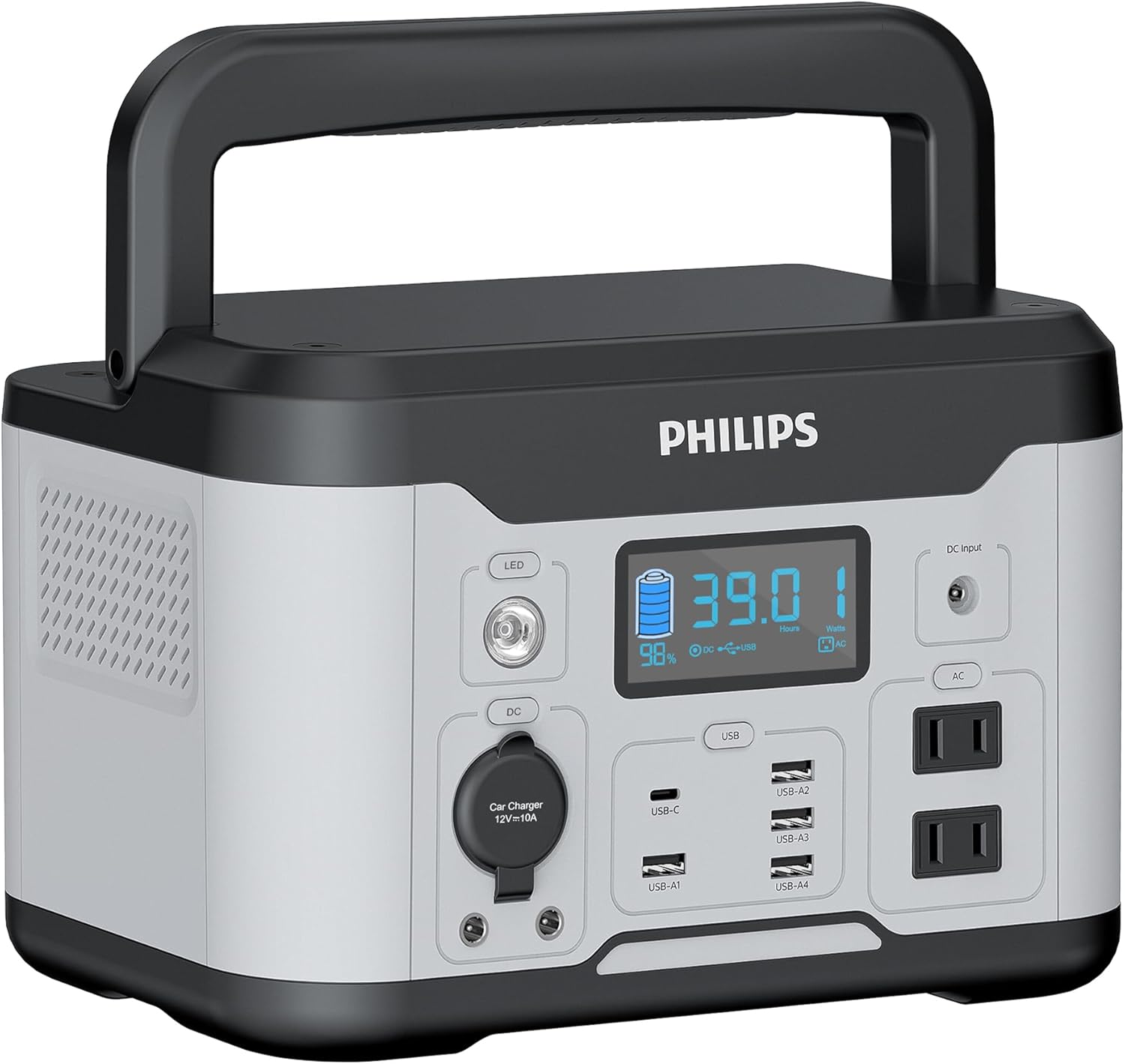
Front view of the Philips DLP8093C Portable Power Station, showing the LED display, AC outlets, USB-A and USB-C ports, DC output, and cigarette lighter port.
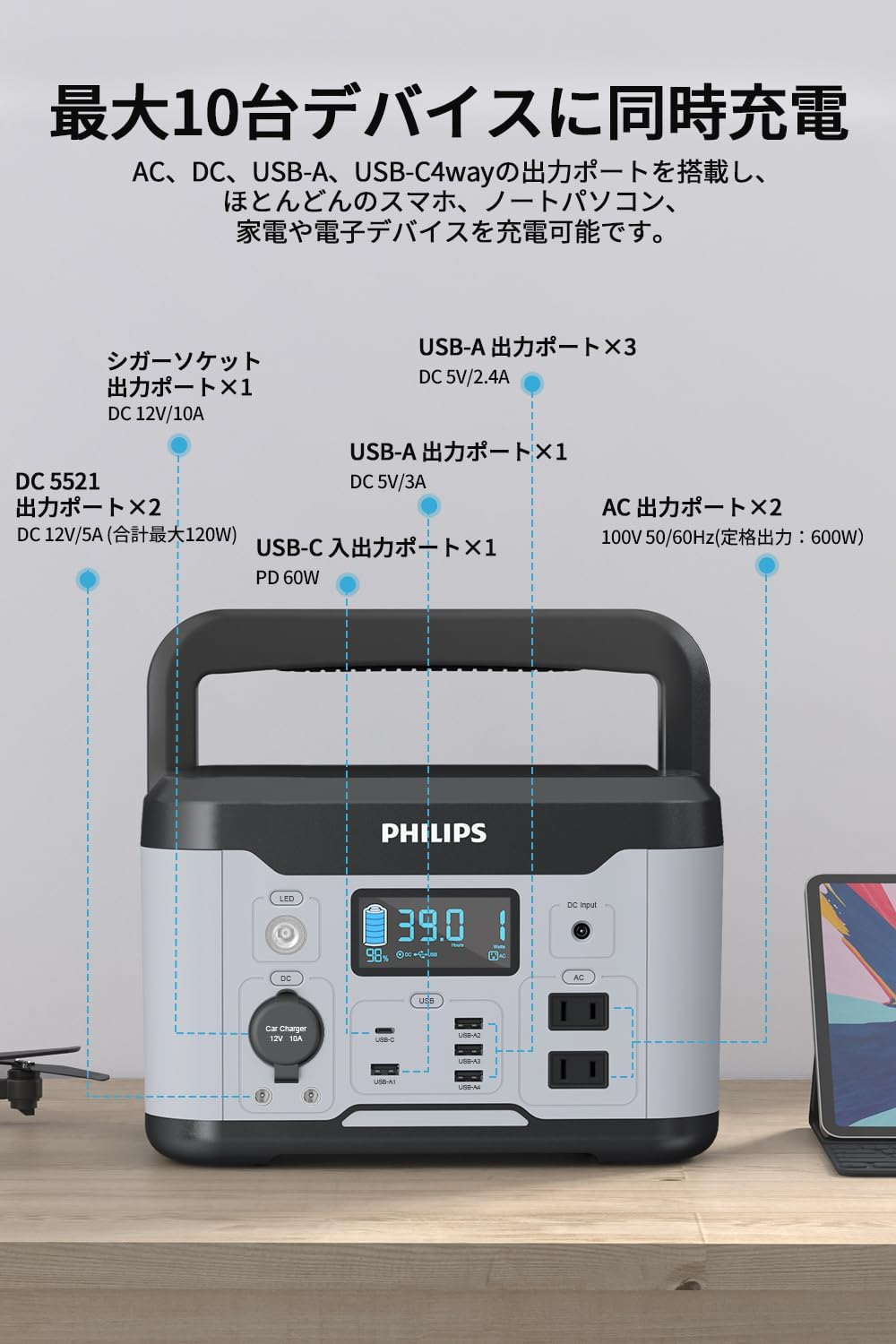
A detailed diagram illustrating the various input and output ports of the Philips DLP8093C Portable Power Station, including AC outlets, DC outputs, USB-A ports, USB-C input/output, and the cigarette lighter port.

The LCD display of the Philips DLP8093C Portable Power Station, showing battery percentage, remaining usage time, total output power, and indicators for fan operation, overload, and high temperature.
Components:
- Main Unit: Philips DLP8093C Portable Power Station
- AC Adapter: For wall charging.
- Cigarette Lighter Cable: For car charging.
- User Manual: This document.
4. Setup
Follow these steps for initial setup:
- Unpack: Carefully remove the power station and all accessories from the packaging.
- Inspect: Check the unit for any visible damage. If damaged, do not use and contact customer support.
- Initial Charge: Before first use, fully charge the power station using the provided AC adapter. Connect the AC adapter to the DC input port on the power station and plug it into a wall outlet. The LCD display will show the charging status.
- Placement: Place the power station on a stable, flat surface in a well-ventilated area, away from direct sunlight, heat sources, and moisture.
5. Operating Instructions
5.1 Charging the Power Station
The DLP8093C offers five flexible charging methods:

Illustrations demonstrating the five different ways to charge the Philips DLP8093C Portable Power Station: AC outlet, USB-C, cigarette lighter, combined AC + USB-C, and solar panel (sold separately).
- AC Outlet: Connect the AC adapter to the DC input port and plug into a standard wall outlet. (Approx. 11 hours for full charge)
- 60W Type-C: Use a 60W USB-C PD charger (not included) to charge via the Type-C input/output port. (Approx. 11 hours for full charge)
- Cigarette Lighter: Use the provided cigarette lighter cable to charge from your vehicle's 12V outlet. (Approx. 15-16 hours for full charge)
- AC Outlet + 60W Type-C (Simultaneous): Combine AC adapter and 60W USB-C PD charger for faster charging. (Approx. 6 hours for full charge)
- Solar Panel: Connect a compatible solar panel (sold separately) to the DC input port for eco-friendly charging. (Approx. 14 hours with 100W solar panel)
5.2 Powering Devices
The DLP8093C features 12 output ports, allowing you to charge up to 10 devices simultaneously:
- AC Output (Pure Sine Wave): Two AC 100V outlets (600W rated, 1200W peak) for laptops, mini-fridges, and other household appliances.
- DC Output: Two stable DC output ports (DC 12V/5A, total 120W).
- USB-A Output: Four USB-A ports (3x DC 5V/2.4A, 1x DC 5V/3A) for smartphones, tablets, and other USB-powered devices.
- USB-C Input/Output: One PD 60W Type-C port for fast charging compatible devices.
- Car Charger Port: One DC 12V/10A cigarette lighter socket.
Pass-Through Charging: The unit supports pass-through charging, meaning you can charge the power station while simultaneously powering other devices without affecting their normal operation.
5.3 LED Light Function
The DLP8093C is equipped with a high-brightness LED light for various situations:
- Press the LED button once for low light.
- Press again for strong light.
- Press a third time for SOS mode (flashing signal).
- Press a fourth time to turn off the light.
This feature is useful for outdoor activities at night or during emergencies.
6. Maintenance
To ensure the longevity and optimal performance of your Philips DLP8093C Portable Power Station:
- Storage: Store the unit in a cool, dry place, away from direct sunlight and extreme temperatures.
- Charging Frequency: If not used for extended periods, charge the unit every 3-6 months to maintain battery health.
- Cleaning: Use a soft, dry cloth to clean the exterior of the unit. Do not use abrasive cleaners or immerse the unit in water.
- Ventilation: Ensure the ventilation openings are clear of dust and debris.
7. Troubleshooting
If you encounter issues with your power station, refer to the following common problems and solutions:
| Problem | Possible Cause | Solution |
|---|---|---|
| Unit not turning on | Battery is depleted. | Charge the unit using an AC adapter or other charging method. |
| No output from ports | Output port not activated or overloaded. | Ensure the specific output (AC/DC/USB) is turned on. Reduce the load if an overload indicator is shown on the display. |
| Charging is slow | Using a low-power charger or single charging method. | Use the recommended AC adapter or combine AC and USB-C charging for faster results. |
| Overheat warning | Poor ventilation or high ambient temperature. | Move the unit to a cooler, well-ventilated area. Ensure vents are not blocked. |
| Unit shuts down unexpectedly | Overload protection or low battery. | Reduce the total power draw from connected devices. Recharge the unit if the battery is low. |
If the problem persists after trying these solutions, please contact Philips customer support.
8. Specifications
| Feature | Specification |
|---|---|
| Model Number | DLP8093C |
| Battery Type | Lithium-ion |
| Battery Capacity | 569Wh / 390000mAh |
| AC Output | 100V, 600W (Pure Sine Wave, 1200W Peak) |
| DC Output | 12V/5A (x2) |
| USB-A Output | 5V/2.4A (x3), 5V/3A (x1) |
| USB-C Input/Output | PD 60W (x1) |
| Cigarette Lighter Output | 12V/10A (x1) |
| Charging Methods | AC Adapter, 60W Type-C, Cigarette Lighter, AC + Type-C, Solar Panel (sold separately) |
| Product Weight | 5.9 kg |
| Package Dimensions | 35.5 x 32.5 x 25 cm |
| Special Features | Lightweight, BMS Battery Protection, Pure Sine Wave, LED Light, Pass-Through Charging |
9. Warranty and Support
All Philips products sold by our store are genuine and new. We offer a one-year warranty from the date of purchase.
- Warranty Coverage: Free product exchange is provided for product defects under normal use during the warranty period.
- Exclusions: Damage caused by customer's intentional acts or negligence is not covered.
- Shipping Damage: If the product arrives damaged or scratched during delivery, please contact us immediately for a free exchange.
For any inquiries or support, please contact Philips customer service through your purchase platform.
Related documentsDLP8093C


Ask a question about this manual
Ask about setup, troubleshooting, compatibility, parts, safety, or missing instructions. Manuals+ will review the question and use this page’s manual context to help answer it.