1. Introduction
This manual provides essential information for the proper use and maintenance of your Generic Replacement Remote Control. This remote is designed as an infrared replacement for specific Samsung Horizon HD TV Mediabox models, including SMT-C5400, SMT-G7400, and SMT-G7401. Please read this manual thoroughly before use to ensure optimal performance and longevity of the device.
2. Product Overview
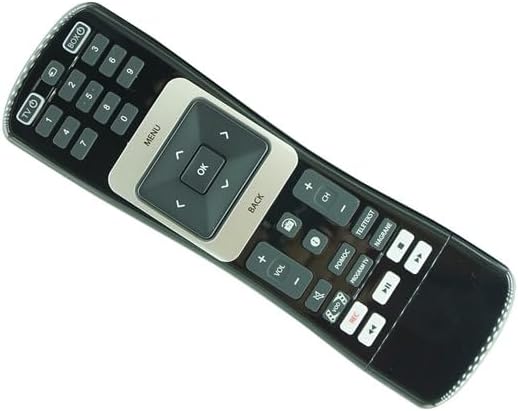
The Generic Replacement Remote Control features a dual-sided design, offering comprehensive control over your compatible Samsung Mediabox. One side provides standard remote functions, while the other features a full QWERTY keyboard for easier text input.


3. Setup
Before using your new remote control, you will need to install batteries.
- Battery Requirements: This remote control requires 1 AAA battery. Please note that batteries are not included with the remote and must be purchased separately.
- Battery Installation:
- Locate the battery compartment on the back of the remote control.
- Slide open the battery compartment cover.
- Insert the AAA battery, ensuring the positive (+) and negative (-) terminals align correctly with the markings inside the compartment.
- Close the battery compartment cover securely.
Note: Always use new, high-quality batteries for optimal performance. Remove batteries if the remote will not be used for an extended period to prevent leakage.
4. Operating Instructions
This remote control is designed to replicate the functions of your original Samsung Horizon HD TV Mediabox remote. Point the remote directly at your Mediabox for best results.
- Power Control: Press the TV or BOX button to power on or off your television or mediabox, respectively.
- Channel Selection: Use the numeric keypad (0-9) to directly enter channel numbers. Use the CH+ and CH- buttons to cycle through channels.
- Volume Control: Adjust the volume using the VOL+ and VOL- buttons.
- Menu Navigation: Use the MENU button to access the mediabox menu. Navigate through options using the arrow keys (up, down, left, right) and confirm selections with the OK button. Press BACK to return to the previous screen.
- Media Playback: Control media playback with dedicated buttons such as Play, Pause, Stop, Fast Forward, Rewind, and Record.
- QWERTY Keyboard: Flip the remote to access the full QWERTY keyboard. This is useful for searching, entering passwords, or navigating smart TV applications that require text input.
Important: As a replacement remote, some advanced or specific functions of your original remote may not be fully replicated. Refer to your Mediabox's original manual for detailed function descriptions.
5. Maintenance
Proper care will extend the life of your remote control.
- Cleaning: Wipe the remote control with a soft, dry cloth. For stubborn dirt, slightly dampen the cloth with water or a mild, non-abrasive cleaner. Do not use harsh chemicals or immerse the remote in water.
- Storage: Store the remote in a cool, dry place away from direct sunlight and extreme temperatures.
- Battery Replacement: Replace batteries when the remote's response becomes sluggish or inconsistent. Always replace all batteries at the same time with new ones.
6. Troubleshooting
If you encounter issues with your remote control, please refer to the following common solutions:
- Remote Not Responding:
- Ensure batteries are correctly installed with the correct polarity (+/-).
- Replace old batteries with new ones.
- Check for any obstructions between the remote and the Mediabox's infrared sensor.
- Ensure you are within the effective range of the Mediabox.
- Certain Functions Not Working:
- Verify that your Mediabox model (SMT-C5400, SMT-G7400, SMT-G7401) is listed as compatible. If your model number is not listed, the remote may not be fully compatible.
- Understand that as a replacement remote, it may not offer all the exact same functions as your original remote. Some highly specific or proprietary functions might not be supported.
- Interference: Strong light sources or other infrared devices can sometimes interfere with the remote's signal. Try using the remote in a different environment.
7. Specifications
- Brand: Generic
- Compatible Devices: Television (specifically Samsung SMT-C5400, SMT-G7400, SMT-G7401 Horizon HD TV Mediabox)
- Connectivity Technology: Infrared (IR)
- Controller Type: Button Control
- Special Feature: Replacement remote designed to substitute specific original models.
- Batteries Required: 1 AAA (not included)
- Manufacturer: Easytry
- ASIN: B0CF9LL364
8. Support and Contact
For any questions, concerns, or if your specific model number is not listed, please contact the seller directly. As this product is a replacement, detailed instructions beyond basic operation are typically not included. The seller, Easytry123, can provide further assistance.
For returns or issues related to your purchase, please refer to the platform's return policy. This product typically has a 30-day return/replacement policy.