
Fanmusic XD05 Pro
XDUOO XD05 Pro User Manual
Model: XD05 Pro | Brand: Fanmusic
Introduction
The XDUOO XD05 Pro is a portable full-balanced DAC (Digital-to-Analog Converter) and headphone amplifier designed to deliver high-fidelity audio. It features a double screen display, versatile input/output options, and powerful output capabilities to drive a wide range of headphones, from low-impedance to high-impedance flagship models. This manual provides essential information for setting up, operating, and maintaining your XD05 Pro.

Figure 1: XDUOO XD05 Pro Portable DAC Headphone Amplifier.
Key Features
- 930MW DESKTOP-GRADE OUTPUT POWER: For 300Ω, 600 Ω impedance flagship headphones, it can provide the output power of 930mW and 510mW, ensuring that not only the flagship headphones should be driven, but also good driving requirements.
- FLAGSHIP DAC MODULE SUPER SOUND QUALITY: DAC's modular approach brings you always leading hardware configuration. Majestic classical music / delicate and full voice / great sense of presence.
- DRIVING LOW IMPEDANCE HEADPHONES ALSO HAS VERY EXCELLENT PERFORMANCE: It provides output power up to 2000mW for a variety of low- impedance headphones, which can thoroughly stimulate the performance of the headphones, show every detail of the music, the human voice is very full, the treble is more crisp, pure and pleasant, driving the headphones to a new height.
- DESKTOP MODE THE SOUND IS CALMER: With HIFI DC12V linear power supply, you can switch to desktop mode, achieve ultra-low distortion, and give you a new experience of every musical note.
- DOUBLE SCREEN DISPLAY NEW AUDIO-VISUAL EXPERIENCE: The main screen displays the working mode, sampling rate, battery and menu. The secondary screen displays the volume value.

Figure 2: Visual representation of key features including DAC chip, output power, and dual screen display.
Setup
1. Unpacking and Initial Inspection
Carefully remove the XD05 Pro and all accessories from the packaging. Inspect the device for any signs of damage. Ensure all listed components are present.
2. Charging the Device
Before first use, fully charge the XD05 Pro using the provided USB cable. Connect the USB cable to the device's charging port and a compatible USB power adapter (not included). The double screen display will indicate charging status.

Figure 3: USB cable combination for charging and data transfer, designed for signal purity.
3. Installing/Replacing DAC Cards (Optional)
The XD05 Pro supports replaceable DAC cards for customized sound. To install or replace a DAC card:
- Power off the device.
- Carefully open the back panel of the XD05 Pro.
- Insert the desired DAC card into the designated slot, ensuring proper alignment.
- Secure the back panel.


Figure 4: Illustration of replaceable DAC cards and internal components.
Operating Modes
1. Portable vs. Desktop Mode
The XD05 Pro supports two main working modes: Portable and Desktop. In Desktop mode, it can be powered by a HIFI DC12V linear power supply (sold separately) for enhanced audio performance with ultra-low distortion.
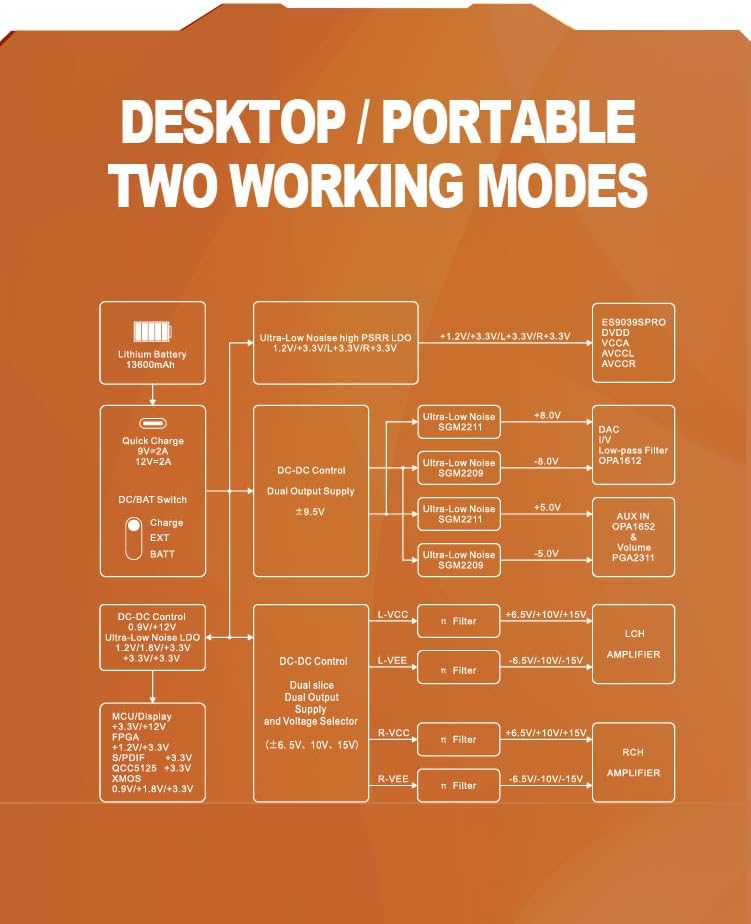
Figure 5: Block diagram illustrating the Desktop and Portable working modes.
2. Output Power Modes
The device offers three output power modes to match various headphone impedances:
- TURBO (Large Output Power): Suitable for big headphones with 250-600Ω impedance, the output power can reach 930mW (300Ω load).
- ECO (Low Output Power): Suitable for in-ear earplugs, perform well and do not overdrive.
- NORMAL (Medium Output Power): Suitable for K701, planar and other big headphones that "eat current", Class A buffer circuit, providing high current output.

Figure 6: Visual guide to TURBO, ECO, and NORMAL output power modes.
Input and Output Interfaces
The XD05 Pro provides a variety of digital and analog input/output options for broad compatibility:
- Digital Inputs: USB, AES, Optical, Coaxial.
- Analog Inputs: 3.5mm unbalanced.
- Analog Outputs: 3.5mm unbalanced, 4.4mm balanced.
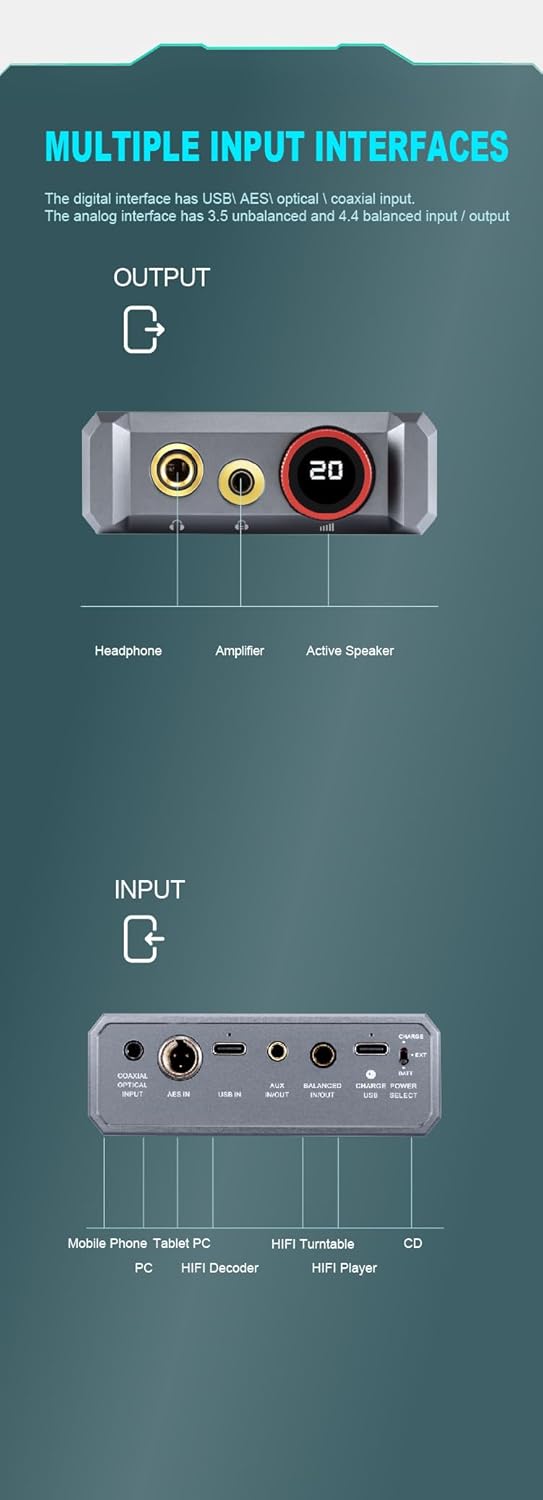
Figure 7: Diagram showing the various input and output ports on the device.
Specifications
| Feature | Detail |
|---|---|
| DAC Chip | Flagship ES9039SPRO (Modular) |
| USB Chip | XMOS XU316 |
| Output Power (300Ω) | 930mW |
| Output Power (600Ω) | 510mW |
| Output Power (Low Impedance) | Up to 2000mW (for 32Ω) |
| Digital Inputs | USB, AES, Optical, Coaxial |
| Analog Inputs | 3.5mm unbalanced |
| Analog Outputs | 3.5mm unbalanced, 4.4mm balanced |
| Display | Double Screen |
| Power Supply | DC12V (Desktop Mode), Internal Battery (Portable Mode) |
| Item Weight | 4.18 pounds |
| Package Dimensions | 10.28 x 10.24 x 3.35 inches |
Note: Specifications are subject to change without prior notice.

Figure 8: Detailed comparison of XD05 series models, highlighting the XD05 Pro's specifications.
Maintenance
- Cleaning: Use a soft, dry cloth to clean the exterior of the device. Avoid using harsh chemicals or abrasive materials.
- Storage: Store the XD05 Pro in a cool, dry place away from direct sunlight and extreme temperatures.
- Battery Care: For optimal battery life, avoid fully discharging the device frequently. If storing for extended periods, charge the battery to approximately 50%.
- Handling: Handle the device with care to prevent drops or impacts, which could damage internal components.
Troubleshooting
No Sound Output
- Ensure headphones are properly connected to the correct output port (3.5mm or 4.4mm balanced).
- Check the volume level on the XD05 Pro and the connected source device.
- Verify that the input source is correctly selected on the XD05 Pro.
- Confirm that the source device is playing audio and its output is not muted.
- Try a different audio cable or headphones to rule out faulty accessories.
Device Not Powering On
- Ensure the device is fully charged. Connect it to a power source and allow it to charge for some time.
- Check the power cable and adapter for any damage.
- If using Desktop Mode, ensure the DC12V linear power supply is connected and functioning correctly.
Connection Issues (USB/Bluetooth)
- For USB connection, ensure the correct drivers are installed on your computer if required.
- Try a different USB port or cable.
- For Bluetooth, ensure the XD05 Pro is in pairing mode and your source device's Bluetooth is enabled and searching.
- Delete the XD05 Pro from your source device's Bluetooth history and re-pair.
Warranty and Support
For warranty information and technical support, please refer to the warranty card included with your product or visit the official Fanmusic/XDUOO website. Keep your proof of purchase for warranty claims.
Manufacturer: XDUOO
Brand: Fanmusic
Related Documents - XD05 Pro
 |
xDuoo XD05 Basic2 Portable DAC & Headphone Amplifier Quick Start Guide Comprehensive guide for the xDuoo XD05 Basic2 portable high-fidelity DAC and headphone amplifier. Learn about its features, specifications, connectivity options via USB and Bluetooth, and how to get started. |
 |
HIFIMAN SERENADE DAC and Headphone Amplifier - Technical Specifications and User Guide Detailed information on the HIFIMAN SERENADE, a professional digital-analog converter and headphone amplifier, featuring HYMALAYA PRO technology. Includes front/rear panel descriptions, block diagram, technical specifications, package contents, and warranty information. |
 |
XDUOO XD05 Basic User Manual and Product Information Comprehensive user manual for the XDUOO XD05 Basic portable DAC and headphone amplifier, detailing its features, specifications, and usage instructions. |
 |
Questyle SIGMA Pro Portable DAC with Headphone Amplifier User Manual Comprehensive guide to the Questyle SIGMA Pro, a portable DAC and headphone amplifier. Learn about its features, connectivity, operation, specifications, and how to use it as a DAC/headphone amp, DAC/preamp, or for analog recording. Includes detailed technical specifications and setup instructions. |
 |
Khadas Tea Pro Magnetic Headphone Amplifier User Manual User manual for the Khadas Tea Pro, a magnetic USB Bluetooth headphone amplifier featuring an XMOS XU316-1024 DAC, MagSafe compatibility, MFi certification, and a color display. Learn about its features, connections, button functions, charging, and specifications. |
 |
Khadas Tea Pro Magnetic Decoding Headphone Amplifier User Manual User manual for the Khadas Tea Pro, a magnetic USB Bluetooth decoding headphone amplifier featuring XMOS XU316-1024 chip, MagSafe compatibility, MFi certification, and a 0.95-inch AMOLED display. Details features, connections, button functions, specifications, and app usage. |
Ask a question about this manual
Ask about setup, troubleshooting, compatibility, parts, safety, or missing instructions. Manuals+ will review the question and use this page’s manual context to help answer it.