Product Overview
This document provides comprehensive instructions for the use and maintenance of your replacement remote control. Designed for compatibility with various Manta LED TV models, including LED1903, LED-1903, LED2206, and LED-2206, this remote offers essential functions for controlling your television.

Figure 1: Front view of the replacement remote control. The remote is black with grey buttons, featuring standard TV controls like power, number pad, volume, channel, menu, and playback buttons.
Setup and Battery Installation
To begin using your new remote control, you will need to install batteries. This remote typically requires two AAA batteries (not included).
- Locate the Battery Compartment: Turn the remote control over. The battery compartment cover is located on the back.
- Open the Cover: Gently slide the battery compartment cover downwards or press the latch and lift, as indicated by the arrow or latch mechanism.
- Insert Batteries: Insert two AAA batteries, ensuring the positive (+) and negative (-) terminals align correctly with the markings inside the compartment. Incorrect insertion can prevent the remote from functioning.
- Close the Cover: Slide the battery compartment cover back into place until it clicks securely.
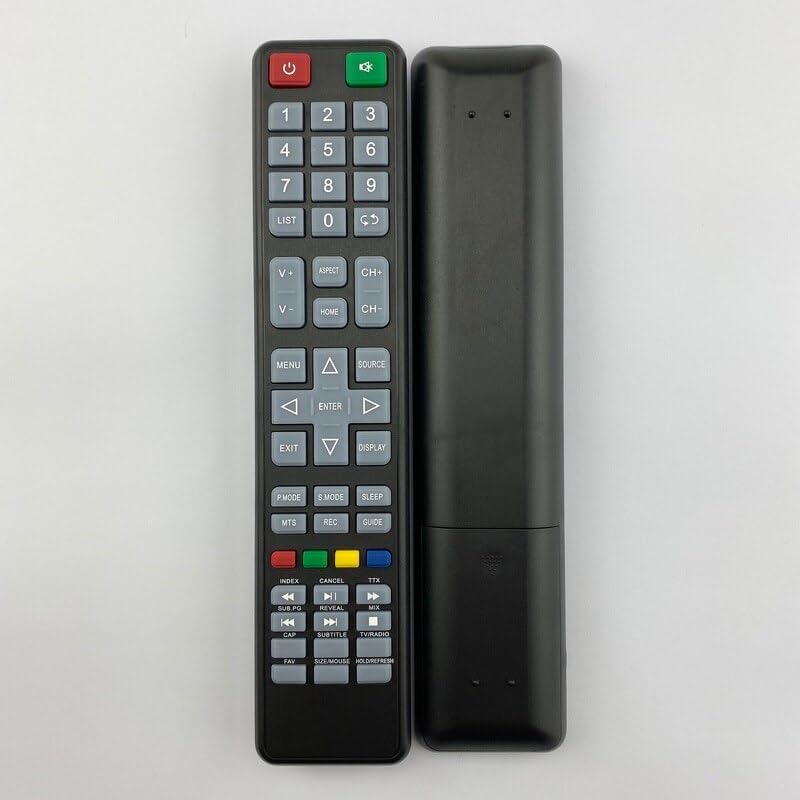
Figure 2: Back view of the replacement remote control. This image shows the smooth back casing, where the battery compartment is located.
Once batteries are installed, the remote control is ready for use. Point the remote directly at your Manta TV's infrared receiver.
Operating Instructions
This section details the functions of the various buttons on your replacement remote control.
| Button/Section | Function |
|---|---|
| Power (Red) | Turns the TV on or off (standby mode). |
| Source (Green) | Switches between input sources (e.g., HDMI, AV, TV). |
| Number Pad (0-9) | Directly selects TV channels or enters numerical values. |
| LIST | Accesses the channel list. |
| V+/V- (Volume Up/Down) | Adjusts the volume level. |
| CH+/CH- (Channel Up/Down) | Changes the TV channel sequentially. |
| ASPECT | Changes the screen aspect ratio. |
| HOME | Accesses the TV's main menu or smart features. |
| MENU | Opens the TV's settings menu. |
| Navigation Arrows (Up, Down, Left, Right) | Navigates through menus and options. |
| ENTER | Confirms selections in menus. |
| EXIT | Exits the current menu or function. |
| DISPLAY | Shows current channel information or on-screen display. |
| P.MODE (Picture Mode) | Cycles through preset picture modes. |
| S.MODE (Sound Mode) | Cycles through preset sound modes. |
| SLEEP | Sets a sleep timer for the TV. |
| MTS | Selects Multi-channel Television Sound (e.g., Stereo, SAP). |
| REC | Initiates recording if the TV supports PVR functionality. |
| GUIDE | Accesses the Electronic Program Guide (EPG). |
| Color Buttons (Red, Green, Yellow, Blue) | Context-sensitive functions within menus or smart TV applications. |
| Playback Controls (Rewind, Play/Pause, Fast Forward, Previous, Stop, Next) | Controls media playback for connected devices or internal media player. |
| SUBTITLE | Toggles subtitles on/off. |
| TV/RADIO | Switches between TV and Radio modes (if supported). |
| FAV | Accesses favorite channels list. |
| SIZE/MOUSE/HOLD/FREEZE | Multi-function button, may control screen size, mouse pointer (if smart TV), or freeze frame. |
Note: Some functions may not be available or may operate differently depending on your specific Manta TV model. This remote is a replacement and may not replicate all functions of your original remote.
Maintenance and Care
- Cleaning: Use a soft, dry cloth to clean the remote control. Do not use liquid cleaners or abrasive materials, as they may damage the surface or internal components.
- Battery Replacement: Replace batteries when the remote's response becomes sluggish or it stops working. Always replace both batteries at the same time with new ones of the same type.
- Storage: If the remote control will not be used for an extended period, remove the batteries to prevent leakage and potential damage. Store in a cool, dry place.
- Avoid Damage: Do not drop the remote control, expose it to extreme temperatures, or immerse it in water.
Troubleshooting
If you experience issues with your remote control, try the following troubleshooting steps:
- Remote Not Responding:
- Check if the batteries are inserted correctly with the correct polarity (+/-).
- Replace old batteries with new ones.
- Ensure there are no obstructions between the remote control and the TV's infrared sensor.
- Make sure you are within the effective range of the TV's IR sensor.
- Specific Buttons Not Working:
- This replacement remote may not support all functions of your original TV remote. Refer to the "Operating Instructions" section for supported functions.
- Clean the button if it feels sticky or unresponsive.
- TV Not Responding to Power Button:
- Ensure the TV is plugged into a working power outlet and is not in a deep sleep mode.
- Try pressing the power button directly on the TV.
Specifications
| Feature | Detail |
|---|---|
| Product Type | Replacement Remote Control |
| Brand | Generic |
| Compatible TV Models | Manta LED1903, LED-1903, LED2206, LED-2206 |
| Power Source | 2 x AAA Batteries (not included) |
| Material | ABS Plastic |
| Color | Black or White (randomly sent) |
| Special Feature | Ergonomic design |
| Max Number of Supported Devices | 5 (as per product specifications, though this remote is for one TV) |
| Compatible Devices (General) | Television, Set Top Box, DVD/Blu-ray Player, Home Theater, Stereo System (as per product specifications, though this remote is primarily for TV) |
Warranty and Support
Information regarding specific warranty terms for this replacement remote control is not provided in the product details. For any issues or support inquiries, please refer to the seller or the platform where the purchase was made.
As this is a generic replacement product, direct manufacturer support may not be available. It is recommended to contact the seller for assistance with product defects or operational questions not covered in this manual.


