
EN2E28S, EN2C28S
User Manual for Generic Replacement Remote Control
Models: EN2E28S, EN2C28S
1. Introduction
This user manual provides comprehensive instructions for the Generic Replacement Remote Control, compatible with Sharp LCD Smart TVs. This remote is designed to replace your original EN2E28S or EN2C28S remote, offering essential functions for controlling your television. Please note that as a replacement, some advanced or specific functions of your original remote may not be supported.
2. Product Overview
The Generic Replacement Remote Control is a durable and ergonomic device made from ABS plastic, designed for comfortable use. It is primarily intended for Sharp LCD Smart TVs but is also compatible with various other devices such as DVD/Blu-ray Players, Home Theater systems, Set Top Boxes, and Stereo Systems, supporting up to 5 devices.
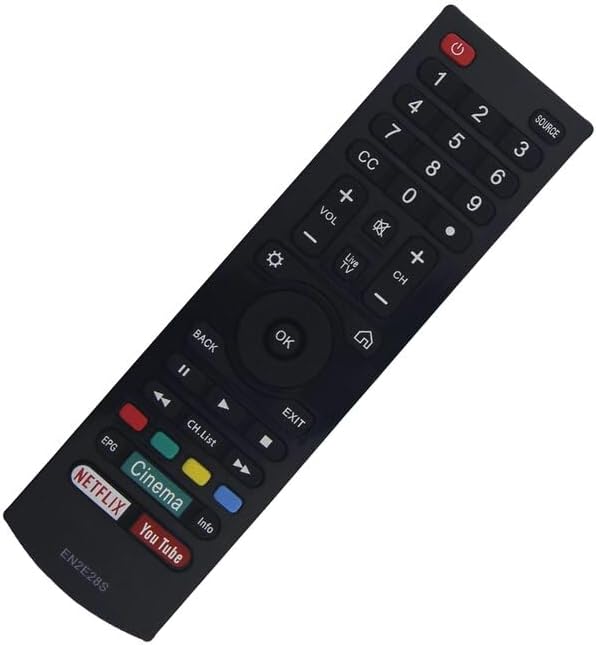
Figure 2.1: Front view of the remote control, showing the button layout including power, number pad, volume, channel, navigation, and dedicated streaming service buttons (Netflix, YouTube, Cinema).

Figure 2.2: Back view of the remote control, showing the battery compartment cover.
3. Setup
This replacement remote control typically does not require complex pairing or programming for basic TV functions. Simply insert batteries, and it should be ready for use with compatible Sharp LCD Smart TVs.
3.1. Installing Batteries
- Locate the battery compartment on the back of the remote control (refer to Figure 2.2).
- Slide the battery compartment cover downwards or in the direction indicated by an arrow to open it.
- Insert two AAA batteries (not included), ensuring the positive (+) and negative (-) terminals align correctly with the markings inside the compartment.
- Close the battery compartment cover by sliding it back into place until it clicks securely.
Once batteries are installed, the remote control is ready for operation.
4. Operating Instructions
The remote control features a standard layout for easy navigation and control of your Sharp LCD Smart TV. Refer to Figure 2.1 for a visual guide to the buttons.
- Power Button (⏻): Located at the top right, press to turn the TV on or off.
- Number Pad (0-9): Use to directly enter channel numbers or other numerical inputs.
- Volume Up/Down (VOL +/-): Adjusts the audio volume.
- Channel Up/Down (CH +/-): Changes the television channel.
- Navigation Buttons (Up, Down, Left, Right, OK): Used to navigate menus and select options. The OK button confirms selections.
- Back Button: Returns to the previous screen or menu.
- Source Button: Cycles through input sources (HDMI, AV, etc.).
- Dedicated App Buttons: Buttons for popular streaming services like Netflix, YouTube, and Cinema provide quick access to these applications.
- Mute Button: Silences the TV audio.
- Menu/Settings Button: Accesses the TV's main menu or settings.
For specific advanced functions or smart TV features, please refer to your television's original user manual, as this replacement remote may have limited functionality for certain proprietary features.
5. Maintenance
Proper care and maintenance will extend the life of your remote control.
5.1. Cleaning
Wipe the remote control with a soft, dry cloth. For stubborn dirt, slightly dampen the cloth with water or a mild, non-abrasive cleaner. Do not use harsh chemicals or immerse the remote in water.
5.2. Battery Replacement
Replace batteries when the remote's response becomes sluggish or it stops functioning. Always replace both batteries at the same time with new ones of the same type (AAA). Dispose of used batteries responsibly according to local regulations.
5.3. Storage
Store the remote control in a cool, dry place away from direct sunlight, extreme temperatures, and high humidity. If the remote will not be used for an extended period, it is advisable to remove the batteries to prevent leakage.
6. Troubleshooting
If you encounter issues with your remote control, try the following troubleshooting steps:
- Remote Not Responding:
- Check if the batteries are inserted correctly with the correct polarity.
- Replace old batteries with new ones.
- Ensure there are no obstructions between the remote control and the TV's infrared sensor.
- Make sure you are within the effective range of the TV's IR sensor.
- Certain Functions Not Working:
- As a replacement remote, some specific or advanced functions of your original TV remote may not be supported. This is normal for universal or replacement remotes.
- Verify that the function you are trying to use is a standard TV function.
- Intermittent Operation:
- This could indicate low battery power. Replace the batteries.
- Ensure the remote's infrared emitter is clean and unobstructed.
If problems persist after trying these steps, please contact the seller for further assistance, providing your original remote's part number or your TV's unit model if possible.
7. Specifications
| Model Numbers | EN2E28S, EN2C28S |
| Brand | Generic |
| Material | ABS Plastic |
| Color | Black/White (color sent randomly) |
| Special Feature | Ergonomic design |
| Max. Supported Devices | 5 |
| Compatible Devices | Sharp LCD Smart TV, DVD/Blu-ray Player, Home Theater, Set Top Box, Stereo System |
8. Warranty and Support
As a generic replacement product, specific warranty details may vary. It is recommended to refer to the purchase terms and conditions provided by your seller for information regarding returns, exchanges, or warranty claims.
For technical support or further inquiries, please contact the seller directly. Providing your original remote's part number or your TV's unit model can assist them in offering the best possible support.
The manufacturer tests each remote before delivery to ensure perfect working condition.