Introduction
This manual provides essential information for the proper use and maintenance of your Generic Replacement Remote Control, model RG51F2/BGEF, designed for Koryo Air Conditioners. Please read this manual carefully before using the remote control to ensure optimal performance and longevity.
Note: This is a replacement remote control. Some functions may differ or not be fully compatible with your original unit's specific features. For best compatibility, ensure your original remote's part number or your air conditioner unit's model matches the intended use of this replacement.
Setup
1. Battery Installation
The remote control requires two AAA batteries (not included). Follow these steps to install them:
- Locate the battery compartment cover on the back of the remote control.
- Slide the cover downwards or in the direction indicated by an arrow to open it.
- Insert two AAA batteries, ensuring the positive (+) and negative (-) terminals align correctly with the markings inside the compartment.
- Slide the battery compartment cover back into place until it clicks securely.
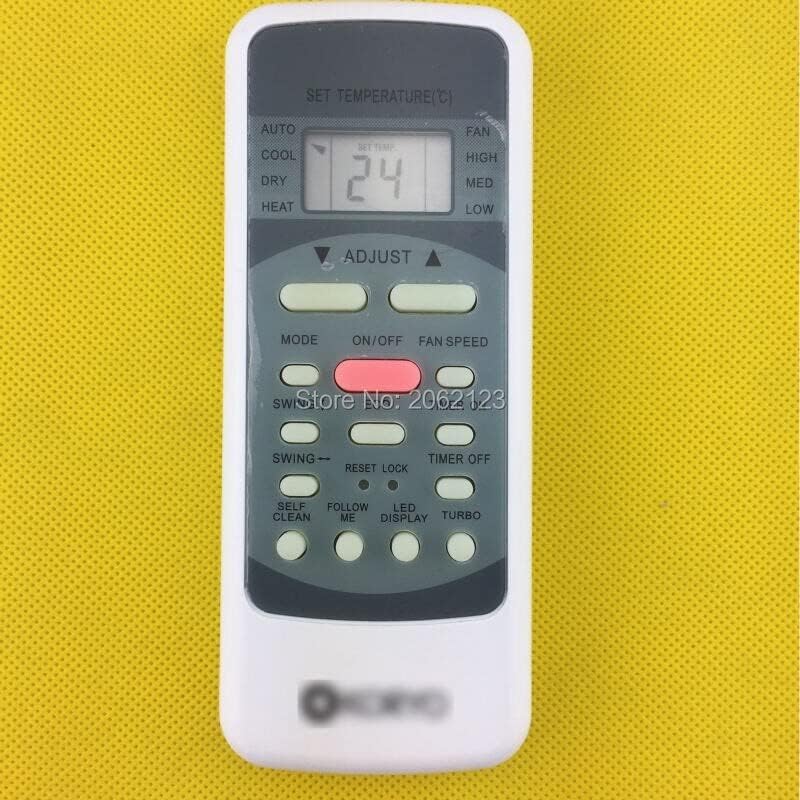
Image: Back view of the remote control, illustrating the location of the battery compartment.
2. Initial Use
Once batteries are installed, the remote control is generally ready for use. Point the remote directly at the air conditioner's receiver. If the air conditioner does not respond, ensure there are no obstructions between the remote and the unit, and that the batteries are correctly inserted and charged.
Operating Instructions
The remote control features various buttons for controlling your air conditioner. Refer to the image below for button layout and general functions:

Image: Front view of the remote control, displaying the LCD screen and various control buttons.
- ON/OFF: Powers the air conditioner on or off.
- MODE: Cycles through operating modes such as AUTO, COOL, DRY, HEAT, and FAN.
- SET TEMP (℃): Displays the current set temperature.
- ADJUST (▼/▲): Adjusts the temperature setting up or down.
- FAN SPEED: Cycles through fan speeds (e.g., LOW, MED, HIGH, AUTO).
- SWING: Activates or deactivates the louver swing function.
- TIMER ON/OFF: Sets a timer for the unit to turn on or off automatically.
- ECO: Activates energy-saving mode (if supported by your AC unit).
- RESET LOCK: Resets certain settings or locks the remote (refer to your AC unit's manual for specific functionality).
- SELF CLEAN: Initiates a self-cleaning cycle (if supported by your AC unit).
- FOLLOW ME: Activates a sensor in the remote to adjust temperature based on its location (if supported by your AC unit).
- LED DISPLAY: Toggles the display light on the AC unit.
- TURBO: Activates maximum cooling/heating for a quick temperature change.
Please note that not all buttons or functions may be supported by every Koryo Air Conditioner model. Functionality depends on the specific features of your air conditioning unit.
Maintenance
Battery Replacement
Replace batteries when the remote's range decreases, or the display becomes dim. Always replace both batteries at the same time with new AAA batteries. Do not mix old and new batteries, or different types of batteries.
Cleaning
To clean the remote control, wipe it gently with a soft, dry cloth. Do not use liquid cleaners, abrasive cleaners, or chemical solvents, as these can damage the remote's surface or internal components.
Storage
If the remote control will not be used for an extended period, remove the batteries to prevent leakage and corrosion. Store the remote in a cool, dry place away from direct sunlight and extreme temperatures.
Troubleshooting
- Remote not responding:
- Check if batteries are inserted correctly with correct polarity.
- Replace old batteries with new ones.
- Ensure there are no obstructions between the remote and the air conditioner's receiver.
- Confirm you are within the effective operating range (typically up to 8 meters).
- Some functions do not work:
- As a replacement remote, not all functions may be compatible with your specific Koryo Air Conditioner model. Refer to your AC unit's original manual for its specific features.
- Ensure the air conditioner unit itself supports the desired function (e.g., ECO, Self Clean).
- Display is dim or blank:
- Batteries are low or depleted. Replace them.
Specifications
| Feature | Description |
|---|---|
| Model | RG51F2/BGEF (Replacement) |
| Compatible Devices | Koryo Air Conditioner |
| Material | ABS Plastic |
| Color | Black or White (Randomly sent) |
| Special Feature | Ergonomic Design |
| Power Source | 2 x AAA Batteries (not included) |
Warranty and Support
Information regarding specific warranty terms or direct manufacturer support for this replacement remote control is not available in this manual. For any issues or inquiries, please refer to the seller or retailer from whom you purchased this product.