
Introduction
This manual provides comprehensive instructions for the safe and effective use, maintenance, and troubleshooting of your MOCEL Water Dental Flosser. Please read this manual thoroughly before operating the device to ensure optimal performance and longevity.
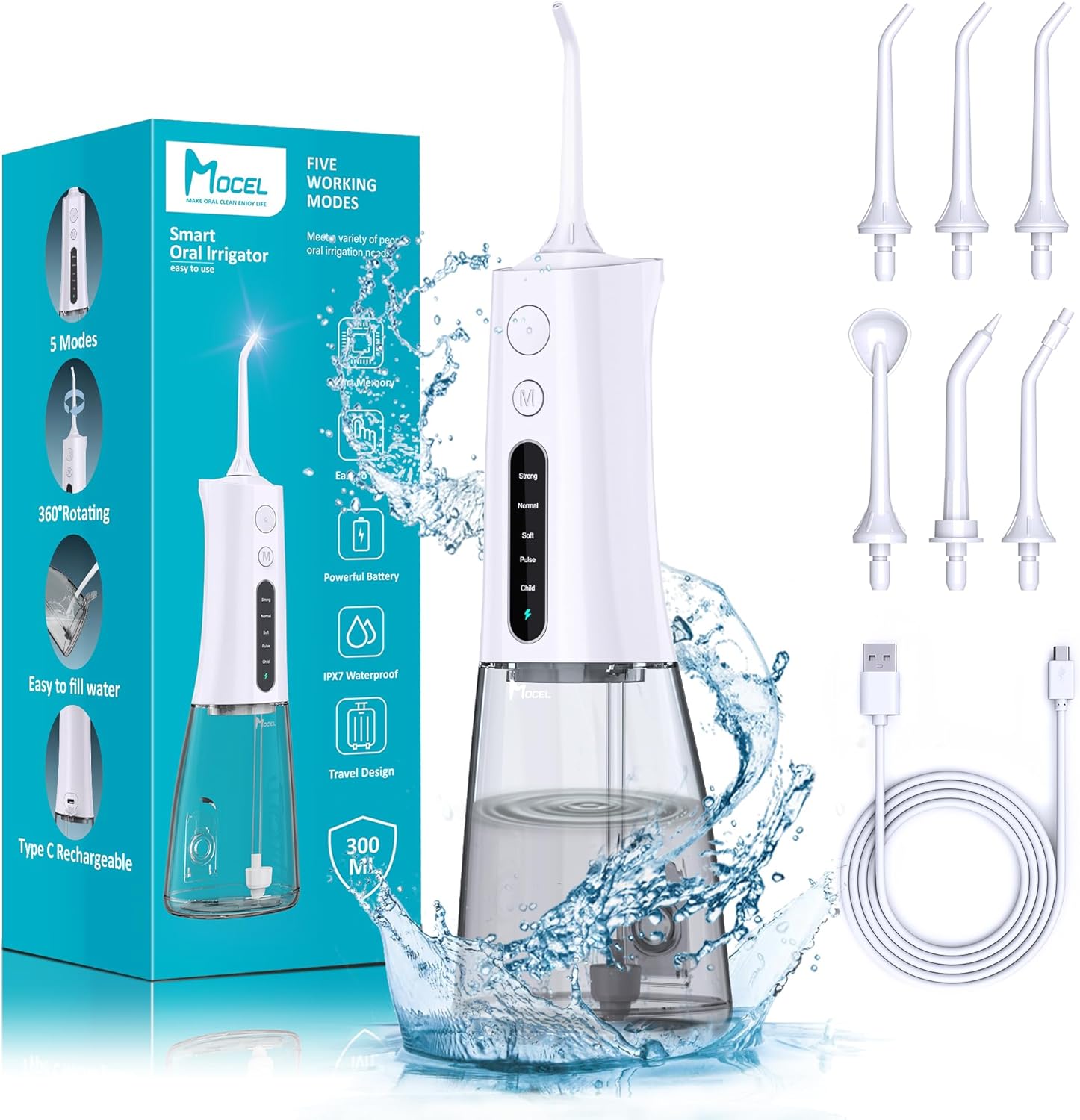
Image: MOCEL Water Dental Flosser, showing the main unit, various nozzle tips, and USB-C charging cable.
Product Overview and Features
The MOCEL Water Dental Flosser is a cordless oral irrigator designed for effective teeth cleaning and gum health. It features multiple modes and intensities to suit various oral care needs.
Key Features:
- 5 Intensities & 5 Modes: Offers a range of pressure settings (50-150 psi) and modes (Child, Pulse, Soft, Normal, Strong) for customized cleaning.
- 300ML Removable Large Capacity Water Tank: Designed for single-fill use and easy cleaning.
- Long Battery Life: A 4-hour charge provides approximately 45 days of continuous use.
- Ergonomic and Portable Design: Compact size suitable for travel and comfortable handling.
- IPX7 Waterproof: Allows for safe use in the shower or bath.
- Multiple Nozzle Tips: Includes various tips for comprehensive oral care.
Operating Modes and Intensities:
The device offers five distinct modes, each with a specific pressure range:
- Child Mode (50 PSI): Gentle cleaning, suitable for children and new users.
- Soft Mode (80 PSI): For daily cleaning and sensitive teeth.
- Pulse Mode (110 PSI): Provides a pulsating stream for gum massage.
- Normal Mode (125 PSI): Effective for general cleaning.
- Strong Mode (150 PSI): For deep cleaning and use with braces.
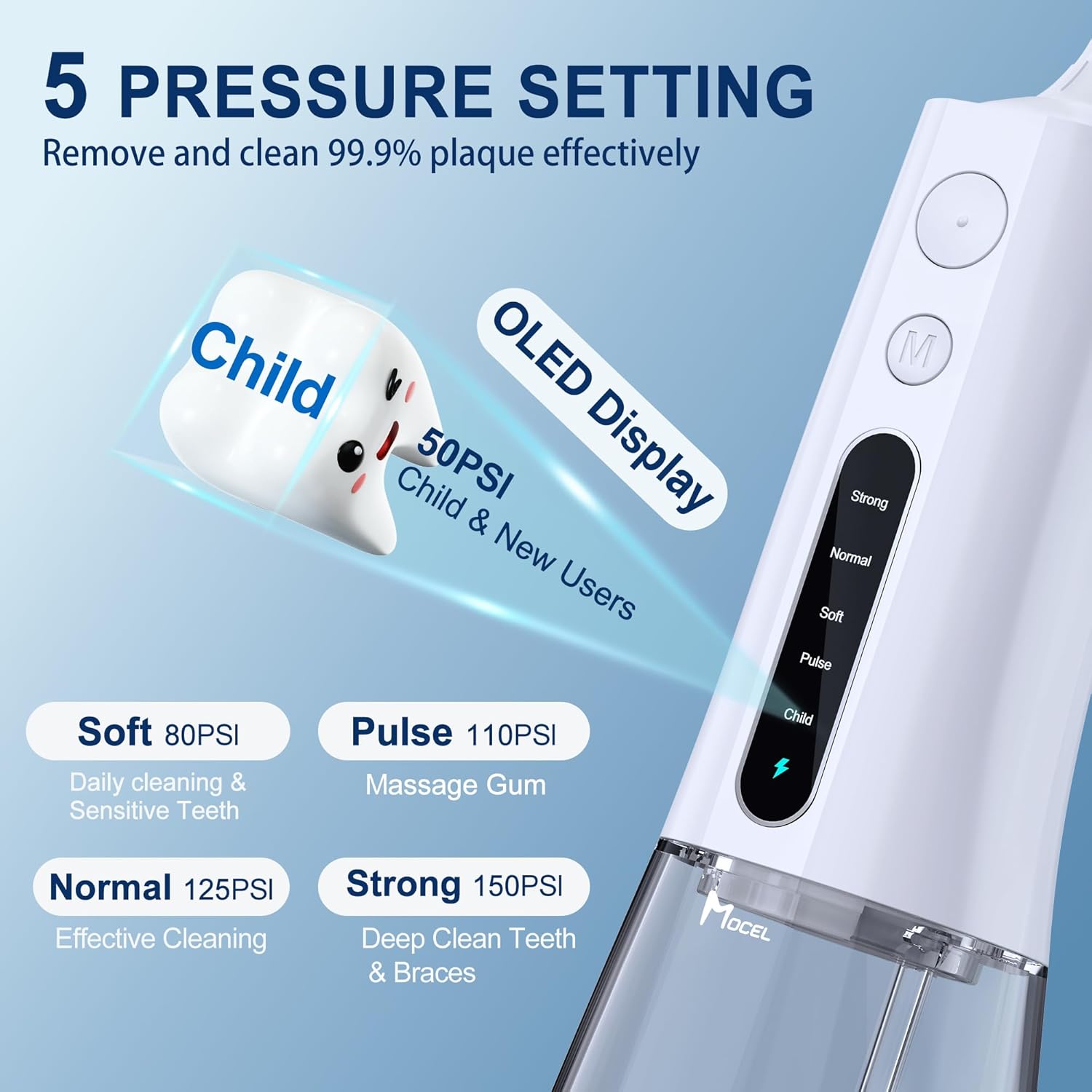
Image: Diagram illustrating the five pressure settings and their corresponding PSI levels and recommended uses.
Included Nozzle Tips:
The MOCEL Water Dental Flosser comes with various tips to address different oral hygiene needs:
- Standard Tips (x3): Suitable for daily dental cleaning, more effective than traditional interdental floss.
- Orthodontic Tip (x1): Designed for cleaning around dental braces or other dental appliances.
- Periodontal Tip (x1): For cleaning periodontal pockets.
- Tongue Cleaner Tip (x1): For daily cleaning of tongue bacteria.
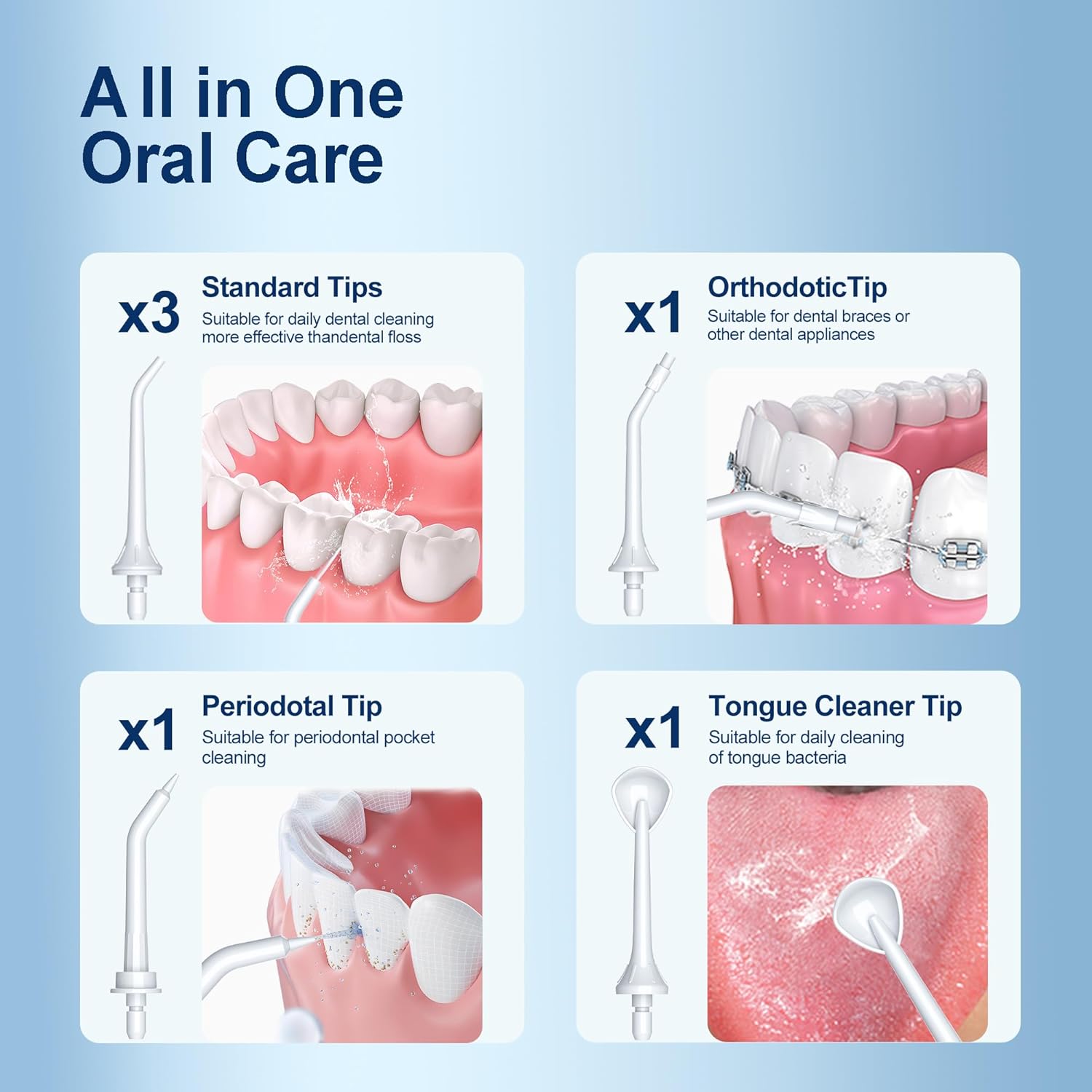
Image: Visual representation of the different nozzle tips included with the flosser, detailing their quantity and specific uses.
Setup
- Initial Charge: Before first use, fully charge the device for 4 hours using the provided USB-C cable. The charging adapter is not included.
- Fill Water Tank: Open the water tank cap and fill the 300ML water tank with warm water. Ensure the water temperature is comfortable for oral use.
- Attach Nozzle: Insert the desired nozzle tip into the opening at the top of the device until it clicks securely into place.

Image: Step-by-step visual guide on how to add water, insert the tip, select a mode, place in mouth, and turn on the device.
Operating Instructions
- Select Mode and Intensity: Press the "M" (Mode) button to cycle through the 5 available modes (Child, Pulse, Soft, Normal, Strong). The selected mode will be indicated on the OLED display.
- Position Device: Place the tip in your mouth, ensuring your lips are closed around the tip to form a tight seal. Lean over a sink to allow water to drain.
- Begin Flossing: Press the Power (On/Off) button to turn on the device.
- Clean Teeth: Guide the water stream along your gum line and between your teeth. Pause briefly on each tooth, allowing the water to clean the area thoroughly.
- Complete Session: Continue until all areas are cleaned or the water tank is empty. Press the Power button again to turn off the device.
Cleaning and Maintenance
Regular cleaning and proper maintenance will ensure the longevity and hygienic operation of your MOCEL Water Dental Flosser.
- Rinse Nozzle: After each use, remove the nozzle tip and rinse it thoroughly under clean water.
- Clean Water Tank: Empty any remaining water from the tank. Clean the water tank with mild soap and warm water. The wide mouth design facilitates easy cleaning.
- Dry and Store: Allow all components to air dry completely before reassembling. Store the device with the tip attached and the tank empty to prevent mold growth.
- Do Not Use Hot Water: Never use excessively hot water in the tank.
- No Dishwasher: Do not place the device or its components in a dishwasher.

Image: Illustration of the 300ML water tank being filled and its wide opening for easy cleaning.

Image: Depiction of the MOCEL Water Dental Flosser submerged in water, highlighting its IPX7 waterproof rating.
Troubleshooting
If you encounter issues with your MOCEL Water Dental Flosser, please refer to the following common solutions:
- Device Not Turning On: Ensure the device is fully charged. Connect it to the USB-C charger for at least 4 hours.
- Weak Water Pressure: Check if the water tank is sufficiently filled. Ensure the nozzle tip is securely attached and not clogged.
- Water Leaking: Verify that the water tank is properly seated and the nozzle tip is fully inserted.
- Short Battery Life: Ensure the device is charged for the recommended 4 hours. Battery performance may decrease over time with extensive use.
For persistent issues not covered here, please refer to the product packaging for manufacturer contact information.
Specifications
| Attribute | Detail |
|---|---|
| Brand | MOCEL |
| Model Number | WF02 |
| Product Dimensions | 20.32 x 7.62 x 20.32 cm |
| Item Weight | 358 g |
| Water Tank Capacity | 300 ML |
| Pressure Settings | 5 (50-150 PSI) |
| Modes | Child, Pulse, Soft, Normal, Strong |
| Battery Life | Up to 45 days (after 4-hour charge) |
| Charging Type | USB-C |
| Waterproof Rating | IPX7 |
| Power Source | Battery Powered |
| Country of Origin | China |
Safety Information
Please adhere to the following safety guidelines to prevent injury or damage to the device:
- Do not immerse the entire device in water beyond its IPX7 rating, especially during charging.
- Keep out of reach of children.
- Charge the device exclusively with the provided USB-C cable.
- Consult a healthcare professional before use if you have pre-existing medical conditions or are pregnant.
- Always follow the instructions provided in this manual and on the product packaging.
- Do not use the device with hot water.
Warranty and Support
For information regarding product warranty, returns, or technical support, please refer to the documentation included in your product packaging or contact the manufacturer directly. Contact details are typically provided on the product box or a separate warranty card.
Legal Disclaimer: Actual product packaging and materials may contain more and different information than what is shown on our website. We recommend that you do not rely solely on the information presented and that you always read labels, warnings, and directions before using or consuming a product.