
1. Product Overview
The TONGVEO 2-in-1 Conference Speaker and Microphone is a versatile audio solution designed for professional meetings and conferencing. It features 360° omnidirectional microphones and a powerful 5W speaker, ensuring clear audio capture and delivery for all participants. This device supports multiple connection methods, including Bluetooth, USB, wireless dongle, and 3.5mm audio jack, offering flexibility for various setups. Its daisy chain capability allows for expanding coverage in larger meeting spaces.

Image 1.1: The TONGVEO 2-in-1 Conference Speaker and Microphone.

Image 1.2: Overview of the TONGVEO Daisy Chain Bluetooth Speakerphone's features.
Key Features:
- 360° omnidirectional microphone arrays for wide sound pickup (up to 20ft/6m).
- Full duplex audio for simultaneous two-way communication.
- Flexible Daisy Chain feature for expanding coverage for up to 30 attendees.
- Intelligent Voice AI algorithm for noise reduction and voice enhancement.
- 5W ultra-clear speaker for loud and clear audio output.
- Sensor touch design with LED indicators for easy control and status monitoring.
- Built-in 8000mAh battery supporting up to 18 hours of call time.
- Multiple connection methods: Bluetooth, USB, Wireless Dongle, 3.5mm Jack.
- Wide compatibility with Windows, Mac OS, iOS, Android, and major conferencing platforms like Zoom, Teams, and WebEx.
2. Package Contents
Please verify that all items are present in the package:
- 2 x Bluetooth Speakerphone units
- 1 x USB Cable
- 1 x 3.5mm Daisy Chain Cable
- 1 x Wireless Dongle
- 1 x OTG Adapter
- 1 x User Manual (this document)
- 1 x Warranty Card

Image 2.1: All components included in the TONGVEO speakerphone package.
3. Product Components and Controls
Familiarize yourself with the various parts and control buttons of the speakerphone unit:
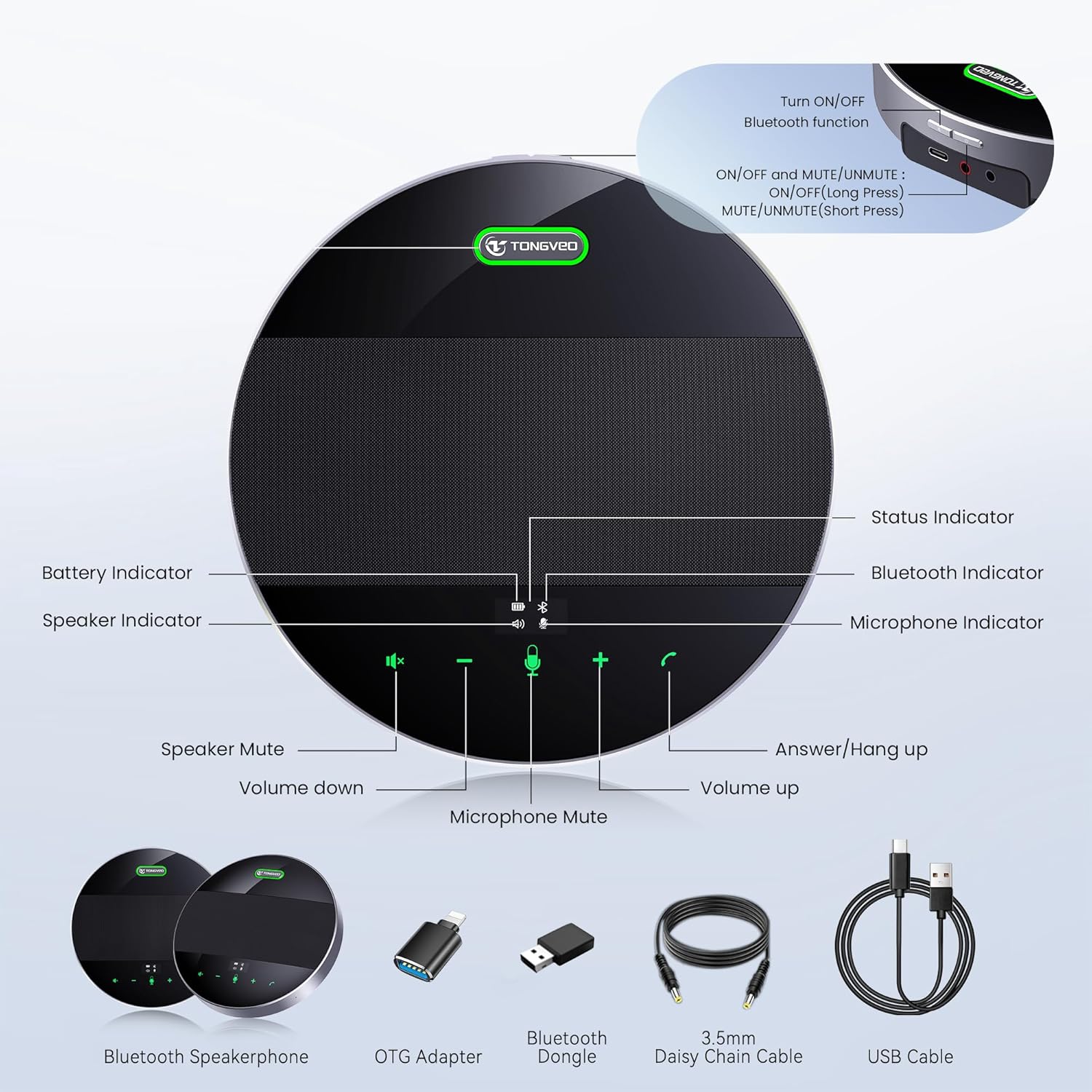
Image 3.1: Diagram illustrating the control buttons and indicators on the speakerphone.
- Power Button: Press and hold to power on/off.
- Volume Down (-): Decreases speaker volume.
- Microphone Mute: Toggles microphone mute on/off.
- Volume Up (+): Increases speaker volume.
- Answer/Hang Up: Manages calls.
- Battery Indicator: Shows remaining battery power on the OLED display.
- Status Indicator: Provides general device status.
- Bluetooth Indicator: Shows Bluetooth connection status.
- Microphone Indicator: Shows microphone status (active/muted).
- Speaker Indicator: Shows speaker status (active/muted).
- USB-C Port: For charging and wired USB connection.
- 3.5mm Jack: For daisy chain connection.
4. Setup
4.1 Charging the Device
Before initial use, fully charge the speakerphone. Connect the provided USB cable to the USB-C port on the speakerphone and the other end to a power adapter (not included) or a computer's USB port. The battery indicator on the OLED display will show charging progress.
4.2 Connection Methods
The TONGVEO speakerphone offers multiple ways to connect to your devices:

Image 4.1: The four primary connection modes: Dongle, Bluetooth, USB, and Daisy Chain.
- USB Connection:
Connect the speakerphone to your computer using the provided USB cable. The device is plug-and-play, requiring no additional drivers. It will be recognized as an audio input/output device.

Image 4.2: Connecting the speakerphone via USB to a laptop.
- Bluetooth Connection:
Turn on the speakerphone. The Bluetooth indicator will flash, indicating it's in pairing mode. On your device (smartphone, tablet, laptop), enable Bluetooth and select "TONGVEO Tevo-M3B" from the list of available devices. Once connected, the Bluetooth indicator will remain solid.
- Wireless Dongle Connection:
Plug the included wireless dongle into a USB port on your computer. Power on the speakerphone. The device will automatically connect to the dongle. This method provides a stable wireless connection without Bluetooth pairing.
- 3.5mm Audio Jack Connection:
For devices with a 3.5mm audio output, you can connect the speakerphone using a standard 3.5mm audio cable (not included, unless for daisy chain). This provides audio output from your device to the speakerphone.
- Daisy Chain Connection (for two units):
This kit includes two speakerphone units that can be cascaded for larger meeting rooms. Connect the two speakerphone units using the provided 3.5mm Daisy Chain Cable. One unit will act as the 'master' (connected to your PC/audio terminal) and the other as the 'slave'. This expands the voice pickup and speaker coverage significantly.
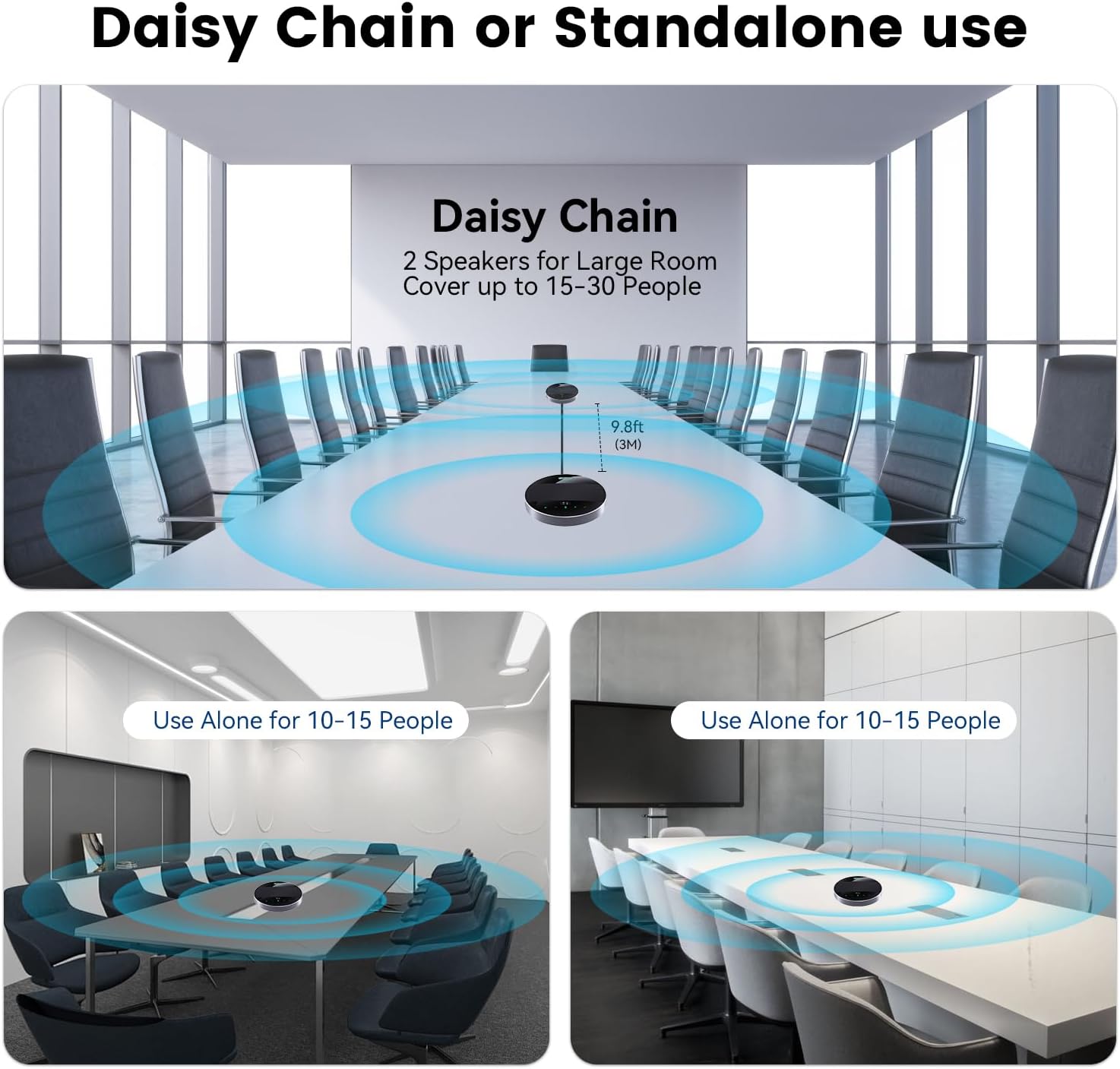
Image 4.3: Two speakerphone units connected via daisy chain for extended coverage.

Image 4.4: Illustration of daisy chain setup for large rooms versus standalone use for smaller groups.
5. Operating Instructions
5.1 Basic Operation
- Power On/Off: Press and hold the power button for 3 seconds.
- Volume Adjustment: Tap the '+' or '-' buttons to increase or decrease the speaker volume.
- Microphone Mute/Unmute: Tap the microphone icon button to mute or unmute the microphone. The microphone indicator will change color to show status.
- Answer/End Call: Tap the phone icon button to answer an incoming call or end an ongoing call.
5.2 Daisy Chain Mode Operation
When using two speakerphone units in daisy chain mode, the unit connected directly to your computer or audio source acts as the master. All controls on the master unit will affect both units. The slave unit will mirror the audio and microphone status of the master.
5.3 Compatibility
The TONGVEO speakerphone is compatible with a wide range of operating systems and conferencing platforms:
- Operating Systems: Windows, Mac OS, iOS, Android.
- Conferencing Platforms: Zoom, Microsoft Teams, WebEx, Google Meet, GoToMeeting, Face Time, OBS Studio, Bluejeans, and more.

Image 5.1: The speakerphone's wide compatibility with popular conferencing software and operating systems.
6. Audio Features and Performance
The TONGVEO speakerphone is engineered for superior audio performance in conference settings.
6.1 360° Omnidirectional Microphones
Equipped with 4 high-sensitivity digital omnidirectional microphone arrays, the device captures sound from all directions, ensuring every voice in the room is heard clearly. It has a voice pickup range of up to 20 feet (6 meters).
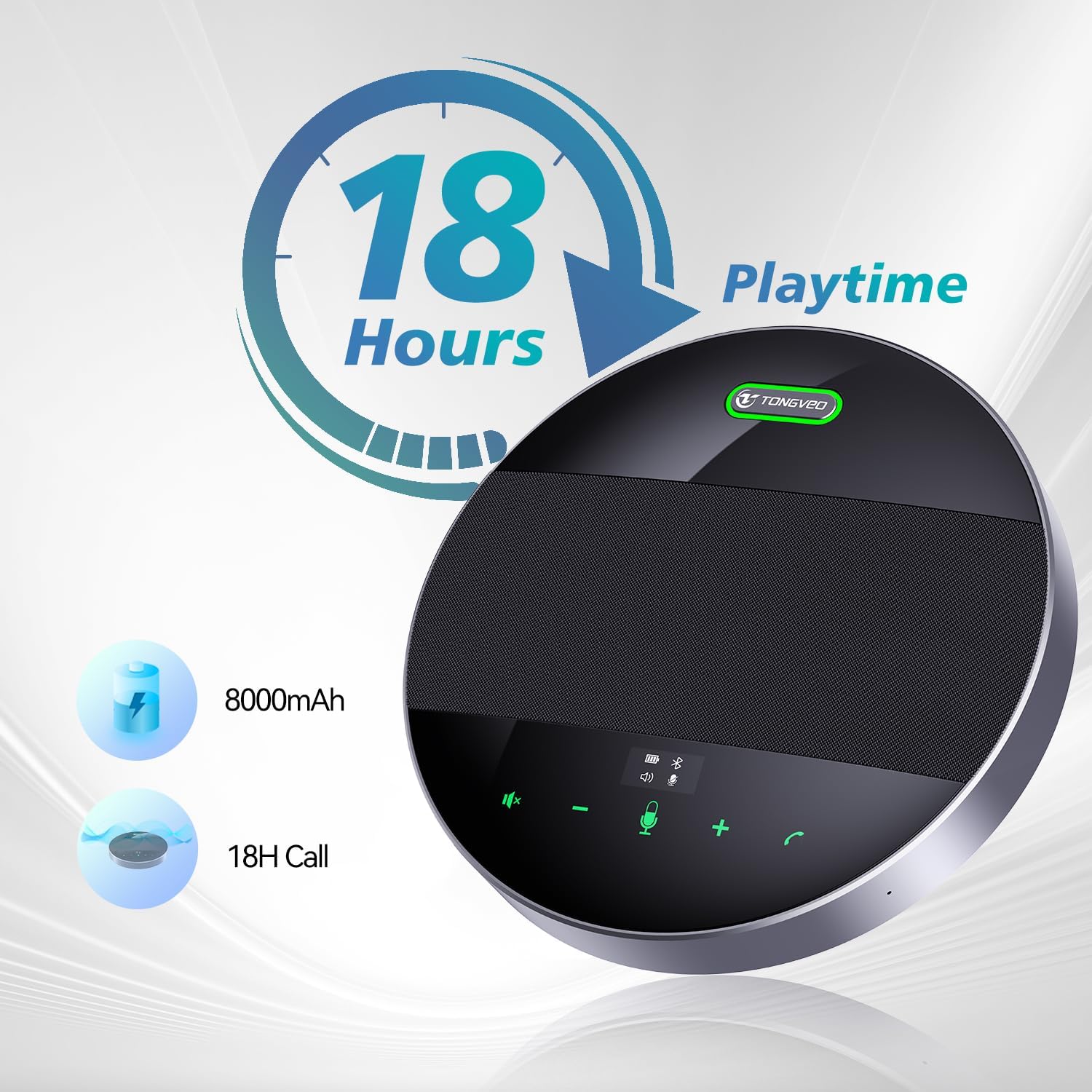
Image 6.1: Illustration of the 360-degree voice pickup capability and 20ft (6m) range.
6.2 Intelligent Noise Reduction and Full Duplex Audio
The integrated Voice AI algorithm actively eliminates background noise while enhancing voices, providing a clear and natural sound experience. Full duplex audio allows multiple participants to speak and be heard simultaneously without interruption, improving communication flow.

Image 6.2: Visual representation of noise reduction technology in action.
6.3 5W Ultra-Clear Speaker
The powerful 5W speaker delivers crystal-clear voice quality, ensuring that remote participants are heard loudly and clearly by everyone in the meeting room.
7. Maintenance
To ensure the longevity and optimal performance of your TONGVEO speakerphone, follow these maintenance guidelines:
- Cleaning: Use a soft, dry cloth to wipe the surface of the device. Do not use liquid cleaners or abrasive materials, as they may damage the finish or internal components.
- Storage: Store the device in a cool, dry place away from direct sunlight and extreme temperatures.
- Handling: Avoid dropping the device or subjecting it to strong impacts.
- Battery Care: For optimal battery life, avoid fully discharging the battery frequently. If storing for an extended period, charge the battery to about 50% before storage.
8. Troubleshooting
If you encounter issues with your TONGVEO speakerphone, please refer to the following common troubleshooting steps:
- No Power: Ensure the device is charged. Connect it to a power source using the USB cable.
- No Sound/Microphone Not Working:
- Check volume levels on both the speakerphone and your connected device.
- Ensure the microphone is not muted (check the microphone indicator).
- Verify that the speakerphone is selected as the default audio input/output device in your computer's sound settings or conferencing software.
- If using USB, try a different USB port or cable.
- Bluetooth Connection Issues:
- Ensure the speakerphone is in pairing mode (Bluetooth indicator flashing).
- Turn off and on Bluetooth on your device.
- Forget the device from your Bluetooth list and re-pair.
- Ensure the speakerphone is within the effective Bluetooth range (typically 30 feet/10 meters).
- If experiencing intermittent disconnections, try connecting via USB or the wireless dongle for a more stable connection.
- Daisy Chain Not Working:
- Ensure the 3.5mm Daisy Chain Cable is securely connected to both units.
- Verify that the master unit is properly connected to your computer/audio source.
- Poor Audio Quality (Echo/Distortion):
- Ensure the speakerphone is placed on a stable surface and not too close to walls or reflective surfaces.
- Reduce the speaker volume if feedback occurs.
- Ensure no other microphones or speakers are active in the same room that could cause interference.
If the problem persists after trying these steps, please contact TONGVEO customer support for further assistance.
9. Specifications
| Feature | Specification |
|---|---|
| Model Name | Tevo-M3B conference wireless speakerphone |
| Dimensions (L x W x H) | 6.89 x 6.89 x 0.79 inches |
| Item Weight | 2.2 pounds (approx. 1 Kilogram) |
| Power Source | Battery Powered |
| Battery Type | 1 CR5 battery (included) |
| Battery Capacity | 8000mAh |
| Talk Time | Up to 18 hours |
| Microphone Type | 4 x 360° Omnidirectional Microphone Arrays |
| Voice Pickup Range | Up to 20 feet (6 meters) |
| Speaker Output | 5W |
| Connectivity Technology | Bluetooth, USB, Wireless Dongle, 3.5mm Jack |
| Compatible Devices | Smartphone, PC, Laptop, Tablet |
| Manufacturer | Tongveo |
10. Warranty and Support
TONGVEO provides a 30-day money-back guarantee for this product. For any questions, technical support, or warranty claims, please contact TONGVEO customer service. Your inquiries will be addressed within 24 hours.
Contact Information: Refer to the warranty card included in your package or visit the official TONGVEO website for the most up-to-date support contact details.


