
Introduction
Thank you for choosing the Soleilwear Men's Heated Vest K102. This manual provides essential information for the safe and effective use, maintenance, and care of your heated vest. Please read it thoroughly before first use and keep it for future reference.
Product Features
- Intelligent Temperature Control: Offers precise heating for optimal comfort.
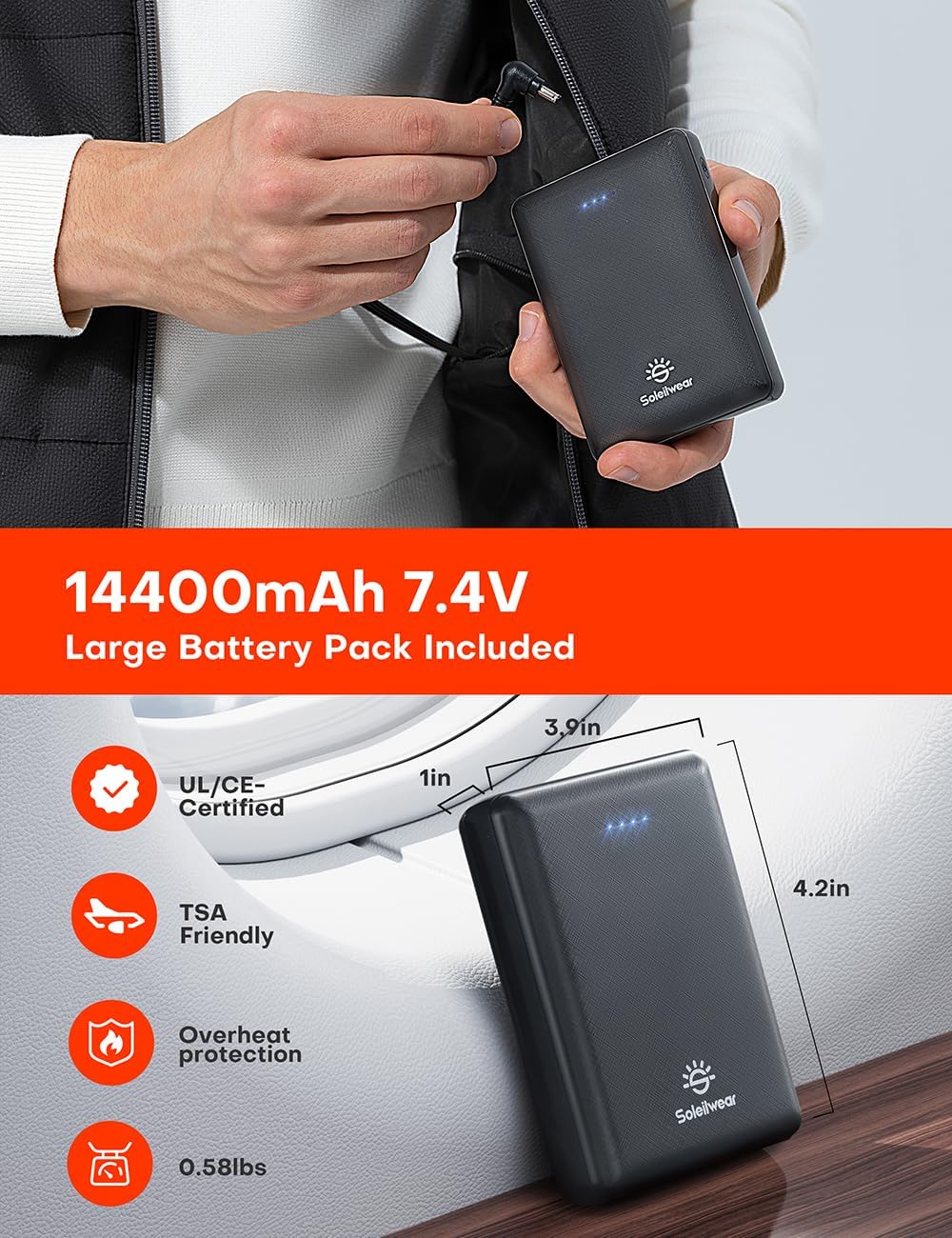
- High-Capacity Battery: Includes a 14400mAh 7.4V rechargeable Lithium Polymer battery for extended warmth.
- Multiple Heating Zones: Features 9 heating zones strategically placed for comprehensive body warmth, including lower-back, mid-back, collar, and mid-abdomen areas.
- Three Heating Levels: Easily adjustable heat settings (High, Medium, Low) via a single button control.
- Durable and Comfortable Design: Constructed with abrasion-resistant, waterproof Nylon fabric and a comfortable heated collar. Features a smooth YKK zipper and an internal pocket for the battery.
- Lightweight and Machine Washable: Designed for ease of wear and simple cleaning.
- Safety Certified: UL/CE-Certified battery with overheat protection, and TSA friendly.


Setup
- Charge the Battery: Before first use, fully charge the included 14400mAh 7.4V Lithium Polymer battery using the provided charging cable and a compatible USB wall charger (not included). The battery indicator lights will show charging progress.
- Connect the Battery: Locate the internal zippered pocket within the vest. Inside, you will find a power cable. Connect this cable to the fully charged battery pack.
- Secure the Battery: Place the connected battery pack securely into the zippered pocket and close the zipper.
Watch this video for a detailed unboxing and initial setup guide, including how to connect the battery to your Soleilwear heated vest.
Operating Instructions
- Power On: Press and hold the power button located on the chest of the vest for approximately 3 seconds until it illuminates red. This indicates the vest is on the High heat setting.
- Adjust Heat Level: Briefly press the power button to cycle through the heat settings:
- Red Light: High heat (approximately 140°F)
- Blue Light: Medium heat (approximately 122°F)
- Green Light: Low heat (approximately 104°F)
- Power Off: Press and hold the power button for approximately 3 seconds until the light turns off. This will power down the heating elements.
This video demonstrates the power button functionality and how to switch between the three heat settings on your Soleilwear heated vest.
Maintenance
- Washing Instructions: The vest is machine washable. Ensure the battery pack is removed from the pocket and the pocket is zipped closed before washing. Use a gentle cycle with cold water. Do not bleach, iron, or dry clean. Hang dry only.
- Battery Care: Store the battery in a cool, dry place when not in use. Avoid exposing the battery to extreme temperatures or direct sunlight.
Troubleshooting
- Vest Not Heating:
- Ensure the battery is fully charged and properly connected to the vest's power cable.
- Confirm the power button is pressed and held for 3 seconds to activate the heating.
- Battery Not Charging:
- Check the charging cable and wall adapter for damage.
- Ensure the charging cable is securely connected to both the battery and the power source.
Specifications
| Model Number | K102 |
| Brand | Soleilwear |
| Department | Men |
| Material | Nylon (Fabric Type), Cotton (Lining) |
| Battery | 1 Lithium Polymer batteries required (included), 14400mAh 7.4V |
| Closure Type | Zipper |
| Number of Pockets | 2 (Zipper pockets) |
| Water Resistance Level | Not Water Resistant |
| Care Instructions | Machine Wash |
| Manufacturer | Shenzhen Xinfubang Electronic Technology Co., Ltd |


Warranty and Support
For warranty information and customer support, please refer to the official Soleilwear website or contact the manufacturer directly. Keep your purchase receipt as proof of purchase.
Manufacturer: Shenzhen Xinfubang Electronic Technology Co., Ltd