
Anker A2557
Anker MagGo 3-in-1 Wireless Charging Station User Manual
Model: A2557
Your comprehensive guide to setting up, operating, and maintaining your Anker MagGo 3-in-1 Wireless Charging Station.
1. Introduction
The Anker MagGo 3-in-1 Wireless Charging Station is designed to provide convenient and efficient charging for your Apple devices, including iPhone, AirPods, and Apple Watch. Its foldable and compact design makes it ideal for both home and travel use.
2. What's in the Box
Upon unboxing your Anker MagGo 3-in-1 Wireless Charging Station, you will find the following components:
- Anker MagGo Wireless Charging Station (Foldable 3-in-1)
- 40W USB-C charger
- 5 ft (1.5 m) USB-C to USB-C cable
- Welcome guide

3. Setup Guide
To begin using your charging station, follow these simple steps:
- Connect the provided 5 ft (1.5 m) USB-C to USB-C cable to the USB-C port on the Anker MagGo Wireless Charging Station.
- Plug the other end of the USB-C cable into the provided 40W USB-C charger.
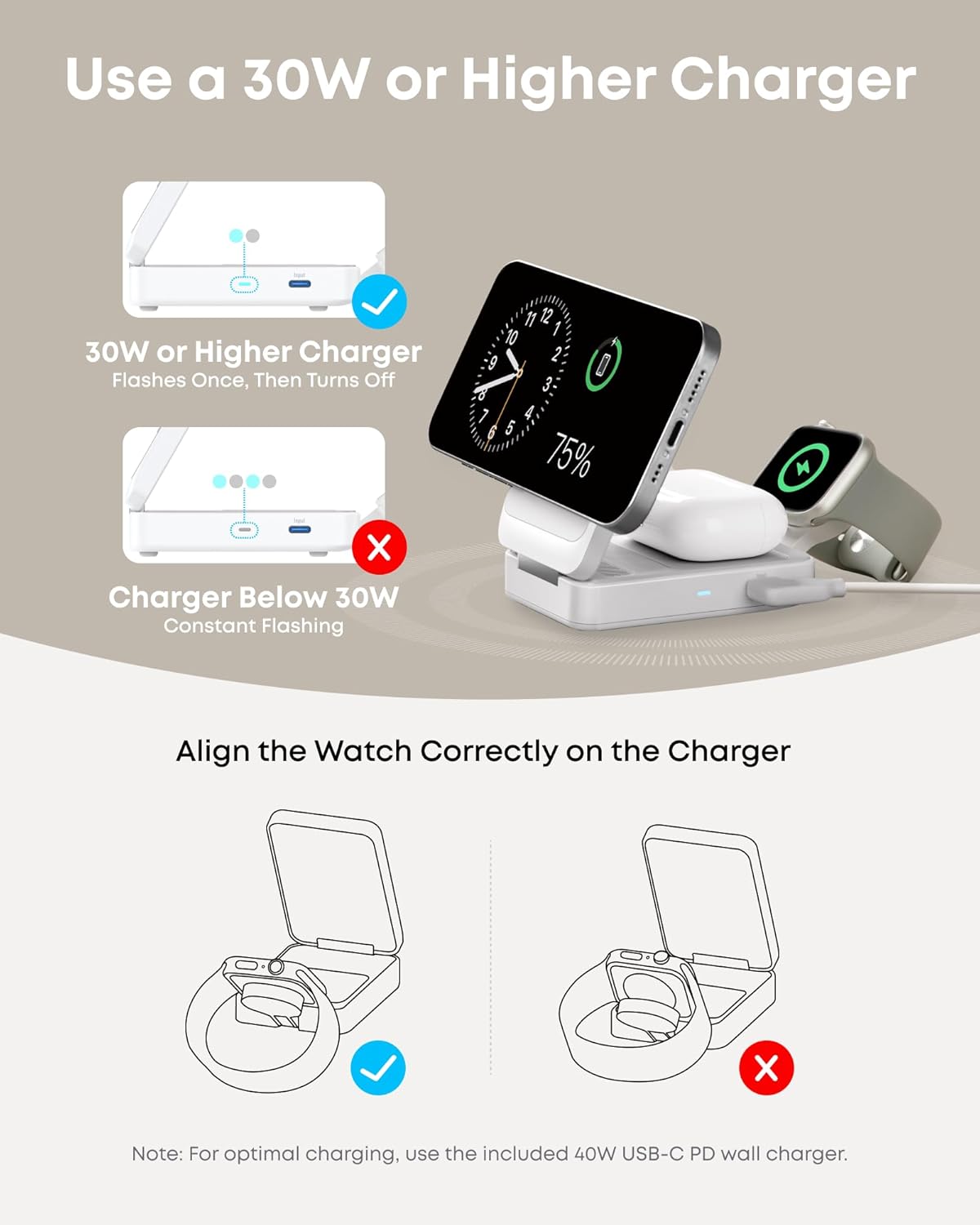
- Insert the 40W USB-C charger into a wall outlet. Ensure the power adapter is 30W or higher for optimal performance.
- Unfold the charging station to its desired configuration for charging your devices.
4. Operating Instructions
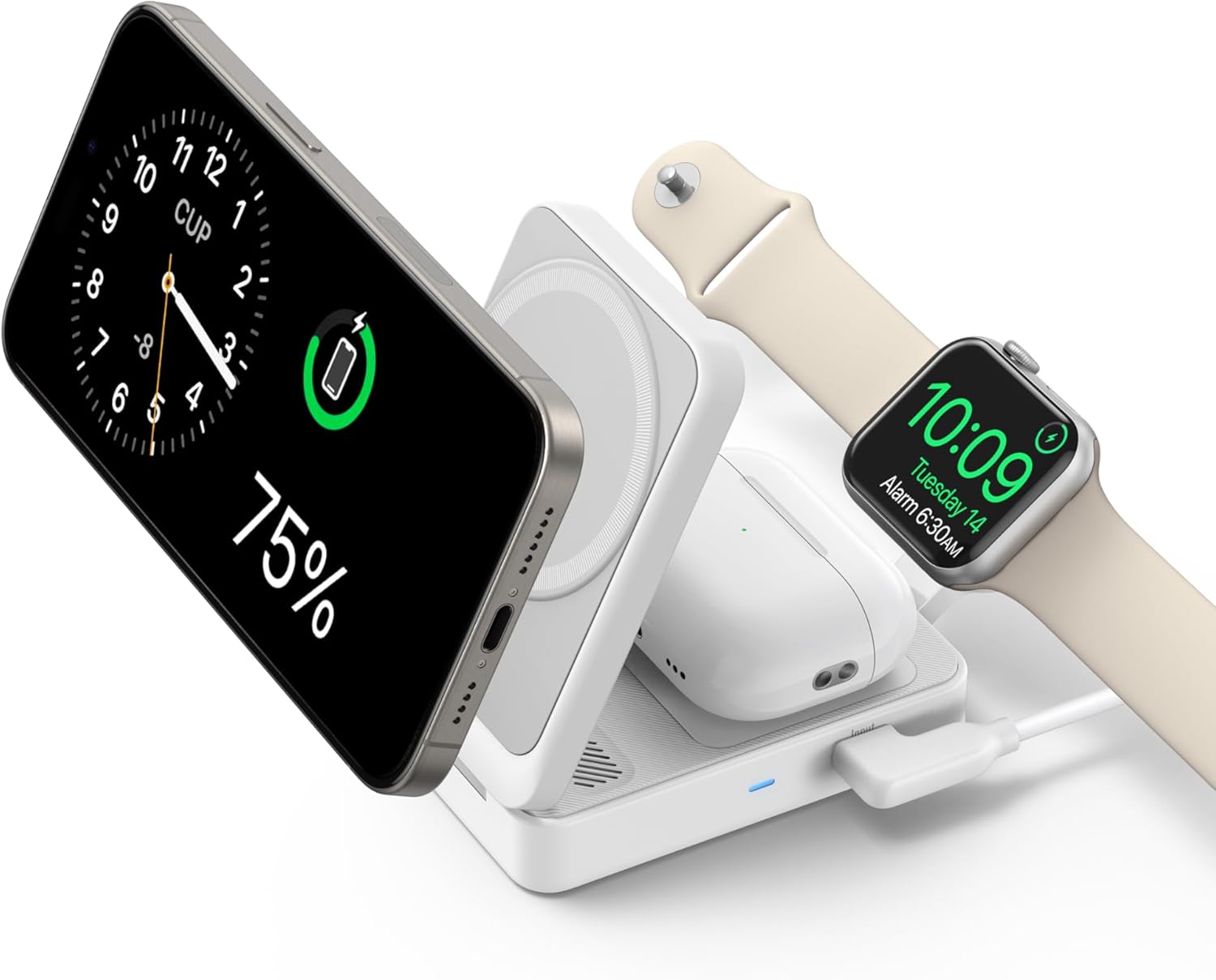
The Anker MagGo Wireless Charging Station allows you to charge up to three Apple devices simultaneously.
4.1 Charging Your iPhone
The front magnetic stand is Qi2 certified and MagSafe-compatible, providing 15W ultra-fast charging for your iPhone (iPhone 12 series and newer). Simply align your iPhone with the magnetic charging surface.

4.2 Charging Your Apple Watch
The integrated Apple Watch charger is MFW certified, allowing you to quickly power up your Apple Watch Series 9 to 47% in just 30 minutes. Flip out the watch charging module and place your Apple Watch on it. For watches with non-detachable bands, elevate the watch module. For watches with detachable bands, unbuckle the strap and flatten the watch module for optimal charging.

4.3 Charging Your AirPods / Wireless Earbuds
The base of the charging station features a dedicated Qi wireless charging pad for your AirPods or other wireless earbuds. Simply place your earbuds in the center of the charging pad.
5. Maintenance
To ensure the longevity and optimal performance of your Anker MagGo Wireless Charging Station, follow these maintenance guidelines:
- Cleaning: Disconnect the charger from the power source before cleaning. Use a soft, dry cloth to wipe down the surfaces. Avoid using abrasive cleaners or solvents.
- Safety Features: The charging station is equipped with Anker's MultiProtect Safety System and ActiveShield 2.0 technology, which monitors temperature over 3,000,000 times per day to maintain optimal device temperature during 15W high-speed charging sessions. It also includes Foreign Object Detection, Radiation Shielding, Overcurrent Protection, and Overvoltage Protection for total safety.
- Storage: When not in use or for travel, fold the charging station into its compact form to protect the charging surfaces and components.
6. Troubleshooting
If you encounter any issues with your Anker MagGo Wireless Charging Station, please refer to the following common troubleshooting tips:
- Blinking Blue Light / Insufficient Power: If the blue indicator light is blinking, it typically signifies that the power supply to the charger is insufficient. While your phone might still charge, other devices on the base may not. Ensure you are using the provided 40W USB-C PD wall charger or another 35W+ Anker charging block for optimal performance.
- Device Not Charging:
- Verify that the charging station is properly connected to a power source.
- Ensure your device is correctly aligned on the respective charging surface. For iPhones, ensure it is centered on the MagSafe area. For AirPods, place them in the center of the base pad. For Apple Watch, ensure it is securely placed on the flipped-out module.
- Remove any thick or non-MagSafe compatible phone cases. Only MagSafe-compatible phone cases with a thickness of 2.5 mm or less are supported.
- Check for any foreign objects between the device and the charging surface.
- Slow Charging: Ensure you are using the recommended 40W USB-C PD wall charger. Lower wattage chargers may result in slower charging speeds.
7. Specifications
| Feature | Detail |
|---|---|
| Model Number | A2557 |
| Product Dimensions | 3.5 x 2.36 x 0.98 inches |
| Item Weight | 6.9 ounces |
| Connectivity Technology | Wireless |
| Connector Type | USB Type C |
| Compatible Devices | Smartphones (iPhone 12/13/14/15/16 series), AirPods, Apple Watch (Ultra 1/2, Series 1-9, SE) |
| Input Voltage | 240 Volts (AC) |
| Special Features | Wireless Charging, Foldable Design, Qi2 Certified, MFW Certified |
| Manufacturer | Anker |
8. Warranty and Support
Anker stands behind the quality of its products. Your Anker MagGo Wireless Charging Station comes with a 24-month warranty.
For further assistance, technical support, or warranty claims, please contact Anker customer service. You can also refer to the official User Guide for more detailed information:
Ask a question about this manual
Ask about setup, troubleshooting, compatibility, parts, safety, or missing instructions. Manuals+ will review the question and use this page’s manual context to help answer it.