
Cecotec 02721
Cecotec Bolero DressCode 10300 Washing Machine User Manual
Model: 02721
1. Introduction
This user manual provides comprehensive instructions for the installation, operation, and maintenance of your new Cecotec Bolero DressCode 10300 Front Load Washing Machine. Please read this manual carefully before using the appliance to ensure safe and efficient operation. Keep this manual for future reference.
2. Safety Instructions
Always follow basic safety precautions when using electrical appliances to reduce the risk of fire, electric shock, and injury to persons.
- Ensure the washing machine is properly grounded.
- Do not operate the machine with a damaged power cord or plug.
- Keep children and pets away from the appliance during operation.
- Do not wash items that are soiled with flammable substances.
- Always unplug the machine before cleaning or performing maintenance.
- Do not open the detergent dispenser or door during a wash cycle, especially when the water level is high or temperature is hot.
- Ensure all transport bolts are removed before first use to prevent damage.
3. Product Overview
The Cecotec Bolero DressCode 10300 is a high-performance front-load washing machine designed for efficiency and convenience. It features a robust Inverter Plus motor, offering quiet operation and significant energy savings.

Figure 3.1: Front view of the Cecotec Bolero DressCode 10300 washing machine, showing the control panel, drum door, and 10kg capacity label.
Key Features:
- Capacity: 10 kg, suitable for large loads.
- Spin Speed: Maximum 1400 rpm, adjustable for various fabric types.
- Programs: 15 pre-set washing programs for diverse laundry needs.
- Motor: Inverter Plus motor for efficient, quiet, and durable performance.
- SteamMax Function: Utilizes steam for enhanced cleaning and wrinkle reduction.
- DrumClean: Automatic drum cleaning function for optimal hygiene.
- DelayStart: Allows setting a delayed start time (0-24 hours).
- KidLock: Child lock feature for safety.
- Extra Rinse: Provides an additional rinse cycle for thorough detergent removal.
- Energy Efficiency: Class A rating for low energy consumption.

Figure 3.2: Detailed view of the control panel, showing the program dial, LED display, and touch controls for various functions.
4. Setup and Installation
Proper installation is crucial for the safe and efficient operation of your washing machine. Please follow these steps carefully.
4.1 Unpacking
Carefully remove all packaging materials. Inspect the appliance for any damage during transit. Report any damage to your retailer immediately.
4.2 Removing Transport Bolts
Before operating the washing machine, you must remove the transport bolts located at the rear of the appliance. These bolts secure the drum during transit and must be removed to prevent severe damage to the machine.
- Locate the transport bolts on the back panel.
- Use a wrench to loosen and remove all bolts.
- Insert the plastic caps provided into the holes.
- Keep the transport bolts for future transportation of the machine.
4.3 Leveling the Appliance
The washing machine must be perfectly level to prevent excessive vibration and noise during operation. Adjust the adjustable feet at the bottom of the machine until it is stable and level on all four corners.

Figure 4.1: Side view of the washing machine, illustrating its dimensions (85 cm height, 59 cm width, 60 cm depth).
4.4 Water Supply Connection
Connect the supplied water inlet hose to the cold water tap and the corresponding inlet valve on the back of the washing machine. Ensure all connections are tight to prevent leaks.
4.5 Drain Hose Connection
Position the drain hose into a standpipe or over the edge of a sink, ensuring it is securely fastened to prevent displacement during draining.
4.6 Electrical Connection
Plug the power cord into a grounded electrical outlet. Ensure the voltage and frequency match the specifications on the rating label of the appliance.
5. Operating Instructions
Follow these steps to operate your Cecotec washing machine.
5.1 Preparing Laundry
- Sort laundry by fabric type, color, and degree of soiling.
- Check garment care labels for washing instructions.
- Empty pockets and close zippers and buttons.

Figure 5.1: A user loading a large item, such as a duvet, into the spacious drum of the washing machine.
5.2 Loading Laundry
Open the door and load the laundry into the drum. Do not overload the machine; leave enough space for the clothes to tumble freely.
5.3 Adding Detergent and Additives
Pull out the detergent dispenser drawer and add the appropriate amount of detergent and fabric softener to the designated compartments. Refer to your detergent packaging for dosage recommendations.
5.4 Selecting a Program
Turn the program dial to select one of the 15 available washing programs. The LED display will show the default settings for the selected program.

Figure 5.2: A user's hand interacting with the rotary dial to select a wash program, with various program options visible around the dial.
5.5 Adjusting Settings
You can customize the wash cycle using the touch buttons on the control panel:
- Temperature: Adjust the water temperature (e.g., 20°C, 40°C, 60°C, 90°C).
- Spin Speed: Modify the spin speed up to 1400 rpm.
- DelayStart: Press to set a delay for the start of the wash cycle (0-24 hours).
- Extra Rinse: Activate for an additional rinse cycle.
- SteamMax: Select this option for steam treatment during the cycle.
5.6 Starting the Wash Cycle
Press the Start/Pause button to begin the selected program. The machine will automatically proceed through the wash, rinse, and spin cycles.
5.7 KidLock Function
To activate the child lock, press and hold the designated KidLock button (or combination of buttons as indicated on the panel) for a few seconds until the lock indicator appears. This prevents accidental changes to settings during operation.
6. Maintenance
Regular maintenance ensures the longevity and optimal performance of your washing machine.
6.1 Cleaning the Detergent Dispenser
Periodically remove and clean the detergent dispenser drawer to prevent residue buildup. Rinse it under running water and dry thoroughly before reinserting.
6.2 DrumClean Function
Utilize the automatic DrumClean function regularly to clean the inside of the drum and prevent odors and bacteria buildup. Refer to the control panel for initiating this cycle.
6.3 Cleaning the Drain Filter
The drain filter should be cleaned periodically to remove lint and small objects. Locate the filter at the bottom front of the machine, place a shallow container underneath to catch water, and carefully unscrew the filter to clean it.
6.4 External Cleaning
Wipe the exterior of the washing machine with a soft, damp cloth. Do not use abrasive cleaners or solvents.
7. Troubleshooting
Before contacting customer service, please refer to the following table for common issues and their solutions.
| Problem | Possible Cause | Solution |
|---|---|---|
| Machine does not start | Power cord not plugged in; Door not closed properly; Program not selected. | Check power connection; Ensure door is latched; Select a program and press Start. |
| Excessive vibration/noise | Transport bolts not removed; Machine not level; Uneven load. | Remove transport bolts; Adjust leveling feet; Redistribute laundry inside drum. |
| Water not draining | Drain hose kinked or blocked; Drain filter clogged. | Check and straighten drain hose; Clean the drain filter. |
| Detergent residue in dispenser | Insufficient water pressure; Detergent clumping; Dispenser dirty. | Check water supply; Use less detergent or dissolve it; Clean dispenser. |
8. Specifications
Detailed technical specifications for the Cecotec Bolero DressCode 10300 Washing Machine.
- Model Number: 02721
- Capacity: 10 Kilograms
- Maximum Spin Speed: 1400 RPM
- Energy Efficiency Class: A
- Power Consumption (Eco 40-60): 49 kWh / 100 cycles
- Water Consumption (Eco 40-60): 50 Liters / cycle
- Noise Level (Spin): 76 dB
- Dimensions (W x D x H): 60 x 54 x 85 cm
- Product Weight: 61 Kilograms
- Voltage: 230 Volts (AC)
- Wattage: 2000W
- Drum Material: Stainless Steel
- Control Type: Touch / Rotary Dial
- Included Components: 1 x Washing machine; 1 x Water supply hose; 1 x User manual; Transport feet.
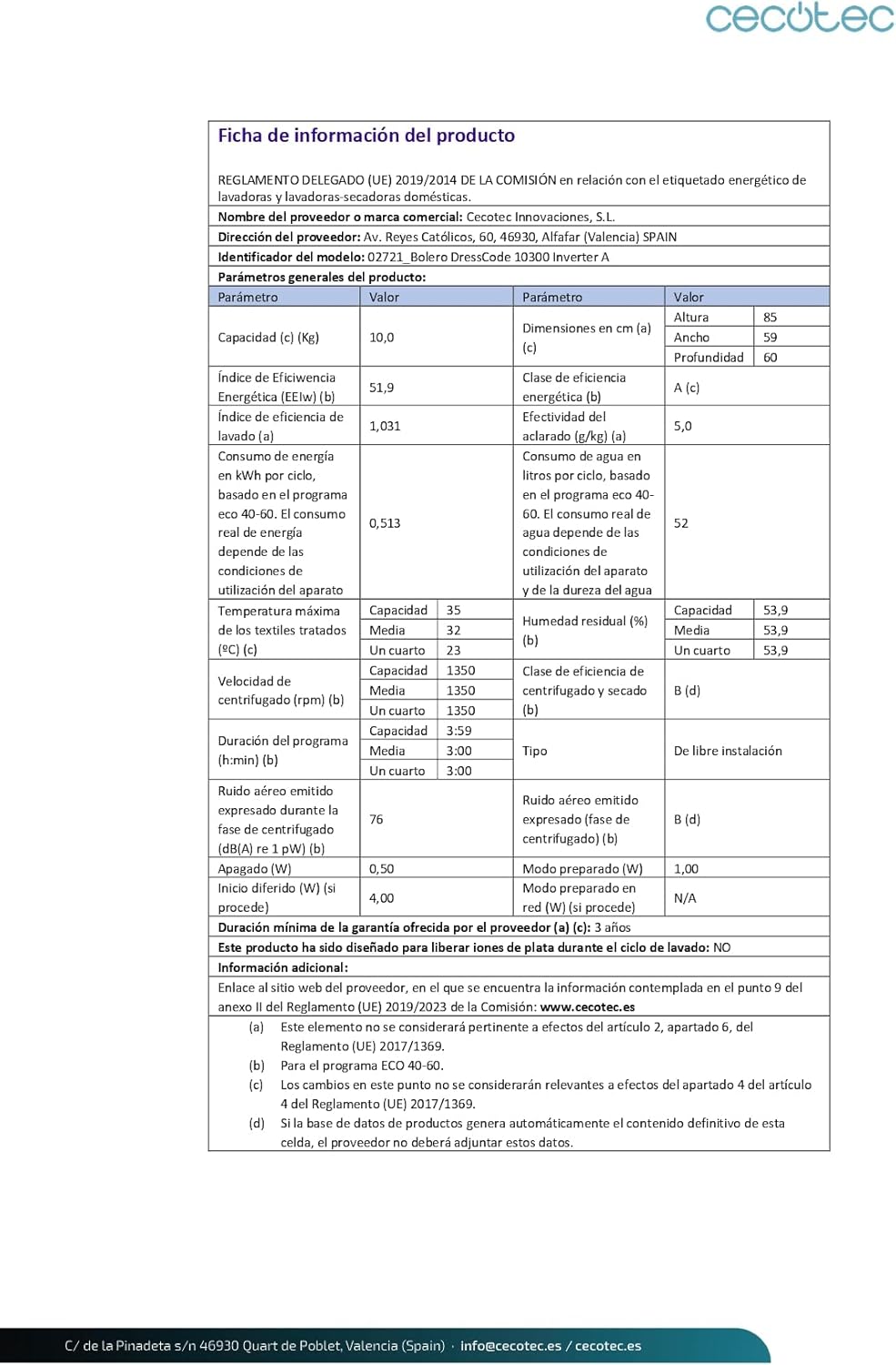
Figure 8.1: European Energy Label for the Cecotec Bolero DressCode 10300, indicating its Class A energy efficiency, 49 kWh/100 cycles, 50 L/cycle water consumption, and 76 dB spin noise level. For more details, visit the official EPREL database: https://eprel.ec.europa.eu/qr/1588755
9. Warranty and Support
Your Cecotec Bolero DressCode 10300 Washing Machine comes with a minimum warranty period of 3 years from the date of purchase. Please retain your proof of purchase for warranty claims.
For technical assistance, spare parts, or warranty service, please contact Cecotec customer support through their official website or the contact information provided in your purchase documentation. Ensure you have your model number (02721) and serial number ready when contacting support.
Ask a question about this manual
Ask about setup, troubleshooting, compatibility, parts, safety, or missing instructions. Manuals+ will review the question and use this page’s manual context to help answer it.