
1. Introduction
This manual provides instructions for the safe and effective use of your Flashstar Pat Light LED Pro. This versatile indoor LED light is designed to enhance your living space with adjustable illumination. Please read this manual thoroughly before installation and operation, and retain it for future reference.

Figure 1: Flashstar Pat Light LED Pro. This image shows the compact, circular design of the LED light, featuring a central light source and a smooth white casing.
2. Safety Information
Please observe the following safety precautions to prevent injury or damage to the product:
- Do not expose the device to water or excessive moisture.
- Do not attempt to disassemble or modify the device. This will void the warranty.
- Keep out of reach of children.
- Use only the recommended battery type (if applicable, will specify in setup).
- Ensure the mounting surface is clean and dry before applying the adhesive.
- Avoid direct eye exposure to the LED light for prolonged periods.
3. Package Contents
The Flashstar Pat Light LED Pro package typically includes:
- 1 x Flashstar Pat Light LED Pro unit
- 1 x Instruction Manual (this document)
- Note: Batteries are not typically included and must be purchased separately.
4. Setup
4.1 Battery Installation
- Gently twist the back cover of the Pat Light counter-clockwise to open the battery compartment.
- Insert 3x AAA batteries (not included) according to the polarity markings (+/-) inside the compartment.
- Replace the back cover and twist clockwise until it clicks securely into place.
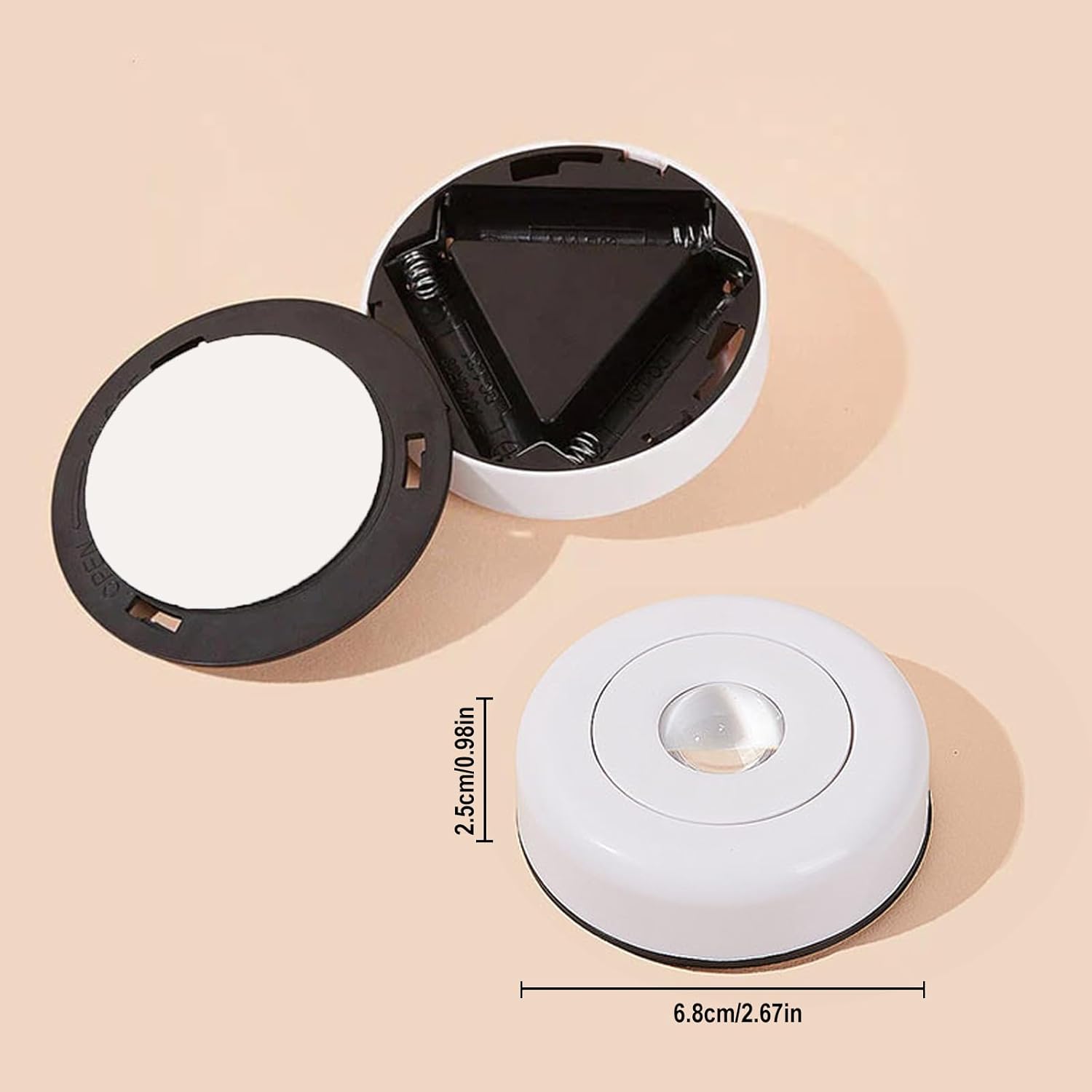
Figure 2: Battery compartment. This image displays the underside of the Pat Light with the cover removed, showing the slots for AAA batteries and the product dimensions (2.5cm height, 6.8cm diameter).
4.2 Mounting the Light
The Pat Light LED Pro features a self-adhesive backing for easy installation.
- Choose a clean, dry, and smooth surface (e.g., ceramic, glass, wood) where you wish to install the light.
- Peel off the protective film from the adhesive backing on the light.
- Press the light firmly onto the desired surface for at least 30 seconds to ensure a strong bond.

Figure 3: Self-adhesive backing. This image shows the reverse side of the Pat Light, highlighting the 3M adhesive for secure mounting.
5. Operation
5.1 Turning On/Off and Brightness Adjustment
The Pat Light LED Pro is operated via a light touch electronic switch located on the front surface.
- To Turn On/Off: Lightly tap the center of the light.
- To Adjust Brightness: The light offers 2 levels of brightness. Tap the center once for the first brightness level, and tap again for the second, brighter level. A third tap will turn the light off.
Figure 4: Touch switch operation. This image illustrates a finger interacting with the central touch switch of the Pat Light, demonstrating how to turn it on/off and adjust brightness.
5.2 Light Modes and Colors
While the specific variant of this product is "White light", the Pat Light LED Pro series offers various light modes and colors, including warm light, sunset, and rainbow effects, depending on the model. The operation for changing modes typically involves repeated taps on the touch switch or a long press, as demonstrated in the video below. Please refer to your specific product packaging for exact color and mode availability.
Video 1: Pat Light LED Pro demonstration. This video showcases the various color-changing capabilities and light effects of the Pat Light LED Pro, including transitions between different hues and brightness levels. Note that specific color options may vary by product variant.

Figure 5: White light illumination. This image shows two Pat Lights installed under a shelf, casting a bright white light on the items below.

Figure 6: Sunset effect. This image demonstrates the Pat Light projecting a warm, gradient sunset-like light effect onto a surface, creating an ambient atmosphere.

Figure 7: Rainbow effect. This image illustrates the Pat Light creating a vibrant rainbow light pattern on a surface, showcasing its dynamic color capabilities.
6. Maintenance
To ensure the longevity and optimal performance of your Pat Light LED Pro, follow these maintenance guidelines:
- Cleaning: Wipe the surface of the light with a soft, dry cloth. Do not use abrasive cleaners or solvents, as they may damage the finish.
- Battery Replacement: When the light appears dim or stops functioning, replace all batteries with new ones of the same type (3x AAA). Ensure correct polarity.
- Storage: If storing the light for an extended period, remove the batteries to prevent leakage.
7. Troubleshooting
| Problem | Possible Cause | Solution |
|---|---|---|
| Light does not turn on. | Dead or incorrectly installed batteries. | Replace batteries, ensuring correct polarity. |
| Light is dim. | Low battery power. | Replace batteries. |
| Adhesive not sticking. | Surface is dirty, wet, or uneven. | Clean and dry the surface thoroughly before re-applying. Ensure the surface is smooth. |
| Light flickers. | Low battery power or loose battery connection. | Replace batteries or ensure they are seated correctly. |
8. Specifications
- Brand: Flashstar
- Model Number: KE089
- ASIN: B0CF22J2F9
- UPC: 600510917760
- Color (this variant): White light
- Material: Plastic
- Power Source: 3x AAA Batteries (not included)
- Dimensions: Approximately 6.8 cm (2.67 in) diameter, 2.5 cm (0.98 in) height
- Mounting: Self-adhesive
9. Warranty and Support
Flashstar products are designed for quality and reliability. For warranty information or technical support, please refer to the contact details provided on your product packaging or visit the official Flashstar website. Please have your model number (KE089) and purchase details ready when contacting support.