
Sokply RC-100
Sokply RC-100 Sensor Remote Programmer User Manual
Model: RC-100
Introduction
The Sokply RC-100 Sensor Remote Programmer is a handheld wireless IR configuration tool designed for remote adjustment of IR-enabled fixture integrated sensors, specifically the ANT-5-4 Sensor used with Sokply Motion Sensor High Bay Shop Lights and UFO Motion Sensor High Bays. This tool allows users to modify sensor parameters without requiring ladders or additional tools, offering convenience and efficiency. It can store up to four sensor parameter modes, streamlining the configuration process for multiple sensors across various areas or sites.
The RC-100 can send sensor settings from a mounting height of up to 50 feet. It supports displaying previously established sensor parameters, copying parameters, and sending new parameters or storing parameter profiles, making it ideal for projects requiring consistent settings across numerous installations.
Product Overview

Figure 1: Front view of the Sokply RC-100 Sensor Remote Programmer, showing its buttons and display area.
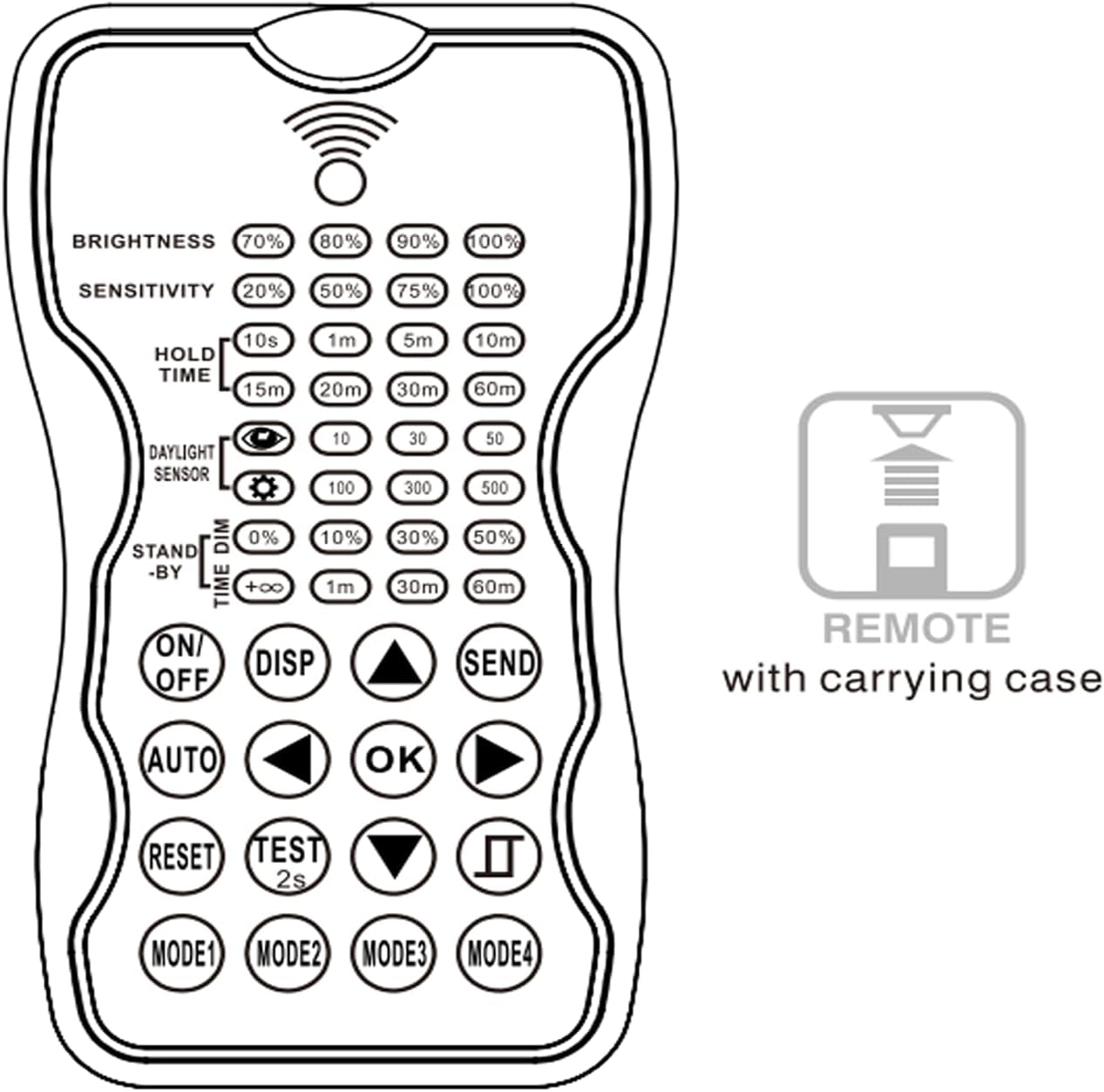
Figure 2: Diagram of the RC-100 remote control, illustrating its layout and indicating it comes with a carrying case.
Setup
Battery Installation
The RC-100 Sensor Remote Programmer requires 2 x AAA 1.5V batteries for operation. Alkaline batteries are preferred for optimal performance and longevity.
- Locate the battery compartment on the back of the RC-100 remote.
- Slide open the battery compartment cover.
- Insert two AAA batteries, ensuring the positive (+) and negative (-) terminals align correctly with the markings inside the compartment.
- Close the battery compartment cover securely.
Important: Batteries are not included with the product and must be purchased separately.
Operating Instructions
The RC-100 remote allows for precise configuration of compatible sensors. Ensure the remote is pointed directly at the sensor you wish to configure, within the effective upload range of up to 50 feet (15 meters).
Key Functions and Buttons
Figure 3: Detailed view of the RC-100 remote control buttons for operational reference.
- BRIGHTNESS: Adjusts the light output level. Options typically include 70%, 80%, 90%, 100%.
- SENSITIVITY: Sets the motion detection sensitivity. Common settings are 20%, 50%, 75%, 100%.
- HOLD TIME: Determines how long the light stays on at full brightness after motion is detected. Options include 10s, 1m, 5m, 10m, 15m, 20m, 30m, 60m.
- DAYLIGHT SENSOR: Configures the ambient light threshold for operation. Settings like 10, 30, 50, 100, 300, 500 (lux or similar unit) dictate when the sensor activates based on natural light.
- STAND-BY TIME DIM: Sets the dimming level for standby mode. Options include 0%, 10%, 30%, 50%.
- STAND-BY TIME: Defines how long the light remains in standby (dimmed) mode after the hold time expires and no motion is detected. Options include +∞ (infinite), 1m, 30m, 60m.
- ON/OFF: Toggles the sensor's controlled light on or off.
- DISP (Display): Used to display the current settings of the connected sensor.
- SEND: Transmits the selected parameters from the remote to the sensor.
- AUTO: Activates automatic operation mode for the sensor.
- OK: Confirms a selection or setting.
- RESET: Resets the sensor to its factory default settings.
- TEST (2s): Initiates a 2-second test mode for the sensor.
- MODE1, MODE2, MODE3, MODE4: Allows saving and recalling up to four custom parameter profiles for quick configuration of multiple sensors.
- Directional Arrows (Up, Down, Left, Right): Used for navigating menus and adjusting parameter values.
Configuring Sensor Parameters
- Point the RC-100 remote directly at the sensor on the light fixture.
- Press the DISP button to view the current settings of the sensor.
- Use the directional arrows to navigate to the parameter you wish to change (e.g., BRIGHTNESS, SENSITIVITY, HOLD TIME).
- Select the desired value for the parameter using the arrows and press OK to confirm.
- Once all desired changes are made, press the SEND button to transmit the new settings to the sensor.
- To save a set of configurations for future use, adjust all parameters as desired, then press and hold one of the MODE buttons (MODE1-MODE4) until confirmation is received (e.g., a flash from the sensor or a confirmation on the remote if it has a display).
- To recall a saved mode, simply press the corresponding MODE button (MODE1-MODE4).
Application Examples

Figure 4: The RC-100 remote being used to configure Sokply Motion Sensor High Bay Shop Lights.

Figure 5: The RC-100 remote being used to configure Sokply UFO Motion Sensor High Bay Lights.
The RC-100 is specifically designed for use with Sokply Motion Sensor High Bay Shop Lights (e.g., ASIN: B0BPMFPSTK) and Sokply UFO Motion Sensor High Bays (e.g., ASIN: B0BVR39HHN). It allows for centralized control and customization of lighting behavior in large industrial or commercial spaces.
Maintenance
Battery Care
To ensure optimal performance and extend the lifespan of your RC-100 remote, follow these battery care guidelines:
- Remove batteries: If the remote will not be used for an extended period (e.g., more than 30 days), remove the batteries from the compartment to prevent leakage and potential damage to the device.
- Replace batteries: Replace batteries when the remote's performance degrades or if the indicator light (if present) suggests low power.
- Dispose properly: Dispose of used batteries according to local regulations. Do not dispose of batteries in general household waste.
Cleaning
Clean the remote control with a soft, dry cloth. Do not use abrasive cleaners, solvents, or strong chemicals, as these may damage the surface or internal components.
Troubleshooting
| Problem | Possible Cause | Solution |
|---|---|---|
| Remote not responding. |
|
|
| Sensor not receiving commands. |
|
|
| Settings not saving after sending. |
|
|
Specifications
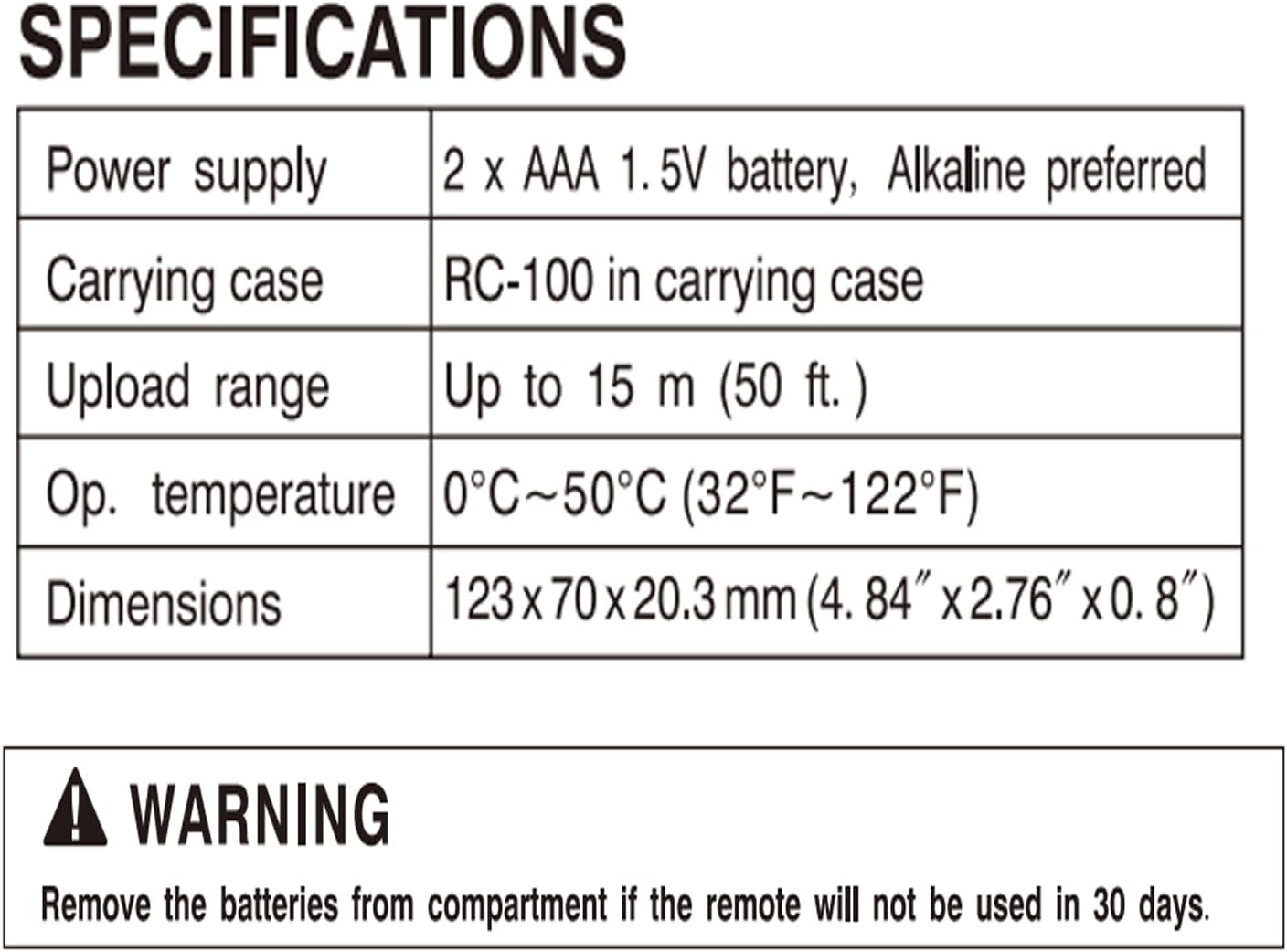
Figure 6: Official specifications table for the RC-100 Sensor Remote Programmer.
| Feature | Detail |
|---|---|
| Model Number | RC-100 |
| Part Number | SRC-100 V2.6 |
| Power Supply | 2 x AAA 1.5V battery (Alkaline preferred) |
| Upload Range | Up to 15 m (50 ft.) |
| Operating Temperature | 0°C ~ 50°C (32°F ~ 122°F) |
| Product Dimensions | 123 x 70 x 20.3 mm (4.84" x 2.76" x 0.8") |
| Material | Copper |
| Compatible Devices | ANT-5-4 Sensor, Sokply Motion Sensor High Bay Shop Light, Sokply UFO Motion Sensor High Bay |
WARNING: Remove the batteries from the compartment if the remote will not be used in 30 days or more to prevent battery leakage and damage.
Support and Further Information
For additional support, detailed diagrams, or specific inquiries, please refer to the official user manual PDF or contact Sokply customer support.
Official User Manual (PDF): Download PDF
Sokply Store: Visit Sokply Store on Amazon