Introduction
This manual provides comprehensive instructions for the operation, maintenance, and troubleshooting of your Shmci C5S Professional HIFI DSD256 Lossless MP3 Player. The C5S is a compact, metal-bodied digital audio player designed for high-fidelity music playback, supporting DSD256 and various lossless audio formats. It features a WM8965 DSP and DAC for superior sound quality and operates via touch-tone controls.
Product Overview
The Shmci C5S is engineered for portable high-resolution audio. Its robust metal body houses a TFT true color screen and intuitive controls for seamless navigation and playback.
Device Layout
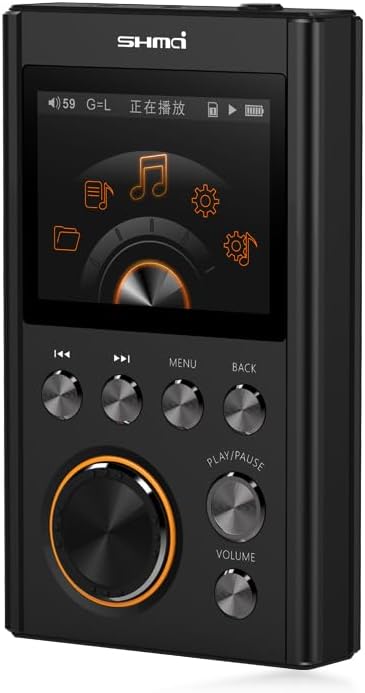
Figure 1: Front view of the Shmci C5S MP3 player, highlighting the display and primary control buttons.

Figure 2: Angled view of the Shmci C5S, providing a perspective of its compact design and button layout.

Figure 3: Top-down angled view of the Shmci C5S, illustrating the arrangement of the screen and physical controls.

Figure 4: Side view of the Shmci C5S, revealing the USB charging/data port and the TF (microSD) card slot.

Figure 5: Back view of the Shmci C5S, displaying the "SHMCI HIFI HIGH FIDELITY MUSIC PLAYER C5" branding and various certification marks.
Controls and Ports
- Display Screen: TFT true color screen for menu navigation and track information.
- Rotary Dial: Large circular dial for menu navigation and selection.
- Play/Pause Button: Initiates or pauses audio playback.
- Volume Buttons: Dedicated buttons for adjusting audio output level.
- Skip Buttons (Previous/Next): For navigating between tracks.
- Menu Button: Accesses the main menu or context-sensitive options.
- Back Button: Returns to the previous screen or menu level.
- USB Port: For charging the device and transferring data (music files).
- TF Card Slot: Supports external memory cards for expanded storage.
- Headphone Jack: Standard 3.5mm audio output.
Setup
1. Charging the Device
Before first use, fully charge the Shmci C5S. Connect the device to a USB power adapter (not included) or a computer's USB port using the provided USB cable. The charging indicator on the device will show its status. A full charge provides approximately 30 hours of continuous playback.
2. Inserting a TF Card (Optional)
The Shmci C5S supports TF (microSD) cards up to 128GB for expanded storage. To insert a card:
- Locate the TF card slot on the side of the device (refer to Figure 4).
- Gently insert the TF card into the slot with the gold contacts facing down until it clicks into place.
- To remove, push the card in slightly until it springs out.
3. Transferring Music Files
Connect the Shmci C5S to your computer using the USB cable. The device will appear as a removable storage drive. You can then drag and drop your music files (including DSD, FLAC, WAV, MP3, etc.) into the device's internal storage or the inserted TF card.
Operating Instructions
Power On/Off
- Power On: Press and hold the Power button (usually located on the top or side) for a few seconds until the screen illuminates.
- Power Off: Press and hold the Power button again until the device shuts down.
Navigation
The Shmci C5S uses a combination of the rotary dial and touch-tone buttons for navigation:
- Rotary Dial: Rotate to scroll through menus and lists. Press the center of the dial to select an item.
- Menu Button: Access the main menu or context-specific options within an application.
- Back Button: Return to the previous screen or exit a menu.
Music Playback
- From the main menu, navigate to the "Music" or "Browser" option.
- Use the rotary dial to browse your music library by artist, album, genre, or folder.
- Select a track and press the Play/Pause button to begin playback.
- During playback:
- Press Play/Pause to pause or resume.
- Use the Skip buttons (◀◀ / ▶▶) to go to the previous or next track.
- Adjust volume using the dedicated Volume buttons.
Settings and Features
Access the "Settings" menu to configure various options, including:
- Audio Settings: Equalizer, gain control, playback mode (repeat, shuffle).
- Display Settings: Brightness, backlight timer.
- System Settings: Language, date/time, firmware update, factory reset.
- Car Mode: The device supports a "Car Mode" for simplified operation in vehicles.
- Dual Line Output: Utilize the dual line output feature for connecting to different audio systems.
Maintenance
- Cleaning: Use a soft, dry, lint-free cloth to clean the device. For stubborn marks, slightly dampen the cloth with water. Avoid using harsh chemicals or abrasive materials.
- Storage: Store the device in a cool, dry place away from direct sunlight, extreme temperatures, and high humidity.
- Battery Care: To prolong battery life, avoid fully discharging the battery frequently. If storing for an extended period, charge the device to about 50% every few months.
- Avoid Impacts: The device has a metal body, but dropping it can still cause damage to internal components or the screen.
Troubleshooting
Device Will Not Power On
- Ensure the battery is charged. Connect the device to a power source and allow it to charge for at least 30 minutes before attempting to power on again.
- Try a different USB cable or power adapter.
No Sound Output
- Check the volume level. Increase it using the volume buttons.
- Ensure headphones are properly connected to the headphone jack.
- Test with different headphones to rule out faulty headphones.
- Verify that the audio file is not corrupted or in an unsupported format.
Cannot Transfer Files
- Ensure the USB cable is securely connected to both the device and the computer.
- Try connecting to a different USB port on your computer.
- Restart both the device and your computer.
- Check if the device is recognized as a removable drive on your computer.
- Ensure there is sufficient storage space on the device or TF card.
Device Freezes or Becomes Unresponsive
- Press and hold the Power button for about 10-15 seconds to force a restart.
- If the issue persists, consider performing a factory reset (refer to the "Settings" section in Operating Instructions), but be aware this will erase all data on the device.
Specifications
| Model | C5S |
| Dimensions (WxHxD) | 98mm x 56mm x 16mm |
| Body Material | Metal |
| DSP | WM8965 |
| DAC | WM8965 |
| Operation Mode | Touch Tone |
| Storage Type | Flash (Internal) |
| External Storage | Supports TF card up to 128GB |
| DSD Support | DSD64/256 |
| Audio Quality | 24bit/192kHz |
| Continuous Playback | Up to 30 hours |
| Screen Type | TFT True Color Screen |
| Connectivity | USB (for charging and data transfer), 3.5mm Headphone Jack |
| Wireless Connectivity | No Wi-Fi, No Bluetooth |
| Additional Features | MIPS+DSP architecture, Intelligent fast charge, Multi-format decoding, Turntable operation, Car mode, Dual line output |

Figure 6: Key features and specifications of the Shmci C5S MP3 player.
Warranty and Support
The Shmci C5S comes with a 12-month warranty from the date of purchase, covering manufacturing defects.
For any issues with the product, such as damaged items or incorrect products received, please contact customer support directly through the Amazon platform. Our team aims to reply to all inquiries within 24 hours to provide assistance and resolution.
Please retain your proof of purchase for warranty claims.