
Introduction
This instruction manual provides essential information for the safe and efficient use of your Mobo Power Bank Sun 10000 mAh portable charger. Please read this manual thoroughly before using the product and retain it for future reference.
Safety Information
- Do not expose the power bank to extreme temperatures, direct sunlight, or fire.
- Do not immerse the power bank in water or other liquids.
- Avoid dropping or subjecting the power bank to strong impacts.
- Do not attempt to disassemble, repair, or modify the power bank. This may void the warranty and pose safety risks.
- Keep out of reach of children.
- Use only compatible charging cables and adapters.
- If the power bank shows signs of damage, overheating, or unusual behavior, discontinue use immediately.
Package Contents
- Mobo Power Bank Sun 10000 mAh (Model: MBPB-20A)
- Micro USB Charging Cable
- User Manual (this document)
Product Overview
The Mobo Power Bank Sun is a compact and high-capacity portable charger designed to provide power to your electronic devices on the go. It features multiple output ports for versatile charging.

Figure 1: Overall view of the Mobo Power Bank Sun 10000 mAh.
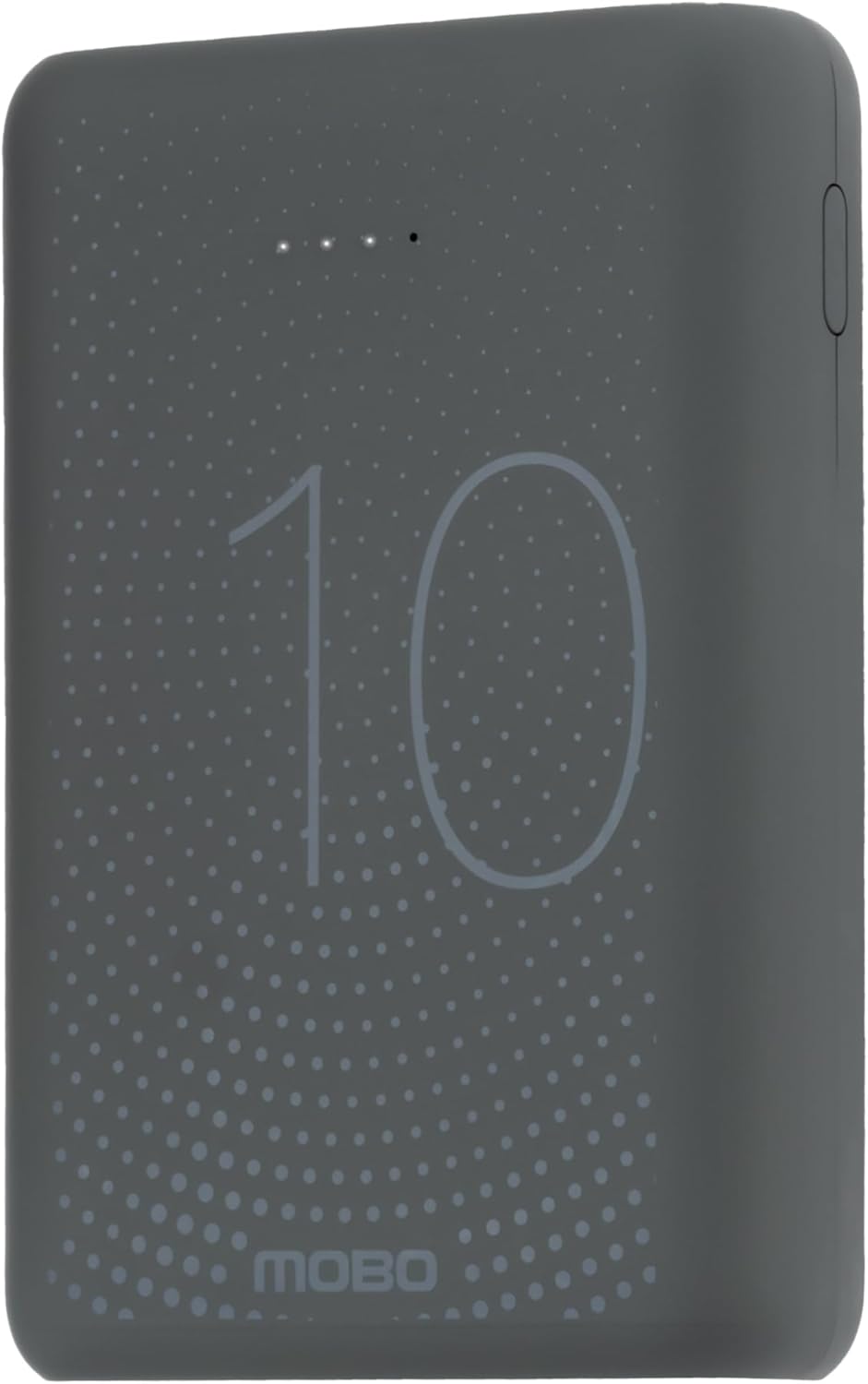
Figure 2: Top view displaying the "10" and "MOBO" logos, along with LED indicators for battery status.
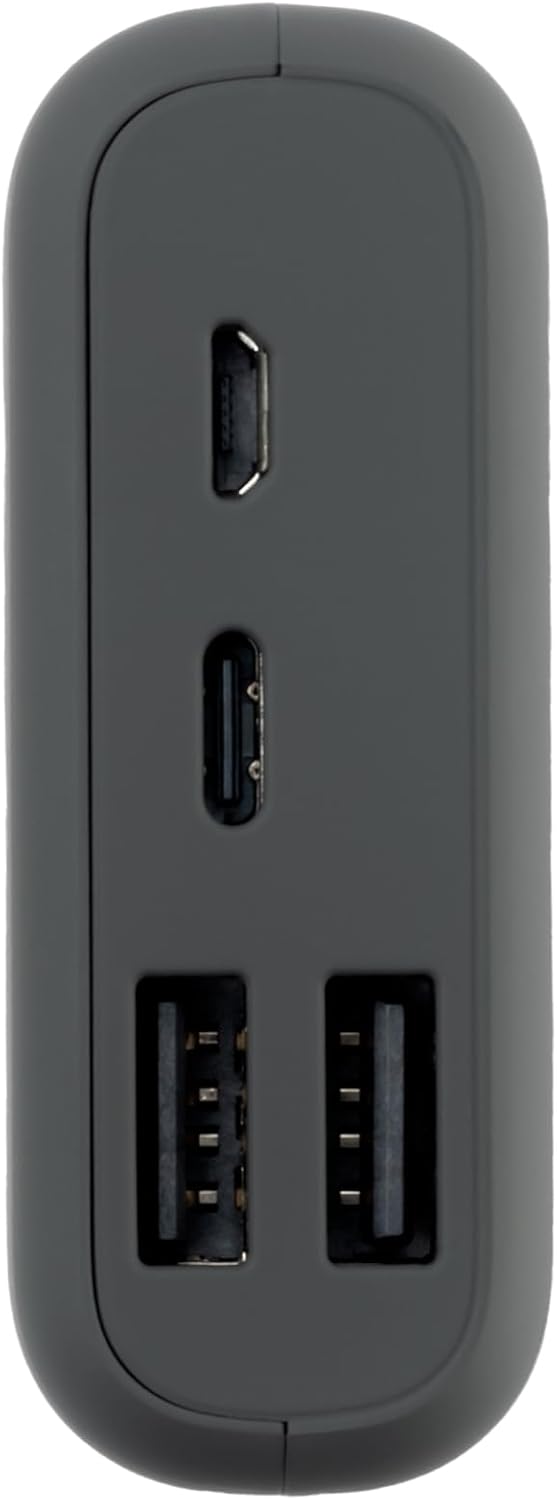
Figure 3: Side view highlighting the input/output ports: Micro USB, USB-C, and two USB-A ports.
Key Features:
- High Capacity: 10000 mAh Lithium Polymer battery.
- Multiple Ports: Includes Micro USB, USB-C, and two USB-A ports for broad compatibility.
- Compact Design: Lightweight and easy to transport.
- LED Indicators: Displays remaining battery charge.
Setup
Charging the Power Bank:
- Before first use, fully charge your Mobo Power Bank.
- Connect the provided Micro USB cable to the Micro USB input port on the power bank. Alternatively, use a USB-C cable with the USB-C input port.
- Connect the other end of the cable to a compatible USB wall adapter (not included) or a computer's USB port.
- The LED indicators on the power bank will illuminate to show the charging progress. All LEDs will be solid when fully charged.
A full charge may take several hours depending on the power source.
Operating Instructions
Charging Your Devices:
- Ensure your Mobo Power Bank is sufficiently charged. You can check the battery level using the LED indicators.
- Connect your device's charging cable to one of the USB-A output ports or the USB-C output port on the power bank.
- Connect the other end of the cable to your smartphone, tablet, or other compatible electronic device.
- The power bank will automatically begin charging your device. If it does not, press the power button on the power bank to initiate charging.
- Once your device is fully charged, disconnect it from the power bank.
The power bank is designed for universal compatibility, supporting various smartphones and tablets including Samsung, Xiaomi, Huawei, and iPhone models.
Maintenance
- Clean the power bank with a soft, dry cloth. Do not use harsh chemicals or abrasive materials.
- Store the power bank in a cool, dry place away from direct sunlight and extreme temperatures.
- If storing for an extended period, charge the power bank to approximately 50-75% every three months to maintain battery health.
Troubleshooting
| Problem | Possible Cause | Solution |
|---|---|---|
| Power bank not charging | Cable not connected properly; faulty cable/adapter; power bank fully charged. | Ensure all connections are secure. Try a different charging cable or adapter. Check LED indicators; if all are solid, the power bank is fully charged. |
| Device not charging from power bank | Power bank is depleted; device cable not connected properly; incompatible device; power bank in standby mode. | Recharge the power bank. Ensure the device's charging cable is securely connected to both the power bank and the device. Press the power button on the power bank to activate charging. Verify device compatibility. |
| Slow charging | Using a non-fast charging port/cable; device drawing high power; environmental factors. | Ensure you are using a fast-charging compatible port and cable if your device supports it. Close background apps on your device. Charge in a moderate temperature environment. |
Specifications
| Feature | Detail |
|---|---|
| Brand | Mobo |
| Model Number | MBPB-20A |
| Battery Capacity | 10000 mAh |
| Battery Cell Composition | Lithium Polymer |
| Color | Grey |
| Dimensions (L x W x H) | 9.5 x 5 x 4.5 cm |
| Product Weight | 260 g |
| Connector Type | Lightning, Micro USB (Input/Output ports include USB-A, USB-C, Micro USB) |
Warranty and Support
For warranty information or technical support, please refer to the official Mobo website or contact their customer service directly. Keep your purchase receipt as proof of purchase.
Return Policy: This product may be eligible for return up to January 31, 2026, as per Amazon's return policy at the time of purchase.
